
1. Introducció
This manual provides comprehensive instructions for the setup, operation, and maintenance of your Mitzu MRC-UNI13 Universal Remote Control. Please read this manual carefully before using the device to ensure proper functionality and to maximize its lifespan.
2. Producte acabatview
The Mitzu MRC-UNI13 is a universal remote control designed for Smart TVs and Slim Screens. It features a lightweight and ergonomic design, providing a practical solution for controlling multiple television brands.
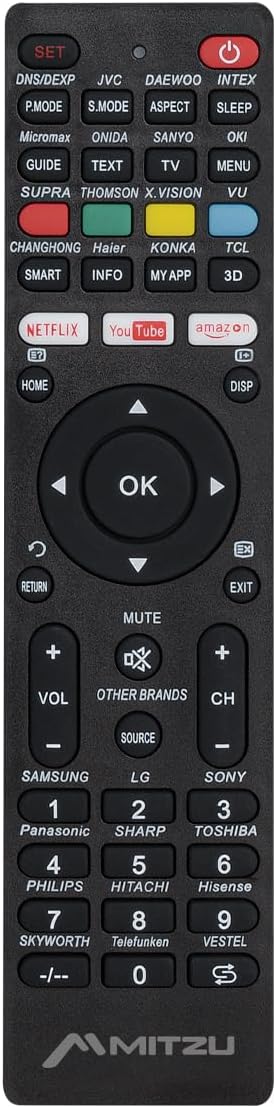
Imatge 2.1: Davant view of the Mitzu MRC-UNI13 Universal Remote Control, showing all buttons and layout.

Imatge 2.2: En angle view of the Mitzu MRC-UNI13 Universal Remote Control, highlighting its slim profile.

Imatge 2.3: Mitzu MRC-UNI13 Universal Remote Control with approximate dimensions: 17.7 cm length, 4.5 cm width, and 2 cm thickness.
3. Configuració
3.1. Instal·lació de la bateria
The Mitzu MRC-UNI13 remote control requires two AAA batteries (not included) for operation. Follow these steps to install the batteries:
- Localitzeu la tapa del compartiment de la bateria a la part posterior del comandament a distància.
- Feu lliscar la coberta cap avall o premeu el pestell per obrir-la.
- Introduïu dues piles AAA, assegurant-vos que els terminals positiu (+) i negatiu (-) s'alineïn correctament amb les marques de l'interior del compartiment.
- Torneu a col·locar la tapa del compartiment de la bateria fent-la lliscar fins que faci clic de manera segura.
Nota: Feu servir sempre piles noves i substituïu-les totes dues alhora. No barregeu piles velles i noves ni piles de tipus diferents.
3.2. Programació del control remot
The MRC-UNI13 is a universal remote control that needs to be programmed to operate your specific television. The programming method typically involves entering a code or using an auto-search function. Refer to the included code list (if provided with the physical product) for your TV brand. If no code list is available, or if the codes do not work, use the auto-search method.
3.2.1. Code Entry Method (Example)
- Turn on the TV you wish to control manually.
- Manteniu premut el botó SET button on the remote until the indicator light (usually red) illuminates.
- Enter the 3-digit code for your TV brand using the numeric keypad. (e.g., for Samsung, LG, Sony, Panasonic, Sharp, Toshiba, Philips, Hitachi, Hisense, Skyworth, Telefunken, Vestel, etc., as indicated on the remote).
- If the code is correct, the indicator light will turn off. Test the remote by pressing the PODER button. If the TV turns off, the remote is programmed.
- If the TV does not respond, repeat the process with the next code listed for your brand.
3.2.2. Auto-Search Method (Example)
- Turn on the TV you wish to control manually.
- Apunteu el comandament a distància cap al televisor.
- Manteniu premut el botó SET botó i el PODER button simultaneously until the indicator light illuminates.
- Release both buttons. The indicator light will flash.
- Premeu contínuament el botó VOL+ botó (o CH+) repeatedly until the TV volume changes or the channel changes. This indicates the remote has found a compatible code.
- Once the TV responds, immediately press the SET per desar el codi. L'indicador lluminós s'apagarà.
- Test all functions of the remote. If some functions do not work, you may need to repeat the auto-search process to find a more compatible code.
Nota: The exact programming steps may vary slightly. If these methods do not work, consult the specific instructions that came with your physical remote or visit the Mitzu support website for detailed programming guides.
4. Instruccions de funcionament
Once programmed, the Mitzu MRC-UNI13 remote control functions similarly to your original TV remote. Below is a general guide to its main functions:
- POWER (botó vermell): Encén o apaga el televisor.
- SET: S'utilitza per programar el comandament a distància.
- DNS/DEXP, JVC, DAEWOO, INTEX, etc. (Brand Buttons): Specific buttons for direct brand code entry or selection.
- P.MODE, S.MODE, ASPECT, SLEEP: Picture mode, Sound mode, Aspect ratio, Sleep timer functions.
- GUIDE, TEXT, TV, MENU, VU: Electronic Program Guide, Teletext, TV/AV input, Menu, Volume Up/Down (likely a typo on the remote, VU usually means Volume Up).
- SMART, INFO, MY APP, 3D: Smart TV functions, Information display, Custom app access, 3D mode.
- NETFLIX, YouTube, Amazon: Direct access buttons for streaming services.
- HOME, DISP: Home menu, Display information.
- Teclat de navegació (amunt, avall, esquerra, dreta, OK): Navega pels menús i confirma les seleccions.
- RETURN, EXIT: Torna a la pantalla anterior o surt d'un menú.
- MUT: Silencia o activa el so del televisor.
- VOL+ / VOL-: Ajusta el volum amunt o avall.
- CH+ / CH-: Canvia el canal cap amunt o cap avall.
- FONT: Selecciona fonts d'entrada (HDMI, AV, etc.).
- Teclat numèric (0-9): Entrada directa del canal.
- -/--: For two-digit channel entry.
Nota: The functionality of some buttons may depend on the specific TV model and brand you are controlling. Not all buttons may be supported by all TVs.
5. Manteniment
To ensure the longevity and optimal performance of your Mitzu MRC-UNI13 Universal Remote Control, follow these maintenance guidelines:
- Neteja: Feu servir un drap suau i sec per netejar el comandament a distància. Per a la brutícia resistent, netegeu lleugerament.ampen the cloth with water or a mild cleaning solution. Do not use abrasive cleaners, alcohol, or solvents.
- Cura de la bateria:
- Traieu les piles si no heu d'utilitzar el comandament a distància durant un període prolongat per evitar fuites.
- If battery leakage occurs, clean the compartment thoroughly before inserting new batteries.
- Eliminar les bateries usades d'acord amb la normativa local.
- Emmagatzematge: Store the remote control in a cool, dry place, away from direct sunlight, extreme temperatures, and high humidity.
- Manipulació: Avoid dropping the remote control or subjecting it to strong impacts, as this can damage internal components.
6. Solució De Problemes
If you encounter issues with your Mitzu MRC-UNI13 Universal Remote Control, refer to the following troubleshooting tips:
- El comandament a distància no funciona gens:
- Comproveu si les piles estan inserides correctament amb la polaritat correcta (+/-).
- Substituïu les piles velles per unes de noves.
- Ensure there is a clear line of sight between the remote and the TV's infrared sensor.
- Remote controls some functions but not others:
- The current code may not be fully compatible with your TV model. Try reprogramming the remote using a different code for your TV brand or using the auto-search method again.
- Some advanced functions (e.g., specific Smart TV features) may not be supported by universal remotes.
- Indicator light does not illuminate during programming:
- Assegureu-vos que manteniu premut el botó SET button for the required duration.
- Comproveu o substituïu les piles.
- TV does not respond during auto-search:
- Ensure the TV is turned on manually before starting the auto-search.
- Assegureu-vos d'apuntar el comandament a distància directament al televisor.
- Premeu el botó VOL+ or CH+ button repeatedly and quickly enough to cycle through codes.
If the problem persists after trying these steps, contact Mitzu customer support for further assistance.
7. Especificacions
| Característica | Detall |
|---|---|
| Marca | Mitzu |
| Model | MRC-UNI13 |
| Dispositius compatibles | Televisions (Smart TVs, Slim Screens) |
| Característiques especials | Lightweight, Universal Compatibility (up to 10 devices, though typically programmed for one TV at a time) |
| Tecnologia de connectivitat | Infrarojos (IR) |
| Font d'alimentació | 2 piles AAA (no incloses) |
| Dimensions (aprox.) | 22.2 x 8.8 x 2.8 cm (Package); Remote: ~17.7 x 4.5 x 2 cm |
| Pes (aprox.) | 70 g (Package) |
8. Garantia i Suport
8.1. Informació de la garantia
Mitzu products are designed for quality and reliability. For specific warranty terms and conditions, please refer to the warranty card included with your purchase or visit the official Mitzu weblloc web. Conserveu el comprovant de compra per a reclamacions de garantia.
8.2. Atenció al client
For technical assistance, programming codes, or any other inquiries regarding your Mitzu MRC-UNI13 Universal Remote Control, please contact Mitzu customer support. Contact details can typically be found on the Mitzu official weblloc web o a l'embalatge del producte.
També podeu visitar el Mitzu Brand Store on Amazon per obtenir més informació sobre el producte.