
Introducció
The Empress Effects Compressor MKII is an advanced guitar effects pedal designed to provide studio-grade compression in a compact format. Building upon the original Compressor, this MKII version incorporates user feedback, offering enhanced control and features such as a 'tilt' tone EQ and a selectable sidechain high-pass filter. It maintains an all-analog signal path, ensuring transparent and dynamic control over your instrument's tone without digital artifacts.
Característiques clau
- All Analog Signal Path: Ensures pure, uncolored sound processing.
- Extremely Transparent: Provides dynamic control without altering the original tone of your instrument.
- 3 Compression Ratios: Selectable 2:1, 4:1, and 10:1 ratios for versatile compression effects.
- Attack and Release Control: Independent knobs for precise shaping of compression characteristics.
- Control de la barreja: Blends the uncompressed (dry) signal with the compressed (wet) signal for parallel compression.
- Mesurament: Dedicated LED meters for both gain reduction and input levels.
- Control de tons: A 'tilt' style tone knob centered at 500Hz for subtle tonal adjustments.
- Sidechain Send/Return: 3.5mm TRS jack for external sidechain compression.
- Sidechain High Pass Filter (HPF): Built-in selectable filter (120Hz, Off, 240Hz) for the detection circuit.
- True Display LEDs: Bright multi-color LEDs provide clear visual feedback on compressor activity.
Controls i indicadors
The Empress Compressor MKII features a comprehensive set of controls and indicators for precise sound shaping. Refer to the image below for a visual guide to the pedal's layout.

Figura 1: Davant view of the Empress Effects Compressor MKII pedal, showing all control knobs, switches, and LED meters.
Perilles de control:
- Entrada: Adjusts the input level of your instrument signal into the compressor. Proper setting ensures optimal compression without clipping.
- Sortida: Controls the overall output volume of the pedal. Use to match levels with your bypassed signal or to boost/cut the compressed signal.
- Atac: Determines how quickly the compressor reacts to signals exceeding the threshold. Faster attack (lower setting) catches transients more aggressively; slower attack (higher setting) allows initial transients to pass through.
- Alliberament: Sets how long it takes for the compressor to return to its uncompressed state after the signal drops below the threshold. Faster release (lower setting) can sound more aggressive; slower release (higher setting) can provide a smoother, more natural decay.
- Barreja: Blends the dry (uncompressed) signal with the wet (compressed) signal. Turning clockwise increases the amount of compressed signal. This allows for parallel compression techniques.
- To: A 'tilt' EQ control centered at 500Hz. Turning clockwise boosts highs and cuts lows; turning counter-clockwise boosts lows and cuts highs. This provides subtle tonal shaping.
Interruptors:
- Ratio Switch: Selecciona la relació de compressió.
- 2:1: Mild compression, suitable for subtle dynamic control.
- 4:1: Moderate compression, a common setting for general use.
- 10:1: Heavy compression, approaching limiting, for significant dynamic reduction.
- Sidechain HPF Switch: Engages a high-pass filter in the compressor's detection circuit.
- DESACTIVAT: No high-pass filter applied to the sidechain.
- 120Hz: Filters out frequencies below 120Hz from the detection circuit, preventing bass frequencies from triggering compression excessively.
- 240Hz: Filters out frequencies below 240Hz from the detection circuit, providing even more bass transparency.
Indicadors:
- Gain Reduction Meter (LEDs): Displays the amount of gain reduction (compression) being applied in dB. More LEDs lit indicates more compression.
- Input Meter (LEDs): Displays the input signal level. Helps in setting the Input knob for optimal signal-to-noise ratio and preventing clipping.
- Bypass Footswitch LED: Indicates whether the pedal is active (on) or bypassed (off).
Jacks and Power:
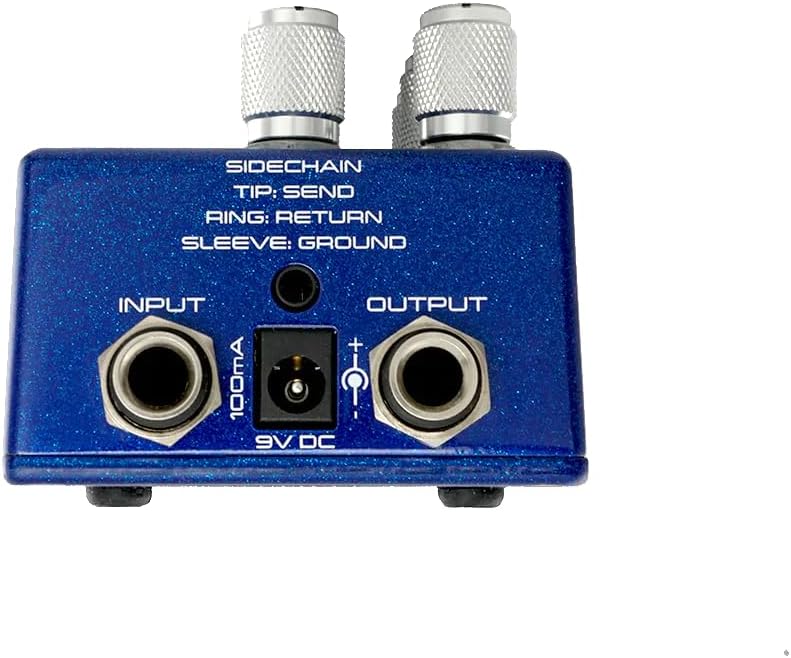
Figura 2: A dalt view of the Empress Effects Compressor MKII, illustrating the input, output, sidechain, and power connections.
- Input Jack (1/4"): Connect your instrument (guitar, bass, etc.) here.
- Output Jack (1/4"): Connecta't al teu amplificador o el següent pedal de la cadena de senyals.
- Sidechain Send/Return (3.5mm TRS): This jack allows for external processing of the compressor's detection circuit.
- Consell: Send (output from the detection circuit)
- Anell: Return (input to the detection circuit)
- màniga: Terra
Nota: Use a TRS (stereo) 3.5mm cable for proper sidechain functionality. This allows you to insert an EQ, filter, or other effect into the compressor's sensing path, enabling advanced compression techniques like ducking or frequency-dependent compression.
- Entrada d'alimentació de 9 V CC: Connecteu una font d'alimentació estàndard de 9 V CC (negatiu central, mínim 100 mA).
Configuració
- Connexió d'alimentació: Connect a standard 9V DC (center negative) power supply to the 9V DC input jack. Ensure the power supply provides at least 100mA.
- Connexió de l'instrument: Connecta el teu instrument (per exemple, la guitarra) a Entrada jack of the Compressor MKII using a standard 1/4" instrument cable.
- Amplifier/Next Pedal Connection: Connecteu el Sortida jack of the Compressor MKII to your amplifier's input or to the input of the next pedal in your signal chain using a standard 1/4" instrument cable.
- Sidechain (Optional): If using an external sidechain, connect a 3.5mm TRS cable to the Sidechain Send/Return jack. The Tip sends the detection signal out, and the Ring receives the processed detection signal back in.
Once all connections are made, you can power on your amplifier and the Compressor MKII. The bypass footswitch LED will indicate the pedal's status.
Operating the Compressor MKII
The Empress Compressor MKII offers a wide range of compression possibilities. Experimentation is key to finding the settings that best suit your instrument and musical style.
Basic Compression Settings:
- Start with Input and Output: Set the Input knob so that the Input Meter LEDs light up consistently with your playing dynamics, but avoid constant red clipping. Adjust the Output knob to match the volume of your bypassed signal.
- Choose a Ratio: Begin with the 2:1 ratio for subtle compression. For more aggressive effects, try 4:1 or 10:1.
- Adjust Attack and Release:
- For a punchy, percussive sound, try a slower Attack and a faster Release.
- For a smoother, more sustained sound, use a faster Attack and a slower Release.
- Observe the Gain Reduction Meter to see how much compression is being applied.
- Utilize the Mix Knob: For a more natural sound, especially with higher compression ratios, blend in some of your dry signal using the Mix knob. This parallel compression technique helps retain transients and dynamic feel.
- Refine with Tone: Use the Tone knob to subtly shape the frequency response. A slight clockwise turn can add presence, while a counter-clockwise turn can add warmth.
Tècniques avançades:
- HPF de cadena lateral: If your bass frequencies are causing the compressor to pump excessively, engage the Sidechain HPF at 120Hz or 240Hz. This prevents low-end energy from triggering the compression, allowing for a more transparent and consistent compression of mid and high frequencies.
- External Sidechain: Connect an external EQ or filter to the Sidechain Send/Return to create custom frequency-dependent compression. For example, you could boost specific frequencies in the sidechain to make the compressor react more strongly to them, or cut them to make it react less.
Manteniment
- Neteja: Feu servir un drap suau i sec per netejar l'exterior del pedal. Eviteu productes de neteja o dissolvents abrasius.
- Font d'alimentació: Always use a regulated 9V DC, center-negative power supply with sufficient current (minimum 100mA). Using an incorrect power supply can damage the unit and void the warranty.
- Medi ambient: Protect the pedal from extreme temperatures, moisture, and direct sunlight.
- Emmagatzematge: When not in use for extended periods, disconnect the power supply and store the pedal in a safe, dry place.
Resolució de problemes
- Sense so:
- Comproveu totes les connexions dels cables (instrument, ampvidador, poder).
- Ensure the power supply is correctly connected and providing the correct voltage and polarity (9V DC, center negative).
- Verify that your instrument and ampel lifier funcionen correctament.
- Check the Output knob setting; ensure it's not turned all the way down.
- Soroll/bruix no desitjat:
- Ensure you are using a high-quality, isolated power supply. Daisy-chaining with other noisy pedals can introduce hum.
- Comproveu si hi ha cables d'instruments defectuosos.
- Ensure proper grounding in your setup.
- Reduce the Input knob if the input signal is too hot, causing clipping.
- Els LED no s'encenen:
- Confirm the pedal is receiving power.
- If only the gain reduction or input LEDs are not lighting, ensure there is an active signal passing through the pedal and that the Input knob is set appropriately.
- Compression Not Engaging:
- Check the Input knob setting; the signal might be too low to trigger compression.
- Adjust Attack and Release settings.
- Ensure the Ratio switch is set to a compression ratio (2:1, 4:1, or 10:1).
Especificacions
| Pes de l'article | 12.9 unces (367 grams) |
| Dimensions del producte | 7 x 4 x 4 polzades |
| Número de model | CP2B |
| Format del senyal | Analògic |
| Font d'alimentació | Alimentació de corrent continu |
| Voltage | 9 Volts |
| Minimum Current Draw | 100 mA |
Garantia i Suport
Empress Effects products are built to high standards and are covered by a manufacturer's warranty against defects in materials and workmanship. For specific warranty details, registration, or technical support, please visit the official Empress Effects weblloc web o contacteu directament amb el servei d'atenció al client. Conserveu el comprovant de compra per a reclamacions de garantia.
For the most up-to-date information and support resources, please refer to the official Empress Effects weblloc: www.empresseffects.com