
Introducció
This manual provides detailed instructions for the installation, operation, and maintenance of your Xigmatek Aquarius Plus Black ATX PC Case. Please read this manual thoroughly before beginning installation to ensure proper setup and safe use of your new PC case.
The Xigmatek Aquarius Plus Black is a mid-tower gaming PC case designed to accommodate ATX, Micro-ATX, and Mini-ITX motherboards. It features excellent cooling potential with support for up to 10 x 120mm fans, including 7 pre-installed ARGB 120mm AY120 fans. The case also offers ample space for a 360mm graphics card, a 158mm CPU cooler, and includes 4 drive bays (2 x 3.5" and 2 x 2.5"/3.5"). Its aesthetic design includes two seamless tempered glass panels and three dust filters for protection.
Informació de seguretat
- Desconnecteu sempre l'alimentació de la presa de corrent abans d'instal·lar o treure qualsevol component.
- Manipuleu tots els components amb cura per evitar danys per descàrrega electrostàtica (ESD). Penseu en la possibilitat d'utilitzar una polsera antiestàtica.
- Avoid placing the PC case in direct sunlight, near heat sources, or in areas with high humidity.
- Assegureu-vos que hi hagi una ventilació adequada al voltant de la carcassa per evitar el sobreescalfament.
- Mantingueu les peces petites i els materials d'embalatge fora de l'abast dels nens.
- Do not attempt to modify the case structure. Unauthorized modifications may void your warranty and pose safety risks.
Contingut del paquet
Verifiqueu que tots els elements siguin presents al paquet:
- Xigmatek Aquarius Plus Black ATX PC Case
- 7 x 120mm ARGB AY120 Fans (pre-installed)
- Accessory kit (screws, standoffs, cable ties)
- Manual d'usuari (aquest document)
Característiques
- Mid-Tower Design: Admet plaques base ATX, Micro-ATX i Mini-ITX.
- Refrigeració avançada: Pre-installed with 7 x 120mm ARGB AY120 fans; supports up to 10 x 120mm fans.
- Panells de vidre temperat: Two seamless tempered glass panels for a clear view de components interns.
- AmpEmmagatzematge: 4 drive bays (2 x 3.5" HDD, 2 x 2.5"/3.5" SSD/HDD).
- Component Clearance: Supports graphics cards up to 360mm and CPU coolers up to 158mm.
- Filtració de pols: Three dust filters included to protect internal components.
- E / S davantera: 1 x USB 2.0, 3 x USB 3.0 ports.
Configuració i instal·lació
Follow these steps to install your PC components into the Xigmatek Aquarius Plus case.
1. Preparar el cas
Carefully remove the tempered glass side panels by unscrewing the thumb screws at the rear of the case. Place the panels on a soft, flat surface to prevent scratches.

Image: The bare chassis of the Xigmatek Aquarius Plus, showing its internal structure before component installation.
2. Install the Motherboard
- Identify the correct standoff positions for your ATX, Micro-ATX, or Mini-ITX motherboard. The case may have pre-installed standoffs or require you to install them using the provided accessory kit.
- Place the motherboard I/O shield into the rear opening of the case.
- Carefully align your motherboard with the standoffs and I/O shield, then gently lower it into place.
- Secure the motherboard with the appropriate screws from the accessory kit. Do not overtighten.

Imatge: Una imatge interna view of the Xigmatek Aquarius Plus case, illustrating the motherboard tray and fan placement.
3. Install Storage Drives
The case supports 2 x 3.5" HDDs and 2 x 2.5"/3.5" SSDs/HDDs.
- Locate the drive bays. Typically, 3.5" bays are found in a cage near the power supply shroud, and 2.5" mounts are on the back of the motherboard tray.
- For 3.5" drives, slide the drive into the bay and secure it with screws.
- For 2.5" drives, mount them to the designated trays or screw points on the motherboard tray.
4. Install the Power Supply Unit (PSU)
The Xigmatek Aquarius Plus supports bottom-mounted PSUs.
- Feu lliscar la font d'alimentació al compartiment corresponent a la part inferior posterior de la carcassa.
- Secure the PSU to the case with screws from the rear.
- Route the necessary power cables through the cable management cutouts to the motherboard and other components.
5. Install Expansion Cards (e.g., Graphics Card)
The case has 4 expansion slots.
- Traieu les cobertes de les ranures d'expansió necessàries de la part posterior de la carcassa.
- Insert your graphics card or other expansion card into the appropriate PCIe slot on your motherboard.
- Fixeu la targeta a la carcassa amb un cargol.
6. Connect Front I/O Cables
Connect the front panel cables (USB 2.0, USB 3.0, HD Audio, Power Switch, Reset Switch, Power LED, HDD LED) to their corresponding headers on your motherboard. Refer to your motherboard manual for exact header locations.
7. Gestió de cables
Utilize the cable management cutouts and tie-down points behind the motherboard tray to route and secure cables. This improves airflow and aesthetics.
8. Reattach Panels
Once all components are installed and cables are managed, carefully reattach the tempered glass side panels and secure them with the thumb screws.
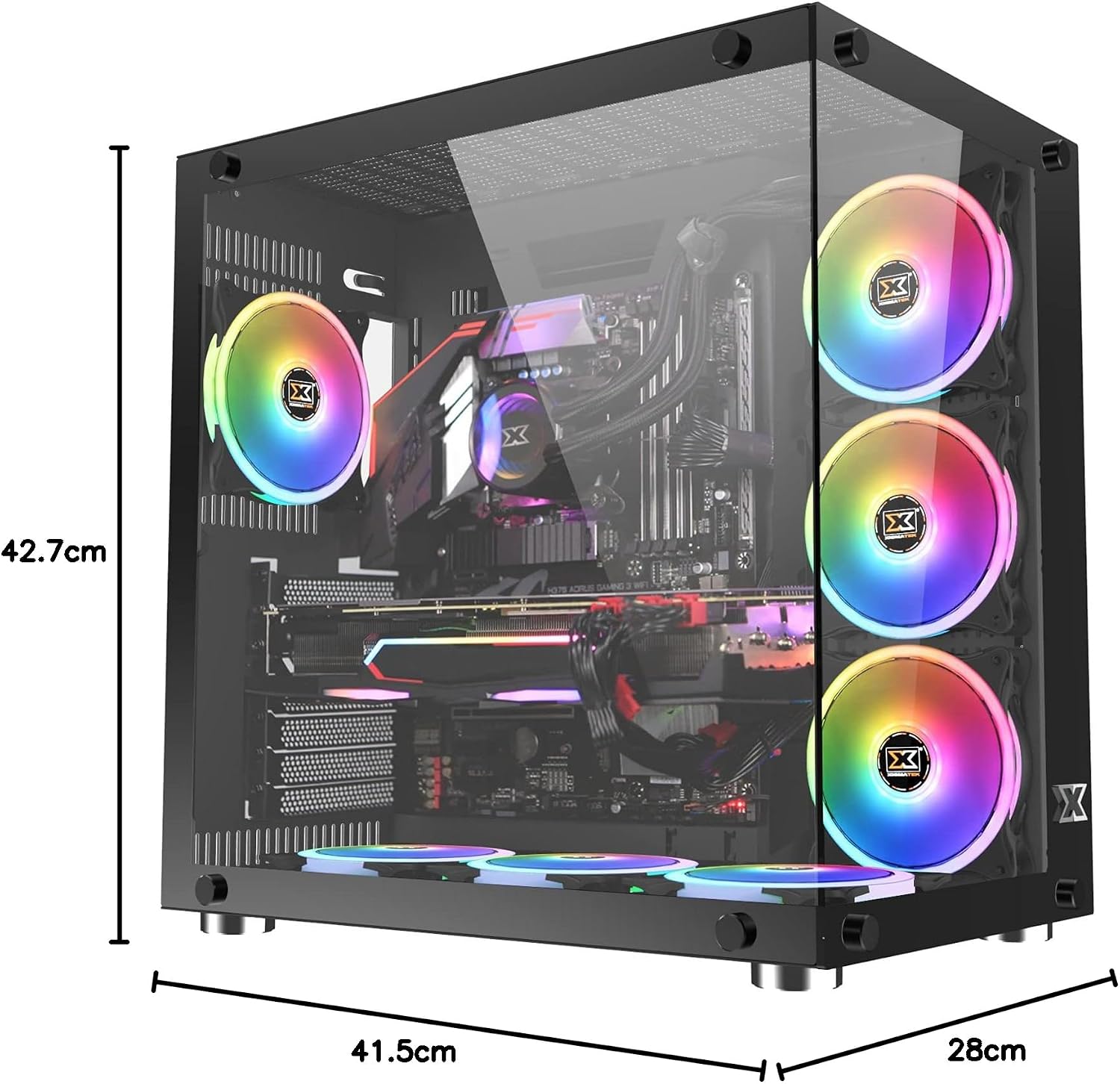
Image: The Xigmatek Aquarius Plus case fully assembled with internal components, showcasing its dimensions (41.5cm D x 28cm W x 42.7cm H).
Instruccions de funcionament
After successful installation, connect your peripherals (monitor, keyboard, mouse) and power cable to the PSU. Press the power button on the front panel to start your system.
ARGB Fan Control
The pre-installed ARGB fans are typically connected to a fan controller or directly to an ARGB header on your motherboard. Refer to your motherboard's manual or the fan controller's instructions for details on how to customize the lighting effects and fan speeds.
Manteniment
Un manteniment regular ajuda a garantir un rendiment òptim i una llarga vida útil dels components del teu PC.
- Filtres de pols: The Xigmatek Aquarius Plus includes three dust filters. Regularly remove and clean these filters to prevent dust buildup inside the case. Use compressed air or a soft brush.
- Neteja interior: Periodically open the case and use compressed air to remove dust from fans, heatsinks, and other components. Ensure the system is powered off and unplugged before cleaning.
- Panells de vidre temperat: Clean the tempered glass panels with a soft, lint-free cloth and a glass cleaner designed for electronics. Avoid abrasive materials.
Resolució de problemes
Si teniu problemes, tingueu en compte els passos habituals següents per resoldre'ls:
- El sistema no s'encén:
- Check if the power cable is securely connected to the PSU and the wall outlet.
- Assegureu-vos que l'interruptor de la font d'alimentació estigui a la posició "ON".
- Verifiqueu que el cable de l'interruptor d'alimentació del panell frontal estigui connectat correctament a la placa base.
- Confirm all internal power cables (24-pin ATX, CPU, GPU) are properly seated.
- Els ventiladors no giren / L'ARGB no s'il·lumina:
- Comproveu les connexions d'alimentació del ventilador a la placa base o al controlador del ventilador.
- Verify ARGB connections to the motherboard or controller.
- Ensure fan controller is powered (if applicable).
- Els ports USB no funcionen:
- Confirm the front panel USB cables are correctly connected to the motherboard's USB headers.
For more complex issues, consult the manuals for your individual PC components (motherboard, GPU, PSU) or contact Xigmatek customer support.
Especificacions
| Nom del model | Aquarius Plus Black |
| Número de model | EN46423 |
| Tipus de cas | Mitjana Torre |
| Compatibilitat amb la placa base | ATX, Micro ATX, Mini ITX |
| Dimensions (P x A x A) | 41.5 cm x 28 cm x 42.7 cm |
| Pes | 7 kg |
| Material | Vidre temperat, acer |
| Ranures d'expansió | 4 |
| Drive Bays | 2 x 3.5" HDD, 2 x 2.5"/3.5" SSD/HDD |
| Ventiladors preinstal·lats | 7 x 120mm ARGB AY120 Fans |
| Suport màxim del ventilador | Ventiladors de fins a 10 x 120 mm |
| Longitud màxima de la GPU | 360 mm |
| Alçada màxima del refrigerador de la CPU | 158 mm |
| Muntatge de la font d'alimentació | A baix |
| Ports d'E / S frontals | 1x USB 2.0, 3x USB 3.0 |
| Mètode de refrigeració | Aire |
| Il·luminació | RGB (on fans) |
Garantia i Suport
For warranty information and technical support, please refer to the official Xigmatek weblloc web o poseu-vos en contacte amb el vostre distribuïdor local. Conserveu el comprovant de compra per a reclamacions de garantia.

