
1. Instruccions de seguretat
Please read and understand all safety information before using this battery charger. Failure to follow these instructions may result in electric shock, fire, or serious injury.
- Seguretat elèctrica: Ensure the charger is connected to a grounded outlet. Do not expose the charger to rain or wet conditions. Disconnect the AC power before making or breaking connections to the battery.
- Seguretat de la bateria: Always connect the red (+) clamp al terminal positiu de la bateria i al born negre (-)amp to the negative battery terminal. Ensure good ventilation when charging lead-acid batteries, as they can produce explosive gases. Do not charge frozen batteries.
- Seguretat personal: Wear eye protection and protective clothing when working with batteries. Avoid touching battery acid. Keep children and unauthorized persons away from the charging area.
- Funcionament del carregador: Do not operate the charger if it has received a sharp blow, been dropped, or otherwise damaged. Do not attempt to disassemble the charger. Refer all servicing to qualified service personnel.
2. Producte acabatview
The FOXSUR 12V/24V 12-Amp 7-Stage Smart Battery Charger is a microprocessor-controlled device designed for charging and maintaining various types of 12V and 24V batteries. It features multiple protection mechanisms and an intelligent digital display for ease of use.

Image 2.1: The FOXSUR Smart Battery Charger, showing its main unit, battery clamps (red for positive, black for negative), and AC power plug.
Característiques principals:
- Microprocessor Control (CPU): Automatically adjusts charging current and maintains battery health.
- 7-Stage Càrrega: Optimized charging process for various battery types.
- Àmplia compatibilitat: Suitable for 12V/24V Calcium, GEL, AGM, LiFePO4, Wet, EFB, and Lead-Acid batteries.
- Pantalla digital intel·ligent: LCD screen shows voltage, current, charging status, and battery status.
- Protecció múltiple: Includes reverse-polarity, output short, overcharging, overvoltage, over-temperature, and over-current protection.
- Funció de reparació del pols: Helps to restore depleted batteries and extend battery life.
Contingut del paquet:
- 1 x FOXSUR Car Battery Charger
- 1 x Manual d'usuari (aquest document)

Image 2.2: The FOXSUR Smart Battery Charger, its cables, and user manual, as typically found in the product packaging.
3. Especificacions
| Especificació | Valor |
|---|---|
| Entrada Voltage | 100-240V CA, 50-60Hz |
| Sortida nominal | 12V 12A, 24V 6A |
| Volum inicial mínimtage | 8.0 V |
| Gamma de bateria | 6-200Ah |
| Protecció tèrmica | 65 °C +/- 5 °C |
| Refrigeració | Refrigeració per ventilador |
| Tipus de bateries | Most types of 12V/24V batteries, including Calcium, Gel, AGM, SLA, Wet, EFB, Lead Acid, LiFePO4 |
| Dimensions del producte | 6.69 x 3.94 x 2.56 polzades (17 x 10 x 6.5 cm) |
| Pes de l'article | 1.58 lliures (0.72 kg) |

Image 3.1: The charger features a heat dissipation fan for efficient cooling during operation.
4. Configuració
Follow these steps to safely connect the battery charger to your battery:
- Identifica els terminals de la bateria: Localitza els terminals positiu (+) i negatiu (-) de la bateria. El terminal positiu normalment està marcat amb un signe més i és més gran, mentre que el terminal negatiu està marcat amb un signe menys.
- Connecta Red Clamp: Connect the red (+) battery clamp from the charger to the positive (+) terminal of the battery.
- Connectar Negre Clamp: Connect the black (-) battery clamp from the charger to the negative (-) terminal of the battery.
- Connecteu l'alimentació de CA: Plug the charger's AC power cord into a standard 100-240V AC wall outlet. The charger will power on and begin its diagnostic process.
- Seleccioneu el mode de càrrega: Use the mode button on the charger to select the appropriate charging mode for your battery type (e.g., AGM, CAR, MOTO, LiFePO4, REPAIR). The charger will automatically detect 12V or 24V.
Important: Ensure all connections are secure before plugging into AC power. Disconnect the AC power source before disconnecting the battery clamps.
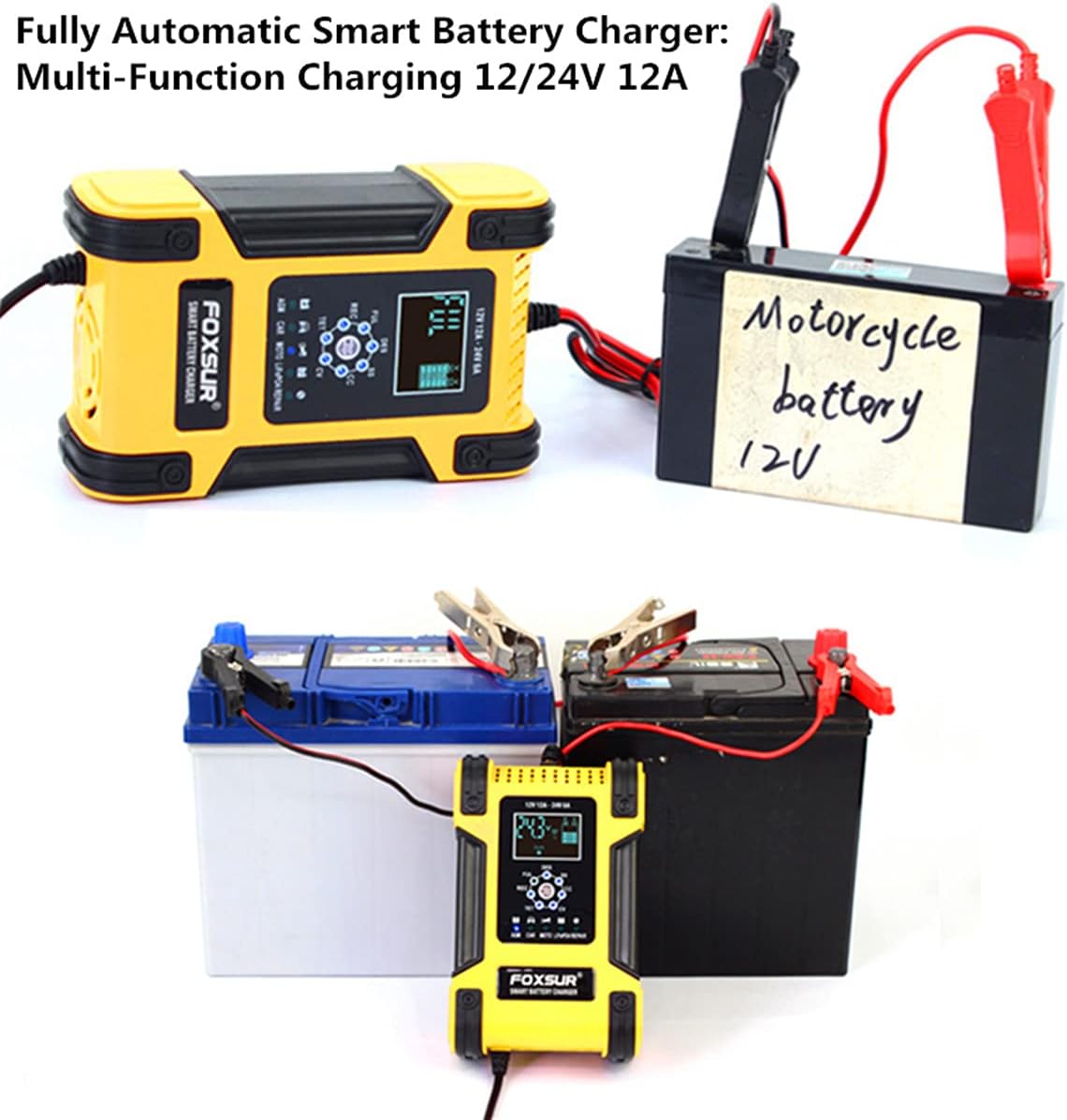
Imatge 4.1: Ex.ample of the charger connected to different battery types, demonstrating proper clamp adjunt.
5. Instruccions de funcionament
Once connected and powered on, the charger will automatically begin its 7-stage charging process based on the detected battery voltage and selected mode.
5.1 Informació de la pantalla digital
La pantalla LCD retroil·luminada proporciona informació en temps real:
- Voltage (V): Volum actual de la bateriatage.
- Corrent (A): Charging current.
- Estat de càrrega: Icons indicating charging progress.
- Estat de la bateria: Indicates battery health or charge level.
- Temperatura: Internal temperature of the charger.
- Bateria plena: Indication when charging is complete.

Image 5.1: The charger's LCD display showing current voltage and charging indicators.
5.2 Automatic Mode Selection (Winter/Summer)
The charger features an automatic temperature compensation function:
- Below 10°C (50°F): The charger will automatically enter Mode d'hivern, adjusting charging parameters for colder conditions.
- Above 28°C (82.4°F): The charger will automatically enter Modalitat d'estiu, adjusting charging parameters for warmer conditions.

Image 5.2: Visual representation of the charger automatically switching between Winter and Summer modes based on ambient temperature.
6. Manteniment
The FOXSUR charger includes a pulse repair function designed to help restore depleted and sulfated batteries, potentially extending their lifespan. To use this function, select the 'REPAIR' mode on the charger.
Nota: This function cannot activate completely dead batteries or repair batteries that are severely damaged. It also cannot restore a battery to 100% new condition.
Atenció general:
- Mantingueu el carregador net i sec.
- Emmagatzemar en un lloc fresc i sec quan no s'utilitzi.
- Inspeccioneu els cables i el clampper detectar danys abans de cada ús.
7. Solució De Problemes
This section addresses common issues you might encounter with your battery charger.
- Charger does not turn on: Ensure the AC power cord is securely plugged into a live outlet and the battery clamps are correctly connected to the battery terminals.
- Charger displays an error or 'bad battery': The charger has multiple protection features (Image 7.1). If an error is displayed, check for reverse polarity, short circuits, or if the battery voltage is below the minimum start voltage (8.0V). The charger cannot activate batteries with 0V or those severely damaged.
- Charging is slow or not reaching full charge: Ensure the correct charging mode is selected for your battery type. The charger's output current is 12A for 12V batteries and 6A for 24V batteries. Charging time varies significantly based on battery capacity and discharge level.
- Screen appears scratched or cloudy: The LCD screen is covered with a protective film. Gently peel off this film to reveal a clear screen.
Image 7.1: The charger's display indicates various protection statuses, which can help diagnose issues.
8. Garantia i Suport
For warranty information and technical support, please refer to the documentation provided at the time of purchase or contact your retailer. Keep your purchase receipt as proof of purchase.
For further assistance, you may also visit the FOXSUR official website or contact their customer service department directly. Contact details are typically found on the product packaging or the manufacturer's weblloc.