
Introducció
This manual provides essential instructions for the setup, operation, and maintenance of your ALLIMITY replacement remote control. This remote is designed to be compatible with various HANNSPREE Smart HDTV models, offering a direct replacement without the need for complex programming. Please read this manual carefully to ensure proper use and longevity of your remote control.
Configuració
Instal·lació de la bateria
The remote control requires two (2) AAA alkaline batteries (not included) for operation. Follow these steps to install the batteries:
- Localitzeu el compartiment de la bateria a la part posterior del comandament a distància.
- Premeu el pestell i feu lliscar la tapa de la bateria cap avall per obrir-la.
- Insert two AAA batteries, ensuring that the positive (+) and negative (-) terminals align correctly with the markings inside the compartment. Incorrect insertion can prevent the remote from functioning.
- Feu lliscar la coberta de la bateria al seu lloc fins que faci un clic de manera segura.
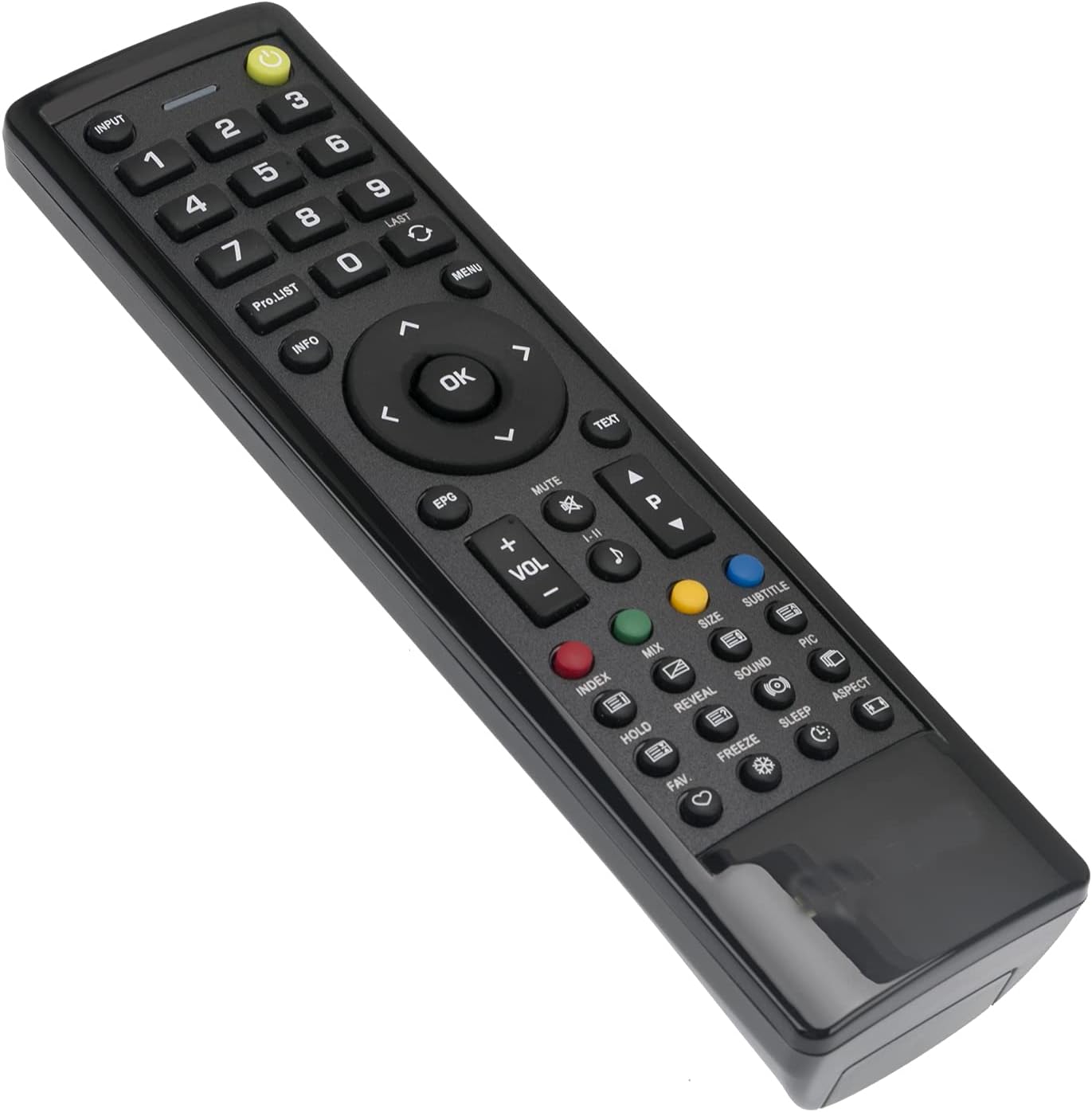
Image: Back of the remote control with the battery compartment open, illustrating the correct orientation for AAA battery insertion.
Once batteries are installed, the remote is ready for use with your compatible HANNSPREE Smart HDTV. No additional programming or setup is typically required.
Instruccions de funcionament
This ALLIMITY replacement remote control is designed for intuitive use, mirroring the functionality of your original HANNSPREE Smart HDTV remote. Simply point the remote towards your television and press the desired button.

Imatge: Frontal view of the remote control, displaying the layout of all functional buttons.
S'han acabat les funcions clauview:
- Botó d'encesa: Encén o apaga el televisor.
- Entrada: Selects video input sources (HDMI, AV, etc.).
- Botons numèrics (0-9): Selecció directa de canals.
- VOL +/-: Ajusta el nivell de volum.
- CH +/- (PRO.LIST): Changes channels sequentially or accesses program list.
- MUT: Silencia l'àudio del televisor.
- Teclat de navegació (amunt, avall, esquerra, dreta, OK): Navega pels menús i confirma les seleccions.
- MENÚ: Obre el menú principal del televisor.
- SORTIDA: Surt del menú o la funció actual.
- EPG: Accedeix a la Guia electrònica de programes.
- Botons de color (vermell, verd, groc, blau): Specific functions within certain TV menus or applications.
- Controls de reproducció: (If present) Play, Pause, Stop, Rewind, Fast Forward for media playback.
Manteniment
Neteja del comandament a distància
To maintain the remote control's appearance and functionality, clean it regularly:
- Feu servir un drap suau i sec per netejar la superfície del comandament a distància.
- Per a la brutícia persistent, lleugerament dampal drap amb aigua o un netejador suau i no abrasiu.
- Avoid using harsh chemicals, solvents, or abrasive cleaning pads, as these can damage the remote's finish or internal components.
Cura de la bateria
- Canvieu les piles quan la resposta del comandament a distància esdevingui lenta o deixi de funcionar.
- Always replace both batteries at the same time with new ones of the same type (AAA alkaline).
- Si no heu d'utilitzar el comandament a distància durant un període prolongat, traieu-ne les piles per evitar fuites i possibles danys.
Resolució de problemes
If you experience issues with your remote control, please refer to the following common solutions:
- El comandament a distància no respon:
- Comproveu si les piles estan inserides correctament amb la polaritat correcta (+/-).
- Substitueix les piles velles per piles alcalines AAA noves.
- Assegureu-vos que no hi hagi obstacles entre el comandament a distància i el sensor d'infrarojos del televisor.
- Make sure you are within the effective operating range (approximately 3.28 feet or 1 meter) and pointing the remote directly at the TV.
- Alguns botons no funcionen:
- This remote is a direct replacement and does not require programming. If specific buttons are not functioning, ensure your TV model is listed as compatible.
- Clean the remote control as described in the Maintenance section, as dirt or debris might be interfering with button contacts.
Si el problema persisteix després d'intentar aquests passos, poseu-vos en contacte amb l'atenció al client per obtenir més ajuda.
Especificacions
| Característica | Detall |
|---|---|
| Marca | ALLIMITAT |
| Número de model | BJKJ-HANNSPREE-JKJB |
| Dispositius compatibles | HANNSPREE Smart HDTV models: HSG1186, HSG1189, HSG1188, HSG1067, 098GR7BD1NEHSJ, ST32AMSB, 52-4R280002G040, HSG1138, HSG1075, HSG1141, HSG1114, HSG1142, HSG1194, HSG1064, HSG1279, 0533007855, 0503000758, HSG1112, HSG1074, HSG1117, HSG1131, HSG1102 |
| Tecnologia de connectivitat | Infrarojos (IR) |
| Tipus de bateria | 2 x AAA Alkaline batteries (not included) |
| Interval màxim | Approximately 3.28 Feet (1 Meter) |
| Pes de l'article | 2 unces |
| Característica especial | Disseny ergonòmic |
Suport
For any questions, concerns, or issues not covered in this manual, please do not hesitate to contact our customer support. We are committed to ensuring your satisfaction with your ALLIMITY replacement remote control.