
Introducció
This manual provides instructions for the safe and effective operation of your Adastra H25B Portable PA System. Please read this manual thoroughly before use and retain it for future reference. The H25B is a compact and portable public address system featuring a built-in rechargeable battery, wireless headset microphone, USB media player, FM radio, and Bluetooth connectivity, designed for various indoor and outdoor applications such as teaching, training, conferences, promotions, and guided tours.
Informació de seguretat
- Llegiu totes les instruccions abans d'utilitzar la unitat.
- No exposeu la unitat a la pluja ni a la humitat per evitar incendis o descàrregues elèctriques.
- Assegureu-vos que l'adaptador de corrent sigui compatible amb la vostra font d'alimentació local.
- No obriu la c.asing; demaneu totes les tasques de manteniment a personal qualificat.
- Eviteu col·locar la unitat a prop de fonts de calor o sota la llum solar directa.
- Mantingueu la unitat allunyada de camps magnètics forts.
- Netegeu només amb un drap sec.
Contingut del paquet
Verifiqueu que tots els components siguin presents en desembalar-lo:
- 1 x Adastra H25B Portable PA Unit
- 1 x VHF Wireless Transmitter
- 1 x micròfon per a auriculars
- 1 adaptador/carregador de corrent
- 2 x AA Batteries (for transmitter)
- 1 x corretja d'espatlla
Producte acabatview

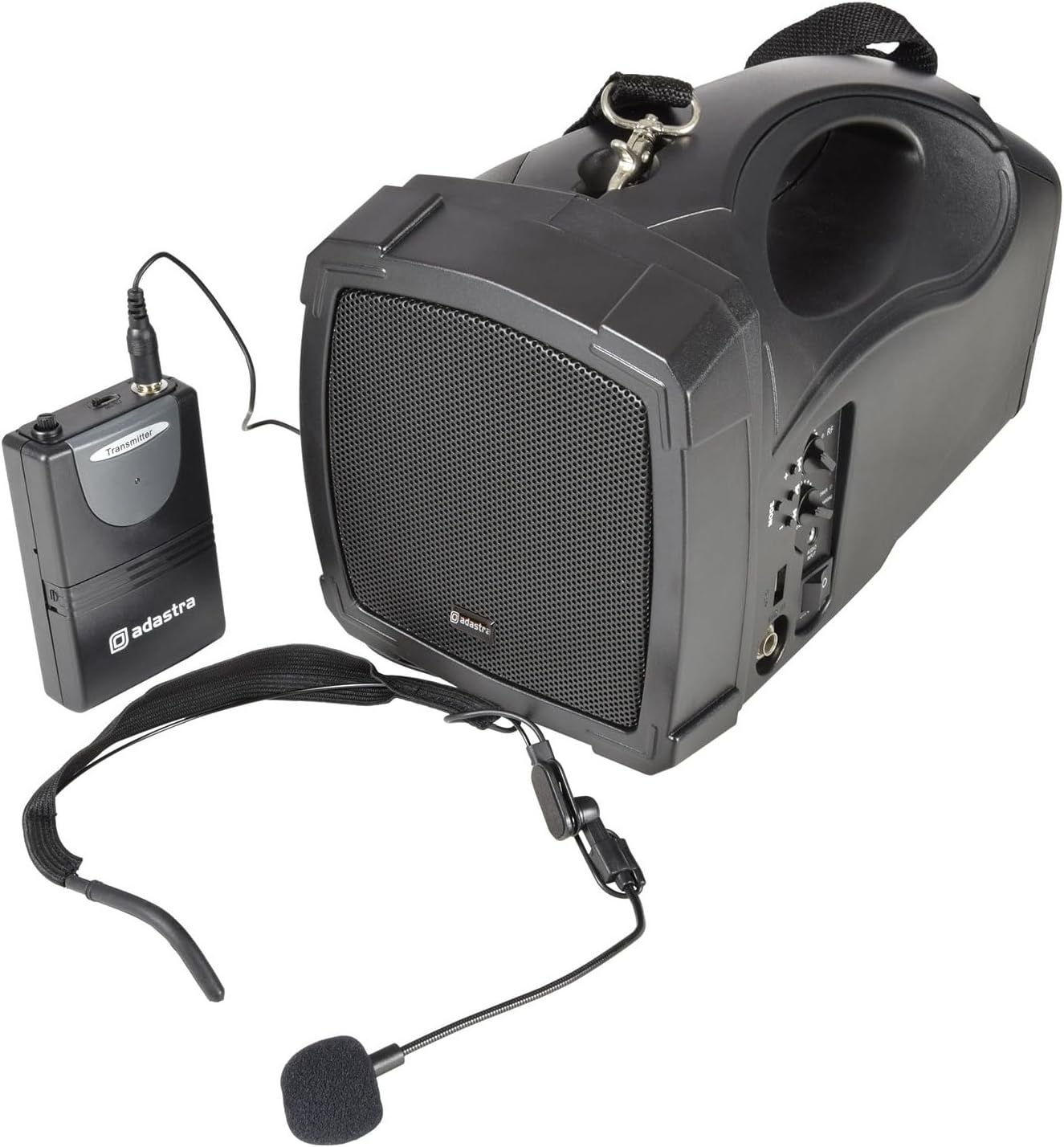
Image: The Adastra H25B Portable PA unit shown with its wireless transmitter and headset microphone. The PA unit features a speaker grille, control panel, and a carry handle.
Main Unit Controls and Ports
Imatge: Una imatge detallada view of the control panel on the Adastra H25B PA unit, showing knobs for volume and tone, buttons for mode selection, USB port, and power switch.
- Control de volum: Ajusta el volum de sortida general.
- Control de tons: Adjusts the treble/bass balance.
- Botó de mode: Switches between Bluetooth, USB, and FM radio modes.
- Port USB: Per connectar unitats USB per a la reproducció de contingut multimèdia.
- Indicador d'encesa/càrrega: Shows power status and charging activity.
- Interruptor ON / OFF: Encén o apaga la unitat.
- Jack d'entrada d'àudio: For wired microphone or auxiliary input.
Wireless Transmitter and Headset Microphone

Image: The compact Adastra VHF wireless transmitter unit, typically worn on a belt, with its input jack for the headset microphone.

Image: The Adastra headset microphone, designed for hands-free operation, featuring an adjustable boom and foam windscreen.
- Entrada del transmissor: Connects to the headset microphone.
- Power Switch (Transmitter): Turns the wireless transmitter on/off.
- Battery Compartment (Transmitter): Conté 2 piles AA.
Configuració
1. Charging the PA Unit
- Connect the provided power adapter to the DC IN port on the PA unit.
- Connecteu l'adaptador a una presa de corrent adequada.
- The POWER/CHARGING indicator will illuminate to show charging status.
- Allow approximately 4-6 hours for a full charge before first use. The unit can be operated while charging.
2. Installing Batteries in the Wireless Transmitter
- Open the battery compartment on the VHF wireless transmitter.
- Introduïu 2 piles AA, assegurant-vos de la polaritat correcta (+/-).
- Tanqueu el compartiment de la bateria de manera segura.
3. Connexió del micròfon dels auriculars
- Plug the 3.5mm jack of the headset microphone into the microphone input port on the VHF wireless transmitter.
- Position the headset microphone comfortably on your head, ensuring the microphone is near your mouth.
4. Encès
- Ensure the VOLUME knob on the PA unit is set to a low level.
- Flip the ON/OFF switch on the PA unit to the 'ON' position. The power indicator will light up.
- Flip the power switch on the VHF wireless transmitter to the 'ON' position. The RF indicator on the PA unit should light up, indicating a successful connection.
En funcionament
1. Using the Wireless Microphone
- With both the PA unit and transmitter powered on, speak into the headset microphone.
- Slowly increase the VOLUME knob on the PA unit to your desired level.
- Adjust the TONE knob to achieve the preferred sound quality.
2. Connectivitat Bluetooth
- Press the MODE button on the PA unit until 'Bluetooth' mode is selected (indicated on the display, if present, or by an audible prompt).
- Al telèfon intel·ligent o a un altre dispositiu amb Bluetooth, cerqueu els dispositius Bluetooth disponibles.
- Select 'Adastra H25B' (or similar name) from the list to pair.
- Once paired, you can play audio from your device through the PA system.
3. Reproducció multimèdia USB
- Inseriu una unitat flash USB que contingui àudio MP3 files into the USB port on the PA unit.
- Press the MODE button until 'USB' mode is selected.
- The unit will automatically begin playing audio files from the USB drive. Use the playback controls (if available) to navigate tracks.
4. Sintonització de ràdio FM
- Press the MODE button until 'FM Radio' mode is selected.
- The unit will automatically scan and store available FM radio stations.
- Use the playback controls (if available) to switch between stored stations.
5. Using the Shoulder Strap

Image: A person demonstrating how to carry the Adastra H25B PA unit using the included shoulder strap, allowing for hands-free portability.
Attach the provided shoulder strap to the designated attachment points on the PA unit for convenient portability during use.
Manteniment
Neteja
- Netegeu l'exterior de la unitat amb un drap suau i sec.
- No utilitzeu netejadors abrasius, ceres ni dissolvents.
Cura de la bateria
- To prolong battery life, fully charge the internal battery before first use and after each use.
- If the unit will not be used for an extended period, charge it every 3 months to maintain battery health.
- Remove AA batteries from the wireless transmitter if it will not be used for a long time to prevent leakage.
Resolució de problemes
| Problema | Causa possible | Solució |
|---|---|---|
| No sound from PA unit. | Unit is off; Volume too low; Wireless transmitter off; Transmitter batteries dead; Incorrect mode selected. | Ensure PA unit and transmitter are on; Increase volume; Check transmitter batteries; Select correct input mode (e.g., Bluetooth, USB, FM). |
| Wireless microphone not working. | Transmitter off; Transmitter batteries dead; Microphone not plugged in correctly; Out of range. | Turn on transmitter; Replace transmitter batteries; Ensure microphone is securely connected; Move closer to the PA unit. |
| El dispositiu Bluetooth no s'aparella. | PA unit not in Bluetooth mode; Device too far; Bluetooth already paired to another device. | Switch PA unit to Bluetooth mode; Ensure device is within range (approx. 10m); Disconnect from other devices and try again. |
| La reproducció per USB no funciona. | USB drive not inserted correctly; Files not in MP3 format; USB drive corrupted. | Reinsert USB drive; Ensure files are MP3; Try a different USB drive. |
| Poor sound quality / crackling. | Low battery; Interference; Volume too high (distortion). | Charge PA unit and replace transmitter batteries; Move away from other electronic devices; Reduce volume. |
Especificacions
| Característica | Especificació |
|---|---|
| Potència de sortida | 25 watts |
| Tecnologia de connectivitat | Sense fil, USB, Bluetooth |
| Entrada d'àudio | Bluetooth, USB, Microphone (VHF wireless) |
| Font d'alimentació | Battery Powered (built-in rechargeable) |
| Dimensions de l'article (L x A x A) | 41.5 x 19 x 22.5 cm |
| Pes de l'article | 2.92 quilos |
| Tipus de muntatge | Muntatge de taula |
| Dispositius compatibles | Portàtil, Smartphone |
| Nombre de canals | 1 |
| Número de part | 952.412 Regne Unit |
Garantia i Suport
Garantia
This product is covered by a standard manufacturer's warranty. Please refer to the warranty card included with your purchase or contact your retailer for specific terms and conditions.
Suport
For technical assistance, troubleshooting beyond this manual, or warranty claims, please contact your retailer or visit the official Adastra weblloc web per a recursos de suport i informació de contacte.