
1. Producte acabatview
The ALLIMITY P3700 is a replacement voice command remote controller designed for NVIDIA SHIELD Android TV and SHIELD TV Pro models from 2015, 2017, and 2019. This remote offers enhanced control features including voice search, motion-activated functions, customizable menu buttons, and an IR blaster for comprehensive television control.
It provides a seamless user experience, allowing you to interact with your NVIDIA SHIELD device efficiently. To ensure full functionality, your NVIDIA SHIELD device must be updated to the latest SHIELD Experience software.
2. Instruccions de configuració
2.1 Instal·lació de la bateria
The ALLIMITY P3700 remote requires two AAA batteries for operation. Insert the batteries into the battery compartment, ensuring correct polarity (+/-) as indicated inside the compartment.
2.2 Connecting and Pairing the Remote
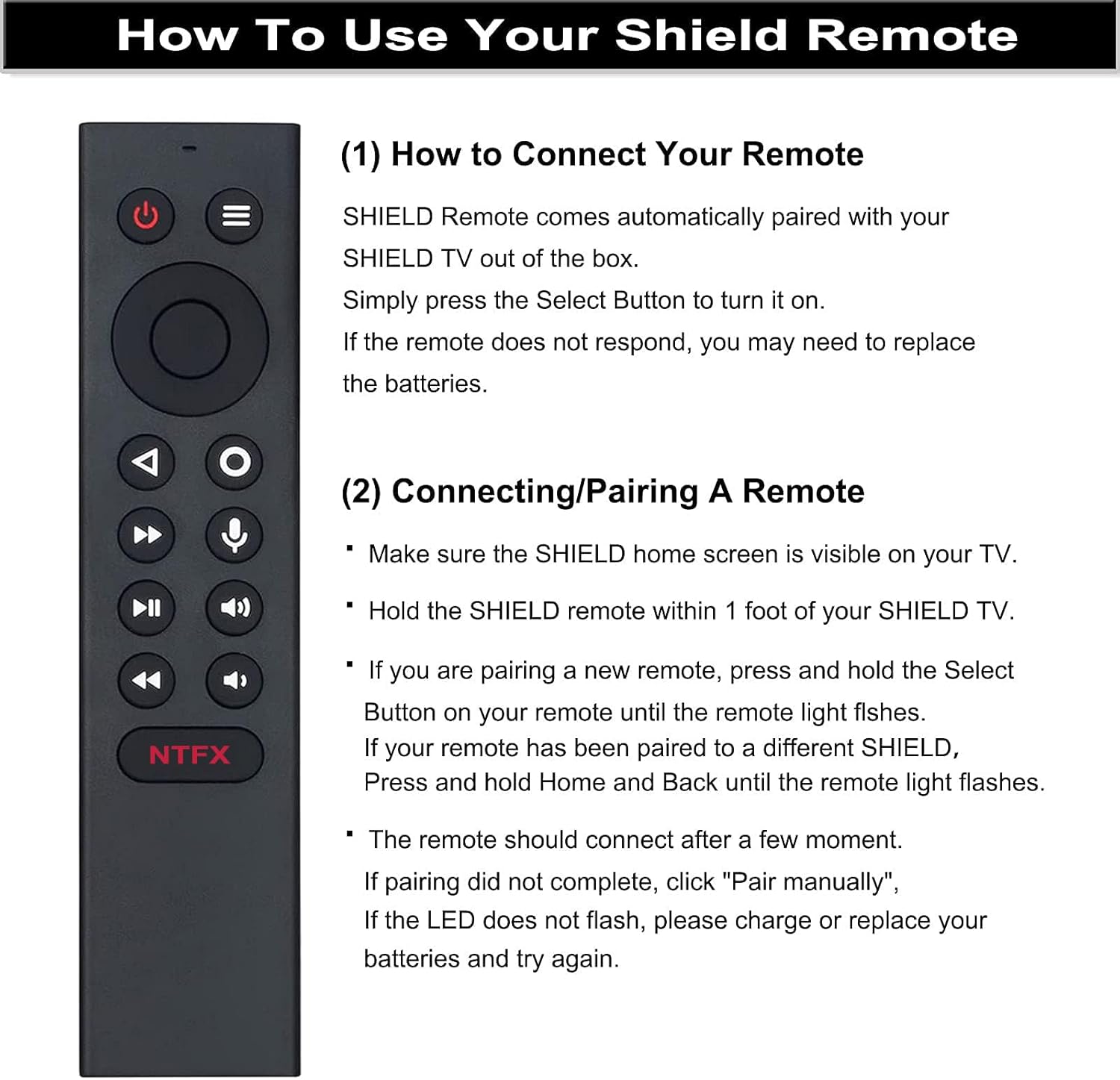
The SHIELD Remote is designed to automatically pair with your SHIELD TV out of the box. Simply press the Seleccioneu el botó to turn it on. If the remote does not respond, you may need to replace the batteries or perform a manual pairing process.
- Ensure the SHIELD home screen is visible on your television.
- Hold the SHIELD remote within 1 foot (approximately 30 cm) of your SHIELD TV.
- If you are pairing a new remote, press and hold the Seleccioneu el botó on your remote until the remote light flashes.
- If your remote has been previously paired to a different SHIELD device, press and hold the Casa i Enrere buttons simultaneously until the remote light flashes.
- The remote should connect after a few moments. If pairing does not complete, select "Pair manually" on your SHIELD TV. If the LED does not flash, replace the batteries and try again.
3. Instruccions de funcionament
3.1 Remote Control Layout and Functions

- Botó d'encesa: Encén o apaga el dispositiu.
- Botó de configuració: Customizable in Settings > Device & Accessories > Customize Setting Button.
- Anell de navegació: Used for Up, Down, Right, and Left navigation within menus.
- Botó de selecció: Confirma les seleccions.
- Botó enrere: Torna a la pantalla anterior.
- Botó d'inici: Torna a la pantalla d'inici de SHIELD TV.
- Fast Forward Button: Skips forward in media playback.
- Voice Search Button: Activates the Google Assistant for voice commands.
- Botó Reprodueix / Pausa: Controla la reproducció de suports.
- Increase Volume Button: Augmenta el volum d'àudio.
- Rewind Button: Skips backward in media playback.
- Decrease Volume Button: Disminueix el volum d'àudio.
- NTFX Button: Directly opens the Netflix application.
3.2 Voice Function
To utilize the voice function, press the botó de micròfon on the remote. This activates the Google Assistant on your Android TV, allowing you to search for content, control playback, and manage your SHIELD TV hands-free using voice commands.
3.3 Customizable Menu Buttons
The remote features customizable menu buttons, offering over 25 choices for personalized control. You can configure these buttons to launch your favorite applications, enable AI upscaling, mute sound, or perform other functions. Different actions can be assigned to a single press, double press, or long press of the customizable button.
3.4 Location Function
To quickly locate your remote if it is misplaced, you can activate the remote locator feature via the SHIELD remote application on your NVIDIA SHIELD device. This function helps prevent losing your remote control.
4. Manteniment
4.1 Neteja
Per netejar el comandament a distància, utilitzeu un drap suau i sec. Per a la brutícia resistent, netegeu lleugerament.ampNetegeu el drap amb aigua o un netejador suau i no abrasiu. Eviteu utilitzar productes químics agressius, dissolvents o materials abrasius, ja que poden danyar la superfície o els components interns del comandament a distància.
4.2 Substitució de la bateria
When the remote's performance degrades or the LED indicator does not flash during pairing attempts, it is likely time to replace the batteries. Always use two new AAA batteries and ensure they are inserted with the correct polarity. Dispose of old batteries responsibly according to local regulations.
5. Solució De Problemes
5.1 El comandament a distància no respon
- Comproveu les bateries: Ensure batteries are correctly installed and have sufficient charge. Replace with new AAA batteries if necessary.
- Reemparellament del comandament a distància: Follow the pairing instructions in Section 2.2 to re-establish the connection with your SHIELD TV.
- Proximitat: Ensure the remote is within 1 foot of your SHIELD TV during pairing.
5.2 Voice Function Not Working
- Botó del micròfon: Ensure you are pressing the dedicated microphone button for voice commands.
- SHIELD Experience Update: Verify that your NVIDIA SHIELD device is updated to the latest SHIELD Experience software, as this is required for full voice functionality.
- Connexió a Internet: Voice commands often require an active internet connection for processing.
5.3 Customizable Buttons Not Functioning
- Comprova la configuració: Navigate to Settings > Device & Accessories > Customize Setting Button on your SHIELD TV to ensure the buttons are correctly configured.
- SHIELD Experience Update: Ensure your SHIELD device is running the latest software for optimal customization options.
6. Especificacions
| Marca | ALLIMITAT |
| Nom del model | P3700 |
| Número de model | P3700 |
| Tecnologia de connectivitat | infrarojos |
| Dispositius compatibles | NVIDIA SHIELD Android TV, NVIDIA SHIELD Android TV Pro, NVIDIA SHIELD TV (2015, 2017, 2019 models) |
| Interval màxim | 10 metres |
| Tipus de bateria | 2 piles AAA (necessàries) |
| Quantitat de botons | 16 |
| Pes de l'article | 1 unces |
| Item Dimensions (Length x Width) | 15.5 cm x 3.5 cm |

7. Informació de la garantia
The ALLIMITY P3700 Replacement Voice Remote comes with a 90 dies de garantia from the date of purchase. This warranty covers manufacturing defects and malfunctions under normal use. Please retain your proof of purchase for warranty claims. For further details or to initiate a warranty claim, please contact customer support.
8. Atenció al client
If you encounter any issues with your ALLIMITY P3700 remote control or require assistance, please do not hesitate to contact our after-sale customer service. Our support team is available to help resolve any problems you may experience with the product.
Please refer to your purchase documentation or the seller's contact information for the most direct way to reach customer support.