
Total TMT47504
Total Digital Multimeter 1000V TMT47504 User Manual
Model: TMT47504 | Brand: Total
1. Informació important de seguretat
Please read and understand all safety warnings and operating instructions before using this multimeter. Failure to do so may result in electric shock, fire, or serious injury.
- Desconnecteu sempre l'alimentació to the circuit under test before connecting or disconnecting test leads.
- Do not exceed the maximum input limits for any function. The maximum operating voltage és 1000V.
- Tingueu precaució quan treballeu amb voltagper sobre de 30 V CA RMS, 42 V pic o 60 V CC. Aquests voltagsuposen un risc de xoc.
- Inspeccioneu els cables de prova for damaged insulation or exposed metal before each use. Replace if damaged.
- Ensure the function dial is set to the correct range before making measurements.
- Never measure resistance or continuity on a live circuit.
- Substituïu les piles immediatament when the low battery indicator appears to ensure accurate readings.
- Do not operate the multimeter if it appears damaged or if the case is open.
- To avoid electrical shock and fire, ensure correct fuse installation when replacing. Refer to the fuse ratings on the back of the device (F600mA/250V and F10A/250V).
2. Producte acabatview
The Total Digital Multimeter TMT47504 is a versatile tool designed for measuring various electrical parameters. It features a large digital display and a rotary function switch for easy operation.
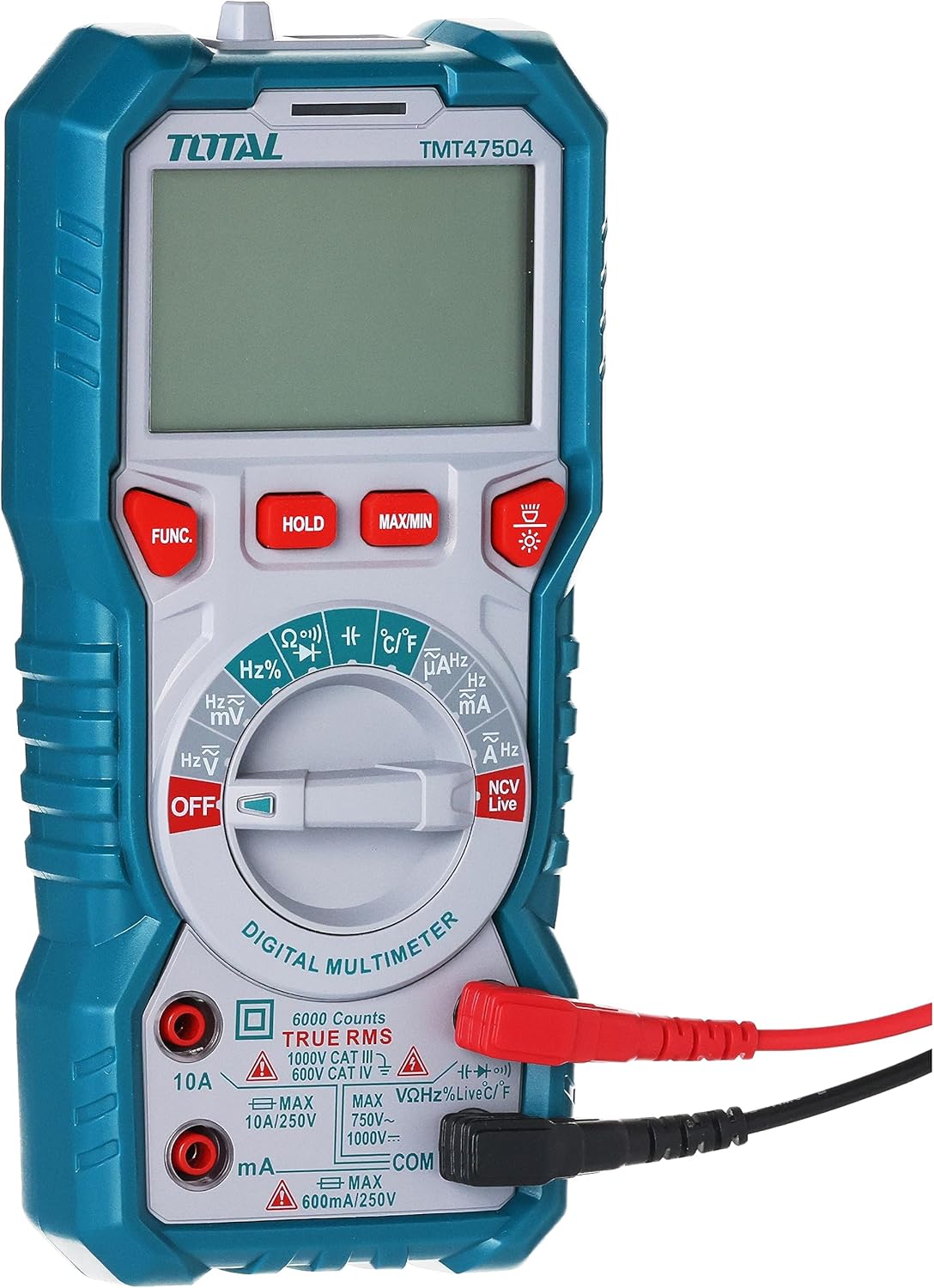
Figura 2.1: Frontal view of the Total Digital Multimeter TMT47504. This image shows the main display, the central rotary function dial, and the input jacks for test leads. Buttons for 'FUNC', 'HOLD', 'MAX/MIN', and backlight are also visible.
2.1 Components
- Pantalla LCD: Mostra lectures de mesura, unitats i indicadors de funció.
- Marcador de funció: Rotary switch to select desired measurement function (e.g., Voltage, Current, Resistance).
- Preses d'entrada: Ports for connecting test leads (COM, VΩmA, 10A).
- Cables de prova: Red and black leads with probes for making electrical connections.
- Botons de funció: Buttons for additional features like data hold, maximum/minimum value, and backlight.

Figure 2.2: The included red and black test leads. These leads are essential for connecting the multimeter to the circuit being tested.
3. Configuració
3.1 Instal·lació de la bateria
The Total Digital Multimeter TMT47504 requires 2 AA batteries for operation. Batteries are not included with the product.
- Localitzeu el compartiment de la bateria a la part posterior del multímetre.
- Feu servir un tornavís per obrir la tapa del compartiment de la bateria.
- Introduïu 2 piles AA, assegurant-vos de la polaritat correcta (+ i -).
- Substituïu la tapa del compartiment de la bateria i fixeu-la amb el cargol.

Figura 3.1: Esquena view of the multimeter, showing the battery compartment cover and the safety warning regarding fuse replacement.
3.2 Connexió dels cables de prova
Proper connection of test leads is crucial for accurate and safe measurements.
- Introduïu el cable de prova negre al COM Presa d'entrada (comuna).
- Per a la majoria de mesures (Voltage, Resistance, Continuity, Diode, Frequency, Capacitance), insert the red test lead into the VΩmA presa d'entrada.
- Per a mesures de corrent elevat (fins a 10 A), inseriu el cable de prova vermell al 10A presa d'entrada.
- Ensure leads are fully inserted and securely connected.
4. Instruccions de funcionament
4.1 Encès/Apagat
To turn the multimeter on, rotate the function dial from the "OFF" position to any desired measurement function. To turn it off, rotate the dial back to "OFF".
4.2 Realització de mesures
Assegureu-vos sempre que el multímetre estigui configurat a la funció i al rang correctes abans de connectar-lo a un circuit.
- DC Voltage (V–):
- Rotate the dial to the V– position.
- Connect the red lead to the positive (+) side of the DC source and the black lead to the negative (-) side.
- Llegeix el voltage valor a la pantalla.
- Vol. ACtage (V~):
- Rotate the dial to the V~ position.
- Connect the test leads across the AC source.
- Llegeix el voltage valor a la pantalla.
- Resistència (Ω):
- Assegureu-vos que el circuit estigui desenergitzat.
- Rotate the dial to the Ω position.
- Connecteu els cables de prova al component que s'ha de mesurar.
- Llegiu el valor de resistència a la pantalla.
- Continuïtat:
- Assegureu-vos que el circuit estigui desenergitzat.
- Rotate the dial to the continuity position (often shared with resistance or diode).
- Connect the test leads across the circuit path. A beep indicates continuity.
- DC Current (A– / mA–):
- Ensure the circuit is de-energized before connecting.
- Rotate the dial to the A– or mA– position.
- Connect the multimeter in series with the circuit. For high current, use the 10A jack.
- Apliqueu alimentació i llegiu el valor del corrent.
4.3 Funcions especials
- MANTENIR: Premeu el botó "HOLD" per congelar la lectura actual a la pantalla. Premeu-lo de nou per alliberar-la.
- MÀXIM / MÍN: Press "MAX/MIN" to record the maximum and minimum readings during a measurement session. Press again to cycle through MAX, MIN, and current readings.
- Il·luminació de fons: Press the backlight button (often indicated by a light bulb icon) to illuminate the display in low-light conditions.
5. Manteniment
5.1 Neteja
Per netejar el multímetre, netegeu la carcassa amb aiguaamp cloth and mild detergent. Do not use abrasives or solvents. Ensure the device is off and test leads are disconnected before cleaning.
5.2 Substitució de la bateria
When the low battery indicator appears on the display, replace the batteries promptly to ensure accurate measurements. Follow the steps outlined in Section 3.1.
5.3 Canvi de fusibles
Si la funció de mesurament de corrent deixa de funcionar, pot ser que calgui substituir el fusible. Always ensure the multimeter is OFF and test leads are disconnected before opening the case.
- Locate the fuse compartment, typically accessible after removing the battery cover or opening the main case.
- Traieu amb cura el fusible vell.
- Replace with a fuse of the exact same type and rating: F600mA/250V for mA range and F10A/250V for 10A range. Using an incorrect fuse can lead to damage or safety hazards.
- Securely close the case before resuming operation.
6. Solució De Problemes
- No Display / Multimeter won't turn on:
- Check if the function dial is set to an "ON" position (not "OFF").
- Verify battery installation and ensure batteries are not depleted. Replace if necessary.
- Lectures incorrectes:
- Assegureu-vos que s'hagin seleccionat la funció i el rang correctes per a la mesura.
- Check test lead connections; ensure they are fully inserted and not damaged.
- Verify battery level; low batteries can affect accuracy.
- Ensure the circuit is de-energized for resistance/continuity measurements.
- La mesura actual no funciona:
- Check if the fuse for the current range is blown. Refer to Section 5.3 for fuse replacement.
- Ensure the red test lead is connected to the correct current input jack (mA or 10A).
7. Especificacions

Figure 7.1: The multimeter shown with its approximate dimensions, indicating a height of 7.7 inches (19 cm).
| Característica | Especificació |
|---|---|
| Número de model | TMT47504 |
| Fabricant | Total |
| Pes de l'article | 530 g (0.53 quilograms) |
| Dimensions del producte | 10 x 20 x 37 cm |
| Piles necessàries | 2 piles AA (no incloses) |
| Estil | Digital |
| Color | Multicolor |
| Volum de funcionament màximtage | 1000 Volts |
| Components inclosos | Multimeter, Test Leads |
8. Garantia i Suport
This product is covered by the standard manufacturer's warranty. For specific warranty terms and conditions, please refer to the documentation provided with your purchase or contact the retailer where the product was acquired.
For technical support, troubleshooting assistance beyond this manual, or warranty claims, please contact Total customer service or your authorized dealer. Keep your purchase receipt as proof of purchase.
Ask a question about this manual
Ask about setup, troubleshooting, compatibility, parts, safety, or missing instructions. Manuals+ will review the question and use this page’s manual context to help answer it.