
1. Introducció
Thank you for choosing the IROAD TR7 Dash Camera. This manual provides essential information for the proper installation, operation, and maintenance of your device. Please read this manual thoroughly before using the product to ensure optimal performance and safety.
2. Contingut del paquet
Verifiqueu que tots els elements que s'enumeren a continuació s'inclouen al paquet del producte. Si falta algun element o està malmès, poseu-vos en contacte amb el vostre distribuïdor.
- Main Unit (Front Camera)
- Càmera posterior
- Main Unit Bracket
- Genuine Micro SD Card (16GB)
- Dongle Wi-Fi
- Quick Manual (Japanese)
- Cable d'alimentació constant
- Cable de la càmera posterior
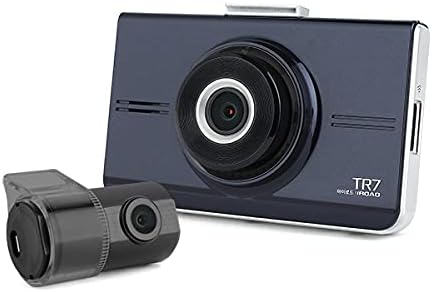
Image 2.1: IROAD TR7 Dash Camera main unit and rear camera, showing the compact design of both components.
3. Configuració i instal·lació
3.1 Inserció de la targeta MicroSD
- Assegureu-vos que la càmera del salpicader estigui apagada.
- Localitzeu la ranura per a targetes MicroSD al lateral de la unitat principal.
- Insert the provided MicroSD card into the slot until it clicks into place.
- To remove, gently push the card in, and it will spring out.

Image 3.1: The IROAD TR7 main unit with the MicroSD card and Wi-Fi dongle inserted into their respective slots on the side.
3.2 Instal·lació de la unitat principal
- Clean the windshield area where the dash camera will be mounted.
- Attach the main unit bracket to the dash camera.
- Remove the protective film from the adhesive pad on the bracket.
- Firmly press the dash camera onto the windshield, ensuring a clear view de la carretera.

Image 3.2: The IROAD TR7 main unit shown with its adjustable mounting bracket, ready for windshield attachment.
3.3 Instal·lació de la càmera posterior
- Clean the rear window area where the rear camera will be mounted.
- Attach the rear camera to the rear window using its adhesive.
- Connect the rear camera to the main unit using the provided rear camera cable. Route the cable neatly along the vehicle's interior trim.

Image 3.3: The compact IROAD TR7 rear camera, designed for discreet installation on the rear window.
3.4 Connexió d'alimentació
Connect the constant power cable to the vehicle's power source according to the installation guide provided with the cable. Ensure proper wiring to enable parking surveillance features.
3.5 Wi-Fi Dongle Connection
Insert the Wi-Fi dongle into the designated USB port on the main unit. This enables connection to your smartphone via the IROAD mobile application for live view, settings adjustment, and video playback.
3.6 Antena GPS opcional
An external GPS antenna (sold separately) can be connected to enable ADAS functions and record location and speed data, which can be viewed on Google Maps via the PC vieweh.
4. Instruccions de funcionament
4.1 Basic Recording Modes
The IROAD TR7 supports several recording modes:
- Gravació contínua: Automatically starts recording when the vehicle's ignition is turned on. Footage is saved in short segments and overwritten when the MicroSD card is full (Loop Recording).
- Event (Impact) Recording: Activated by the built-in 3-axis G-sensor upon detecting a significant impact or sudden braking/acceleration. These files are saved in a separate folder to prevent overwriting.
- Parking (Motion Detection) Recording: When the vehicle is parked and the ignition is off, the camera enters parking mode. It records when motion is detected in its field of view or an impact is sensed. Requires a constant power connection.
4.2 ADAS (Advanced Driver-Assistance System) Functions
The IROAD TR7 includes ADAS features to enhance driving safety. These functions are available only when an external GPS antenna is connected:
- Sistema d'avís de canvi de carril (LDWS): Alerts the driver if the vehicle deviates from its lane without signaling.
- Sistema d'alerta de col·lisió frontal (FCWS): Warns the driver of a potential collision with a vehicle ahead.
- Avís de sortida del vehicle davanter (FVDW): Notifies the driver when the vehicle in front starts moving after a stop.
4.3 Gravació d'àudio
The dash camera records audio by default. This feature can be toggled on or off via the mobile application or PC viewla configuració.
4.4 Touch Panel Operation
The IROAD TR7 features a touch panel screen for intuitive control. Users can access live view, playback recorded videos, and adjust settings directly on the device. Refer to the on-screen menu for specific options.

Imatge 4.1: posterior view of the IROAD TR7 main unit, showcasing its touch panel display for user interaction.
5. Manteniment
5.1 Gestió de targetes MicroSD
Regularly format the MicroSD card (at least once a month) to maintain optimal recording performance and prevent data corruption. Use a Class 10 or higher MicroSD card for reliable operation. The camera supports capacities from 16GB to 256GB.
5.2 Neteja
Use a soft, dry cloth to clean the camera lenses and the touch screen. Avoid using abrasive cleaners or solvents that could damage the device.
6. Solució De Problemes
- La càmera no s'encén: Check the power cable connection and ensure the vehicle's ignition is on (for continuous recording) or the constant power cable is correctly installed (for parking surveillance).
- Problemes de gravació: Ensure the MicroSD card is inserted correctly and has sufficient free space. Format the MicroSD card if issues persist.
- Problemes de connexió Wi-Fi: Verify the Wi-Fi dongle is securely inserted. Restart the camera and your smartphone's Wi-Fi.
- ADAS functions not working: Confirm that an external GPS antenna is connected and receiving a signal. ADAS features require GPS data.
- La pantalla tàctil no respon: Reinicieu el dispositiu. Si el problema continua, poseu-vos en contacte amb l'atenció al client.
7. Especificacions
| Característica | Especificació |
|---|---|
| Front Camera Resolution/Frame Rate/Angle | Full HD 1920×1080, 30fps, 142° |
| Rear Camera Resolution/Frame Rate/Angle | HD 1280×720, 30fps, 135° |
| Funcions ADAS | LDWS, FCWS, FVDW (GPS connection required) |
| Sensor | 3-axis G-sensor (for impact recording) |
| Antena GPS externa | Opcional (es ven per separat) |
| Mitjans de gravació | MicroSD card 16GB~256GB supported (Class 10 recommended) |
| Modes d'enregistrament | Continuous, Event (Impact), Parking (Motion Detection), Audio Recording |
| Compressió de vídeo / àudio | H.264/PCM |
| Temperatura de funcionament | -20 ℃ a 60 ℃ |
| PC Viewer Compatibilitat | Windows 7, 8, 10 (32Bit/64Bit) |
| Tipus de visualització | Panell tàctil LCD |
| Mètode de muntatge | Tipus d'adhesiu |
8. Garantia i Suport
For warranty information, please refer to the warranty card included with your product or contact your point of purchase. For technical support or inquiries, please visit the official IROAD weblloc o poseu-vos en contacte amb el seu departament d'atenció al client.