
Introducció
Thank you for choosing the Remax RB-T32 Wireless Bluetooth Earphone. This manual provides detailed instructions on how to set up, operate, and maintain your new earphone. Please read this manual carefully before use to ensure optimal performance and longevity of your device.
Contingut del paquet
Si us plau, comproveu el paquet per veure si hi ha els elements següents:
- Remax RB-T32 Wireless Bluetooth Earphone
- Cable de càrrega
- Coixins per a les orelles (diverses mides)
- Manual d'usuari
Producte acabatview
Familiarize yourself with the components of your Remax RB-T32 earphone.
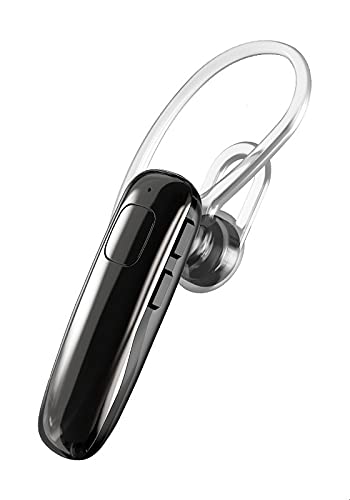
Image: The Remax RB-T32 Wireless Bluetooth Earphone, showcasing its compact design and in-ear form factor. This image provides a general view del producte.
The earphone features a compact in-ear design with integrated touch controls for easy operation. It includes a charging port, an LED indicator, and a built-in microphone for calls.
Configuració
1. Charging the Earphone
- Connect the charging cable to the earphone's charging port.
- Connecteu l'altre extrem del cable a una font d'alimentació USB (per exemple, un ordinador, un adaptador de paret).
- The LED indicator will show the charging status. A full charge typically takes approximately 1-2 hours.
- Once fully charged, the LED indicator will change or turn off. Disconnect the earphone from the charger.
2. Vinculació amb un dispositiu Bluetooth
- Ensure the earphone is charged and turned off.
- Press and hold the multi-function button (or touch area) on the earphone until the LED indicator flashes red and blue alternately, indicating pairing mode.
- Al dispositiu (telèfon intel·ligent, tauleta, etc.), activeu el Bluetooth i cerqueu els dispositius disponibles.
- Select "RB-T32" from the list of found devices.
- Once successfully paired, the LED indicator will flash blue slowly or turn off, and you will hear a confirmation tone.
- The earphone will automatically connect to the last paired device when turned on, if Bluetooth is enabled on the device.
Instruccions de funcionament
Encès/Apagat
- Encès: Press and hold the touch area for approximately 3 seconds until the LED indicator flashes blue and you hear a power-on prompt.
- Apagar: Press and hold the touch area for approximately 5 seconds until the LED indicator flashes red and you hear a power-off prompt.
Reproducció de música
- Reproduir/pausa: Tap the touch area once.
- Pista següent: Fes doble toc a l'àrea tàctil de l'auricular dret.
- Pista anterior: Fes doble toc a l'àrea tàctil de l'auricular esquerre.
Gestió de trucades
- Respondre/Finalitzar la trucada: Tap the touch area once during an incoming call or an active call.
- Rebutja la trucada: Press and hold the touch area for 2 seconds during an incoming call.
Control de volum
- Augmenta el volum: Triple-tap the touch area on the right earphone.
- Disminueix el volum: Triple-tap the touch area on the left earphone.
Assistent de veu
- Activa l'Assistent de veu: Press and hold the touch area for 2 seconds (when not on a call) to activate your device's voice assistant (e.g., Siri, Google Assistant).
Manteniment
- Neteja: Use a soft, dry cloth to clean the earphone. Do not use harsh chemicals or abrasive materials.
- Emmagatzematge: Store the earphone in a cool, dry place away from direct sunlight and extreme temperatures.
- Cura de la bateria: To preserve battery life, charge the earphone regularly, even if not in use for extended periods. Avoid fully discharging the battery frequently.
- Resistència a l'aigua: This earphone is not waterproof. Avoid exposure to water or excessive moisture.
Resolució de problemes
| Problema | Solució |
|---|---|
| Earphone does not power on. | Ensure the earphone is fully charged. |
| No es pot emparellar amb un dispositiu. |
|
| Sense so o amb un volum baix. |
|
| Connexió intermitent. |
|
Especificacions
| Característica | Detall |
|---|---|
| Marca | Remax |
| Nom del model | RB-T32 |
| Tecnologia de connectivitat | Sense fil (Bluetooth) |
| Factor de forma dels auriculars | A l'orella |
| Tipus de control | Volume Control (Touch) |
| Dispositius compatibles | Multi-device compatible |
| Components inclosos | Coixinets per a les orelles |
| Descripció del rang d'edat | Adult |
| Color | Negre |
Garantia i Suport
The Remax RB-T32 Wireless Bluetooth Earphone comes with a standard manufacturer's warranty. Please refer to the warranty card included in your package for specific terms and conditions, including the warranty period and coverage details.
For technical support, troubleshooting assistance, or warranty claims, please contact your local Remax distributor or the retailer where you purchased the product. Keep your proof of purchase for warranty validation.


