
PHILIPS 43PUS7556/12
PHILIPS 43PUS7556/12 4K UHD LED Smart TV User Manual
Model: 43PUS7556/12
Introducció
This user manual provides comprehensive instructions for the PHILIPS 43PUS7556/12 4K UHD LED Smart TV. Please read this manual carefully before using your television to ensure proper setup, operation, and maintenance. Keep this manual for future reference.
Informació important de seguretat
Seguiu sempre les precaucions de seguretat bàsiques quan utilitzeu aquest televisor per reduir el risc d'incendi, descàrrega elèctrica i lesions.
- No exposeu el televisor a la pluja ni a la humitat.
- No bloquejar les obertures de ventilació.
- Assegureu-vos una correcta connexió a terra.
- Desendolleu el televisor durant tempestes o quan no l'utilitzeu durant períodes prolongats.
- Demaneu tot el servei a personal de servei qualificat.
Contingut del paquet
Verifiqueu que tots els elements siguin presents al paquet:
- PHILIPS 43PUS7556/12 4K UHD LED Smart TV
- Control remot
- Cable d'alimentació
- Tabletop Stand (if applicable)
- Guia d'inici ràpid
- Safety and Legal Leaflet
- Bateries per a comandament a distància
Configuració
1. Fixació del suport
If you are not wall-mounting the television, attach the tabletop stand as follows:
- Carefully place the television face down on a soft, flat surface to prevent screen damage.
- Alineeu el suport amb els forats de muntatge de la part inferior del televisor.
- Fixeu el suport amb els cargols proporcionats. Assegureu-vos que el suport estigui ben fixat.

Imatge: Part posterior view of the television, illustrating the stand attachment points and various input/output ports. This image helps in identifying where to connect the stand and external devices.
2. Connexió de dispositius externs
The PHILIPS 43PUS7556/12 TV offers multiple connectivity options. Refer to the image below for port locations.
- HDMI: Connect Blu-ray players, game consoles, or set-top boxes. This model features 3 HDMI ports.
- USB: Connect USB storage devices for media playback. This model features 2 USB ports.
- Antena/cable: Connect your antenna or cable TV input.
- Ethernet: For a wired internet connection. Wi-Fi is also available.

Imatge: Detallada view of the television's rear panel, highlighting the HDMI, USB, and other connectivity ports. This visual aid assists users in correctly identifying and connecting their external devices.
3. Encès
- Connect the power cord to the television and then to a wall outlet.
- Press the power button on the remote control or on the television itself.
- Follow the on-screen instructions for initial setup, including language selection, network connection (Wi-Fi or Ethernet), and channel scanning.
Instruccions de funcionament
Funcions de control remot
Familiaritzeu-vos amb els botons del comandament a distància per facilitar la navegació.
- Potència: Encén o apaga el televisor.
- Font: Selecciona les fonts d'entrada (HDMI 1, HDMI 2, TV, etc.).
- Botons de navegació (amunt/avall/esquerra/dreta): Navega pels menús i opcions.
- D'ACORD: Confirma les seleccions.
- Tornar/Sortir: Torna al menú anterior o surt del menú actual.
- Volum +/-: Ajusta el nivell de volum.
- Canal +/-: Canvia els canals de televisió.
- Televisor intel·ligent/llar: Accesses the Smart TV interface (SAPHI OS).
Smart TV Features (SAPHI OS)
The PHILIPS 43PUS7556/12 runs on the SAPHI operating system, providing access to various apps and streaming services.

Image: Screenshot of the Philips Smart TV home screen, displaying the SAPHI OS interface with icons for popular streaming applications such as YouTube, Netflix, and Prime Video. This illustrates the user interface for accessing smart features.
- Premeu el botó Smart TV or Casa botó del comandament a distància.
- Use the navigation buttons to browse through available applications.
- Select an app (e.g., Netflix, YouTube, Amazon Prime Video) and press OK per llançar-lo.
- Ensure your TV is connected to the internet for optimal Smart TV functionality.

Imatge: Una altra view of the Philips Smart TV interface, specifically highlighting the logos of popular streaming services like Netflix, Rakuten TV, YouTube, and Amazon Prime Video. This confirms the availability of these services on the TV.
Configuració d'imatge i so
Personalitza el teu viewexperiència d'escolta i escolta:
- Modes d'imatge: Access settings to adjust brightness, contrast, color, and sharpness. Pre-set modes like Standard, Vivid, Movie, and Game are available.
- Modes de so: Adjust audio settings, including bass, treble, and balance. This TV supports Dolby Atmos for immersive sound.
- Dolby Vision: The TV supports Dolby Vision for enhanced HDR content. Ensure your content source also supports Dolby Vision for the best experience.

Image: The Philips 43PUS7556/12 television screen displaying a dynamic, colorful image, accompanied by icons indicating key features such as LED display technology, Dolby Vision Atmos, and UltraHD HDR. This visually represents the TV's display capabilities.
Manteniment
Neteja del televisor
- Desendolla sempre el televisor abans de netejar-lo.
- Feu servir un drap suau i sense borrissol per netejar suaument la pantalla i la carcassa.
- Per a marques persistents, dampen the cloth with a small amount of water or a mild, non-abrasive screen cleaner. Do not spray cleaner directly onto the screen.
- Avoid using alcohol, solvents, or ammonia-based cleaners, as these can damage the screen.
Substitució de la bateria del comandament a distància
When the remote control's performance decreases, replace the batteries:
- Obriu la tapa del compartiment de la bateria a la part posterior del comandament a distància.
- Traieu les piles velles.
- Insert new batteries, ensuring correct polarity (+ and -).
- Tanqueu la tapa del compartiment de la bateria.
Resolució de problemes
Si teniu problemes amb el televisor, consulteu les solucions habituals següents:
Sense poder
- Assegureu-vos que el cable d'alimentació estigui connectat correctament tant al televisor com a la presa de corrent.
- Comproveu si la presa de corrent funciona connectant-hi un altre dispositiu.
- Prova de prémer el botó d'engegada del televisor, no només el comandament a distància.
No hi ha imatge, però hi ha so
- Verifiqueu que s'ha seleccionat la font d'entrada correcta (per exemple, HDMI 1, TV).
- Comproveu les connexions dels cables entre el televisor i els dispositius externs.
- Adjust picture settings (brightness, contrast).
No hi ha so, però hi ha imatge
- Ensure the volume is not muted or set to zero.
- Comproveu les connexions del cable d'àudio.
- Verify sound output settings on the TV (e.g., internal speakers, external audio system).
El control remot no funciona
- Substituïu les piles del comandament a distància.
- Assegureu-vos que no hi hagi obstacles entre el comandament a distància i el sensor d'infrarojos del televisor.
- Apunta el comandament a distància directament al televisor.
Smart TV Apps Not Loading or Slow
- Comproveu la vostra connexió a Internet (Wi-Fi o Ethernet).
- Reinicieu el televisor desendollant-lo de la presa de corrent durant uns minuts i després tornant-lo a connectar.
- Assegureu-vos que el programari del televisor estigui actualitzat.
Especificacions
The following table outlines the key technical specifications for the PHILIPS 43PUS7556/12 TV.
| Característica | Especificació |
|---|---|
| Marca | PHILIPS |
| Número de model | 43PUS7556/12 |
| Mida de la pantalla | 43 polzades |
| Tecnologia de visualització | LED |
| Resolució | 4K (3840 x 2160) |
| Freqüència d'actualització | 60 Hz |
| Sistema operatiu | SAFIS |
| Connectivitat | Bluetooth, WiFi |
| Ports HDMI | 3 |
| Ports USB | 2 |
| Sortida d'àudio | 20 W |
| Característiques especials | Dolby Vision, Dolby Atmos, Freeview HD |
| Color | Negre |
| Dimensions (sense suport) | 82.1 mm (profunditat) |
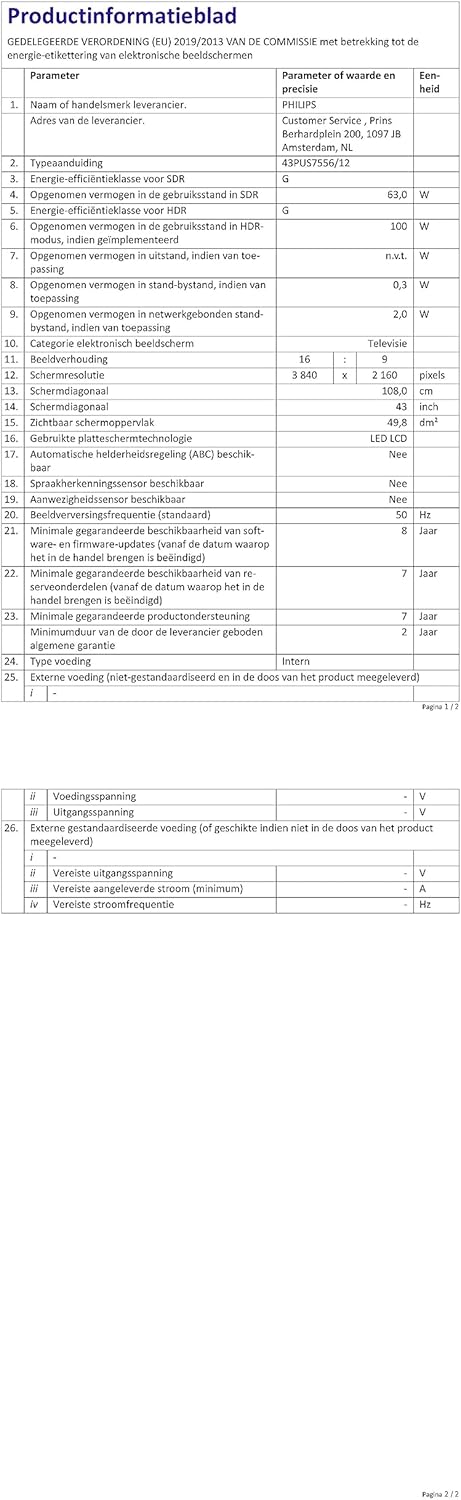
Image: A technical specification sheet for the Philips 43PUS7556/12 television, detailing various parameters and values. This document provides comprehensive technical data for the product.

Image: Another technical specification sheet for the Philips 43PUS7556/12 television, presented in Dutch, listing detailed product information and performance metrics. This provides additional technical context.

Image: A diagram illustrating the physical dimensions of the 43-inch Philips 43PUS7556/12 television, including width, height, and depth measurements. This helps users understand the TV's physical footprint.
Garantia i Suport
Informació de la garantia
This product comes with a manufacturer's warranty. Please refer to the warranty card included in your package for specific terms and conditions. The typical warranty period for consumer electronics is 2 years from the date of purchase.
- Disponibilitat mínima garantida de recanvis: 7 anys
- Suport mínim garantit al producte: 7 anys
Atenció al client
For further assistance, technical support, or service inquiries, please contact PHILIPS customer support. You can find contact details on the official PHILIPS website or in the documentation provided with your television.
When contacting support, please have your model number (43PUS7556/12) and serial number ready.
Ask a question about this manual
Ask about setup, troubleshooting, compatibility, parts, safety, or missing instructions. Manuals+ will review the question and use this page’s manual context to help answer it.