
Introducció
The Pruveeo D90 is an advanced 3-channel dash camera system engineered to provide comprehensive video surveillance for your vehicle. It is equipped with three 1080P cameras, capturing simultaneous footage from the front, interior, and side perspectives. This design ensures a wide 170-degree viewing angle for each camera, enhancing situational awareness and evidence collection. The D90 incorporates features such as superior night vision for clear recordings in low-light conditions, 24/7 parking monitoring for continuous protection, automatic loop recording to manage storage efficiently, and an emergency accident lock function that secures critical footage en detecció d'impacte.
This manual serves as a comprehensive guide to help you set up, operate, and maintain your Pruveeo D90 dash cam, ensuring optimal performance and longevity.
Característiques clau

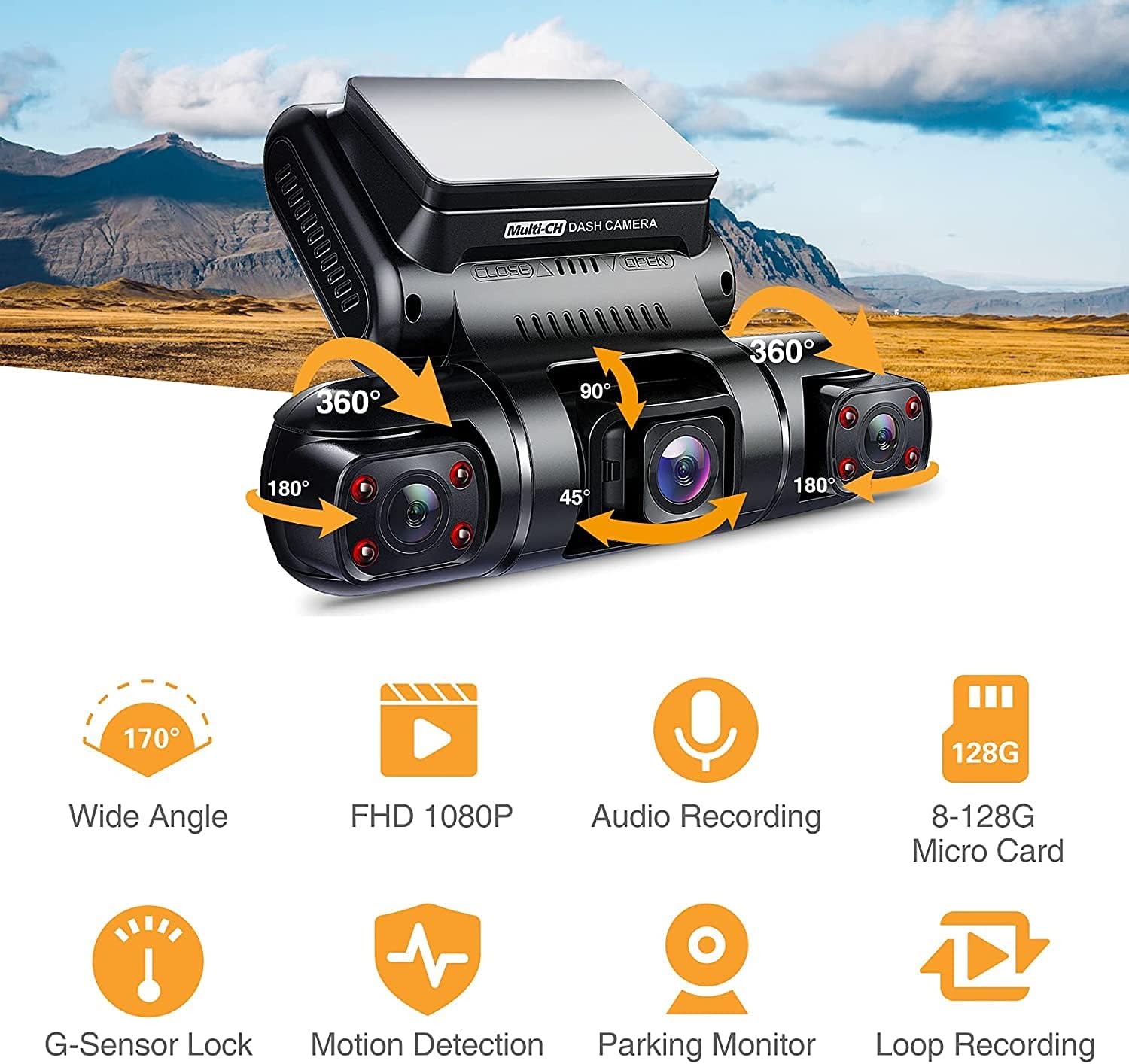
Producte general View: The Pruveeo D90 dash cam features a central display unit with two adjustable side cameras, allowing for flexible recording angles. The main unit includes control buttons for easy navigation.

Triple Channel Recording: The dash cam records simultaneously from three perspectives: front, interior, and side (left/right), each in 1080P resolution with a 170° wide angle, providing comprehensive coverage.
- Triple 1080P Recording: Captures video at 1920x1080P resolution from three independent channels (front, interior, and side).
- 170° Super Wide Angle Lens: Each camera provides a broad field of view, minimizing blind spots and capturing more of the surrounding environment.
- Adjustable Interior Cameras: The two cabin cameras can rotate back and forth, and left and right, allowing users to customize recording angles for specific needs, such as monitoring the left and right sides of the car or the interior.
- Visió nocturna superior: Equipped with 4 infrared lights and an F1.8 aperture on the cabin cameras, along with a highly sensitive night vision image sensor, ensuring clear video capture even in dark conditions.
- Monitorització d'aparcament 24/7: Provides continuous surveillance of your vehicle when parked, automatically detecting and recording moving objects or impacts.
- Enregistrament en bucle: Sobreescriu automàticament el menjar desbloquejat més antictage when the memory card reaches its maximum capacity, ensuring continuous recording without manual intervention. Supports 1, 2, or 3-minute loop recording segments.
- Emergency Accident Lock (G-Sensor): A built-in G-sensor detects sudden collisions and automatically locks the current recording, preventing it from being overwritten.
- Wide Memory Card Support: Compatible with Class 10 or higher micro-SD cards up to 128GB.
- Supercondensador: Utilizes a supercapacitor for power, offering enhanced durability and reliability in extreme temperatures compared to traditional lithium-ion batteries.

Flexible Recording Angles: The D90's design allows for multiple recording configurations, enabling users to capture various perspectives inside and around the vehicle for comprehensive evidence.

Funció acabadaview: Visual representation of the dash cam's core functionalities including wide-angle recording, Full HD 1080P resolution, audio recording, extensive micro SD card support, G-sensor lock, motion detection, parking monitor, and loop recording.
Super Night Vision & 24 Hours Parking Monitor: The dash cam provides clear images even in low light. When parked, it detects moving objects and automatically begins recording, ensuring continuous protection.

Loop Recording Functionality: When the micro SD card's storage is full, the oldest non-protected files are automatically overwritten, allowing for continuous recording without interruption.
Què hi ha a la caixa
En obrir el paquet, comproveu que hi hagi tots els components següents:
- Pruveeo D90 3-Channel Dash Cam Unit
- Targeta de memòria
- Muntatge de succió
- Manual d'usuari (aquest document)
- Car Charger (typically included for power)
- USB Cable (for data transfer/power)
Note: Specific accessories may vary slightly. Please refer to the product packaging for the most accurate list.
Guia de configuració
1. Prepare the Memory Card
- Insert a Class 10 or higher micro SD card (up to 128GB) into the dash cam's memory card slot. Ensure the card is inserted correctly until it clicks into place.
- It is highly recommended to format the memory card within the dash cam's settings before first use and periodically thereafter (e.g., once a month) to ensure optimal performance and prevent data corruption.
2. Muntar la càmera del salpicader
- Netegeu a fons la zona escollida del parabrisa. Assegureu-vos que estigui lliure de pols i greix.
- Attach the suction mount to the dash cam unit.
- Press the suction cup firmly against the cleaned windshield surface and engage the locking mechanism to secure it. Position the dash cam so that the front camera has a clear view of the road ahead, and the interior/side cameras can capture their intended areas.
- Adjust the angle of the dash cam and individual cameras as needed to achieve the desired recording coverage.
3. Connexió d'alimentació
- Connecteu el carregador de cotxe inclòs al port d'entrada d'alimentació de la càmera del salpicader.
- Connecteu l'altre extrem del carregador de cotxe a la presa de corrent de 12 V del vostre vehicle (endoll de l'encenedor de cigarrets).
- Route the power cable neatly along the windshield and dashboard edges to avoid obstructing your view o interferir en la conducció.
Instruccions de funcionament
Encès/Apagat
- Automatic Power: The dash cam will automatically power on and begin recording when your vehicle's ignition is turned on (and the 12V outlet receives power). It will power off automatically shortly after the ignition is turned off.
- Manual Power: To manually power on or off, press and hold the Power button located on the dash cam unit.
Modes d'enregistrament
- Enregistrament en bucle: Un cop engegada, la càmera del salpicader iniciarà automàticament la gravació en bucle. Vídeo files are saved in segments (e.g., 1, 2, or 3 minutes). When the memory card is full, the oldest unlocked files es sobreescriurà.
- Enregistrament d'emergència (sensor G): In the event of a sudden impact or collision, the built-in G-sensor will automatically trigger emergency recording. These files are locked and protected from being overwritten by loop recording. You can also manually trigger emergency recording by pressing the designated button (refer to your device's button layout).
- Monitor d'aparcament: When the vehicle is parked and the dash cam is connected to a continuous power source (e.g., hardwire kit, not included), the parking monitor function will activate. It uses motion detection or G-sensor triggers to record events while the vehicle is stationary.
Reproducció i File Gestió
- A view recorded videos on the dash cam's screen, enter playback mode via the menu. Navigate through files using the directional buttons and select a video to play.
- Per transferir files to a computer, remove the micro SD card and insert it into a card reader connected to your computer, or connect the dash cam directly to your computer via USB (if supported for data transfer).
Ajust de configuració
Access the menu settings to customize various parameters:
- Resolució de vídeo: Adjust the recording resolution for each channel.
- Durada de la gravació en bucle: Set the length of video segments (1/2/3 minutes).
- Sensibilitat del sensor G: Adjust the sensitivity of the G-sensor to prevent accidental emergency recordings or ensure proper detection.
- Monitor d'aparcament: Enable/disable and configure parking monitor settings.
- Data/Hora Stamp: Assegureu-vos que la data i l'hora siguin correctes per a un registre precís.
- Enregistrament d'àudio: Activa o desactiva la gravació d'àudio.
- Idioma: Select your preferred language for the menu interface.
Manteniment
- Formatació de la targeta de memòria: Regularly format your micro SD card (e.g., once a month) using the dash cam's format function. This helps maintain card health and prevents data corruption. Back up any important files abans de formatar.
- Neteja: Feu servir un drap suau i sec per netejar les lents i la pantalla de la càmera del salpicader. Eviteu utilitzar productes de neteja abrasius o dissolvents que puguin danyar el dispositiu.
- Actualitzacions de firmware: Periodically check the Pruveeo official website for any available firmware updates. Firmware updates can improve performance, add new features, or fix bugs. Follow the instructions provided with the firmware update carefully.
- Consideracions sobre la temperatura: Avoid exposing the dash cam to extreme temperatures for prolonged periods. While the supercapacitor offers better heat resistance, prolonged exposure to direct sunlight in a hot car can still affect its lifespan.
Resolució de problemes
| Problema | Possible solució |
|---|---|
| La càmera del salpicader no s'encén. |
|
| Dash cam turns off unexpectedly. |
|
| Video recording stops or freezes. |
|
| Mala qualitat de vídeo o imatges borroses. |
|
| El sensor G és massa sensible/no prou sensible. |
|
Especificacions
| Característica | Detall |
|---|---|
| Dimensions del producte | 2 x 3 x 5 polzades |
| Pes de l'article | 1.28 lliures |
| Nom del model | D90 |
| Número de model de l'article | 1080P Front +1080P Inside +1080P Inside |
| Resolució de captura de vídeo | 1080p (for each channel) |
| Característica especial | Night Vision, G-Sensor, Parking Monitor, Loop Recording |
| Tecnologia de connectivitat | USB |
| Tipus de muntatge | Muntatge de succió |
| Color | Negre |
| Font d'alimentació | Supercondensador |
| Compatibilitat màxima amb targetes SD | 256GB (Class 10 or higher) |
Garantia i Suport
Pruveeo products are designed and manufactured to the highest quality standards. For specific warranty information regarding your D90 dash cam, please refer to the warranty card included in your product packaging or visit the official Pruveeo weblloc. La garantia normalment cobreix els defectes de fabricació durant un període especificat a partir de la data de compra.
For technical support, troubleshooting assistance beyond this manual, or warranty claims, please contact Pruveeo customer service through the contact information provided on their official website or the product packaging. When contacting support, please have your product model (D90) and purchase details readily available.