
1. Introducció
Thank you for choosing the Doubc Wireless Earbuds Model i17. These earbuds are designed to provide a high-quality audio experience with advanced features such as Bluetooth 5.1 connectivity, active noise cancellation, and IPX7 waterproofing. This manual will guide you through the setup, operation, and maintenance of your new earbuds to ensure optimal performance and longevity.

Image: Doubc Wireless Earbuds i17 in their charging case, displaying a 100% charge level on the LED screen.
2. Contingut del paquet
Si us plau, reviseu el paquet per assegurar-vos que hi ha tots els elements:
- Doubc Wireless Earbuds (Left and Right)
- Estoig de càrrega
- Cable de càrrega USB tipus C
- Múltiples mides de puntes d'orella de silicona (petites, mitjanes, grans)
- Manual d'usuari
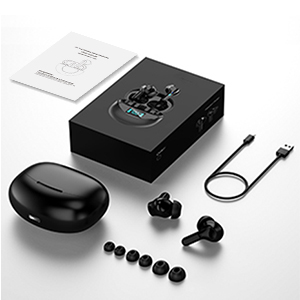
Image: All components included in the Doubc i17 earbud package, neatly arranged.
3. Producte acabatview
The Doubc i17 earbuds feature an ergonomic in-ear design for a comfortable and secure fit, suitable for various activities. They deliver Hi-Fi stereo sound through 10mm enhanced dynamic drivers.

Image: Illustration demonstrating the comfortable and secure fit of the earbuds, highlighting the various silicone eartip sizes for customization.

Imatge: Detallada view of the 10mm dynamic driver, emphasizing the Hi-Fi stereo sound capability.
Controls tàctils
Each earbud is equipped with a multi-function touch key for easy control of music playback, calls, and voice assistant activation.
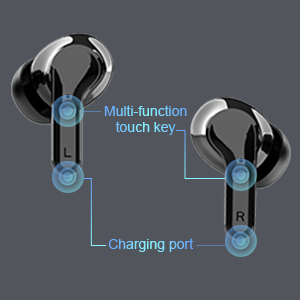
Image: Diagram highlighting the location of the multi-function touch key and charging port on the earbuds.
4. Configuració
4.1 Càrrega inicial
Before first use, fully charge the earbuds and the charging case. The charging case features an LED display that shows the battery percentage tant per a la funda com per als auriculars individuals.
- Col·loqueu els auriculars a la caixa de càrrega.
- Connecteu el cable de càrrega USB tipus C al port de càrrega de la carcassa i a una font d'alimentació.
- The LED display will show the charging status. A full charge typically takes approximately 1.5 hours.

Image: The charging case's LED display indicating battery levels for the case and each earbud.
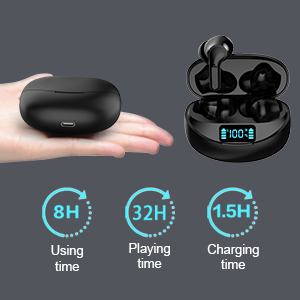
Image: Visual representation of battery life: 8 hours of use per charge, up to 32 hours total with the charging case, and 1.5 hours charging time.
4.2 Vinculació Bluetooth
The earbuds utilize Bluetooth 5.1 for a stable and fast connection. They support one-step pairing.
- Obre l'estoig de càrrega. Els auriculars s'encendran automàticament i entraran en mode d'emparellament.
- Al dispositiu (telèfon intel·ligent, tauleta, etc.), aneu a la configuració de Bluetooth.
- Assegureu-vos que el Bluetooth estigui habilitat.
- Look for "i17" in the list of available devices and select it to connect.
- Un cop connectats, sentireu un missatge d'àudio i els auriculars estaran llestos per utilitzar.

Image: Visual of the earbuds automatically connecting to a smartphone's Bluetooth settings.
5. Instruccions de funcionament
5.1 Control de música
- Reproduir/pausa: Single tap the multi-function touch key on either earbud.
- Pista següent: Toca dues vegades l'auricular dret.
- Pista anterior: Toca dues vegades l'auricular esquerre.
5.2 Control de trucades
- Respondre/Finalitzar la trucada: Short press the multi-function touch key on either earbud.
- Rebutja la trucada: Long press the multi-function touch key on either earbud.
- Control de volum: Adjust volume directly from your connected mobile phone.
5.3 Assistent de veu
- Activa l'assistent de veu (per exemple, Siri): Triple tap the multi-function touch key on either earbud.

Image: A user demonstrating the touch control functions on the earbud, with corresponding icons for various actions.
6. Manteniment
6.1 Resistència a l'aigua
The Doubc i17 earbuds are IPX7 waterproof, making them resistant to sweat and splashes. This feature is beneficial for sports and outdoor activities. However, they are not designed for submersion in water for extended periods.

Image: Earbuds shown with water splashing, illustrating their IPX7 waterproof and sweatproof design.
6.2 Atenció general
- Keep the earbuds and charging case in a dry place when not in use.
- If not used for long periods, it is recommended to recharge them at least every 2 months to maintain battery health.
- Clean the earbuds and charging contacts regularly with a soft, dry cloth to prevent dust and debris buildup.
7. Solució De Problemes
- Auriculars que no es connecten: Ensure both earbuds are charged and taken out of the case. Check your device's Bluetooth settings to confirm they are visible and selected.
- Un auricular no funciona: Place both earbuds back into the charging case, close the lid, then open it again to reset the connection. Ensure both earbuds have sufficient charge.
- Volum baix o qualitat de so deficient: Check the volume level on both your device and the earbuds. Ensure the ear tips are properly seated in your ears for a good seal.
- Earbuds automatically power off: If not connected to any device, the earbuds will automatically power off after 5 minutes to save battery.
8. Especificacions
| Característica | Especificació |
|---|---|
| Nom del model | i17 |
| Tecnologia de connectivitat | Sense fil (Bluetooth 5.1) |
| Forma de l'auricular | Bud |
| Col·locació de l'orella | A l'orella |
| Tipus de control | Control tàctil |
| Control de soroll | Cancel·lació activa del soroll |
| Nivell de resistència a l'aigua | IPX7 impermeable |
| Temps de joc (auriculars) | Fins a 8 hores |
| Temps de reproducció total (amb estoig de càrrega) | Fins a 32 hores |
| Temps de càrrega | Aprox. 1.5 hores |
| Pes de l'article | 1.52 unces (43 grams) |
| Dimensions del producte | 1.38 x 0.79 x 0.71 polzades |
| Fabricant | Dubc |
9. Garantia i Suport
For warranty information and customer support, please refer to the documentation included in your product packaging or contact Doubc customer service through their official channels. Keep your purchase receipt for warranty claims.