
Roxicosly CR1018
Roxicosly Digital Alarm Clock User Manual
Model: CR1018
1. Introducció
Thank you for choosing the Roxicosly Digital Alarm Clock. This device is designed to provide accurate timekeeping, reliable alarm functions, and convenient charging capabilities for your mobile devices. Featuring a large LED display and user-friendly controls, this manual will guide you through the setup, operation, and maintenance of your new alarm clock.
2. Característiques del producte
- 8.7" LED Display with 7-Level Dimmer: Large digits for clear visibility from a distance, with adjustable brightness to suit day and night viewing.
- Rellotge despertador dual: Configura dues alarmes separades per a diferents horaris.
- 2 ports de càrrega USB: Conveniently charge two mobile devices simultaneously.
- 7-Level Adjustable Volume: Customize alarm volume from 92-110dB.
- Large Snooze Button: Provides an extra 9 minutes of sleep.
- Alimentació de CA amb bateria de seguretat: Requires AC power for operation, with a CR2032 coin cell battery (included) to retain time and alarm settings during power outages.
- 12/24H & DST Support: Switch between 12-hour and 24-hour time formats, and enable/disable Daylight Saving Time.
3. Contingut del paquet
- Roxicosly Digital Alarm Clock (Model: CR1018)
- CR2032 Coin Cell Battery (pre-installed)
- Cable de càrrega
- Adaptador d'alimentació
- Manual d'usuari
4. Guia de configuració
4.1 Connexió d'alimentació
Connect the provided charging cable to the DC IN 5V port on the back of the alarm clock. Plug the power adapter into a standard AC outlet (100-240V). The display will light up, indicating the clock is powered on.
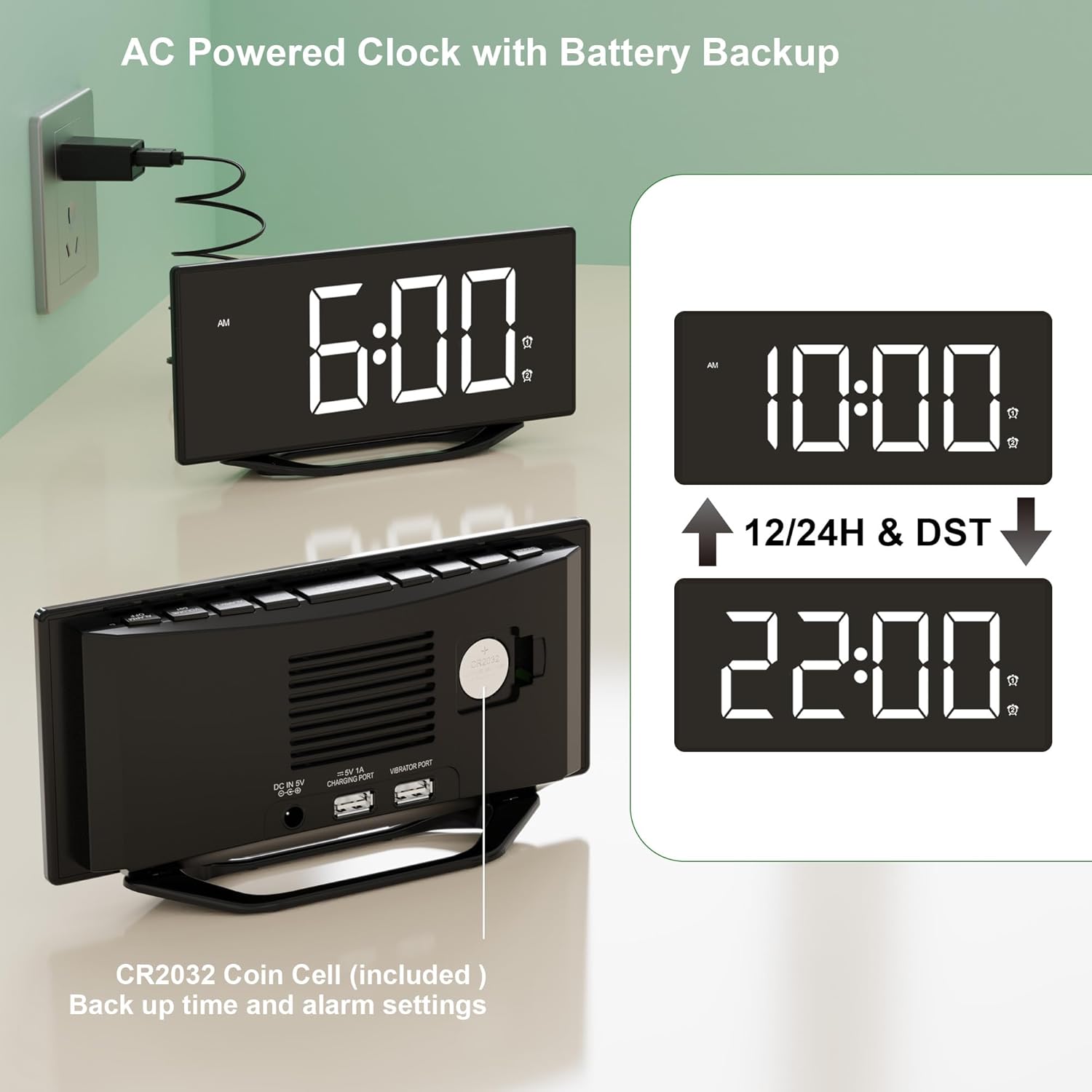
Image: The alarm clock connected to a wall outlet via its power adapter, illustrating the AC power connection.
4.2 Bateria de reserva
A CR2032 coin cell battery is pre-installed to provide backup power. This battery ensures that time and alarm settings are retained during a power outage. The clock will not display time or function without AC power, but settings will be saved.

Imatge: Part posterior view of the clock highlighting the CR2032 battery compartment, indicating its role in backing up settings.
5. Instruccions de funcionament
5.1 Configuració de l'hora
- Premeu el botó HORA CONFIGURADA premeu el botó una vegada. Els dígits de les hores començaran a parpellejar.
- Utilitza el HORA per ajustar l’hora.
- Premeu el botó MINUT per ajustar el minut.
- Premeu HORA CONFIGURADA de nou per confirmar i sortir del mode de configuració de l'hora.
5.2 Configuració d'alarmes (alarma 1 i alarma 2)
This clock features two independent alarms.
- Premeu el botó ALARMA 1 or ALARMA 2 button once. The corresponding alarm time will flash.
- Utilitza el HORA per configurar l'hora d'alarma desitjada.
- Utilitza el MINUT per configurar el minut d'alarma desitjat.
- Premeu ALARMA 1 or ALARMA 2 again to confirm the alarm time. The alarm icon (1 or 2) will appear on the display, indicating the alarm is active.
- To turn off an alarm, press the corresponding ALARMA 1 or ALARMA 2 botó fins que la icona de l'alarma desaparegui de la pantalla.

Image: Illustration of the dual alarm functionality, allowing for two distinct alarm settings.
5.3 Ajust de la brillantor de la pantalla
The display has 7 levels of brightness. Press the DIMMER button repeatedly to cycle through the brightness levels from brightest to dimmest. Select the level that is most comfortable for your environment.

Image: Visual representation of the 7-level display brightness settings.
5.4 Ajust del volum de l'alarma
The alarm volume can be adjusted to 7 levels. When an alarm is sounding, or while setting an alarm, press the VOLUM button to cycle through the volume levels. Choose a volume suitable for your needs.

Image: Detail of the volume control button on the clock's interface.
5.5 Funció de repetició
Quan soni una alarma, premeu la tecla gran DORMITAR button located on top of the clock. The alarm will pause for 9 minutes and then sound again. You can repeat this process until you press the corresponding ALARMA DESACTIVADA button to fully deactivate the alarm.

Image: A user activating the snooze function by pressing the large button on top of the clock.
5.6 ports de càrrega USB
The clock is equipped with two USB output ports (5V/1A) on the back, allowing you to charge your smartphones, tablets, or other USB-powered devices. Simply connect your device's USB charging cable to one of the ports.

Image: The alarm clock actively charging two mobile devices via its integrated USB ports.
5.7 12/24H Format & DST
To switch between 12-hour and 24-hour time formats, press the 12/24H button. When in 12-hour format, 'AM' or 'PM' indicators will be displayed. To enable or disable Daylight Saving Time (DST), press the DST button. When DST is active, the time will adjust by one hour, and the 'DST' indicator will appear on the display.

Image: Comparison of the clock display in 12-hour and 24-hour formats.
6. Manteniment
To ensure the longevity and optimal performance of your alarm clock, follow these maintenance guidelines:
- Neteja: Netegeu el rellotge amb un drap suau i sec. No utilitzeu netejadors abrasius, ceres ni dissolvents, ja que poden danyar l'acabat.
- Col·locació: Col·loqueu el rellotge sobre una superfície estable i plana, allunyada de la llum solar directa, la calor excessiva o la humitat.
- Substitució de la bateria: If the CR2032 backup battery needs replacement, carefully open the battery compartment on the back of the unit and insert a new CR2032 battery, observing polarity.
7. Solució De Problemes
| Problema | Causa possible | Solució |
|---|---|---|
| Display is blank or not lighting up. | No AC power; Power adapter faulty; Dimmer set to lowest level. | Ensure power adapter is securely plugged into the clock and a working outlet. Check the power outlet. Press the DIMMER button to increase brightness. |
| L'alarma no sona. | Alarm not set or deactivated; Volume set too low. | Verify alarm icon (1 or 2) is visible on the display. Re-set the alarm if necessary. Increase alarm volume using the VOLUME button. |
| La càrrega USB no funciona. | Device not properly connected; Cable faulty; Device requires more power than 1A. | Ensure USB cable is firmly connected to both the clock and the device. Try a different USB cable. Note that the ports provide 5V/1A, which may not be sufficient for all devices (e.g., some tablets). |
| Restabliment de l'hora/configuració després d'un apagadatage. | La pila de reserva CR2032 està morta o no hi és. | Replace the CR2032 coin cell battery. Ensure it is inserted with correct polarity. |
8. Especificacions
- Marca: Roxicosly
- Número de model: CR1018
- Color: Black (non-mirror Surface)
- Dimensions del producte: 19.79 x 10.21 x 4.42 cm
- Pes de l'article: 300 g
- Material: Plàstic
- Tipus de visualització: LED
- Font d'alimentació: AC (100-240V)
- Còpia de seguretat de la bateria: 1 x CR2032 Coin Cell (included)
- Sortida USB: 2 x 5V/1A ports
- Característiques especials: 7-level Dimmer, Dual Alarm, Dual USB Charging Ports, Snooze, 12/24H & DST
9. Garantia i Suport
For warranty information or technical support, please refer to the purchase documentation or contact the seller/manufacturer directly. Keep your proof of purchase for any warranty claims.