
Amazon Echo Show 5 (3a generació)
Manual d'usuari de l'Amazon Echo Show 5 (3a generació)
Model: Echo Show 5 (3a generació)
Introducció
The Amazon Echo Show 5 (3rd Gen) is a smart display designed to enhance your daily life with visual and audio interactions. It features a 5.5-inch touch screen, improved audio with deeper bass and clearer vocals, and a 2 MP camera with a built-in shutter for privacy. This manual provides essential information for setting up, operating, maintaining, and troubleshooting your device.
With Alexa built-in, you can use voice commands to check the weather, make video calls, view compatible cameras, stream music and shows, manage your smart home devices, and much more.
Guia de configuració
Follow these steps to set up your Echo Show 5 (3rd Gen) for the first time.
- Desempaquetar el dispositiu: Carefully remove the Echo Show 5 and its power adapter from the packaging.
- Connectar l'alimentació: Plug the included 22W power adapter into the power port on the back of your Echo Show 5, then plug the adapter into a wall outlet. The device will power on automatically.
- Seguiu les instruccions a la pantalla: The Echo Show 5 display will guide you through the initial setup process. This includes:
- Selecció del vostre idioma.
- Connecting to a Wi-Fi network (supports dual-band 802.11a/b/g/n/ac).
- Logging in with your Amazon account.
- Confirming your time zone and address.
- Exploreu les característiques: Once setup is complete, the device will display a tutorial on its features. You can say "Alexa, what can you do?" to learn more.

Image: The Echo Show 5 (3rd Gen) displaying a music interface. This illustrates the device's compact size and screen capabilities.
Funcionament del vostre Echo Show 5
The Echo Show 5 can be operated using voice commands with Alexa or by interacting directly with its touch screen.
Comandaments de veu
To activate Alexa, simply say the wake word "Alexa" followed by your command. Examples inclouen:
- "Alexa, what's the weather today?"
- "Alexa, reprodueix música."
- "Alexa, show me my calendar."
- "Alexa, call Mom."
- "Alexa, encén els llums de la sala d'estar."

Image: A white Echo Show 5 (3rd Gen) on a desk, demonstrating its use for audiobooks and general voice control.
Navegació per pantalla tàctil
Swipe down from the top of the screen to access quick settings and notifications. Swipe left from the right edge to view home screen cards and shortcuts. Tap on icons and content to interact.
Privacy Controls
The Echo Show 5 is designed with multiple privacy layers:
- Botó de desactivació del micròfon/càmera: Press this button on the top of the device to electronically disconnect the microphones and camera. A red light indicator will appear.
- Obturador de la càmera integrat: Slide the physical shutter to cover the camera lens for complete visual privacy.
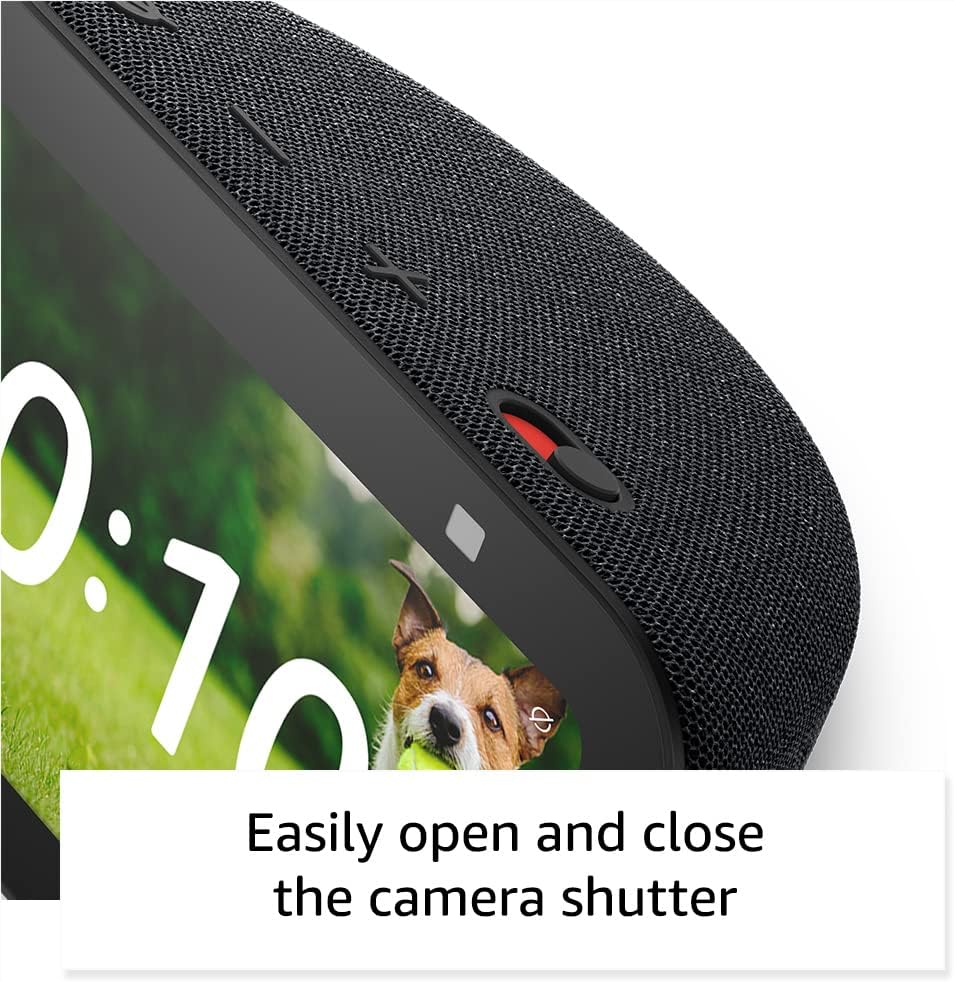
Imatge: Un primer pla view of the Echo Show 5's camera shutter, highlighting the ease of controlling camera privacy.
Manteniment i cura
Proper care ensures the longevity and optimal performance of your Echo Show 5.
- Neteja: Use a soft, lint-free cloth to clean the screen and exterior. Do not use abrasive cleaners or sprays directly on the device.
- Col·locació: Place the device on a stable, flat surface away from direct sunlight, heat sources, and liquids. Ensure adequate ventilation around the device.
- Actualitzacions de programari: Your Echo Show 5 automatically receives software security updates. Ensure it is connected to Wi-Fi for these updates to download and install.
Resolució de problemes
If you encounter issues with your Echo Show 5, try the following solutions:
| Problema | Solució |
|---|---|
| Device not responding to voice commands. |
|
| No hi ha connexió Wi-Fi. |
|
| La pantalla està negra o no respon. |
|
| La càmera no funciona. |
|
Especificacions tècniques
- Mida: 5.8 "W x 3.6" D x 3.2 "H (147 mm x 91 mm x 82 mm)
- Pes: 16.1 oz (456 grams)
- Visualització: Pantalla tàctil de 5.5”.
- Càmera: Càmera de 2 MP amb obturador integrat
- Connectivitat WiFi: Dual-band wifi (802.11a/b/g/n/ac)
- Connectivitat Bluetooth: A2DP support for audio streaming, AVRCP for voice control
- Àudio: Altaveu integrat de gamma completa d'1.75 polzades
- Processador: MediaTek MT 8169 B
- Inclòs a la caixa: Echo Show 5 (3rd Gen), power adapter, Quick Start Guide
- Idioma: L'Alexa parla anglès i castellà
Garantia i Suport
Your Echo Show 5 (3rd Gen) comes with a 1-year limited warranty and service. Optional extended warranties (1-year, 2-year, and 3-year) are available for U.S. customers and sold separately.
For customer support, visit the official Amazon support website or contact Amazon Customer Service directly. For information specific to your device, visit Gestioneu el vostre contingut i dispositius.
Software security updates are guaranteed for at least four years after the device is last available for purchase as a new unit on Amazon webllocs.
Ask a question about this manual
Ask about setup, troubleshooting, compatibility, parts, safety, or missing instructions. Manuals+ will review the question and use this page’s manual context to help answer it.