
1. Introducció
This manual provides essential instructions for the installation, operation, and maintenance of your Hikvision 8MP AcuSense WDR Mini Bullet Network Camera, model DS-2CD2083G2-IU. Please read this manual thoroughly before using the product and retain it for future reference.
Producte acabatview
The Hikvision DS-2CD2083G2-IU is a high-performance 8-megapixel (4K) network camera designed for advanced surveillance. It features AcuSense technology for accurate human and vehicle target classification, Wide Dynamic Range (WDR) for clear imaging against strong backlight, and a fixed 2.8mm lens for a wide field of view. Its IP67 rating ensures robust outdoor performance, and the integrated microphone allows for audio monitoring.
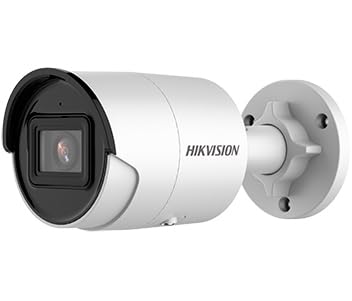
Figure 1: Hikvision 8MP AcuSense WDR Mini Bullet Network Camera (DS-2CD2083G2-IU)
This image displays the Hikvision 8MP AcuSense WDR Mini Bullet Network Camera, highlighting its compact bullet-style design suitable for various installation environments.
Característiques clau
- 8 Megapixel (4K) Resolution: Delivers high-quality, detailed video.
- Tecnologia AcuSense: Reduces false alarms by accurately classifying human and vehicle targets.
- Ampli rang dinàmic (WDR): Ensures clear images even in scenes with strong contrast.
- Fixed 2.8mm Lens: Provides a broad viewangle de ing.
- Il·luminació infraroja (IR): Night vision up to 40 meters.
- Classificació de resistència a la intempèrie IP67: Apte per a ús a l'aire lliure en diverses condicions meteorològiques.
- Micròfon integrat: Enables audio monitoring.
- Integrated Card Reader: Supports local storage (microSD card not included).
2. Informació de seguretat
Si us plau, observeu les següents precaucions de seguretat per evitar lesions o danys al producte:
- Ensure the power supply meets the camera's requirements (6.5 Watts).
- No exposeu la càmera a temperatures extremes, humitat ni ambients corrosius.
- Avoid pointing the lens directly at strong light sources, as this may damage the sensor.
- La instal·lació ha de ser realitzada per personal qualificat d'acord amb les normes elèctriques locals.
- Utilitzeu només accessoris especificats pel fabricant.
- Netegeu la lent de la càmera amb un drap suau i sec. Eviteu productes químics agressius.
3. Configuració i instal·lació
3.1 Desembalatge
Carefully unpack the camera and check for any signs of damage. Ensure all components are present. (Typical components include: camera unit, mounting template, screws, waterproof connector, quick start guide).
3.2 Instal·lació física
The camera is designed for ceiling mounting. Select a suitable location that provides the desired field of view and is within reach of network and power cables. Due to its IP67 rating, it is suitable for outdoor environments.
- Use the provided mounting template to mark drill holes on the ceiling.
- Drill the necessary holes and insert wall plugs if required.
- Fixeu la base de la càmera a la superfície de muntatge amb els cargols subministrats.
- Ajusteu l'angle de la càmera per a una cobertura òptima.
3.3 Connexió de xarxa i alimentació
This is an IP network camera. It requires a network connection and power. Power over Ethernet (PoE) is typically supported, simplifying installation by delivering both power and data over a single Ethernet cable. If PoE is not used, a separate 12V DC power adapter (not included) will be required.
- Connect an Ethernet cable from your network switch/router to the camera's RJ45 port. Use the waterproof connector for outdoor installations.
- Si no feu servir PoE, connecteu un adaptador de corrent continu de 12 V a l'entrada d'alimentació de la càmera.
- Un cop connectada, la càmera s'encén. Espereu uns minuts perquè s'iniciï.
3.4 Configuració inicial
Accedir a la càmera web interfície mitjançant a web browser using its default IP address (refer to the quick start guide or use Hikvision's SADP tool to discover the IP address). You will be prompted to set a strong password for security. Follow the on-screen instructions to configure network settings, date/time, and other basic parameters.
4. Instruccions de funcionament
4.1 Viu View i Enregistrament
After initial setup, you can view the live feed from the camera through its web interface, a Network Video Recorder (NVR), or Hikvision's client software (e.g., iVMS-4200) or mobile app (Hik-Connect). Configure recording schedules and methods (continuous, motion-triggered) via the camera's settings or NVR.
4.2 AcuSense Smart Features
The AcuSense technology allows the camera to distinguish between humans, vehicles, and other moving objects, significantly reducing false alarms caused by animals, rain, or falling leaves. Configure these detection rules in the camera's event settings to receive more accurate alerts.
- Detecció de moviment 2.0: Set up detection zones and sensitivity for human and vehicle events.
- Detecció d'intrusions: Define virtual boundaries, and the camera will trigger an alarm if a human or vehicle crosses them.
- Detecció de creuament de línies: Similar to intrusion, but for a specific line.
4.3 Wide Dynamic Range (WDR)
WDR compensates for extreme lighting conditions, such as strong backlight, to ensure that both bright and dark areas of the image are clearly visible. This feature is typically enabled by default but can be adjusted in the image settings.
4.4 Infrared (IR) Night Vision
The camera automatically switches to IR mode in low-light conditions, providing clear black-and-white video up to 40 meters. Ensure no obstructions block the IR LEDs for optimal night vision performance.
4.5 Monitorització d'àudio
With its built-in microphone, the camera can capture audio from the surveillance area. Audio settings, including gain control, can be configured in the camera's web interface. Ensure local regulations regarding audio recording are followed.
5. Manteniment
- Neteja: Netegeu regularment la lent i la carcassa de la càmera amb un drap suau iamp tela. No utilitzeu netejadors abrasius.
- Actualitzacions de firmware: Consulteu periòdicament el lloc web oficial de Hikvision. website for firmware updates. Keeping the firmware updated ensures optimal performance, new features, and security enhancements.
- Inspecció del cable: For outdoor installations, periodically inspect cables and connections for wear or damage, especially the waterproof connectors.
- Gestió de contrasenyes: Regularly change your camera's password to maintain security.
6. Solució De Problemes
| Problema | Causa possible | Solució |
|---|---|---|
| Sense imatge/càmera fora de línia | No power, network cable disconnected, incorrect IP address. | Check power supply and network cable. Verify IP address using SADP tool. Restart camera. |
| Mala qualitat d'imatge | Dirty lens, incorrect focus (if adjustable), poor lighting, network bandwidth issues. | Clean the lens. Ensure adequate lighting. Check network connection speed. Adjust image settings (WDR, exposure). |
| False alarms from motion detection | Sensitivity too high, environmental factors (trees, animals), AcuSense not configured. | Adjust motion detection sensitivity. Configure AcuSense human/vehicle detection. Adjust detection zones. |
| No es pot accedir web interfície | Incorrect IP address, network connectivity issue, browser compatibility. | Verify IP address. Ensure camera and PC are on the same network segment. Try a different browser. |
If the problem persists after attempting these solutions, please contact Hikvision technical support.
7. Especificacions
| Característica | Detall |
|---|---|
| Número de model | DS-2CD2083G2-IU |
| Sensor d'imatge | CMOS |
| Màx. Resolució | 8 MP (4K) |
| Lent | Objectiu fix 2.8mm |
| Rang IR | Fins a 40 metres |
| WDR | Admet |
| AcuSense | Human and Vehicle Target Classification |
| Àudio | Micròfon incorporat |
| Emmagatzematge local | Integrated Card Reader (MicroSD slot) |
| Classificació resistent a la intempèrie | IP67 |
| Consum d'energia | 6.5 watts |
| Dimensions (L x A x A) | 15 x 15 x 8 cm (aproximadament) |
| Tipus de muntatge | Muntatge al sostre |
| Tipus d'alerta | Motion Only (configurable for human/vehicle) |
8. Garantia i Suport
Els productes Hikvision solen incloure una garantia limitada del fabricant. Consulteu la targeta de garantia inclosa amb el producte o visiteu el lloc web oficial de Hikvision. weblloc web per obtenir informació detallada sobre els termes i condicions de garantia específics de la vostra regió.
For technical support, firmware downloads, or further assistance, please visit the official Hikvision support portal or contact their customer service department. Ensure you have your product model number (DS-2CD2083G2-IU) and serial number ready when contacting support.
Hikvision oficial Weblloc: www.hikvision.com