
Introducció
The Macally BTBLZKEYSG is a full-size backlit Bluetooth keyboard designed specifically for Mac and iOS devices. It features a MacOS-specific layout with 107 scissor-switch keys and 14 convenient shortcuts, enhancing workflow and productivity. This keyboard allows seamless pairing and switching between up to three Bluetooth-enabled devices, including MacBooks, iMacs, iPhones, and iPads. The integrated white LED backlighting offers three adjustable brightness levels for comfortable typing in various lighting conditions. Powered by a built-in 1500mAh rechargeable battery, it provides extended usage time between charges.
Contingut del paquet
- Macally BTBLZKEYSG Backlit Bluetooth Keyboard
- Cable de càrrega USB-C
- Manual d'instruccions
Característiques del producte
- Tecles retroil·luminades: Crisp white LEDs with 3 brightness levels for typing in low-light environments. Backlight can be turned off.
- MacOS Specific Layout: 107 scissor-switch keys with 14 macOS shortcuts for familiar and efficient use.
- Multi-Device Bluetooth: Easily pair and switch between up to 3 Bluetooth-enabled devices (Mac, iPhone, iPad) within a 30 ft wireless range.
- Bateria recarregable: Built-in 1500mAh battery provides 1 to 4 weeks of runtime with backlighting on. USB-C charging cable included.
- Disseny prim i còmode: Only 0.87 inches thin with an integrated kickstand for ergonomic typing.
Configuració
1. Càrrega del teclat
Before initial use, fully charge the keyboard. Connect the supplied USB-C charging cable to the keyboard's USB-C port and the other end to a USB power source (e.g., computer USB port, USB wall adapter). The LED indicator will show charging status.
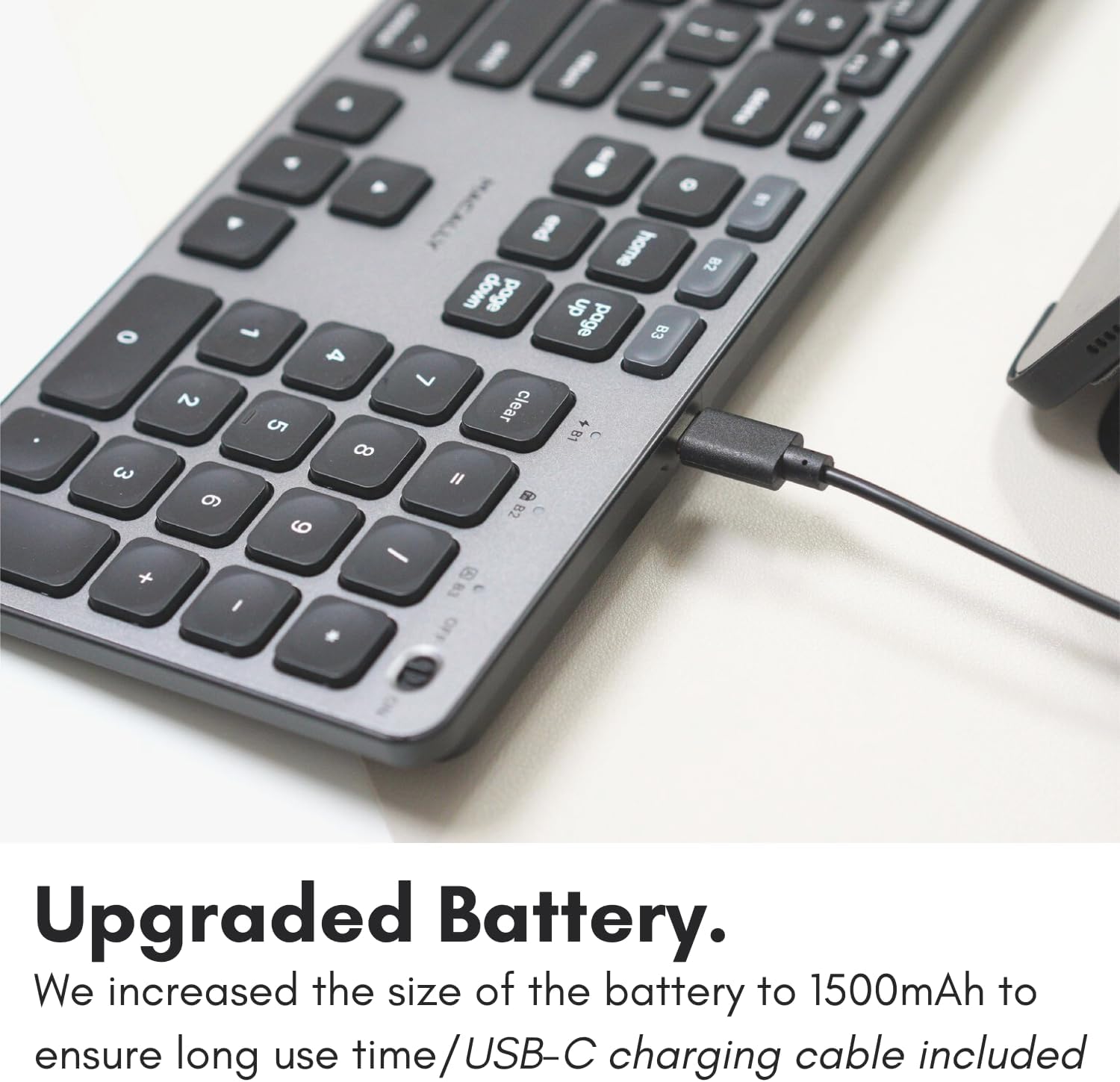
Image: The USB-C charging port on the side of the Macally BTBLZKEYSG keyboard, with the charging cable inserted.
2. Encès
Locate the power switch on the keyboard, usually on the top right edge. Slide the switch to the 'ON' position.
3. Vinculació amb un dispositiu
- Assegureu-vos que el teclat estigui encès.
- Press and hold one of the Bluetooth pairing keys (B1, B2, or B3) for 3-5 seconds until the corresponding LED indicator above the key starts blinking rapidly. This indicates the keyboard is in pairing mode.
- On your Mac or iOS device, go to Configuració del sistema (o Preferències del sistema) > Bluetooth.
- Look for "Macally BTBLZKEYSG" (or similar name) in the list of available devices and click/tap to connect.
- Si se us demana, introduïu el codi d'emparellament que es mostra a la pantalla amb el teclat i premeu Entra.
- Once connected, the LED indicator for the selected Bluetooth channel will stop blinking and remain solid for a few seconds before turning off.

Image: The Macally BTBLZKEYSG keyboard shown with a MacBook and an iPad, illustrating its multi-device capability.
Instruccions de funcionament
MacOS Specific Keys and Shortcuts
The keyboard features a standard MacOS layout, including function keys (F1-F12) that double as media and system control shortcuts. Use the Fn key in combination with these keys to access their secondary functions.
- Fn+F1: Disminueix la brillantor de la pantalla
- Fn+F2: Augmenta la brillantor de la pantalla
- Fn+F3: Control de missió
- Fn+F4: Launchpad
- Fn+F7: Pista anterior
- Fn+F8: Reproduir/Pausa
- Fn+F9: Pista següent
- Fn+F10: Silencia el volum
- Fn+F11: Disminuir el volum
- Fn+F12: Augmenta el volum
Control de la llum de fons
The keyboard's backlight can be adjusted to three brightness levels or turned off completely. Use the dedicated backlight control keys, typically located near the function keys or arrow keys, to cycle through the brightness settings.

Image: The Macally BTBLZKEYSG keyboard with its white LED backlighting illuminated at different intensity levels.
Canvi entre dispositius aparellats
To switch between your paired Bluetooth devices, simply press the corresponding Bluetooth pairing key (B1, B2, or B3) that your device is connected to. The keyboard will automatically connect to the selected device.
Manteniment
Per garantir la longevitat i el rendiment òptim del teclat, seguiu aquestes pautes de manteniment:
- Neteja: Utilitzeu un drap suau i sense pelusa lleugerament dampened with water or a mild cleaning solution to wipe the keyboard surface. Avoid harsh chemicals or abrasive materials.
- Eliminació de pols: Feu servir aire comprimit per eliminar la pols i les restes que hi ha entre les tecles.
- Emmagatzematge: When not in use for extended periods, store the keyboard in a dry, cool place.
- Eviteu líquids: Do not expose the keyboard to excessive moisture or spill liquids on it.
Resolució de problemes
| Problema | Solució |
|---|---|
| El teclat no s'encén. | Ensure the power switch is in the 'ON' position. Charge the keyboard using the supplied USB-C cable. |
| Keyboard does not pair with device. | Ensure the keyboard is in pairing mode (LED blinking). Check your device's Bluetooth settings to ensure Bluetooth is enabled and the keyboard is visible. Try restarting both the keyboard and your device. |
| El teclat es desconnecta sovint. | Ensure the keyboard is within the 30 ft wireless range of your device. Check for interference from other wireless devices. Ensure the keyboard battery is sufficiently charged. |
| La retroiluminació no funciona. | Press the backlight control keys to cycle through brightness levels. Ensure the keyboard battery is charged, as low battery may disable backlighting. |
| Les claus no responen. | Check the Bluetooth connection. If connected, try restarting the keyboard. Ensure no debris is lodged under the keys. |
Especificacions
| Característica | Detall |
|---|---|
| Número de model | BTBLZKEYSG |
| Connectivitat | Bluetooth, Sense fil |
| Dispositius compatibles | Mac Mini / Pro Studio, iMac, Macbook Air, MacBook Pro, iPhone, iPad |
| Descripció del teclat | Backlit Keyboard for Mac |
| Característiques especials | Backlit, Multi-Device Bluetooth, Rechargeable |
| Color | Gris |
| Il·luminació del teclat | Single Color (White), 3 Brightness Levels |
| Dimensions del producte | 16.8 cm de llargada x 4.6 cm d'amplada x 0.87 cm d'alçada |
| Nombre de claus | 107 |
| Font d'alimentació | Alimentat per bateria (recarregable de 1500 mAh) |
| Tipus de canvi | Tactile Scissor Keys |
| Disposició del teclat | QWERTY (MacOS) |
| Material | Alumini |
| UPC | 701107500362 |
Vídeo oficial del producte
Vídeo: Un overview of the Macally Backlit Bluetooth Keyboard for Mac & iOS, highlighting its features and compatibility.
Garantia i Suport
The Macally BTBLZKEYSG Backlit Bluetooth Keyboard comes with a warranty of up to two years. For technical support, warranty claims, or further assistance, please visit the official Macally weblloc o poseu-vos en contacte amb el seu departament d'atenció al client.