
SPRT SP-POS 887 E
SPRT SP-POS 887 E POS Receipt Printer User Manual
Model: SP-POS 887 E | Brand: SPRT
1. Introducció
Thank you for choosing the SPRT SP-POS 887 E POS Receipt Printer. This manual provides essential information for setting up, operating, and maintaining your printer to ensure optimal performance and longevity. Please read this manual thoroughly before using the device.
2. Característiques clau
- High-Speed Thermal Printing: Prints at up to 220 mm per second.
- Alta resolució: 8 dots per inch for clear and legible receipts.
- Múltiples opcions de connectivitat: Equipped with USB and Ethernet ports, and supports RS-232.
- Càrrega fàcil de paper: Designed for quick and effortless paper roll replacement.
- Paper End Sensor: Alerts the user when the paper roll is running low.
- Disseny compacte: Slim and integrated design allows flexible placement.
- Àmplia compatibilitat: Supports Windows and Linux operating systems.
3. Configuració
3.1 Desembalatge
Carefully remove the printer and all accessories from the packaging. Verify that all components are present:
- SPRT SP-POS 887 E Printer
- Adaptador d'alimentació
- Cable USB
- Paper Roll (starter)
- Manual d'usuari (aquest document)
3.2 Connexió de la impressora
- Connect the power adapter to the printer's power input port and then plug it into a power outlet.
- For USB connection: Connect one end of the USB cable to the printer's USB port and the other end to your computer.
- For Ethernet connection: Connect an Ethernet cable to the printer's LAN port and the other end to your network router or switch.
3.3 Càrrega de paper
The SPRT SP-POS 887 E uses standard thermal paper rolls. Follow these steps to load a new roll:
- Press the 'PRESS' button on the top cover to open the paper compartment.
- Insert the new thermal paper roll with the paper feeding from the bottom, ensuring the leading edge is straight.
- Estireu una petita quantitat de paper per treure-la del tallador.
- Tanqueu la coberta superior fermament fins que encaixi al seu lloc.
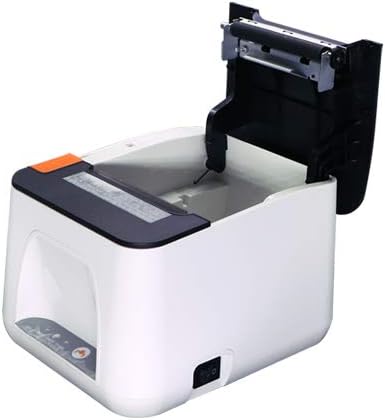
Figure 1: Paper compartment open for loading.
4. Instruccions de funcionament
4.1 Engegada/apagada
To power on the printer, ensure it is connected to a power source and press the power switch, usually located on the side or back of the device. To power off, press the power switch again.
4.2 Instal·lació del controlador
Before printing, you must install the appropriate drivers on your computer. Drivers for Windows and Linux operating systems are typically provided on a CD included with the printer or can be downloaded from the SPRT official weblloc. Seguiu les instruccions que apareixen a la pantalla durant la instal·lació.
4.3 Printing a Receipt
Once the printer is connected and drivers are installed, you can print receipts from your POS software or any application that supports printing. Select the SPRT SP-POS 887 E as your default printer and initiate the print command.
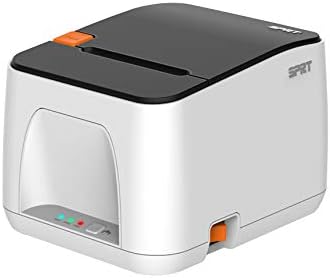
Figura 2: Frontal view of the SPRT SP-POS 887 E printer.

Figura 3: lateral view of the SPRT SP-POS 887 E printer, showing paper output.
5. Manteniment
5.1 Neteja de la impressora
Una neteja regular ajuda a mantenir la qualitat d'impressió i allarga la vida útil de la impressora.
- Capçal d'impressió: Feu servir un bastonet de cotó lleugeramentampHumitejat amb alcohol isopropílic per netejar suaument el capçal d'impressió tèrmica. Deixeu-lo assecar completament abans d'utilitzar-lo.
- Exterior: Netegeu l'exterior amb un suau, damp tela. No utilitzeu netejadors abrasius ni dissolvents.
- Ruta del paper: Traieu la pols o les restes de paper del camí del paper amb un raspall suau o aire comprimit.
5.2 Substitució del rotlle de paper
When the paper sensor indicates low paper, or when the current roll is depleted, replace it following the steps in Section 3.3.
6. Solució De Problemes
| Problema | Causa possible | Solució |
|---|---|---|
| La impressora no imprimeix | No power; Incorrect cable connection; Driver issue; Paper jam; Out of paper. | Check power cable and switch; Verify USB/Ethernet connection; Reinstall drivers; Clear paper jam; Load new paper roll. |
| Poca qualitat d'impressió | Dirty print head; Low quality paper; Incorrect driver settings. | Clean print head (Section 5.1); Use recommended thermal paper; Adjust print density settings in driver. |
| Embús de paper | Improper paper loading; Foreign object in paper path. | Open cover, remove jammed paper, reload correctly; Inspect paper path for obstructions. |
| Impressora no reconeguda per l'ordinador | Loose USB/Ethernet cable; Driver not installed or corrupted. | Ensure cables are securely connected; Reinstall printer drivers. |
7. Especificacions
- Marca: SPRT
- Model: SP-POS 887 E
- Printer Technology: Impressora tèrmica de línia
- Tecnologia de connectivitat: USB, Ethernet, RS-232
- Sortida de la impressora: Impressora de rebuts
- Velocitat d'impressió: Fins a 220 mm/s
- Resolució: 8 dots/inch
- Amplada d'impressió: 72 mm
- Característiques especials: Network Ready, Paper End Sensor
- Tipus de controlador: Linux (compatible with Windows)
- Pes de l'article: 540 g
- Dimensions del paquet: 22.2 x 10.6 x 9.8 cm
- Primera data disponible: 27 de juliol de 2021
8. Garantia i Suport
For warranty information and technical support, please refer to the warranty card included with your product or visit the official SPRT website. You may also contact your local distributor or retailer for assistance.
Documents relacionats - SP-POS 887 E
 |
Manual d'usuari de la impressora tèrmica de rebuts SPRT SP-POS891 POS Comprehensive user manual for the SPRT SP-POS891 POS Thermal Receipt Printer, covering features, specifications, installation, interface options, operation, and troubleshooting. Includes details on print performance, paper handling, connectivity, buttons, indicators, and parameter settings. |
 |
SPRT SP-POS890 Thermal Receipt Printer User's Manual User's manual for the SPRT SP-POS890 Thermal Receipt Printer, covering features, performance, operation specifications, interface details, buttons, indicators, self-test, and parameter settings. |
 |
SPRT SP-POS892 POS Thermal Receipt Printer User's Manual User's manual for the SPRT SP-POS892 POS Thermal Receipt Printer, detailing its features, performance, operation, specifications, interfaces, error handling, self-test, parameter settings, and upgrade procedures. |
 |
Manual d'usuari de la impressora tèrmica SPRT SP-POS88V: característiques, especificacions i funcionament Manual d'usuari complet per a la impressora tèrmica SPRT SP-POS88V. Cobreix les característiques, el rendiment d'impressió, les especificacions del paper, les fonts, les interfícies (sèrie, paral·lela, Ethernet, USB, calaix de diners), la font d'alimentació, l'entorn d'operació, les dimensions, les classificacions de models, els botons, els indicadors, l'autoprova, la impressió hexadecimal, la configuració de paràmetres i els modes d'actualització del programa. |
 |
SPRT SP-R301 POS Thermal Receipt Printer User's Manual Comprehensive user manual for the SPRT SP-R301 POS Thermal Receipt Printer, covering features, specifications, operation, installation, troubleshooting, and parameter settings. |
 |
SPRT POS Thermal Receipt Printer SP-POS8811/POS8822 User Manual This manual provides detailed information on the features, performance, and operation of the SPRT POS Thermal Receipt Printer models SP-POS8811 and SP-POS8822. It covers installation, interface connections (Ethernet, USB, Bluetooth, Cash Drawer), indicator lights, buttons, troubleshooting, and parameter settings. |
Ask a question about this manual
Ask about setup, troubleshooting, compatibility, parts, safety, or missing instructions. Manuals+ will review the question and use this page’s manual context to help answer it.