
cimetech KF10
cimetech KF10 Wireless Keyboard and Mouse Combo User Manual
Model: KF10
Brand: cimetech
1. Introducció
Thank you for choosing the cimetech KF10 Wireless Keyboard and Mouse Combo. This product is designed to provide a comfortable, efficient, and quiet typing and navigation experience for your computer. With its ultra-slim design, stable 2.4G wireless connection, and silent keys, it is ideal for various environments, including home, office, and travel.
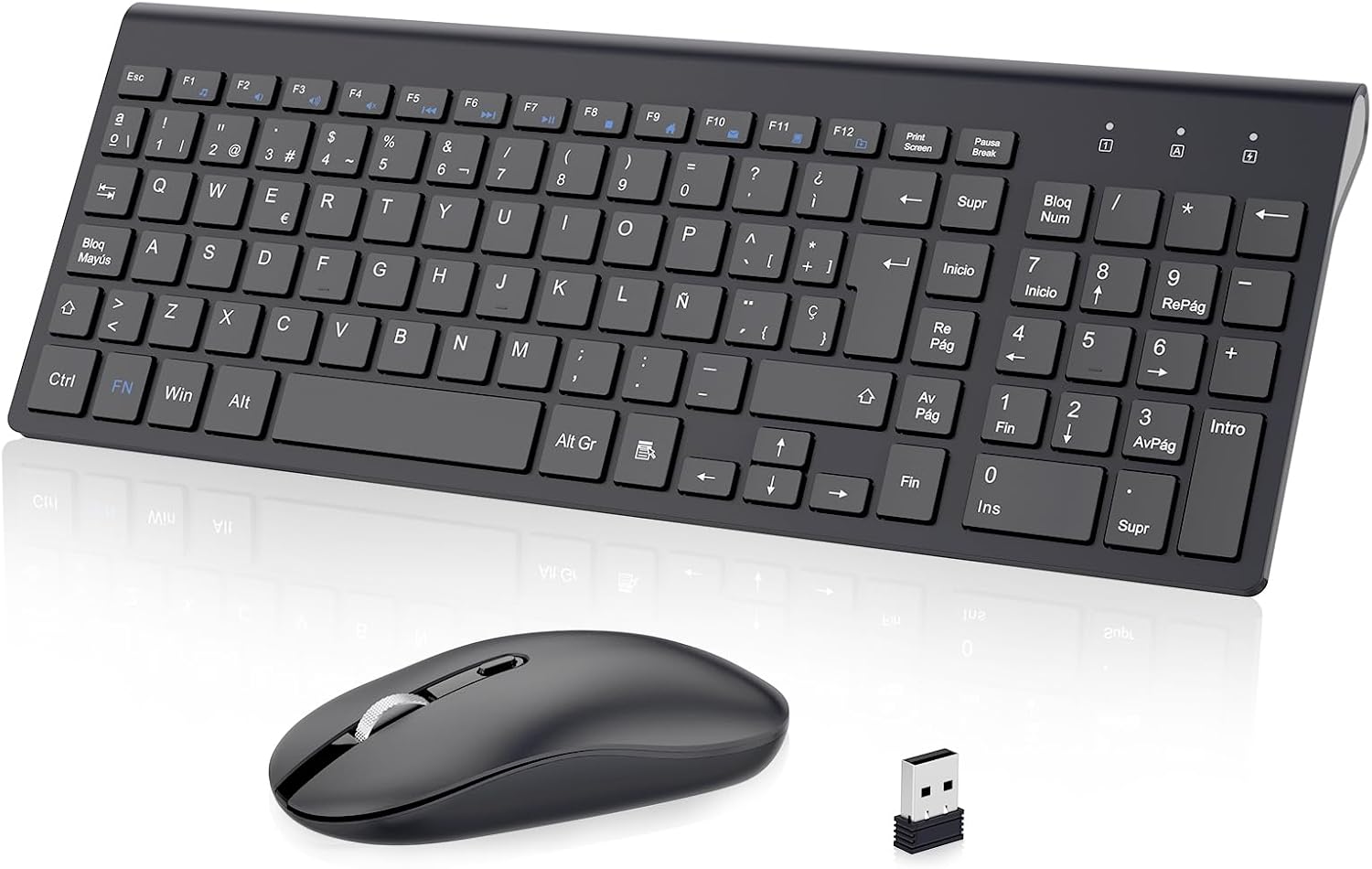
Figure 1: cimetech KF10 Wireless Keyboard and Mouse Combo.
2. Contingut del paquet
- 1 x cimetech Wireless Keyboard
- 1 x cimetech Wireless Mouse
- 1 x 2-in-1 USB Receiver (stored inside the mouse)
- 1 x Manual d'usuari
3. Guia de configuració
3.1. Instal·lació de bateries
The keyboard requires 2 AAA batteries and the mouse requires 1 AA battery (batteries are not included). Please ensure correct polarity when inserting the batteries.
3.2. Localització del receptor USB
The 2-in-1 USB receiver for both the keyboard and mouse is conveniently stored inside the mouse. To access it, open the battery compartment cover on the underside of the mouse.

Figure 2: The USB receiver is stored in the mouse's battery compartment.
3.3. Connecting to Your Device (Plug and Play)
- Remove the USB receiver from the mouse's battery compartment.
- Connecteu el receptor USB a un port USB disponible de l'ordinador o portàtil.
- Turn on the mouse using the On/Off switch located on its underside.
- El teclat i el ratolí es connectaran automàticament al dispositiu. No calen controladors addicionals.

Figure 3: Simply plug the USB receiver into your device for instant connection.
Video 1: Demonstrates the setup process for the cimetech Wireless Keyboard and Mouse Combo, highlighting its ergonomic, silent, and portable features, along with the plug-and-play setup and energy-saving mode.
4. Instruccions de funcionament
4.1. Ús del teclat
- Disseny a mida completa: The keyboard features a full-size layout with 102 keys (Spanish QWERTY layout), including a numeric keypad for efficient data entry.
- Tecles multimèdia: Utilize the 12 multimedia function keys (F1-F12, often combined with the 'Fn' key) for quick access to media controls, volume, and other common functions.
- Escriptura silenciosa: The advanced scissor-switch keys provide a comfortable, responsive, and significantly quieter typing experience compared to traditional keyboards.

Figure 4: The silent keys reduce typing noise by up to 90%.
4.2. Ús del ratolí
- Clics silenciosos: The mouse features silent buttons, ensuring a quiet working environment without disruptive clicking sounds.
- DPI ajustable: The mouse offers adjustable DPI levels (800/1200/1600 PPP) to customize cursor sensitivity for precise control. Press the DPI button on top of the mouse to cycle through the settings.
- Disseny ambidextre: The mouse is designed for comfortable use by both left and right-handed users.
Figure 5: The silent mouse features adjustable DPI settings for customized sensitivity.
5. Mode d'estalvi d'energia
Per estalviar bateria, tant el teclat com el ratolí tenen un mode de repòs automàtic:
- El ratolí entrarà en mode de repòs després de 8 minuts d'inactivitat.
- El teclat entrarà en mode de repòs després de 3 minuts d'inactivitat.
To wake the devices, simply press any key on the keyboard or move/click the mouse. The devices will reactivate within 3 seconds.

Figure 6: Automatic sleep mode helps save battery power.
6. Característiques acabadesview
- 2.4G Stable Wireless Connection: Provides a powerful and reliable connection up to 10 meters (33 feet) without delays or dropouts.
- Disseny ultraprim i portàtil: The keyboard is only 0.7 inches thick, making the combo easy to carry and space-saving.
- Silent Typing and Clicking: Advanced scissor-switch keys and silent mouse buttons ensure a quiet working environment.
- Disseny ergonòmic: The keyboard is designed with an inclination angle to alleviate muscle strain during long hours of work.

Figure 7: The ergonomic design provides a comfortable typing experience.

Figure 8: Dimensions illustrating the ultra-thin and lightweight design of the keyboard and mouse.
7. Compatibilitat
The cimetech KF10 Wireless Keyboard and Mouse Combo is widely compatible with various operating systems and devices:
- Sistemes operatius: Windows 2000 / ME / XP / Vista / 7 / 8 / 10.
- Dispositius compatibles: Desktops, Chromebooks, PCs, laptops, and more with an available USB port.

Figure 9: The combo is compatible with Windows operating systems and various computer types.
8. Manteniment
- Keep the keyboard and mouse clean by wiping them with a soft, dry cloth.
- Avoid exposing the devices to excessive moisture or extreme temperatures.
- Quan no l'utilitzeu durant períodes prolongats, apagueu el ratolí per estalviar bateria.
- Store the USB receiver inside the mouse to prevent loss when transporting the devices.
9. Solució De Problemes
| Problema | Possible solució |
|---|---|
| El teclat/ratolí no respon |
|
| Connexió amb retard o intermitent |
|
| El cursor del ratolí és erràtic o no es mou suaument |
|
10. Especificacions
| Característica | Detall |
|---|---|
| Tecnologia de connectivitat | Sense fil de 2.4 GHz (receptor USB) |
| abast sense fils | Fins a 10 metres (33 peus) |
| Disposició del teclat | Spanish QWERTY (102 keys) |
| Tipus de teclat | Ultra-slim, Scissor-switch keys |
| Configuració de DPI del ratolí | 800/1200/1600 PPP (Adjustable) |
| Orientació del ratolí | Ambidextre |
| Font d'alimentació | Keyboard: 2 x AAA batteries (not included) Mouse: 1 x AA battery (not included) |
| Sistemes operatius compatibles | Windows 2000 / ME / XP / Vista / 7 / 8 / 10 |
| Dimensions del producte (teclat) | Aprox. 36.8 x 13.8 x 0.6 cm |
| Pes del producte | 610 g (pes total del paquet) |
11. Garantia i Suport
cimetech products come with a 12-month warranty. For any questions, technical support, or warranty claims, please contact cimetech customer service. Professional customer service is available 24 hours to provide a satisfactory solution.
Ask a question about this manual
Ask about setup, troubleshooting, compatibility, parts, safety, or missing instructions. Manuals+ will review the question and use this page’s manual context to help answer it.