
Introducció
This manual provides comprehensive instructions for the Allimity AH59-02530A replacement remote control. This remote is designed to be compatible with various Samsung Blu-ray Home Entertainment System models, including HT-H4200R, HT-F4500, HT-FM45/ZA, HT-H4500R, HT-H4550R, HT-J4500, HT-J5500W, HT-JM41, and HT-J4100. No programming or setup is required; simply insert batteries to begin operation.
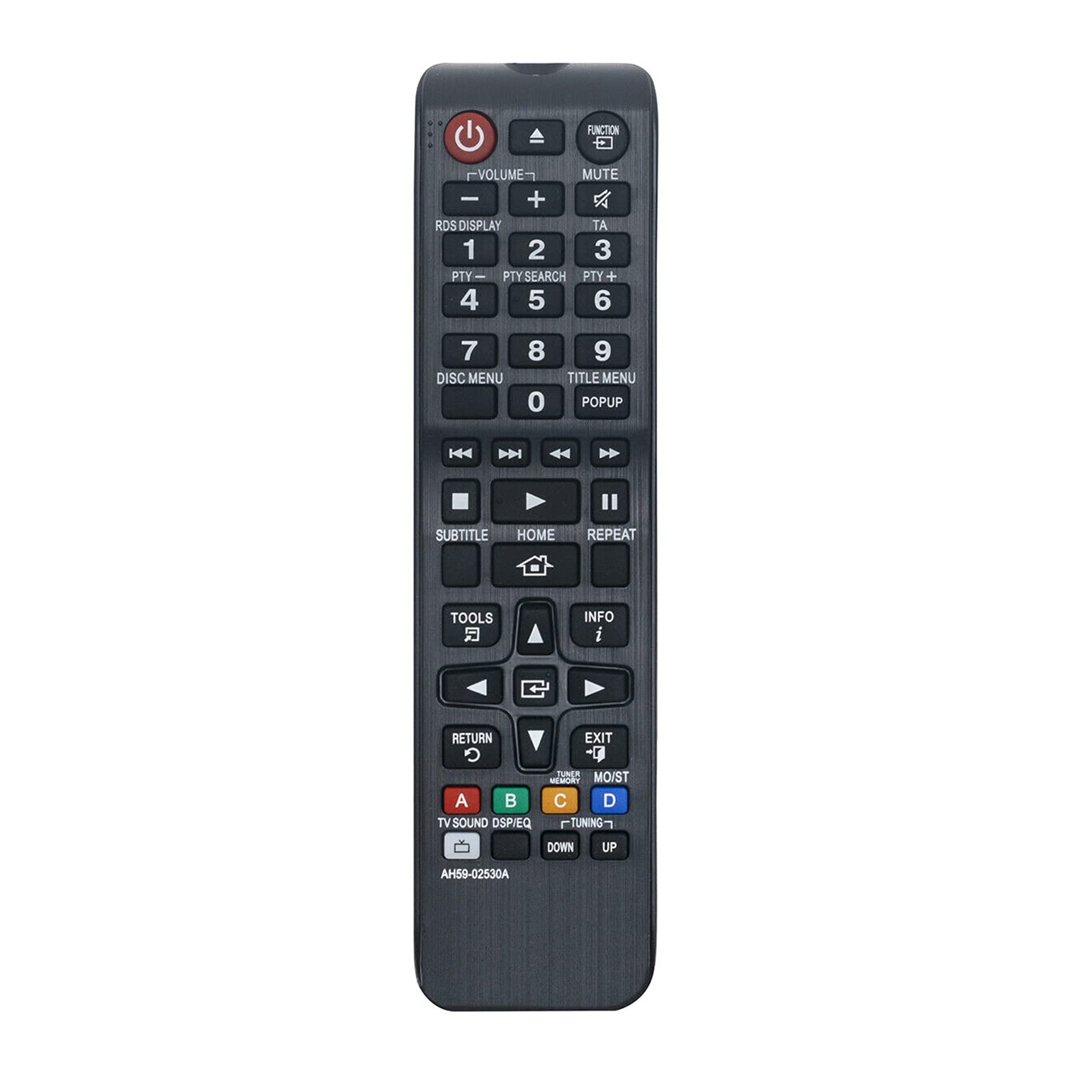
Figura 1: Angle view of the Allimity AH59-02530A remote control, showcasing its layout and buttons.
Configuració
Instal·lació de la bateria
The Allimity AH59-02530A remote control requires two AAA alkaline batteries (not included) for operation. Follow these steps to install the batteries:
- Localitzeu la tapa del compartiment de la bateria a la part posterior del comandament a distància.
- Premeu la pestanya i feu lliscar la tapa cap avall per obrir el compartiment.
- Insert two new AAA alkaline batteries, ensuring the positive (+) and negative (-) terminals match the diagrams inside the compartment.
- Feu lliscar la tapa del compartiment de la bateria fins que faci clic de manera segura.

Figura 2: posterior view of the remote control with the battery compartment open, showing the slots for two AAA batteries.
Once batteries are installed, the remote is ready for use with your compatible Samsung Home Entertainment System.
Instruccions de funcionament
This remote control is designed to replicate the functions of your original Samsung remote. Point the remote directly at your Samsung Home Entertainment System for optimal performance. Below is a general guide to common button functions:

Figura 3: Frontal view of the remote control, highlighting the various function buttons.
- Botó d'encendre (⏻): Turns the home entertainment system on or off.
- Botó de funció: Cycles through available input sources or functions.
- Volum (+/-): Ajusta el nivell de volum de l'àudio.
- Botó de silenci: Silences or restores the audio.
- Botons numèrics (0-9): Used for direct input, such as track selection or menu navigation.
- Disc Menu / Title Menu / POPUP: Accesses disc-specific menus or pop-up menus.
- Playback Controls (Play, Pause, Stop, Fast Forward, Rewind, Skip): Controla la reproducció multimèdia.
- Botó HOME: Returns to the main home screen or menu of the system.
- tecla de navegació (amunt, avall, esquerra, dreta, intro): Used to navigate through menus and confirm selections.
- Botó TORNAR: Torna a la pantalla o al menú anterior.
- Botó EXIT: Surt del menú o la funció actual.
- Botó TOOLS: Accesses quick settings or tools menu.
- Botó INFO: Displays information about the current content or system status.
- Botons de color (A, B, C, D): These buttons (Red, Green, Yellow, Blue) provide access to specific functions depending on the content or menu displayed on your screen.
For specific functions related to your Samsung Home Entertainment System model, refer to your system's original user manual.
Manteniment
Canvi de bateria
Replace batteries when the remote control's response becomes sluggish or inconsistent. Always replace both AAA batteries at the same time with new alkaline batteries. Do not mix old and new batteries, or different types of batteries.
Neteja
To clean the remote control, wipe it gently with a soft, dry cloth. Do not use liquid cleaners, sprays, or abrasive materials, as these can damage the remote's surface or internal components.
Emmagatzematge
When not in use for extended periods, it is recommended to remove the batteries to prevent leakage, which could damage the remote control.
Resolució de problemes
- El comandament a distància no respon:
- Assegureu-vos que les piles estiguin inserides correctament amb la polaritat correcta (+/-).
- Substitueix les piles velles per piles alcalines AAA noves.
- Ensure there are no obstructions between the remote control and the home entertainment system's infrared receiver.
- Confirm the remote is pointed directly at the system.
- Rang de funcionament limitat:
- The maximum effective range is approximately 33 feet (10 meters). Ensure you are within this range.
- Bright light sources, such as direct sunlight or strong fluorescent lights, can interfere with the infrared signal. Try to minimize such interference.
- Funcions específiques que no funcionen:
- Verify that your Samsung Home Entertainment System model is listed as compatible.
- Some advanced functions might be specific to the original remote or require specific system settings.
Especificacions
| Marca | ALLIMITAT |
| Número de model | AH59-02530A |
| Tecnologia de connectivitat | infrarojos |
| Dispositius compatibles | Samsung Blu-ray Home Entertainment Systems (HT-H4200R, HT-F4500, HT-FM45/ZA, HT-H4500R, HT-H4550R, HT-J4500, HT-J5500W, HT-JM41, HT-J4100) |
| Tipus de bateria | 2 piles alcalines AAA (no incloses) |
| Interval màxim | 33 peus (10 metres) |
| Color | Negre |
| Dimensions de l'article (L x A x A) | 6"L x 2"W x 0.5"H (approximately) |
| Pes de l'article | 2 Ounces (approximately) |
Informació de la garantia
Specific warranty details for the Allimity AH59-02530A remote control are typically provided by the seller or manufacturer at the time of purchase. Please refer to your product packaging, purchase receipt, or contact the seller directly for information regarding warranty coverage and terms.
Suport
For technical assistance, troubleshooting beyond this manual, or inquiries about your Allimity AH59-02530A remote control, please contact the seller or manufacturer directly. Contact information can usually be found on the product packaging or the platform where the item was purchased.