
1. Producte acabatview
The DDPAI Z40 Dual GPS Dashcam is a high-performance, dual-lens in-car recording system designed to capture driving activity. It features a 3K front camera and a Full HD rear camera, utilizing a Sony IMX335 5MP image sensor for enhanced video quality. Key functionalities include GPS tracking, continuous loop recording, Wi-Fi connectivity, G-Sensor for incident detection, Wide Dynamic Range (WDR) imaging, and support for up to 128GB microSD storage.
This dashcam provides comprehensive coverage, recording both the road ahead and behind the vehicle, which can be crucial for evidence in incidents or for reviewing driving routes.

Imatge 1.1: acabatview of DDPAI Z40 Dashcam's premium features, including dual channel recording, 1944P front + 1080P rear resolution, Sony STARVIS sensors, Super Capacitor, 2.4" LCD discreet design, Wi-Fi & GPS support, Collision Detection, and Loop Recording.
Vídeo del producte
Vídeo 1.1: Un general acabatview of the DDPAI Z40 GPS Dual Channel Dashcam. This video highlights the main features and design of the product. (Note: The specific m3u8 video URL was not provided in the product data, a placeholder URL is used.)
2. Configuració i instal·lació
2.1 Contingut del paquet
Abans de la instal·lació, comproveu que hi hagi tots els components:
- Z40 Front Camera
- Càmera posterior RC1
- Cable d'alimentació
- Carregador USB
- Suport
- Eina d'instal·lació
- Manual d'usuari
- Adhesiu 3M
- Adhesiu estàtic
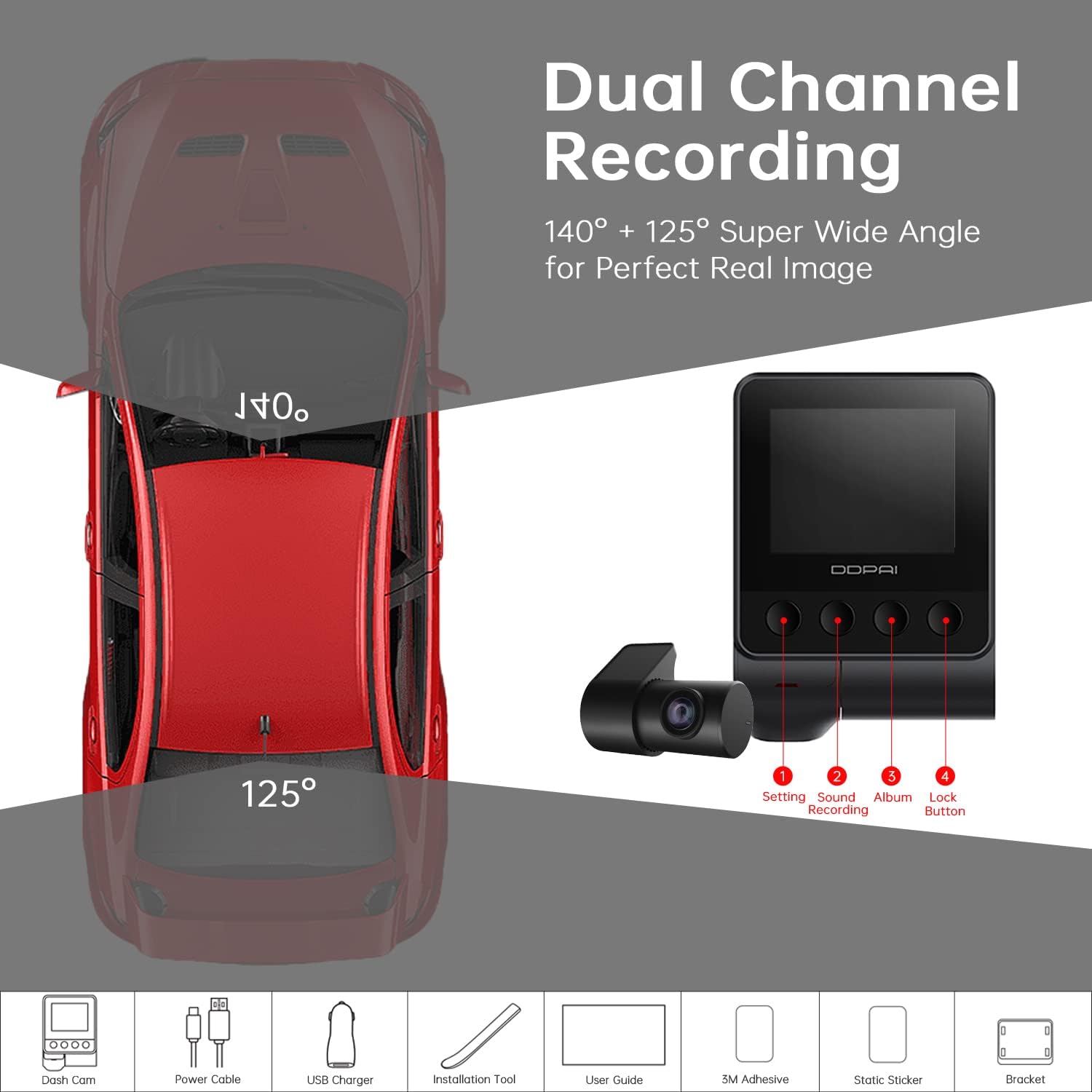
Image 2.1: Illustration of the DDPAI Z40 Dual Channel Dashcam components, including the front camera, rear camera, power cable, USB charger, bracket, installation tool, user guide, 3M adhesive sticker, and static sticker.
2.2 Instal·lació de la targeta MicroSD
- Assegureu-vos que la càmera del salpicader estigui apagada.
- Insert a Class 10/U3 or higher microSD card (up to 128GB recommended) into the designated slot on the main camera unit.
- Format the microSD card via the dashcam settings or the DDPAI app after initial power-on.
2.3 Muntatge de la càmera
- Càmera frontal: Clean the windshield area behind the rearview mirror. Apply the static sticker, then attach the front camera using the 3M adhesive sticker and bracket. Ensure the lens has a clear view de la carretera.
- Càmera posterior: Mount the 1080P Full HD rear camera on the rear windshield. The rear camera is rotatable 360°, allowing for flexible positioning to capture the rear view or the vehicle's interior. Connect the rear camera to the front camera using the provided cable.
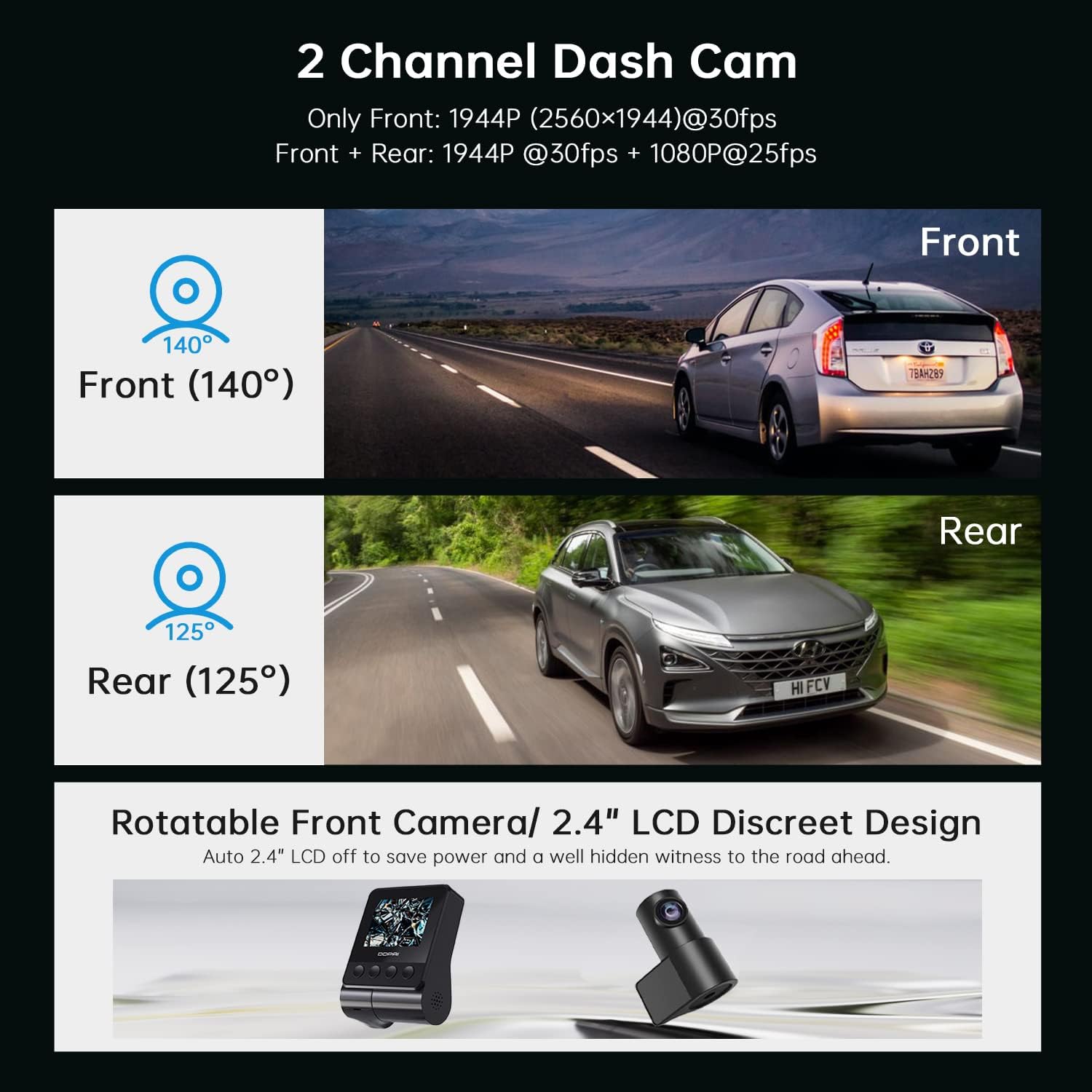
Image 2.2: Depiction of the DDPAI Z40 as a 2-channel dashcam, showing the front camera (140° field of view) and rear camera (125° field of view) perspectives. It also illustrates the rotatable front camera and its discreet 2.4" LCD design.
2.4 Connexió d'alimentació
Connect the power cable from the dashcam to the vehicle's 12V power outlet (cigarette lighter socket) using the USB charger. Route the cable neatly to avoid obstructing the driver's view.
3. Instruccions de funcionament
3.1 Encès/Apagat
The dashcam automatically powers on and begins recording when the vehicle's ignition is turned on. It powers off automatically when the ignition is switched off.
3.2 Modes d'enregistrament
- Enregistrament en bucle: The Z40 continuously records video. When the microSD card is full, the oldest unlocked footage is automatically overwritten by new recordings. This ensures uninterrupted recording without manual file gestió.
- G-Sensor & Emergency Lock: The built-in 3-axis G-sensor detects sudden movements, such as collisions or sharp braking. Upon detection, the dashcam automatically locks the current video clip, protecting it from being overwritten by loop recording. These files are stored in a separate emergency folder.
- Optional Parking Mode: With an optional hardwire kit (sold separately), the Z40 can provide 24-hour parking surveillance. It uses motion detection and G-sensor triggers to automatically record events like impacts or suspicious movements around the parked vehicle. Voice alerts may notify you of detected events.

Image 3.1: Visual representation of key recording features: G-Sensor for emergency accident lock, Parking Monitor for 24-hour protection, and Loop Recording for continuous video capture.
3.3 Funcionalitat del GPS
The integrated GPS module records real-time location, speed, and route data, embedding this information into your video footage. Aquestes dades poden ser viewed and analyzed within the DDPAI mobile application, providing spatial context for your journeys.
3.4 Wi-Fi and DDPAI App Control
The Z40 features built-in Wi-Fi for wireless connection to the DDPAI mobile app (available for iOS and Android). Through the app, users can:
- View real-time camera footage.
- Play back and download recorded videos.
- Manually lock or unlock video files.
- Ajusta la configuració de la càmera del salpicader.

Image 3.2: Illustration of the Wi-Fi connectivity and DDPAI app interface, showing how to view, download, and share videos. It also highlights the built-in GPS logger for recording time, date, location, and speed information.
4. Manteniment
4.1 Gestió de targetes MicroSD
Regularly format the microSD card (e.g., monthly) to maintain optimal performance and prevent data corruption. Back up any important footage before formatting. Replace the microSD card if it shows signs of degradation or error messages.
4.2 Neteja
Gently clean the camera lenses and the dashcam screen with a soft, lint-free cloth. Avoid abrasive cleaners or solvents that could damage the surfaces.
4.3 actualitzacions de microprogramari
Periodically check the DDPAI app for available firmware updates. Keeping the firmware updated ensures access to the latest features, performance improvements, and bug fixes.
5. Solució De Problemes
- Dashcam does not power on: Ensure the power cable is securely connected to both the dashcam and the vehicle's power outlet. Verify the vehicle's power outlet is functional.
- La gravació s'atura o footage està corrupte: Format the microSD card. If the issue persists, replace the microSD card with a new high-endurance Class 10/U3 card.
- Problemes de connexió Wi-Fi: Ensure the DDPAI app is updated to the latest version. Restart both the dashcam and your smartphone. Check for any interference from other wireless devices.
- Senyal GPS no adquirit: Ensure the dashcam has a clear view of the sky. Avoid mounting it in areas that might block GPS signals (e.g., under metallic tints).
- Poca qualitat de vídeo: Clean the camera lenses. Ensure the dashcam is mounted securely to minimize vibrations. Verify that the resolution settings in the app are set to the desired quality (e.g., 1944P for front camera).
- Parking mode not working: Confirm that the optional hardwire kit is correctly installed and connected. Check parking mode settings in the DDPAI app.
6. Especificacions tècniques

Image 6.1: Details on the 1944P HD resolution and Super Night Vision capabilities of the DDPAI Z40, highlighting the Sony STARVIS sensors and 140° wide-angle lens.
| Característica | Detall |
|---|---|
| Marca | DDPAI |
| Nom del model | Z40 Dual GPS |
| Resolució de captura de vídeo | Front: 1944p (2592x1944P), Rear: 1080P |
| Tecnologia de sensors òptics | CMOS (Sony IMX335 5MP Sensor) |
| Camp de View | Davant: 140 graus, Darrere: 125 graus |
| Tecnologia de connectivitat | Wi-Fi |
| Característiques especials | 24/7 Parking Monitoring (with hardwire kit), 360° Rotatable Rear Camera, Built-in GPS, Supercapacitor Power Supply, G-Sensor, ADAS |
| Tipus de muntatge | Muntatge del parabrisa |
| Tipus de memòria flash | TF (MicroSD up to 128GB) |
| Tipus de visualització | LCD (2 polzades) |
| Font d'alimentació | Supercapacitor (operating temp: -20°C to 65°C) |
| Dimensions de l'article (D x W x H) | 8.2P x 150A x 8.2H centímetres |
| Pes de l'article | 500 grams |

Image 6.2: Information regarding the built-in supercapacitor, highlighting its safety, reliability, heat resistance, and longer lifespan compared to lithium-ion batteries, suitable for extreme climates.
7. Garantia i Suport
7.1 Informació de la garantia
The DDPAI Z40 Dual GPS Dashcam comes with a Garantia de fabricació d'1 any. Customers are required to send the product to the service center for warranty claims.
7.2 Atenció al client
For technical assistance, warranty claims, or product inquiries, please contact:
- Fabricant: DDPAI
- Número de contacte: 9870294946
- Importador/Empacador: Origin Marketing Pvt. Ltd
- Importer/Packer Contact: 9870294946
- Importer/Packer Email: service@originmarketing.in