
EPEVER IP1500-12 Plus
EPEVER IPower-Plus Series IP1500-12 Plus Pure Sine Wave Inverter
Manual d’instruccions de l’usuari
1. Introducció
This manual provides detailed instructions for the installation, operation, and maintenance of your EPEVER IPower-Plus Series IP1500-12 Plus Pure Sine Wave Inverter. This 1500W 12VDC to 230VAC inverter is designed for off-grid systems, household lighting, vehicle-mounted systems, and other applications requiring reliable AC power from a DC source.
The IPower-Plus series features a 180-degree rotatable LCD display, compatibility with lithium batteries, a USB port (for 12V/24V models), and transient suppression on the input side to protect battery cells and Battery Management Systems (BMS) from transient current damage. It also boasts low idle current consumption.
2. Instruccions de seguretat importants
Llegiu atentament totes les instruccions i advertències abans de la instal·lació i el funcionament. Si no seguiu aquestes instruccions, podeu patir descàrregues elèctriques, incendis o lesions greus.
- Ensure the inverter is installed in a well-ventilated area, away from flammable materials and moisture.
- Do not expose the inverter to rain, snow, spray, or any liquids.
- No feu funcionar l'inversor si s'ha fet malbé d'alguna manera.
- Totes les instal·lacions elèctriques han de complir amb les normatives elèctriques locals i nacionals.
- Només personal qualificat ha de realitzar les connexions elèctriques.
- Disconnect all power sources before performing any maintenance or troubleshooting.
- Assegureu-vos que l'entrada de CC voltage matches the inverter's rated voltage (12VDC for this model).
- Do not connect the inverter to an AC utility grid.
- Mantingueu els nens lluny de l'inversor.
3. Producte acabatview
The EPEVER IPower-Plus inverter is designed for robust performance and ease of use. Below are key components and their functions.

Figura 3.1: Frontal View amb pantalla LCD. This image shows the front of the EPEVER IPower-Plus inverter, highlighting the central LCD display which provides real-time operational data such as output voltage and fault indicators. The display is rotatable for optimal viewing.
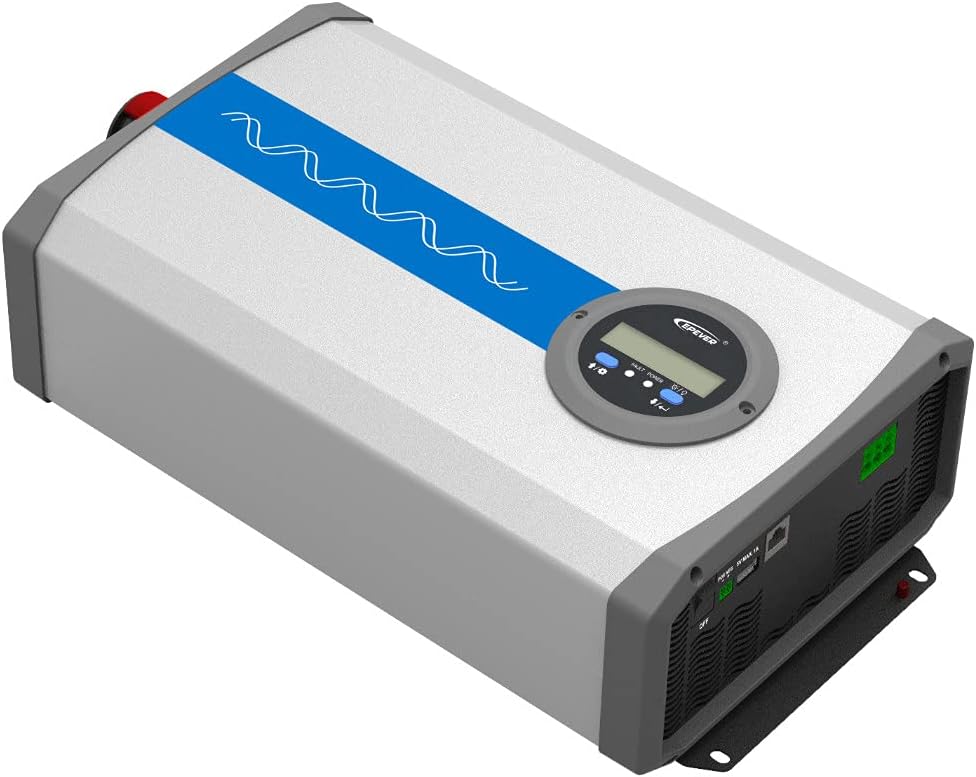
Figura 3.2: Part superior inclinada View. This perspective shows the overall compact design of the inverter, with the blue stripe indicating the pure sine wave output capability. The robust casing ensures durability.

Figure 3.3: Angled Bottom View. Això view highlights the mounting brackets at the base of the inverter, designed for secure installation on various surfaces.

Figura 3.4: Connexions del panell posterior. The rear panel features the AC output terminals (N, L), an RS485 communication interface for remote monitoring, a 5VDC/1A USB output port, and the main ON/OFF power switch.

Figure 3.5: Front Panel DC Input and Fans. This image displays the DC input terminals (positive and negative) for connecting to the battery bank, along with the integrated cooling fans that ensure optimal operating temperature.

Figura 3.6: lateral View amb l'etiqueta del producte. The side of the inverter shows the product label, which includes model information, serial number, and certification marks.
4. Configuració i instal·lació
4.1 Selecció del lloc
- Install the inverter indoors, away from direct sunlight, high temperatures, and high humidity.
- Ensure adequate airflow around the inverter for proper cooling. Maintain at least 15 cm (6 inches) of clearance around all sides.
- Munteu l'inversor verticalment sobre una superfície no inflamable.
4.2 Connexions de cablejat
- Connexió d'entrada de CC:
- Assegureu-vos que l'interruptor ON/OFF de l'inversor estigui en la posició "OFF".
- Connect the positive (+) terminal of the battery bank to the positive (+) DC input terminal of the inverter.
- Connect the negative (-) terminal of the battery bank to the negative (-) DC input terminal of the inverter.
- Use appropriate gauge cables for the DC connections to minimize voltage drop and ensure safety.
- Tighten all connections securely to prevent loose contacts and overheating.
- Connexió de sortida de CA:
- Connect your AC loads to the AC output terminals (N, L) on the rear panel.
- Ensure the total power consumption of your AC loads does not exceed the inverter's continuous output power (1500W).
- For safety, it is recommended to connect the inverter's chassis to an earth ground.
- Optional Connections (RS485 & USB):
- The RS485 interface allows for remote monitoring and control via PC software or mobile app. Connect an RS485 communication cable if desired.
- The USB port provides a 5VDC/1A output for charging small electronic devices.
Warning: Incorrect wiring can cause severe damage to the inverter and connected devices. Always double-check polarity before powering on.
5. Instruccions de funcionament
5.1 Engegada/apagada
- After all connections are secure, switch the ON/OFF button on the rear panel to the "ON" position.
- The LCD display will illuminate, showing the output voltage and other operational parameters.
- To power off, switch the ON/OFF button to the "OFF" position.
5.2 Pantalla LCD i indicadors
The LCD display provides real-time information about the inverter's status. It can be rotated 180 degrees for convenient viewing.
- Vol. De sortidatage: Mostra el vol actual de sortida de CAtage (p. ex., 220.0 V).
- Fault/Power Indicator: Indicates operational status or error codes.
- Voltage: Shows the DC input voltage de la bateria.
- Potència de càrrega: Displays the current power consumption of connected AC loads.
5.3 USB and RS485 Usage
- Port USB: Connect compatible USB devices for charging. The output is 5VDC, Max. 1A.
- Interfície RS485: Use this port with an appropriate communication module (sold separately) to connect to a PC or mobile device for advanced monitoring, data logging, and parameter settings via EPEVER's software or app.
6. Manteniment
Un manteniment regular garanteix la longevitat i el rendiment òptim del vostre inversor.
- Neteja: Periodically clean the inverter's exterior with a dry cloth. Ensure ventilation openings are free from dust and debris. Do not use liquid cleaners.
- Connexions: Annually check all electrical connections (DC input and AC output) for tightness. Loose connections can cause overheating and damage.
- Medi ambient: Assegureu-vos que l'entorn d'instal·lació es mantingui dins dels rangs de temperatura i humitat especificats.
- Salut de la bateria: Monitor your battery bank's health and charge level regularly, as it directly impacts inverter performance.
7. Solució De Problemes
Aquesta secció ofereix solucions a problemes comuns que podeu trobar.
| Problema | Causa possible | Solució |
|---|---|---|
| No AC Output / Inverter not turning on |
|
|
| Alarma de sobrecàrrega |
|
|
| Alarma de sobretemperatura |
|
|
| Abnormal Output Voltage |
|
|
If the problem persists after trying the above solutions, please contact EPEVER customer support.
8. Especificacions tècniques
| Característica | Especificació |
|---|---|
| Marca | SEMPRE |
| Nom del model | IPower-Plus Series IP1500-12 Plus |
| Volum de la bateria del sistematage | 12V DC |
| Potència contínua | 1500W |
| Pulse Power (5s) | 3000W |
| Vol. De sortidatage | 220VAC (±3%); 230VAC (-7%~+3%) |
| Freqüència de sortida | 50/60Hz ±0.2% |
| Màxima eficiència | >93% (30% load) |
| Corrent inactiu | <1.2A |
| Sortida USB | 5VDC/Max. 1A |
| RS485 Interface Output | 5VDC / 200mA |
| Classe de protecció | IP20 |
| Dimensions (L×W×H) | 387 × 231.5 × 123 mm |
| Pes net | 6 kg |
| Proteccions de seguretat | Reverse polarity, Over-voltage, Vol baixtage, Overload, Short-circuit, Over-temperature |
9. Garantia i Suport
9.1 Informació de la garantia
The EPEVER IPower-Plus Series IP1500-12 Plus inverter comes with a Garantia del fabricant de 2 anys des de la data de compra. Aquesta garantia cobreix els defectes de materials i de mà d'obra en ús normal.
La garantia no cobreix els danys causats per:
- Instal·lació o cablejat incorrectes.
- Modificacions o reparacions no autoritzades.
- Accidents, abuse, or neglect.
- Natural disasters or acts of God.
- Operating outside specified environmental conditions.
Conserveu el vostre comprovant de compra per a reclamacions de garantia.
9.2 Atenció al client
For technical assistance, troubleshooting beyond this manual, or warranty claims, please contact your authorized EPEVER dealer or visit the official EPEVER weblloc per obtenir informació de contacte d'assistència.
Manufacturer: SolarV (Brand: EPEVER)
Per a més informació, podeu visitar el EPEVER Brand Store.
Ask a question about this manual
Ask about setup, troubleshooting, compatibility, parts, safety, or missing instructions. Manuals+ will review the question and use this page’s manual context to help answer it.