
AZDOME PG02S
AZDOME Mirror Dash Cam PG02S User Manual
Model: PG02S
Marca: AZDOME
1. Introducció
The AZDOME Mirror Dash Cam PG02S is an advanced vehicle recording system designed to enhance driving safety and provide comprehensive video evidence. This manual provides detailed instructions for the proper installation, operation, and maintenance of your device.
2. Característiques clau
- High-Definition Dual Camera System: Equipped with a 1440P front camera and a 1080P rear camera, both featuring a 170° wide-angle lens for comprehensive coverage and super sharp video recording.
- Control de veu intel·ligent: Offers hands-free operation with intuitive voice commands, allowing you to control essential functions safely while driving.
- Split-Screen Display & GPS Functionality: Simultàniament view front and rear camera feeds on the screen. Integrated GPS records real-time location, driving track, and speed for detailed journey logs.
- Superior Night Vision & WDR Technology: Utilizes an advanced Sony sensor and Wide Dynamic Range (WDR) to capture clear videos with enhanced detail in low-light conditions and manage varying light intensities effectively.
- Loop Recording & Parking Assistance: Ensures continuous recording by overwriting old footage (locked accident videos are protected). The parking assistance feature provides guide lines for safer reversing.
- Disseny durador: The rear camera boasts IP68 waterproof rating and anti-fog/dust properties, ensuring reliable performance in various weather conditions.
3. Contingut del paquet
Si us plau, comproveu el contingut del paquet acuradament en desembalar-lo. Si falta algun article o hi ha algun malmès, poseu-vos en contacte amb el servei d'atenció al client.
- AZDOME Mirror Dash Cam Unit
- Càmera posterior amb cable
- Mòdul GPS
- Cable d'alimentació (carregador de cotxe)
- Mounting Straps/Bands
- Manual d'usuari
- 32GB MicroSD Card (may vary by package)

Imatge: Més deview of the AZDOME Mirror Dash Cam PG02S and its included accessories, such as the main mirror unit, rear camera, GPS antenna, and a 32GB microSD card.
4. Configuració i instal·lació
4.1 Instal·lació de la unitat principal
- Secure the mirror dash cam over your vehicle's existing rearview mirror using the provided rubber straps. Ensure it is firmly attached and does not obstruct your view.
- Connect the power cable to the dash cam's power input port and route it neatly along the windshield trim to the vehicle's cigarette lighter socket.
- Insert the MicroSD card into the designated slot on the dash cam. Ensure it is inserted correctly until it clicks into place.
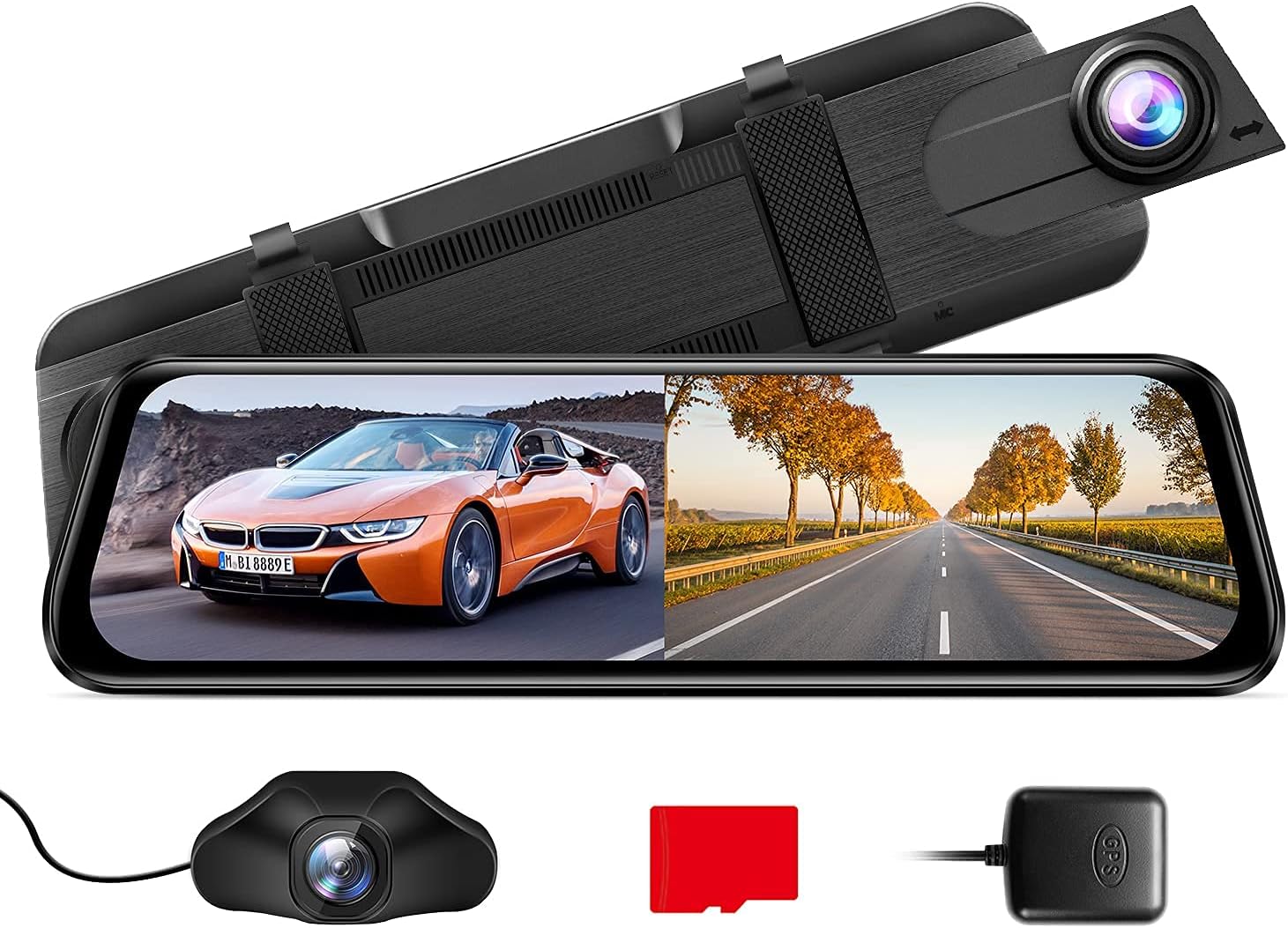
Image: The AZDOME Mirror Dash Cam PG02S main unit, designed to clip over the existing rearview mirror, displaying a split view del camí davant i darrere.
4.2 Instal·lació de la càmera posterior
- Mount the rear camera at the back of your vehicle, typically above the license plate or inside the rear window, ensuring a clear view.
- Connecteu el cable de la càmera posterior al port d'entrada de la càmera posterior de la unitat principal de la càmera del salpicader.
- Route the rear camera cable discreetly along the vehicle's interior trim to the main unit. If connecting to reverse lights for parking assistance, consult a professional.
4.3 Connexió del mòdul GPS
- Connect the GPS module to the dedicated GPS port on the dash cam.
- Position the GPS module on your dashboard or windshield where it has a clear view del cel per a una recepció òptima del senyal.
5. Instruccions de funcionament
5.1 Engegada/apagada
La càmera del salpicader s'encendrà automàticament i començarà a gravar quan s'activi el contacte del vehicle. S'apagarà automàticament quan s'apagui el contacte.
5.2 Control de veu intel·ligent
The PG02S supports voice commands for hands-free operation. Speak clearly and directly towards the device.
- "Open Recording": Starts video recording.
- "Turn off Display": Turns off the screen while recording continues.
- "Turn off Recording": Stops video recording.
- "Lock the video": Protects the current recording from being overwritten.
- "Take Picture": Captures a still image.
- "Show front camera": Displays only the front camera view.
- "Show rear camera": Displays only the rear camera view.

Image: An illustration of a driver utilizing the smart voice control feature to operate the dash cam hands-free, showing example commands like "Open screen" and "Lock The Video".
5.3 Display Modes and Touch Screen Operation
The device features a responsive touch screen. You can switch between display modes (front view, posterior view, split-screen) by swiping on the screen or using on-screen icons. Adjust settings and review footage directly on the touch screen.

Image: A hand interacting with the touch screen of the AZDOME Mirror Dash Cam, demonstrating its intuitive user interface for controlling recording and viewing opcions.
5.4 Parking Assistance System
When the vehicle is put into reverse (if the rear camera is wired to the reverse light), the screen will automatically display the rear view with parking guide lines. These lines assist in safe parking maneuvers.

Image: The dash cam display showing the reversing aid system with green and red parking guide lines overlaid on the rear camera feed, assisting with safe parking.
6. Manteniment
- Neteja: Feu servir un drap suau i sec per netejar la pantalla i les lents de la càmera del salpicader. Eviteu utilitzar netejadors o dissolvents abrasius.
- Targeta MicroSD: Format the MicroSD card regularly (e.g., once a month) to ensure optimal performance and prevent data corruption. Back up important videos before formatting. Replace the card if it shows signs of degradation.
- Actualitzacions de firmware: Periodically check the AZDOME official website for available firmware updates. Updates can improve performance and add new features. Follow the instructions provided with the firmware carefully.
- Rear Camera Durability: The rear camera is IP68 waterproof. However, regular checks for dirt or debris on the lens will ensure clear footage.

Image: A comparison illustrating the superior clarity of the Mirror Dash Cam PG02S streaming media view in rainy or foggy conditions compared to a traditional rearview mirror, highlighting its IP68 waterproof and anti-fog features.
7. Solució De Problemes
| Problema | Possible causa/solució |
|---|---|
| La càmera del salpicader no s'encén. | Check the power connection to the cigarette lighter socket. Ensure the vehicle's ignition is on. Test the power cable in another vehicle or with another compatible device. |
| L'enregistrament s'atura inesperadament. | The MicroSD card may be full or corrupted. Format the MicroSD card. Ensure you are using a high-speed (Class 10 or U3) MicroSD card. |
| Vídeo footage és borrós o poc clar. | Clean the camera lenses. Ensure the protective film has been removed from the lenses. Check if the camera is securely mounted and not vibrating. |
| El senyal GPS és feble o no es troba. | Ensure the GPS module is placed in an open area with a clear view of the sky (e.g., dashboard). Avoid placing it under metallic objects or tinted windows that block signals. |
| El control per veu no respon. | Speak clearly and at a normal volume. Ensure there is no excessive background noise. Check if the voice control feature is enabled in the settings. |
8. Especificacions
| Característica | Detall |
|---|---|
| Model | PG02S |
| Resolució de la càmera frontal | 1440P (2.5K HD) |
| Resolució de la càmera posterior | 1080P |
| Angle de la lent | Dual 170° Wide Angle |
| Mètode de control | Voice, Touch Screen |
| Visió nocturna | Supervisió nocturna amb sensor Sony |
| Característiques especials | WDR, Loop Recording, G-Sensor, Parking Monitor, GPS, Split-Screen Display |
| Rear Camera Water Resistance | IP68 |
| Primera data disponible | 16 d'agost de 2021 |

Image: An illustration detailing the 2.5K UHD recording capability of the front camera (1440P) and the 1080P recording of the rear camera, emphasizing high-resolution capture.

Image: A visual representation of the dash cam's super night vision capability, showing a clear image of a busy street at night, supported by WDR, F/1.8 Aperture, and a 6-glass lens.
9. Garantia i Suport
For detailed warranty information, product registration, and technical support, please refer to the official AZDOME weblloc web o contacteu directament amb el seu servei d'atenció al client.
També podeu visitar el AZDOME Store on Amazon per obtenir més informació sobre el producte i recursos d'assistència.
Ask a question about this manual
Ask about setup, troubleshooting, compatibility, parts, safety, or missing instructions. Manuals+ will review the question and use this page’s manual context to help answer it.