
POLI 2200-86820-001
Poly Rove B2 Single/Dual Cell DECT Base Station User Manual
Model: 2200-86820-001
1. Introducció
This user manual provides detailed instructions for the installation, operation, and maintenance of your Poly Rove B2 Single/Dual Cell DECT Base Station. This base station is designed to seamlessly integrate with the Poly Rove family of handsets, providing reliable and secure wireless communication.
The Poly Rove B2 base station supports both single and dual-cell modes, offering flexibility to scale your communication system as your organization's needs evolve. Its robust DECT wireless security ensures that your conversations remain private and protected.

Figura 1: Frontal view of the Poly Rove B2 DECT Base Station, showing the Poly logo and a green status indicator light.
2. Què hi ha a la caixa
Verifiqueu que tots els elements siguin presents al vostre paquet:
- Estació base
- Dempeus
- Cable Ethernet
- Adaptador d'alimentació
- Kit de muntatge a la paret
- Targeta d'inici ràpid
- Full de seguretat
3. Característiques clau
- Tecnologia: Single or dual-cell DECT base station designed for use with the Poly Rove family of handsets.
- Escalabilitat: Allows for flexible scaling by choosing various quantities of handsets to meet evolving organizational needs.
- Seguretat: Features DECT wireless security to ensure conversations are safe and secure, maintaining DECT encryption even in repeater mode.
- Productivitat: Incorporates Poly's redundancy feature, ensuring continuous operation of your communication solution even if a base station experiences an issue.
4. Guia de configuració
4.1 Connexió de l'estació base
- Connexió d'alimentació: Connect the power adapter to the base station's power port and then plug it into a power outlet.
- Connexió de xarxa: Connect one end of the Ethernet cable to the LAN port on the base station and the other end to your network router or switch.
- Col·locació: Place the base station on a flat, stable surface using the provided stand, or use the wall mounting kit for secure wall installation. Ensure optimal placement for DECT signal coverage.
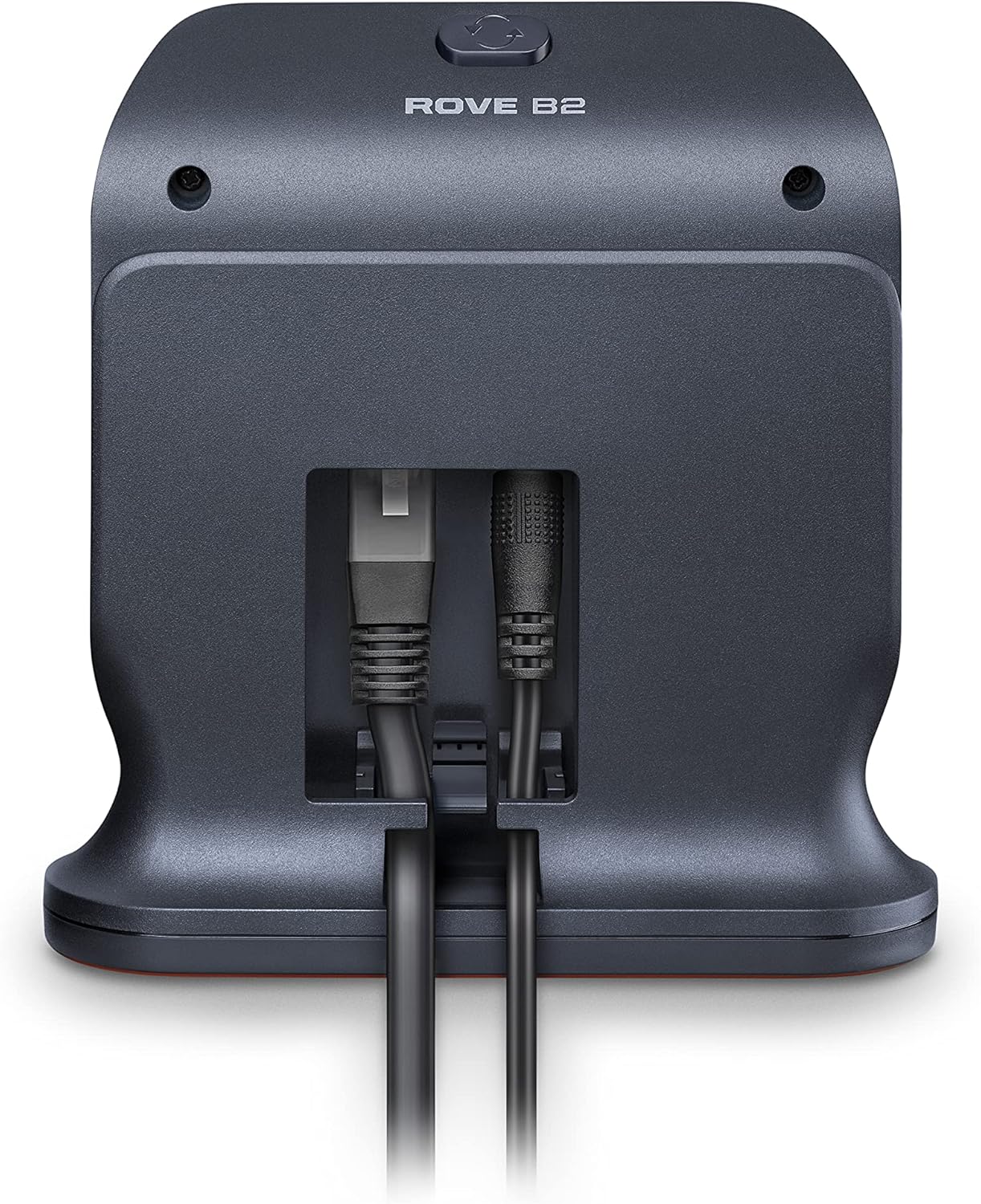
Figura 2: posterior view of the Poly Rove B2 DECT Base Station, illustrating the Ethernet and power connections.
4.2 Encès inicial
Once connected, the base station will power on automatically. Observe the status indicator light on the front of the unit. A solid green light typically indicates a successful power-on and network connection. Refer to the Quick Start Card for specific LED indicator meanings.

Figura 3: De dalt a baix view of the Poly Rove B2 DECT Base Station, showing the compact design and cable routing.
5. Funcionament
5.1 Pairing Handsets
The Poly Rove B2 base station is designed to work with Poly Rove handsets. Refer to your specific Poly Rove handset's user manual for detailed instructions on how to pair it with the base station. The base station provides the DECT signal for secure and reliable wireless communication with paired handsets.
5.2 Single vs. Dual Cell Mode
The Rove B2 base station can operate in either single-cell or dual-cell mode. The configuration of this mode is typically managed through the system's administration interface, not directly on the base station itself. Consult your system administrator or the Poly Rove system documentation for details on configuring and utilizing these modes to optimize coverage and capacity for your environment.
5.3 DECT Wireless Security
The base station utilizes DECT wireless security protocols to encrypt all communications between the base station and paired handsets. This ensures the privacy and integrity of your conversations, even when operating in repeater mode.
6. Manteniment
6.1 Neteja
To clean the base station, gently wipe the exterior with a soft, dry, lint-free cloth. Do not use abrasive cleaners, waxes, or solvents, as these may damage the finish or internal components. Ensure the device is powered off and unplugged before cleaning.
6.2 Consideracions ambientals
To ensure optimal performance and longevity, operate the base station within recommended environmental conditions. Avoid exposing the device to extreme temperatures, direct sunlight, high humidity, or dusty environments. Ensure proper ventilation around the unit.
7. Solució De Problemes
7.1 Sense poder
- Ensure the power adapter is securely connected to both the base station and a working power outlet.
- Verifiqueu que la presa de corrent estigui activa provant-la amb un altre dispositiu.
7.2 Sense connexió de xarxa
- Check that the Ethernet cable is securely connected to both the base station and your network router/switch.
- Verify that your network router/switch is functioning correctly and has an active internet connection.
- Restart your network equipment (router, switch) and the base station.
7.3 Handsets Not Connecting
- Ensure the handsets are within the DECT range of the base station.
- Confirm that the handsets are properly paired with the base station according to their respective user manuals.
- Check for any obstructions or interference sources that might be affecting the DECT signal.
7.4 System Redundancy
The Poly Rove system includes a redundancy feature designed to maintain operation even if a base station fails. If you experience system-wide communication issues, consult your system administrator or Poly support for assistance in leveraging this feature or diagnosing a potential base station failure.
8. Especificacions
| Atribut | Valor |
|---|---|
| Marca | POLY |
| Número de model | 2200-86820-001 |
| Dimensions del producte (L x A x A) | 8.5 x 5.7 x 1.8 polzades |
| Pes de l'article | 14.6 unces |
| Color | Negre |
| Dispositius compatibles | Rove handsets by Poly |
| Font d'alimentació | Adaptador d'alimentació (inclòs) |
| Connectivitat | DECT Wireless, Ethernet |
| Conferència de trucades | Bàsica |
| Fabricant | Poli |
| Primera data disponible | 17 d'agost de 2021 |
9. Garantia i Suport
9.1 Informació de la garantia
For detailed warranty information regarding your Poly Rove B2 DECT Base Station, please refer to the warranty card included in your product packaging or visit the official Poly weblloc. Els termes i condicions de la garantia poden variar segons la regió.
9.2 Suport tècnic
If you encounter any issues or require technical assistance, please contact Poly customer support. You can find contact information and additional resources, including FAQs and software downloads, on the official Poly support weblloc.
Visit the official Poly Store for more products and information: Botiga Poly a Amazon
Documents relacionats2200-86820-001


Ask a question about this manual
Ask about setup, troubleshooting, compatibility, parts, safety, or missing instructions. Manuals+ will review the question and use this page’s manual context to help answer it.