
TOMZON A31
Manual d'usuari de la bateria i el carregador del mini dron Tomzon A31
Model: A31 Battery & Charger Kit
1. Producte acabatview
This manual provides essential information for the safe and efficient use of your Tomzon A31 Mini Drone Battery and Charger kit. This kit includes two rechargeable batteries and a dedicated charger designed specifically for the Tomzon A31 mini drone, ensuring optimal performance and extended flight time.
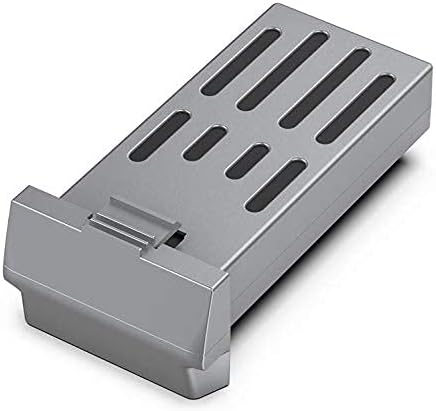
Figure 1: Tomzon A31 Mini Drone Battery. This image shows a single gray rectangular battery pack with ventilation slots on the top surface and a connector at one end, designed for the Tomzon A31 mini drone.
2. Configuració
2.1 Desembalatge i components
Carefully unpack all items from the box. Verify that the following components are present:
- 2 x Tomzon A31 Mini Drone Batteries
- 1 x Tomzon A31 Battery Charger
- 1 x USB Charging Cable (if included with charger)
2.2 Càrrec inicial
Before first use, it is recommended to fully charge both batteries. Follow the charging instructions in the "Operating" section.
3. Funcionament
3.1 Càrrega de les bateries
- Connect the charger to a suitable USB power source (e.g., computer USB port, USB wall adapter) using the provided USB cable.
- Insert the battery into the charging slot(s) on the charger. Ensure the battery is inserted correctly and securely.
- Observe the charging indicator lights on the charger. Typically, a red light indicates charging, and a green light indicates a full charge. Refer to the charger's specific indicators if different.
- Charging time may vary depending on the power source and battery depletion level. A full charge usually takes approximately 60-90 minutes per battery.
- Once fully charged, disconnect the battery from the charger and unplug the charger from the power source.
Important: Always use the original Tomzon charger provided with the kit or a compatible charger specified by Tomzon. Using unauthorized chargers may damage the battery or pose safety risks.
3.2 Installing Batteries into the Drone
- Ensure the Tomzon A31 mini drone is powered off.
- Locate the battery compartment on the drone (refer to your drone's specific user manual for exact location).
- Carefully insert the fully charged battery into the compartment, ensuring the connectors align properly.
- Tanqueu bé la tapa del compartiment de la bateria.
4. Manteniment
4.1 Cura i emmagatzematge de la bateria
- Emmagatzemeu les bateries en un lloc fresc i sec, lluny de la llum solar directa i de temperatures extremes.
- Do not store fully charged or completely depleted batteries for extended periods. For long-term storage, charge batteries to approximately 50-60% capacity.
- Avoid physical damage to the batteries. Do not puncture, drop, or expose them to water.
- If a battery appears swollen, damaged, or leaks, discontinue use immediately and dispose of it properly according to local regulations.
4.2 Cura del carregador
- Mantingueu el carregador net i sense pols. Feu servir un drap suau i sec per netejar-lo.
- No exposeu el carregador a la humitat ni a líquids.
- Store the charger in a safe place when not in use, away from children and pets.
5. Solució De Problemes
- La bateria no es carrega:
- Assegureu-vos que el carregador estigui connectat correctament a una font d'alimentació que funcioni.
- Verify the battery is correctly inserted into the charger.
- Proveu un altre port USB o adaptador de corrent.
- Comproveu si la bateria o el carregador tenen danys visibles.
- Drone not powering on with charged battery:
- Ensure the battery is fully charged (green indicator on charger).
- Verify the battery is securely installed in the drone's compartment.
- Refer to your Tomzon A31 drone's user manual for specific power-on procedures.
6. Especificacions
| Atribut | Detall |
|---|---|
| Marca | TOMZON |
| Tipus de producte | Kit de bateria i carregador |
| Compatibilitat | Tomzon A31 Mini Drone |
| ASIN | B09CTGTWJ3 |
| Fabricant | Tomzon |
7. Garantia i Suport
Information regarding product warranty and customer support for the Tomzon A31 Mini Drone Battery and Charger kit is not available in the provided product details. Please refer to the official Tomzon website or contact their customer service directly for warranty claims, technical assistance, or further inquiries.
For general product information, you may visit the TOMZON brand page on Amazon.
Ask a question about this manual
Ask about setup, troubleshooting, compatibility, parts, safety, or missing instructions. Manuals+ will review the question and use this page’s manual context to help answer it.