
Boean U8
Boean Bluetooth Headphones U8 User Manual
Model: U8
1. Producte acabatview
The Boean U8 Bluetooth Headphones are designed for sports enthusiasts, offering a stable Bluetooth 5.3 connection, IPX7 waterproof rating, and up to 16 hours of playtime. These in-ear headphones provide stereo sound with powerful bass and feature an ergonomic design for a secure and comfortable fit during physical activity.

Image 1.1: Boean U8 Bluetooth Headphones. These headphones feature a red cable connecting the two earbuds, which are black with red accents and ear hooks.

Image 1.2: Key features of the Boean U8 headphones, highlighting IPX7 waterproofing, rich bass, 15 hours playtime, built-in microphone, various ear cap sizes, battery display, voice assistant support, hands-free controls, soft ear hooks, and Bluetooth 5.3 connectivity.
2. Contingut del paquet
Si us plau, verifiqueu que tots els elements siguin presents al paquet:
- Auriculars Bluetooth
- Ear caps (multiple sizes)
- Cable de càrrega (USB-C)
- Cable Clothing Clip
- Bossa organitzadora

Image 2.1: Contents of the Boean U8 headphone package, showing the headphones, different sized ear caps, USB-C charging cable, cable clothing clip, and an organizer bag.
3. Configuració i primer ús
3.1 Càrrega dels auriculars
Abans del primer ús, carregueu completament els auriculars. Una càrrega completa triga aproximadament 2 hores.
- Connecteu el cable USB-C proporcionat al port de càrrega dels auriculars.
- Connecteu l'altre extrem del cable USB-C a un adaptador de corrent USB (no inclòs) o al port USB d'un ordinador.
- The LED indicator on the headphones will show charging status and turn off or change color when fully charged.
3.2 Emparellament amb un dispositiu Bluetooth
The Boean U8 headphones use Bluetooth 5.3 for a stable connection.
- Assegureu-vos que els auriculars estiguin apagats.
- Press and hold the multi-function button (power button) on the headphones until the LED indicator flashes red and blue, indicating pairing mode.
- Al dispositiu (telèfon intel·ligent, tauleta, ordinador), activeu el Bluetooth i cerqueu els dispositius disponibles.
- Select "Boean U8" or similar from the list of found devices.
- Once connected, the LED indicator will typically flash blue slowly or turn off.
3.3 Achieving a Comfortable and Secure Fit
The ergonomic design with ear hooks ensures a secure fit, especially during sports. Experiment with the included ear caps to find the best seal and comfort.
- Choose the ear caps that provide a snug fit in your ear canal. A good seal enhances sound quality and noise isolation.
- Position the ear hooks over your ears to secure the headphones in place.
- Use the cable clothing clip to manage the cable length and prevent it from bouncing during movement.

Image 3.1: Proper fit and control overview. This image illustrates how to select the correct ear cap size, position the ear hook, and use the cable clip for a secure and comfortable fit. It also shows the location of the control buttons.
4. Instruccions de funcionament
4.1 Funcions dels botons
The headphones feature intuitive controls for media playback and calls.
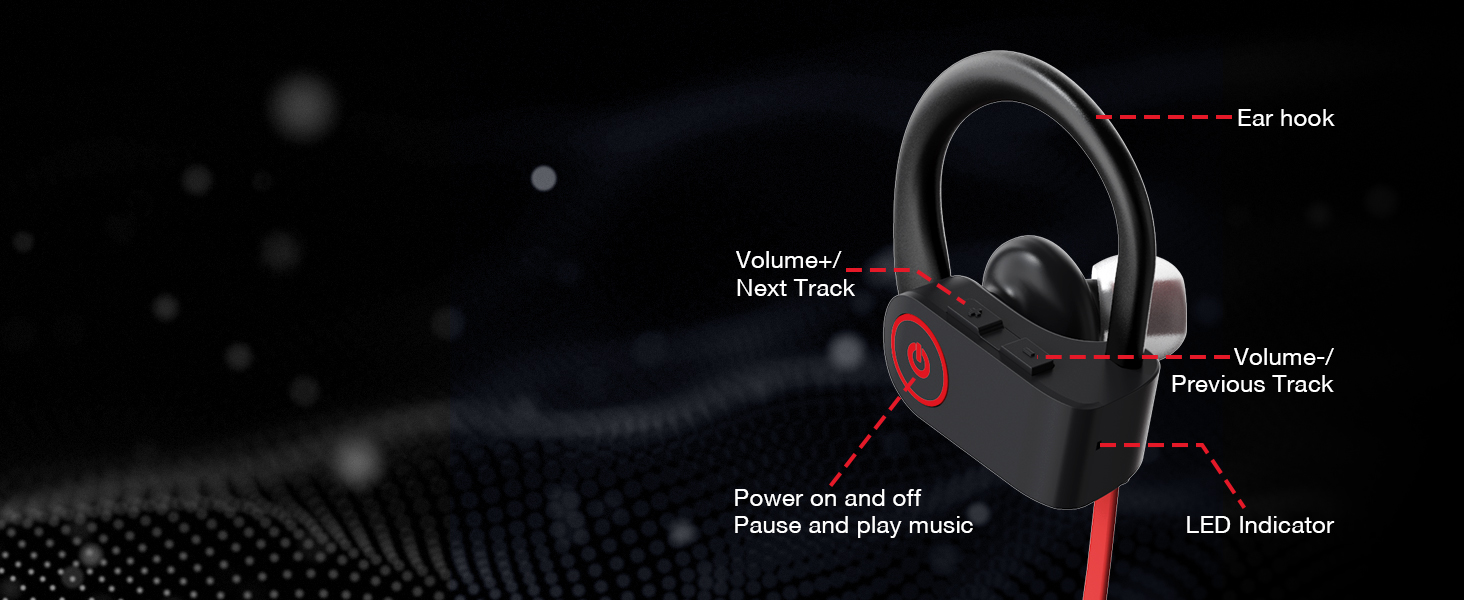
Image 4.1: Control layout of the Boean U8 headphones, detailing the functions of each button for power, playback, volume, track navigation, and the LED indicator.
| Botó/Acció | Funció |
|---|---|
| Botó d'engegada (multifunció) |
|
| Botó Volum + / Pista següent |
|
| Volume - / Previous Track Button |
|
4.2 Gestió de trucades
El micròfon integrat permet fer trucades de mans lliures amb un so clar.
- Respondre una trucada: Premeu breument el botó d'engegada.
- Finalització d'una trucada: Premeu breument el botó d'engegada.
- Rebutjar una trucada: Manteniu premut el botó d'engegada.

Image 4.2: Crystal Clear Call feature, indicating the headphones' ability to provide clear audio during phone conversations even in noisy environments.
5. Manteniment i cura
Proper care will extend the lifespan of your Boean U8 headphones.
5.1 Neteja
- Gently wipe the earbuds and cable with a soft, dry, lint-free cloth.
- Remove ear caps and clean them with mild soap and water if necessary. Ensure they are completely dry before reattaching.
- No utilitzeu productes químics aggressivs, dissolvents de neteja o detergents forts.
5.2 Resistència a l'aigua (IPX7)
The Boean U8 headphones are rated IPX7 waterproof, meaning they can withstand sweat, rain, and splashes. They are not designed for swimming or prolonged submersion.
- After exposure to sweat or water, wipe the headphones dry before charging to prevent damage to the charging port.
- Do not intentionally submerge the headphones in water.

Image 5.1: IPX7 Sweatproof feature, showing the headphones with water droplets, indicating their resistance to sweat and splashes during workouts or in rainy conditions.
6. Solució De Problemes
If you encounter issues with your headphones, please refer to the following common solutions:
6.1 No Power / Cannot Turn On
- Ensure the headphones are fully charged. Connect them to a power source and allow at least 30 minutes for charging.
- Prova amb un cable de càrrega o un port USB diferent.
6.2 No es pot emparellar amb el dispositiu
- Ensure Bluetooth is enabled on your device and the headphones are in pairing mode (LED flashing red and blue).
- Make sure the headphones are not already connected to another device. Disconnect them from any previously paired devices.
- Move the headphones closer to your device (within 10 meters/30 feet).
- Reinicieu els auriculars i el dispositiu.
- Esborra l'historial d'emparellament Bluetooth del dispositiu i torna a intentar l'emparellament.
6.3 Sense so o volum baix
- Comproveu el nivell de volum tant dels auriculars com del dispositiu connectat.
- Assegureu-vos que els auriculars estiguin connectats correctament al dispositiu.
- Try playing different audio files or from different applications.
- Ensure the ear caps are properly seated in your ear for optimal sound.
6.4 Intermittent Connection / Audio Dropouts
- Redueix la distància entre els auriculars i el dispositiu.
- Avoid obstacles between the headphones and your device (e.g., walls, large metal objects).
- Minimitzar les interferències d'altres dispositius sense fil (encaminadors Wi-Fi, altres dispositius Bluetooth).
7. Especificacions
Detailed technical specifications for the Boean U8 Bluetooth Headphones:
| Característica | Detall |
|---|---|
| Nom del model | U8 |
| Tecnologia de connectivitat | Sense fil (Bluetooth) |
| Tecnologia de comunicació sense fils | Bluetooth 5.3 |
| Interval Bluetooth | Fins a 10 metres (30 peus) en espai obert |
| Durada de la bateria (temps de reproducció) | Fins a 16 hores |
| Temps de càrrega | Aproximadament 2 hores |
| Nivell de resistència a l'aigua | IPX7 (impermeable) |
| Control de soroll | Aïllament acústic |
| Tipus de controlador d'àudio | Conductor dinàmic |
| Mida del controlador d'àudio | 11 mil·límetres |
| Impedància | 8 ohms |
| Forma de l'auricular | A l'orella |
| Mètode de control | Botons de control tàctil / multimèdia |
| Material | Acrilonitril butadiè estirè (ABS) |
| Pes de l'article | 3.81 unces (108 grams) |
| Dimensions del producte | 1.4 x 0.57 x 0.58 polzades |

Image 7.1: Playtime and Standby Time. The Boean U8 headphones offer up to 16 hours of continuous playtime and 250 hours of standby time.

Image 7.2: HD & Powerful Bass. An illustration of the 11mm large diaphragm speaker and in-ear acoustic structure responsible for surging low-frequency sound and deep, flexible bass.

Image 7.3: Product Dimensions. Detailed measurements of the Boean U8 earbud, including its height, width, and the length of the ear hook.
8. Garantia i Suport
Boean is committed to providing high-quality products. For any questions or support needs regarding your Boean U8 headphones, please refer to the following:
- Informació de la garantia: Please refer to the warranty card included in your product packaging or contact Boean customer service for details on warranty coverage.
- Atenció al client: For technical assistance, troubleshooting not covered in this manual, or other inquiries, please visit the official Boean store on Amazon or contact their customer support channels as provided with your purchase.
- Recursos en línia: Additional information and FAQs may be available on the Boean Store on Amazon.
Ask a question about this manual
Ask about setup, troubleshooting, compatibility, parts, safety, or missing instructions. Manuals+ will review the question and use this page’s manual context to help answer it.