
1. Introducció
Thank you for choosing the A4tech FG1112 Fstyler Wireless Keyboard and Mouse Set. This compact and efficient combo provides a reliable 2.4GHz wireless connection, offering convenience and comfort for your daily computing needs. The keyboard features a Q Turkish layout with FN multimedia keys, while the mouse offers precise 1200 DPI optical tracking. This manual will guide you through the setup, operation, and maintenance of your new device.
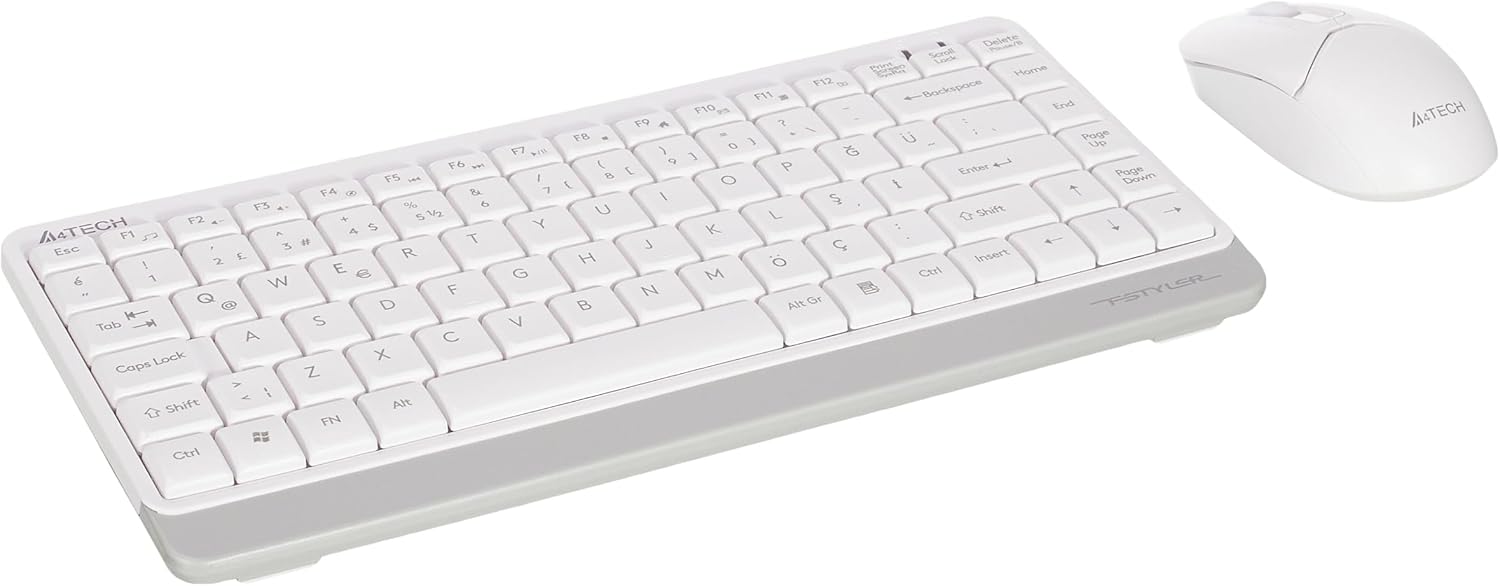
Image 1.1: A4tech FG1112 Fstyler Wireless Keyboard and Mouse Set (White)
2. Contingut del paquet
Si us plau, comproveu el contingut del paquet per assegurar-vos que hi hagi tots els elements:
- 1 x A4tech FG1112 Wireless Keyboard
- 1 x A4tech Fstyler Wireless Mouse
- 1 x Nano receptor USB
- 2 piles AAA (per al teclat)
- 1 x AA Battery (for mouse, typically included)
- 1 x Manual d'usuari (aquest document)
3. Instruccions de configuració
- Insereix les piles:
- For the keyboard: Open the battery compartment cover on the underside of the keyboard. Insert two AAA batteries, ensuring correct polarity (+/-). Close the cover.
- For the mouse: Open the battery compartment cover on the underside of the mouse. Insert one AA battery, ensuring correct polarity (+/-). Close the cover.

Image 3.1: Mouse bottom view showing battery compartment and power switch.
- Connecteu el nanoreceptor USB: Locate the USB Nano Receiver, typically stored inside the mouse's battery compartment or packaged separately. Plug the receiver into an available USB port on your computer.
- Encès:
- For the keyboard: Ensure the keyboard is powered on. There might be a power switch on the top right or underside.
- For the mouse: Slide the power switch on the underside of the mouse to the "ON" position.
- Connexió automàtica: Your computer should automatically detect and install the necessary drivers for the keyboard and mouse. This process may take a few moments. Once complete, your devices are ready for use.
Video 3.1: A short demonstration of the A4tech Fstyler Wireless Keyboard and Mouse Set, showing its compact design and wireless connectivity. This video illustrates the product's features and ease of use.
4. Instruccions de funcionament
4.1 Ús del teclat
The A4tech FG1112 keyboard features a compact design with a Q Turkish layout. It is designed for comfortable and quiet typing.

Imatge 4.1: Part superior view of the A4tech FG1112 Wireless Keyboard, highlighting its Q Turkish layout.
Tecles multimèdia i de funció:
The keyboard includes 12 multimedia and internet function keys integrated into the F1-F12 keys. To activate these functions, press the FN simultàniament amb la tecla F desitjada.
- FN + F1: Reproductor multimèdia
- FN + F2: Baixar el volum
- FN + F3: Pujar el volum
- FN + F4: Mut
- FN + F5: Pista anterior
- FN + F6: Pista següent
- FN + F7: Reproduir/Pausa
- FN + F8: Atura
- FN + F9Pàgina d'inici
- FN + F10: Correu electrònic
- FN + F11: El meu ordinador
- FN + F12: Calculadora

Image 4.2: Illustration of FN key functionality for multimedia controls.
4.2 Ús del ratolí
The A4tech Fstyler mouse provides precise 1200 DPI optical tracking for smooth and accurate cursor movement.

Imatge 4.3: Part superior view of the A4tech Fstyler Wireless Mouse.
Funcions bàsiques:
- Clic esquerre: Primary function, used for selecting items, opening files, etc.
- Clic dret: Secondary function, typically opens context menus.
- Roda de desplaçament: Used for scrolling documents and web pages vertically. Can also function as a middle click button.
5. Manteniment
- Neteja: Feu servir un drap suau i sec per netejar el teclat i el ratolí. Per a la brutícia persistent, feu servir un drap lleugerament sec.amp cloth can be used, but ensure no liquid enters the devices.
- Substitució de la bateria: When the keyboard or mouse becomes unresponsive or exhibits delayed input, it's time to replace the batteries. Follow the "Insert Batteries" steps in the Setup section.
- Emmagatzematge: When not in use for extended periods, turn off the mouse to conserve battery life. Store the devices in a cool, dry place.
6. Solució De Problemes
| Problema | Possible solució |
|---|---|
| El teclat/ratolí no respon |
|
| Delayed or intermittent response |
|
| Les tecles multimèdia no funcionen |
|
7. Especificacions
| Característica | Detall |
|---|---|
| Marca | A4tech |
| Model | FG1112 |
| Tecnologia de connectivitat | 2.4 GHz sense fils |
| Disposició del teclat | Q Turkish |
| Tipus de teclat | Multimedia Membrane |
| DPI del ratolí | 1200 DPI Optical |
| Keyboard Power Source | 2 x piles AAA |
| Mouse Power Source | 1 x AA Battery (typical) |
| Característiques especials | Wireless, Mini, Multimedia Keys, Optical Mouse, Laser Printed Keys, Water-resistant design (with drainage channels) |
| Pes del producte | 0.62 Kilograms (Set) |
| Dimensions (teclat) | Approx. 315mm (Width) x 146mm (Depth) x 25mm (Height) |
| Dimensions (ratolí) | Approx. 64mm (Width) x 108mm (Depth) x 35mm (Height) |

Image 7.1: Dimensions of the A4tech FG1112 Keyboard and Mouse.
8. Garantia i Suport
This A4tech FG1112 Fstyler Wireless Keyboard and Mouse Set comes with a 2 any de garantia des de la data de compra. Si us plau, conserveu el comprovant de compra per a reclamacions de garantia.
For technical support, troubleshooting assistance, or warranty inquiries, please contact A4tech customer service through their official weblloc web o el vostre distribuïdor local.
Podeu trobar més informació i recursos de suport a A4tech Store on Amazon.