
MageGee Typewriter Mechanical Gaming Keyboard
Manual d'usuari del teclat mecànic per a jocs MageGee Typewriter
Model: Typewriter Mechanical Gaming Keyboard
Introducció
This manual provides instructions for the MageGee Typewriter Mechanical Gaming Keyboard. It covers setup, operation, maintenance, and troubleshooting to ensure optimal performance and longevity of your device. Please read this manual thoroughly before using the keyboard.
Contingut del paquet
- MageGee Typewriter Mechanical Gaming Keyboard
- Repòs de canell magnètic
- Cable USB
- Manual d'usuari (aquest document)
Configuració
1. Connexió del teclat
- Localitza el cable USB que s'inclou amb el teclat.
- Connect the USB Type-A end of the cable to an available USB port on your computer (PC, Laptop, or Mac).
- Connect the other end of the USB cable to the port on the keyboard.
- The keyboard is plug-and-play; no additional drivers or software are required for basic functionality. Your operating system should automatically detect and configure the device.
2. Attaching the Wrist Rest
If your model includes a magnetic wrist rest, align it with the front edge of the keyboard. The magnets will help secure it in place, providing ergonomic support during use.
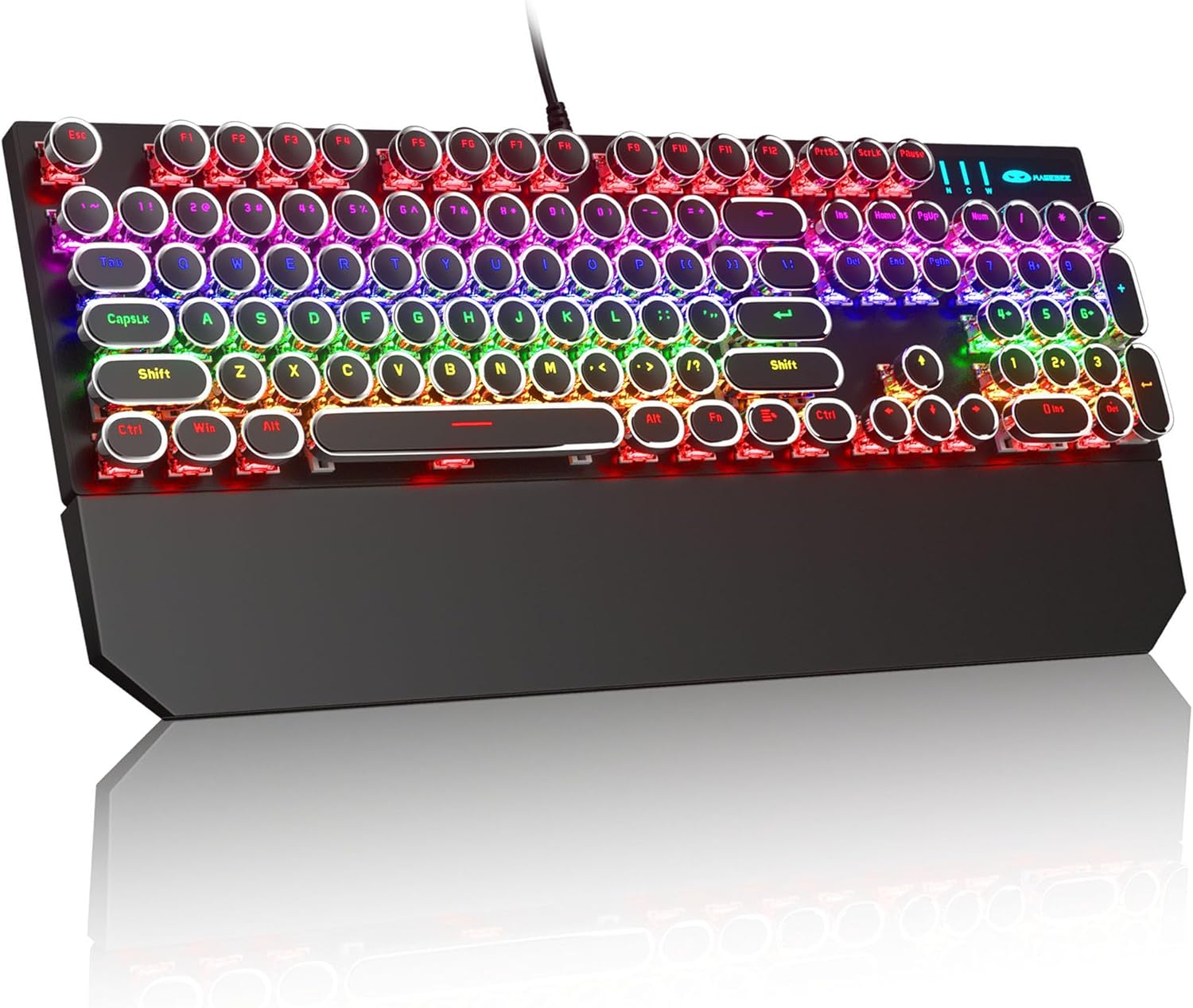
Image: The MageGee Typewriter Mechanical Gaming Keyboard connected via USB, with its magnetic wrist rest attached. The keyboard features retro round keycaps and vibrant RGB backlighting.
Instruccions de funcionament
Disposició del teclat
The MageGee Typewriter Mechanical Gaming Keyboard features a full-size 104-key layout, including a numeric keypad and dedicated function keys (F1-F12).

Imatge: Una imatge superior view of the keyboard, highlighting the full 104-key layout and the LED backlighting effect.
Control de la llum de fons
The keyboard features multiple RGB rainbow backlit modes. Use the following key combinations to adjust the lighting effects:
- Fn + Ins: Cycle through various backlight modes.
- Fn + Inici: Ajusta la brillantor de la retroiluminació.
- Fn + Pàg: Augmenta la velocitat de la retroiluminació.
- Fn + PgDn: Redueix la velocitat de retroiluminació.
- Fn + Del: Change backlight color (if applicable to the current mode).
- Fn + Final: Turn backlight on/off.

Imatge: Un primer pla view of the keyboard's keys, illustrating the RGB backlighting and the visible blue mechanical switches beneath the round keycaps.
Tecles multimèdia i de funció
The F1-F12 keys can be used in conjunction with the Fn key to access multimedia and system functions. Specific functions may vary slightly depending on your operating system.
| Combinació de tecles | Funció |
|---|---|
| Fn + F1 | Reproductor multimèdia |
| Fn + F2 | Baixa el volum |
| Fn + F3 | Puja el volum |
| Fn + F4 | Silenciar |
| Fn + F5 | Atureu-vos |
| Fn + F6 | Pista anterior |
| Fn + F7 | Reproduir/Pausa |
| Fn + F8 | Pista següent |
| Fn + F9 | Correu electrònic |
| Fn + F10 | Web Navegador |
| Fn + F11 | El meu ordinador |
| Fn + F12 | Calculadora |
Manteniment
Neteja del teclat
- Desconnecteu el teclat de l'ordinador abans de netejar-lo.
- Utilitzeu un drap suau i sense pelusa lleugerament dampEsbandiu amb aigua o una solució de neteja suau per netejar les tecles i la superfície del teclat.
- Per a la pols i les restes entre les tecles, feu servir aire comprimit.
- Eviteu utilitzar productes químics agressius, netejadors abrasius o ruixar líquids directament sobre el teclat.
Atenció General
- Avoid exposing the keyboard to extreme temperatures, humidity, or direct sunlight.
- Do not drop the keyboard or subject it to strong impacts.
- Keep liquids away from the keyboard to prevent damage.
Resolució de problemes
El teclat no respon
- Assegureu-vos que el cable USB estigui connectat correctament tant al teclat com a l'ordinador.
- Prova de connectar el teclat a un port USB diferent de l'ordinador.
- Prova el teclat en un altre ordinador per descartar un problema específic de l'ordinador.
- Reinicieu l'ordinador.
La retroiluminació no funciona o és incorrecta
- Ensure the backlight is not turned off (Fn + End).
- Adjust backlight brightness (Fn + Home).
- Cycle through different backlight modes (Fn + Ins) to see if the issue persists across all modes.
Keys Not Registering or Double Typing
- Clean the affected key(s) using compressed air to remove any debris.
- If the issue persists, it may indicate a hardware fault. Contact customer support for assistance.
Especificacions
| Característica | Detall |
|---|---|
| Model | Typewriter Mechanical Gaming Keyboard |
| Connectivitat | USB 2.0 per cable |
| Tipus de clau | Mechanical (Blue Switch) |
| Taps de claus | Retro Round, Double-shot injection molded |
| Llum de fons | RGB Rainbow Backlit |
| Disseny | 104-Key Full-Size, Anti-ghosting |
| Compatibilitat | Windows (2000, XP, ME, Vista, 7, 8), Linux, Mac |
| Dimensions (L x A x A) | 17.1 x 4.9 x 1.3 polzades (434 mm x 130 mm x 37 mm) |
| Pes de l'article | 1.99 lliures |
| Material | Aluminum alloy metal panel |

Image: A diagram illustrating the physical dimensions of the keyboard and its detachable wrist rest.
Garantia i Suport
Informació de la garantia
MageGee products are designed for quality and reliability. This product comes with a standard manufacturer's warranty against defects in materials and workmanship. Please refer to the product packaging or the official MageGee weblloc web per conèixer els termes i la durada específics de la garantia.
Atenció al client
If you encounter any issues or have questions regarding your MageGee Typewriter Mechanical Gaming Keyboard, please contact our customer support team:
- Correu electrònic: support@magegee.com
- Weblloc: www.magegee.com
When contacting support, please provide your product model and a detailed description of the issue.
Ask a question about this manual
Ask about setup, troubleshooting, compatibility, parts, safety, or missing instructions. Manuals+ will review the question and use this page’s manual context to help answer it.