
FLEXISPOT E4 Classic
FLEXISPOT E4 Classic Electric Standing Desk User Manual
Model: E4 Classic | Brand: FLEXISPOT
Introducció
This manual provides detailed instructions for the assembly, operation, and maintenance of your FLEXISPOT E4 Classic Electric Standing Desk. Please read this manual thoroughly before use to ensure proper function and longevity of your product.

Figure 1: The FLEXISPOT E4 Classic Electric Standing Desk, featuring a bamboo contour desktop and silver frame, set up with dual monitors in an office environment.
Informació de seguretat
- Assegureu-vos que tots els components estiguin ben subjectats abans d'utilitzar-los.
- Mantingueu els nens i les mascotes allunyats de l'escriptori durant el funcionament.
- Do not overload the desk beyond its specified weight capacity (220 lbs).
- Eviteu col·locar líquids directament sobre el tauler de control o els components del motor.
- Desconnecteu l'alimentació abans de la neteja o el manteniment.
- Utilitzeu només l'adaptador d'alimentació subministrat.
Contingut del paquet
Si us plau, verifiqueu que hi hagi totes les peces abans de començar el muntatge. Si falta alguna peça o hi ha alguna danyada, poseu-vos en contacte amb el servei d'atenció al client.
- Bamboo Contour Whole-Piece Desktop (55"x28")
- Silver Frame Legs (Dual Motor)
- Tauler de control
- Adaptador d'alimentació i cable
- Maquinari de muntatge (cargols, eines, etc.)
- Manual d'instruccions (aquest document)
Muntatge i muntatge
Cal muntatge per a aquest producte. Segueix aquests passos amb atenció.
- Desempaquetar components: Traieu amb cura totes les peces de l'embalatge i col·loqueu-les sobre una superfície neta i suau per evitar ratllades.
- Fixar les potes a l'escriptori: Position the desktop upside down. Align the leg frames with the pre-drilled holes on the underside of the desktop. Secure them using the provided screws and tools.
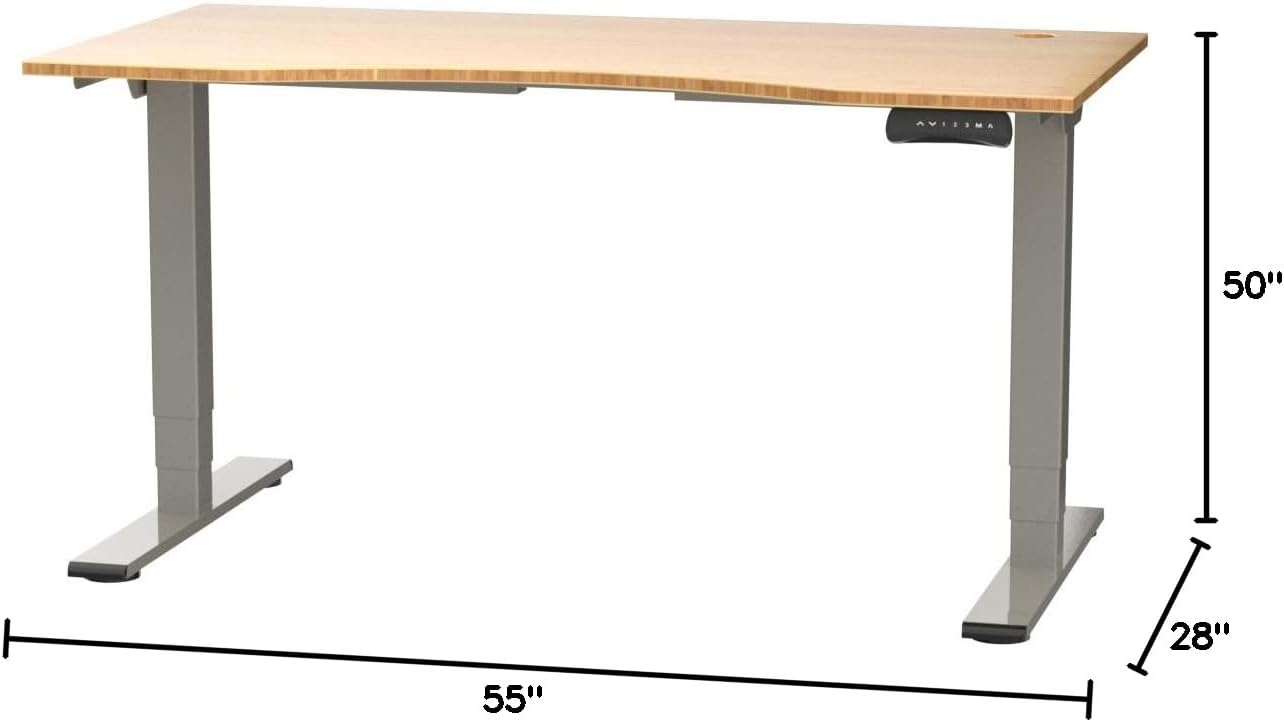
Figure 2: Desk dimensions indicating 55 inches width, 28 inches depth, and adjustable height up to 50 inches.
- Instal·leu el tauler de control: Mount the control panel to the desired location on the underside of the desktop, typically on the front edge for easy access. Connect the control panel cable to the motor control box.

Figure 3: The programmable control panel with LED display, up/down buttons, and memory presets (1, 2, 3, M, A).
- Connectar l'alimentació: Plug the power adapter into the control box, and then plug the power cable into a standard electrical outlet.
- Gestió de cables: Utilize the two cable management holes on the desktop to route and organize your cables, preventing clutter.

Figure 4: Detail showing the integrated cable management holes and the water-resistant surface of the bamboo desktop.
- Calibració inicial: After assembly and power connection, the desk may require an initial calibration. Refer to the "Operating Instructions" section for details on resetting or calibrating the desk.
Instruccions de funcionament
Ajust d'alçada
The FLEXISPOT E4 Classic desk features a dual-motor lift system for smooth and quiet height adjustments.
- Pujar escriptori: Manteniu premut el botó Fletxa amunt button (▲) on the control panel. The desk will move upwards.
- Escriptori inferior: Manteniu premut el botó Fletxa cap avall button (▼) on the control panel. The desk will move downwards.
- Release the button at your desired height. The desk can adjust from 24.4 inches to 50 inches.
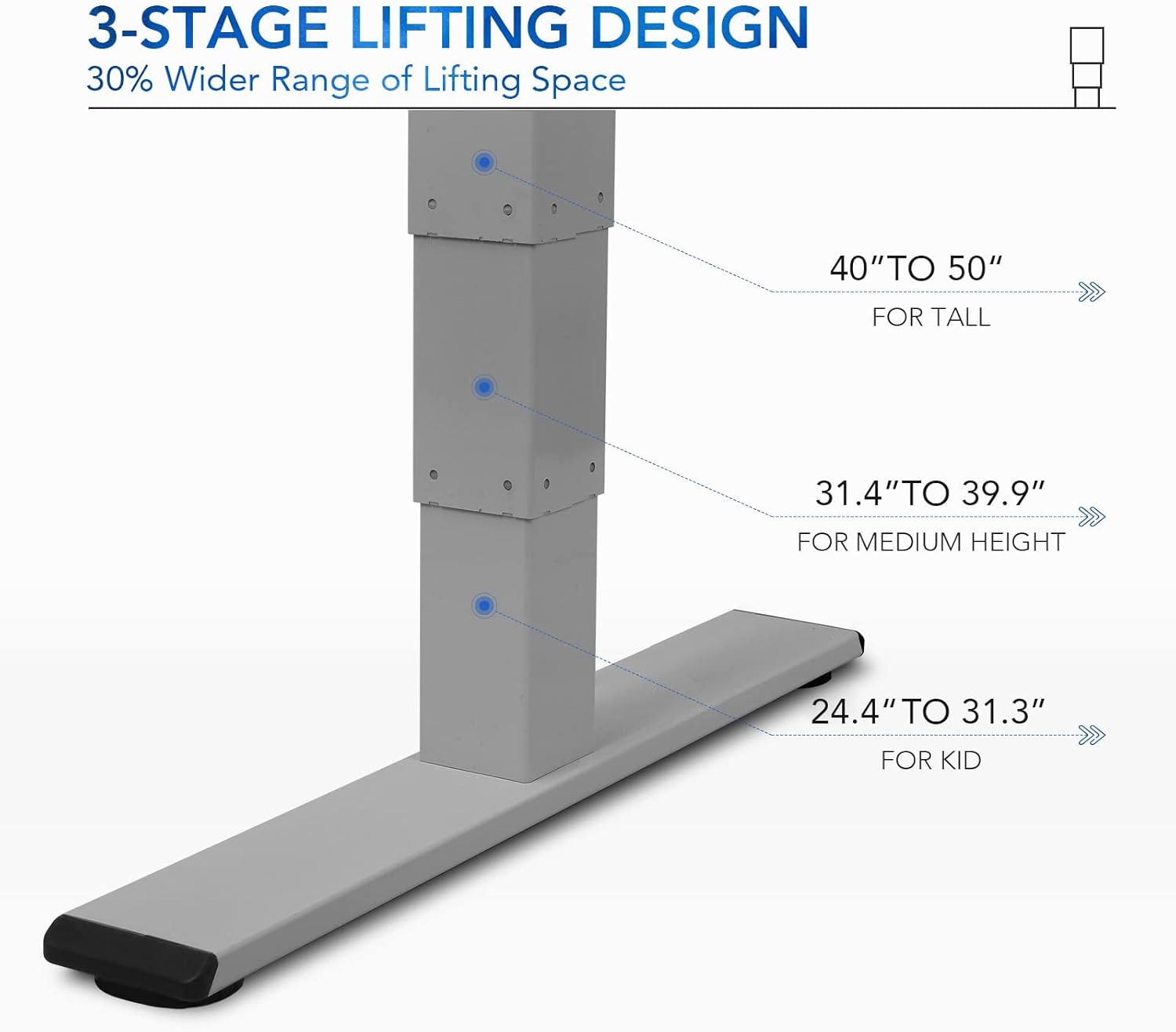
Figura 5: Les 3-stage lifting design provides a wide range of height adjustments, suitable for various user heights, from 24.4" (kid) to 50" (tall).
Programmable Memory Presets
El tauler de control permet desar fins a tres configuracions d'alçada preferides per a ajustaments ràpids.
- Establir una posició de memòria:
- Ajusteu l'escriptori a l'alçada desitjada amb els botons Amunt/Avall.
- Premeu el botó "M" button. The LED display will show "S-".
- En 3 segons, premeu un dels botons numèrics ("1", "2", o "3") to save the current height to that preset. The display will show "S-1", "S-2", or "S-3" to confirm.
- Recordar una posició de memòria: Simplement premeu el botó numèric corresponent ("1", "2", o "3"). L'escriptori es mourà automàticament a l'alçada desada.
Sit/Stand Reminder
The "A" button can be used to set a reminder to switch between sitting and standing positions.
- Consult the full manual for detailed instructions on setting and customizing the sit/stand reminder function.
Ergonomic Curved Design
The 55"x28" desktop features an ergonomic curved design for enhanced comfort and efficiency during work or study.

Figure 6: The ergonomic curved edge of the desktop, designed to provide a more comfortable and natural working posture.
Manteniment
- Neteja: Netegeu la superfície i el marc de l'escriptori amb un drap suau iamp cloth. Avoid abrasive cleaners or harsh chemicals. The bamboo surface is designed to be water-resistant, making it easy to clean.
- Cura del motor: The dual-motor system is designed for low noise and durability. No specific user maintenance is required for the motors.
- Gestió de cables: Periodically check that all cables are neatly routed through the cable management holes and are not pinched or tangled.
- Comprovació de fixació: De tant en tant, comproveu tots els cargols i elements de fixació per assegurar-vos que estiguin ben ajustats. Torneu a apretar-los si cal.
Resolució de problemes
| Problema | Causa possible | Solució |
|---|---|---|
| L'escriptori no es mou. | Power cable disconnected; overload protection activated; motor error. | Check power connections. Reduce weight on desk. Unplug and replug power after 10 minutes. Perform a reset (see below). |
| L'escriptori es mou de manera irregular o fa un soroll inusual. | Loose fasteners; obstruction; motor synchronization issue. | Check and tighten all assembly screws. Ensure no obstructions under the desk. Perform a reset. |
| LED display shows an error code (e.g., "E01", "RST"). | System error; need for reset. | Procediment de restabliment: Press and hold the Down Arrow button until the desk reaches its lowest position and then slightly rises. Release the button. If the error persists, unplug the desk for 10 minutes and try again. |
| Els preajustaments de memòria no funcionen. | Els preajustos no s'han desat correctament. | Re-save your desired memory positions following the "Programmable Memory Presets" instructions. |
If the issue persists after attempting these solutions, please contact FLEXISPOT customer support.
Especificacions
| Característica | Detall |
|---|---|
| Model | E4 Classic |
| Marca | FLEXISPOT |
| Material d'escriptori | Bamboo Contour Whole-Piece Board |
| Material del marc | Alloy Steel (Silver Frame) |
| Dimensions del producte (P x A x A) | 28"D x 55"W x 50"H (Max Height) |
| Interval d'ajust d'altura | 24.4" a 50" |
| Sistema d'elevació | Dual Motor, 3-Stage Lifting |
| Capacitat de pes | Fins a 220 lliures |
| Característiques especials | Electric Height Adjustment, Programmable Memory Presets, Sit/Stand Reminder, Curved Ergonomic Design, Cable Management Holes, Waterproof Surface |
| Muntatge obligatori | Sí |
Garantia i Suport
FLEXISPOT products are designed for durability and performance. For specific warranty details regarding your E4 Classic Electric Standing Desk, please refer to the warranty card included with your purchase or visit the official FLEXISPOT weblloc.
For technical support, troubleshooting assistance, or to inquire about replacement parts, please contact FLEXISPOT customer service:
- Weblloc: www.flexispot.com
- Correu electrònic: support@flexispot.com
- Telèfon: Consulteu l'oficial weblloc per als números de contacte regionals.
When contacting support, please have your product model (E4 Classic) and purchase information ready.
Ask a question about this manual
Ask about setup, troubleshooting, compatibility, parts, safety, or missing instructions. Manuals+ will review the question and use this page’s manual context to help answer it.