
1. Introducció
This manual provides detailed instructions for the setup, operation, maintenance, and troubleshooting of your uRage Exodus 700 Semi-Mechanical Gaming Keyboard. Please read this manual thoroughly before using the product to ensure optimal performance and longevity.
2. Contingut del paquet
Verifiqueu que tots els elements siguin presents al paquet:
- uRage Exodus 700 Semi-Mechanical Gaming Keyboard
- User's Guide (this document)
- Targeta de garantia
3. Configuració
3.1 Connexió del teclat
The uRage Exodus 700 keyboard connects via a wired USB-A connection. Follow these steps to connect your keyboard:
- Localitzeu un port USB-A disponible al vostre ordinador.
- Connecteu el connector USB-A del cable del teclat al port USB-A de l'ordinador.
- The operating system (Windows 11/10/8/7) will automatically detect and install the necessary drivers.
3.2 Instal·lació de programari (opcional)
For advanced customization, including macro programming and lighting effects, dedicated gaming software is available. Refer to the official uRage weblloc web per obtenir les instruccions de descàrrega i instal·lació del programari més recents.

Image 1: uRage Exodus 700 Semi-Mechanical Gaming Keyboard connected and ready for use.
4. Funcionament del teclat
4.1 Característiques clau
- Semi-Mechanical Keys: Provides a tactile typing experience with fast response times (1 ms) and a key travel of 2.5 mm.
- Anti-fantasma: Ensures that multiple key presses are registered simultaneously, crucial for gaming. Up to 24 keys can be registered at once.
- Il·luminació RGB: Customizable backlighting with various effects and colors.
- WIN Lock-Function: Disables the Windows key to prevent accidental interruptions during gameplay.
- Reposa-canell integrat: Designed for enhanced comfort during extended use.
4.2 Control d'il·luminació RGB
The keyboard features integrated RGB lighting. Specific key combinations (often involving the 'Fn' key) or the dedicated gaming software can be used to:
- Turn the lighting on or off.
- Cycle through different lighting modes and effects.
- Ajustar els nivells de brillantor.
Refer to the keyboard's function key legends for specific lighting control shortcuts.

Image 2: Keyboard in use, demonstrating RGB lighting.
4.3 Macro and Multimedia Functions
The keyboard includes 4 dedicated macro buttons (G1-G4) and additional multimedia functions. These can be programmed and controlled:
- Programació de macros: Use the dedicated gaming software to record and assign complex key sequences to the macro buttons.
- Controls multimèdia: Access functions like volume control, play/pause, and track skipping via function key combinations.
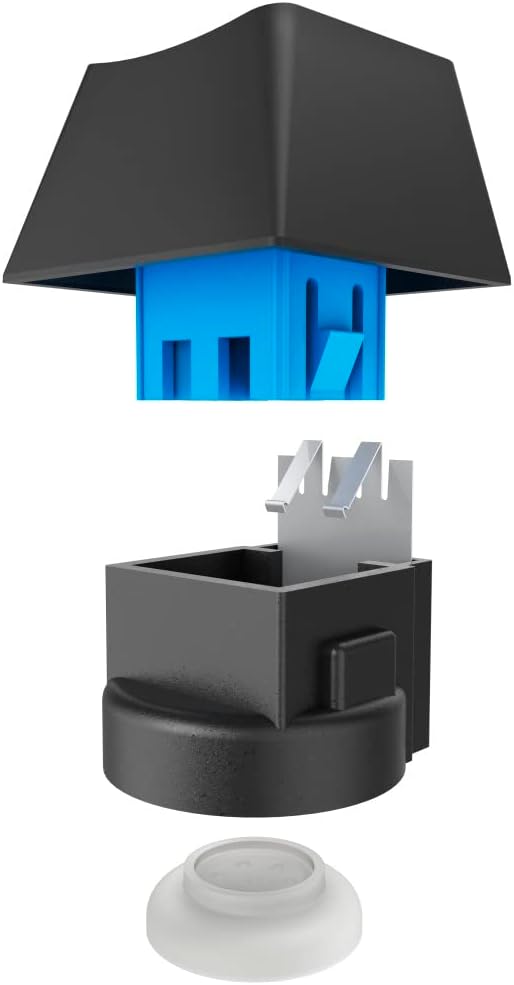
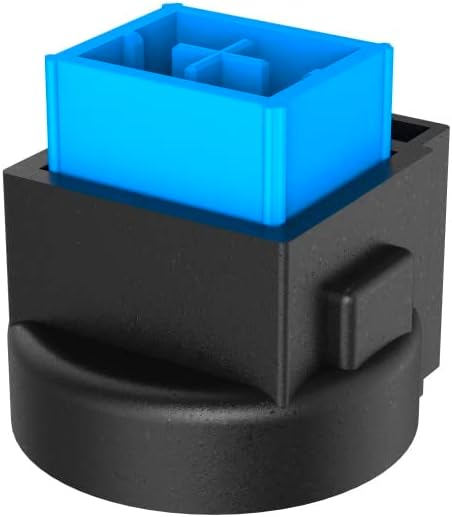
Image 3: Exploded and assembled views of the semi-mechanical key structure.
5. Manteniment
Un manteniment adequat garanteix la longevitat i el rendiment del teclat.
5.1 Neteja
- Desconnecteu el teclat de l'ordinador abans de netejar-lo.
- Feu servir un drap suau i sec per netejar la superfície del teclat.
- Per a la pols i les restes entre les tecles, feu servir aire comprimit.
- Eviteu l'ús de productes químics agressius, netejadors abrasius o humitat excessiva.
5.2 Emmagatzematge
Quan no l'utilitzeu, guardeu el teclat en un lloc net i sec, allunyat de la llum solar directa i de temperatures extremes.
6. Solució De Problemes
If you encounter issues with your uRage Exodus 700 keyboard, refer to the following common solutions:
- El teclat no respon:
- Assegureu-vos que el cable USB estigui ben connectat tant al teclat com a l'ordinador.
- Prova de connectar el teclat a un port USB diferent.
- Reinicieu l'ordinador.
- Claus que no es registren:
- Check for any physical obstructions under the keycaps.
- Ensure the keyboard drivers are correctly installed (check Device Manager on Windows).
- La il·luminació RGB no funciona:
- Verify that the lighting is not turned off via keyboard shortcuts.
- Check the gaming software settings if installed.
- Macro functions not working:
- Ensure the gaming software is running and macros are correctly configured.
- Update the gaming software to the latest version.
If problems persist, contact uRage customer support for further assistance.
7. Especificacions
| Característica | Especificació |
|---|---|
| Nom del model | Èxode 700 |
| Número de model | ham_n8_U8186011 |
| Disposició del teclat | QWERTY (anglès) |
| Tecnologia clau | Semi-Mechanical |
| Nombre de claus | 114 |
| Rollover Buttons | Fins a 24 |
| Temps de resposta | 1 ms |
| Clau de vida útil | 10 Million Attacks |
| Work Travel | 2.5 mm |
| Connectivitat | USB-A per cable |
| Il·luminació | Colors RGB |
| Sistema operatiu compatible | Windows 11/10/8/7 |
| Number of Macro Buttons | 4 |
| Color | Negre |
| Material | Plàstic |
| Longitud del cable | 180 cm |
| Dimensions (A x A x P) | 47 cm x 3.5 cm x 19 cm |
| Pes | 885 g |
8. Garantia i assistència
8.1 Garantia del fabricant
The uRage Exodus 700 Semi-Mechanical Gaming Keyboard comes with a 5 any de garantia del fabricantSi us plau, conserveu el comprovant de compra per a reclamacions de garantia. La garantia cobreix defectes de materials i fabricació en condicions d'ús normal.
8.2 Atenció al client
For technical support, warranty claims, or further inquiries, please visit the official uRage website or contact their customer service department. Contact information can typically be found on the warranty card included in your package or on the brand's official weblloc.