
Introducció
Thank you for choosing the SOMIC MS300 Over-Ear Wireless Bluetooth Headphones. This manual provides essential information for setting up, operating, and maintaining your headphones to ensure optimal performance and longevity. Please read this manual thoroughly before using the product.
Contingut del paquet
- SOMIC MS300 Over-Ear Wireless Bluetooth Headphones
- Cable de càrrega USB
- Cable d'àudio de 3.5 mm
- Manual d'usuari (aquest document)
Producte acabatview
Familiarize yourself with the various components and controls of your SOMIC MS300 headphones.
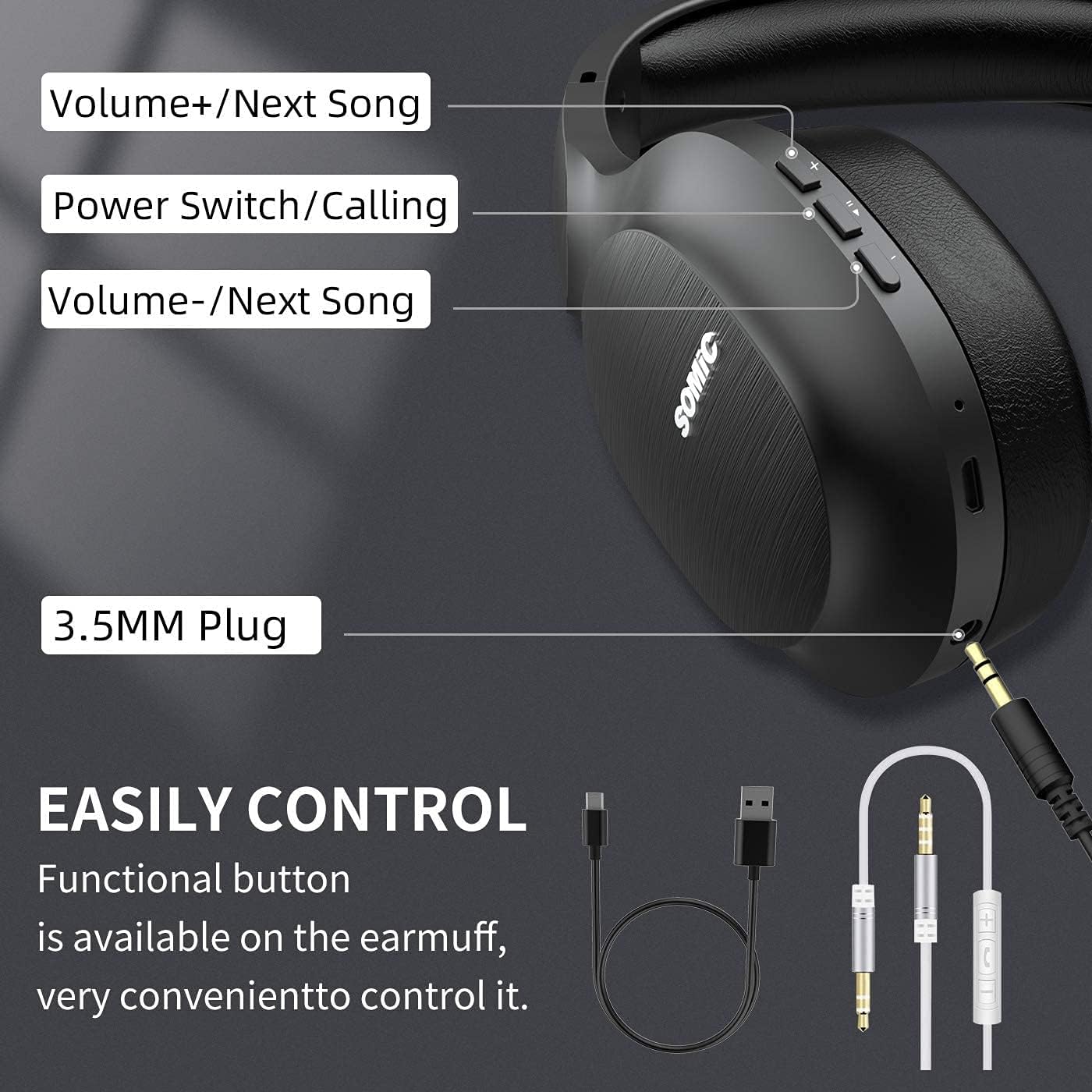
Imatge: Acabatview of the SOMIC MS300 headphone controls, including volume buttons, power switch, and 3.5mm audio jack.
Controls i Ports
- Volum + / Cançó següent: Press briefly to increase volume, press and hold to skip to the next song.
- Power Switch / Calling: Press and hold to power on/off. Briefly press to play/pause music. During a call, press to answer/end a call.
- Volum - / Cançó anterior: Press briefly to decrease volume, press and hold to go to the previous song.
- Conector d'àudio de 3.5 mm: For wired connection using the included 3.5mm audio cable.
- Port de càrrega USB: For charging the headphones using the included USB cable.
- Micròfon: Built-in for hands-free calling.
Configuració
Carregant els auriculars

Imatge: The SOMIC MS300 headphones illustrating the fast charging capability: 5 minutes of charge provides 2 hours of playback.
- Connecteu l'extrem petit del cable de càrrega USB al port de càrrega USB dels auriculars.
- Connecteu l'extrem més gran del cable de càrrega USB a un adaptador de corrent USB (no inclòs) o al port USB d'un ordinador.
- L'indicador LED mostrarà l'estat de càrrega (per exemple, vermell per a la càrrega, blau per a la càrrega completa).
- A full charge takes approximately 2-3 hours. For quick use, a 5-minute charge provides up to 2 hours of playtime.

Imatge: The SOMIC MS300 headphones highlighting their strong endurance with up to 72 hours of playtime on a single charge.
Encès/Apagat
- Per encendre: Press and hold the Power Switch button for approximately 3 seconds until the LED indicator flashes blue.
- Per apagar: Press and hold the Power Switch button for approximately 3 seconds until the LED indicator turns off.
Emparellament Bluetooth
- Assegureu-vos que els auriculars estiguin apagats.
- Press and hold the Power Switch button for about 5-7 seconds until the LED indicator flashes red and blue alternately, indicating pairing mode.
- Al dispositiu (telèfon intel·ligent, tauleta, ordinador), activeu el Bluetooth i cerqueu els dispositius disponibles.
- Select "SOMIC MS300" from the list of devices.
- Un cop connectat, l'indicador LED parpellejarà blau lentament.
Connexió amb cable (cable d'àudio de 3.5 mm)

Imatge: The SOMIC MS300 headphones demonstrating their versatility with both wireless Bluetooth connectivity and a wired option via a 3.5mm audio cable.
The SOMIC MS300 headphones can also be used with a wired connection, even if the battery is depleted.
- Connect one end of the 3.5mm audio cable to the 3.5mm audio jack on the headphones.
- Connect the other end of the 3.5mm audio cable to the audio output port of your device.
- The headphones will automatically switch to wired mode. Bluetooth functionality will be disabled.
Instruccions de funcionament
Reproducció de música
- Reproduir/pausa: Briefly press the Power Switch button.
- Pujar el volum: Briefly press the Volume + button.
- Baixar el volum: Briefly press the Volume - button.
- Pista següent: Mantingueu premut el botó Volum +.
- Pista anterior: Mantingueu premut el botó de volum -.
Trucades telefòniques
- Respondre/Finalitzar la trucada: Briefly press the Power Switch button.
- Rebutja la trucada: Press and hold the Power Switch button for 2 seconds.
- Torna a marcar l'últim número: Double-press the Power Switch button.
Connexió de dispositiu dual
The SOMIC MS300 headphones support connecting to two Bluetooth devices simultaneously.
- Connect the headphones to the first device as described in the "Bluetooth Pairing" section.
- Desactiva el Bluetooth al primer dispositiu. Els auriculars tornaran a entrar en mode d'emparellament.
- Connecteu els auriculars al segon dispositiu.
- Re-enable Bluetooth on the first device. The headphones should automatically reconnect to both devices.
- L'àudio es reproduirà des del dispositiu que estigui reproduint activament contingut multimèdia o rebent una trucada.
Noise Cancellation (CVC 8.0)

Imatge: A person wearing SOMIC MS300 headphones in a public setting, demonstrating the effectiveness of CVC Noise Cancelling Technology in reducing ambient noise.
The SOMIC MS300 headphones feature CVC 8.0 noise cancelling technology, which helps reduce ambient noise during calls for clearer communication. This feature is automatically active when using the built-in microphone.
Manteniment
Neteja
- Netegeu els auriculars amb un drap suau, sec i sense borrissol.
- Do not use abrasive cleaners, solvents, or spray cleaners.
- Eviteu que entri humitat a cap obertura.
Emmagatzematge
- Guardeu els auriculars en un lloc fresc i sec, allunyat de temperatures extremes i de la llum solar directa.
- Quan no els feu servir durant períodes prolongats, carregueu els auriculars com a mínim un cop cada tres mesos per allargar la durada de la bateria.
Cura de la bateria
- Do not attempt to replace the battery yourself. Contact customer support for battery-related issues.
- Eviteu descarregar completament la bateria amb freqüència, ja que això pot reduir-ne la vida útil total.
Resolució de problemes
| Problema | Possible solució |
|---|---|
| Els auriculars no s'engeguen. | Assegureu-vos que els auriculars estiguin carregats. Connecteu-los a una font d'alimentació amb el cable USB. |
| No es pot emparellar amb un dispositiu. | Ensure headphones are in pairing mode (LED flashing red and blue). Turn off and on Bluetooth on your device. Move headphones closer to the device. |
| Sense so o amb un volum baix. | Check volume levels on both headphones and the connected device. Ensure headphones are properly paired or the 3.5mm cable is fully inserted. |
| La qualitat del so és deficient. | Move closer to the connected device to avoid interference. Ensure there are no obstacles between the headphones and the device. |
| El micròfon no funciona. | Ensure the headphones are connected via Bluetooth. Check microphone settings on your device. |
Especificacions

Imatge: Un va explotar view of the 40mm dynamic driver and the Qualcomm QCC Bluetooth 5.0 chip, highlighting the audio technology within the SOMIC MS300 headphones.
| Característica | Detall |
|---|---|
| Model | MS300 |
| Marca | SOMIC |
| Connectivitat | Wireless (Bluetooth 5.0), Wired (3.5mm Audio Jack) |
| Xip Bluetooth | Qualcomm QCC Bluetooth 5.0 |
| Mida del controlador | Controladors dinàmics de 40 mm |
| Control de soroll | Cancel·lació de soroll CVC 8.0 |
| Capacitat de la bateria | 1000 mAh |
| Hora de joc | Fins a 72 hores |
| Càrrega ràpida | 5 minuts de càrrega per a 2 hores de reproducció |
| Material de les orelles | Memory Foam Protein |
| Pes | 208 g |
| Color | Negre |
| Resistència a l'aigua | No resistent a l'aigua |
Garantia i Suport
Informació de la garantia
SOMIC products are designed and manufactured to the highest quality standards. This product is covered by a limited warranty from the date of purchase. Please refer to the warranty card included in your package for specific terms and conditions. Keep your proof of purchase for warranty claims.
Atenció al client
If you encounter any issues or have questions regarding your SOMIC MS300 headphones, please contact our customer support team. Contact details can typically be found on the warranty card or the official SOMIC website. Please have your model number (MS300) and purchase information ready when contacting support.