
1. Introducció
This manual provides comprehensive instructions for the installation, operation, maintenance, and troubleshooting of the Axis Communications M7116 Video Encoder. The M7116 is designed to integrate analog video surveillance systems into an IP-based network, allowing for remote monitoring and management of up to 16 analog cameras.
2. Informació de seguretat
Please read all safety instructions carefully before installing or operating the device. Keep this manual for future reference.
- Assegureu-vos que la font d'alimentació compleix el volum especificattage requisits.
- No exposeu el dispositiu a la humitat ni a temperatures extremes.
- Eviteu bloquejar les obertures de ventilació per evitar el sobreescalfament.
- Only use accessories specified by Axis Communications.
- Demaneu tot el servei a personal de servei qualificat.
3. Contingut del paquet
Verifiqueu que tots els elements siguin presents al paquet:
- Axis Communications M7116 Video Encoder
- Adaptador d'alimentació
- Guia d'instal·lació
- Mounting Kit (if applicable)
4. Producte acabatview
The Axis M7116 is a 16-channel video encoder that digitizes analog video signals for network transmission. It features multiple BNC inputs for analog cameras, an Ethernet port for network connectivity, and serial ports for PTZ control.
4.1 Tauler frontal
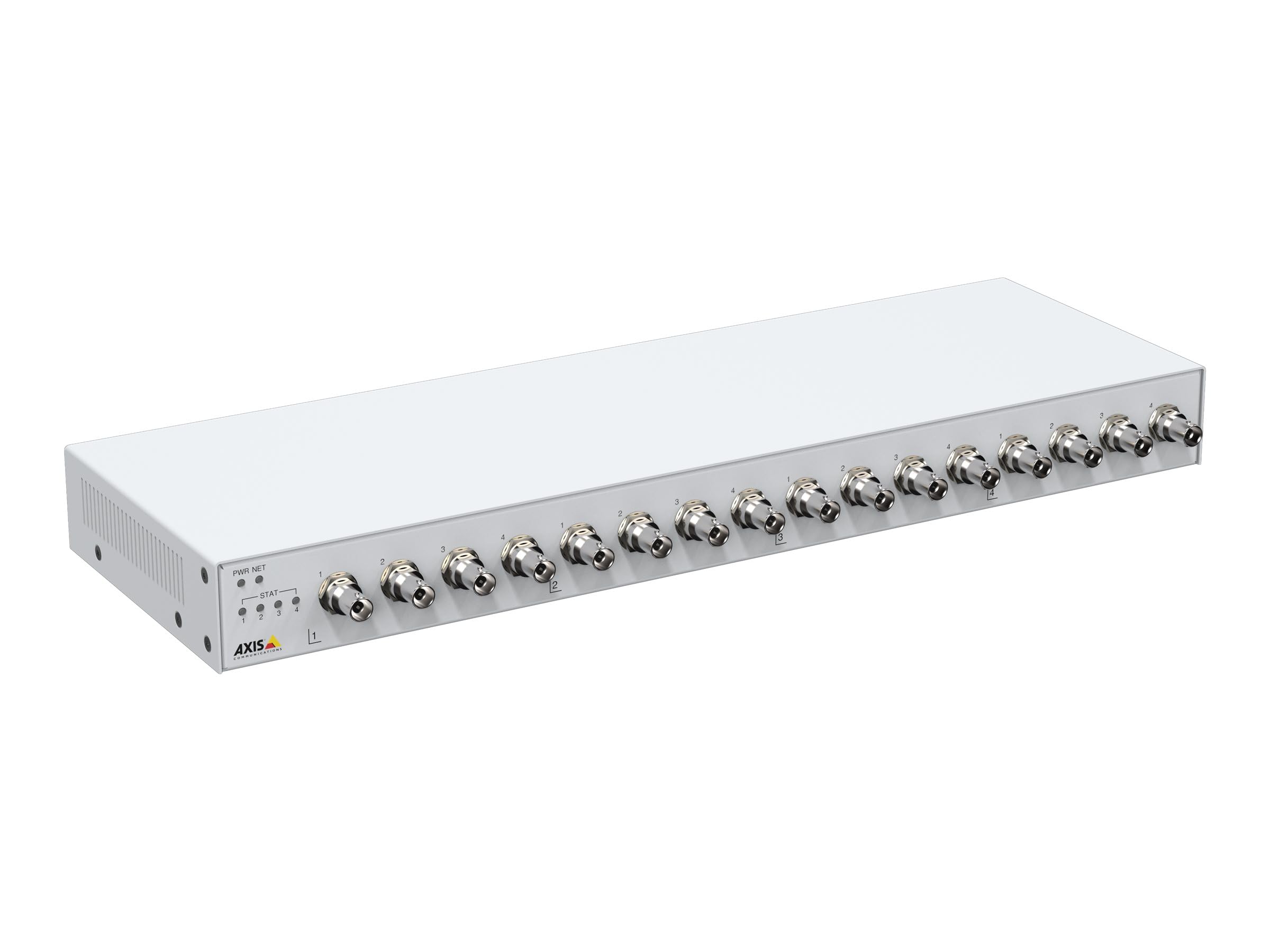
Figura 1: Davant view of the Axis M7116 Encoder, showing 16 BNC video input connectors and status indicator LEDs on the left side.

Figura 2: Close-up of the front panel, highlighting the Power (PWR), Network (NET), and Status (STAT) LEDs, along with the first four BNC video input ports.
4.2 Panell posterior

Figura 3: posterior view of the Axis M7116 Encoder, showing the Ethernet port, power input, and RS-485/422 serial communication ports.
4.3 Indicadors
- LED PWR (alimentació): Indicates power status. Solid green for normal operation.
- NET (Network) LED: Indicates network activity. Flashing green for data transmission.
- LED d'estat (STAT): Indicates device status. Refer to the online help for detailed status codes.
5. Configuració
Follow these steps to set up your Axis M7116 Encoder:
- Muntatge: Securely mount the encoder in a suitable location, ensuring adequate ventilation. The device is suitable for both indoor and outdoor usage, but ensure proper environmental protection if used outdoors.
- Connect Analog Cameras: Connect up to 16 analog cameras to the BNC input connectors on the front panel.
- Connecteu-vos a la xarxa: Connect an Ethernet cable (Cat 5e or higher) from the encoder's NET port to your network switch or router.
- Connectar l'alimentació: Connect the power adapter to the power input on the rear panel and then plug it into a power outlet. The PWR LED should illuminate.
- Configuració inicial: Use the Axis IP Utility or a web browser to discover the device on your network and assign an IP address. Access the device's web interface for further configuration, including video settings, user management, and network parameters.
6. Instruccions de funcionament
Once the M7116 Encoder is set up and configured, it will begin encoding video streams from the connected analog cameras. You can access and manage these streams through the device's web interface or compatible video management software.
- Accedint al Web Interfície: Obre a web browser and enter the IP address of the encoder. Log in with your credentials to access live views, recordings, and system settings.
- Transmissió de vídeo: The encoder provides H.264 and MJPEG video streams. Configure resolution, frame rate, and compression settings as needed for each channel.
- Control PTZ: If PTZ (Pan/Tilt/Zoom) cameras are connected via the RS-485/422 ports, you can control them through the web interface or integrated VMS.
- Gestió d'esdeveniments: Set up event triggers and actions, such as motion detection, tampering alarms, and scheduled recordings.
7. Manteniment
Regular maintenance ensures optimal performance and longevity of your Axis M7116 Encoder.
- Neteja: Gently clean the exterior of the device with a soft, dry cloth. Do not use liquid cleaners or aerosols. Ensure ventilation openings are free from dust and debris.
- Actualitzacions de firmware: Reviseu periòdicament les comunicacions d'Axis website for firmware updates. Keeping the firmware up-to-date ensures access to the latest features, security patches, and performance improvements.
- Monitorització del sistema: Regularly check system logs and status indicators for any anomalies.
8. Solució De Problemes
This section addresses common issues you might encounter with the M7116 Encoder.
| Problema | Causa possible | Solució |
|---|---|---|
| Sense alimentació (LED PWR apagat) | L'adaptador de corrent no està connectat o està defectuós; problema amb la presa de corrent. | Check power cable connections. Test power outlet. Replace power adapter if necessary. |
| No network connection (NET LED off/no activity) | Ethernet cable disconnected or faulty; network configuration issue. | Verify Ethernet cable connection. Check network switch/router status. Confirm IP address settings. |
| No video from a camera channel | Analog camera not connected or faulty; BNC cable issue; encoder channel misconfigured. | Check camera power and functionality. Inspect BNC cable. Verify channel settings in the web interfície. |
| No es pot accedir web interfície | Adreça IP incorrecta; problema de connectivitat de xarxa; tallafocs que bloqueja l'accés. | Ensure correct IP address. Check network connection. Temporarily disable firewall for testing. |
9. Especificacions
Key technical specifications for the Axis Communications M7116 Encoder (Model 02036-003):
- Marca: Comunicacions de l'eix
- Número de model: 02036-003
- Dimensions del producte: 19.69 x 19.69 x 11.02 polzades
- Pes de l'article: 4.4 lliures
- Tipus de connector: Ethernet, BNC
- Tipus de cable: Ethernet (Cat 5e recommended)
- Dispositius compatibles: Analog cameras, Network Video Recorders (NVRs), Video Management Systems (VMS)
- Característica especial: Tangle Free (referring to internal cabling/design)
- Usos recomanats: Connecting electronic devices, specifically for integrating analog video into IP networks
- Gènere del connector: Male-to-Female (for specific cable types)
- Nombre de pins: 8 (for Ethernet)
- Recompte d'unitats: 1.0 recompte
- Especificació complerta: RoHS
- Ús interior/exterior: Indoor, Outdoor (with appropriate environmental protection)
- Nombre d'articles: 1
- Fabricant: AXIS - ENCODER/DECODER
- Primera data disponible: 22 d'octubre de 2021
10. Garantia i Suport
The Axis Communications M7116 Encoder comes with a 2 any de garantia from the date of purchase, covering defects in materials and workmanship under normal use. For warranty claims or technical support, please contact Axis Communications customer service or visit their official weblloc web amb recursos de suport, preguntes freqüents i informació de contacte.
Per obtenir la informació d'assistència més actualitzada, visiteu: www.axis.com/support