
1. Introducció
This manual provides detailed instructions for the installation, operation, and troubleshooting of the avedio Links 1X4 HDMI Extender Splitter. This device allows you to extend a single HDMI video source to four HDMI displays simultaneously over long distances using CAT5e/6/7 Ethernet cables.
The extender supports resolutions up to 1080P@60Hz and features Power Over Cable (POC) technology, requiring power only at the transmitter unit. It also includes EDID management for enhanced compatibility with various display devices.
2. Informació de seguretat
- Ensure all cables are connected securely before powering on the device.
- No exposeu el dispositiu a l'aigua, la humitat ni a temperatures extremes.
- Utilitzeu només l'adaptador d'alimentació subministrat.
- No intenteu obrir ni reparar el dispositiu. Encarregueu totes les tasques de manteniment a personal qualificat.
- Keep the device away from sources of strong electromagnetic interference.
3. Contingut del paquet
Verifiqueu que tots els elements siguin presents al vostre paquet:
- 1x HDMI Extender 1x4 Transmitter Unit
- 4x HDMI Extender Receiver Units
- 1x adaptador d'alimentació DC 12V
- 1 x manual d'usuari
- 2x Fixed Hangers

Image: Contents of the avedio Links 1X4 HDMI Extender Splitter package.
4. Producte acabatview
4.1 Transmitter Panel (TX)
The transmitter unit connects to your HDMI source and distributes the signal to the receiver units.
- Interruptor ON / OFF: Power control for the transmitter.
- Indicador d'alimentació: Lights up when the unit is powered on.
- Signal Indicator (TX): Indicates HDMI signal input.
- RJ45 Output (CAT1-CAT4): Connects to receiver units via CAT5e/6/7 cables.
- EDID Switch (1-2-3): Dip switches for EDID mode selection.
- Entrada HDMI: Connects to your HDMI source device.
- Entrada d'alimentació DC 12V: Connects to the provided 12V power adapter.
4.2 Receiver Panel (RX)
The receiver units connect to your HDMI displays and receive the extended signal from the transmitter.
- Entrada RJ45: Connects to the transmitter unit via a CAT5e/6/7 cable.
- Sortida HDMI: Connects to your HDMI display device.
- Entrada d'alimentació DC 5V: Not required for operation due to POC technology.
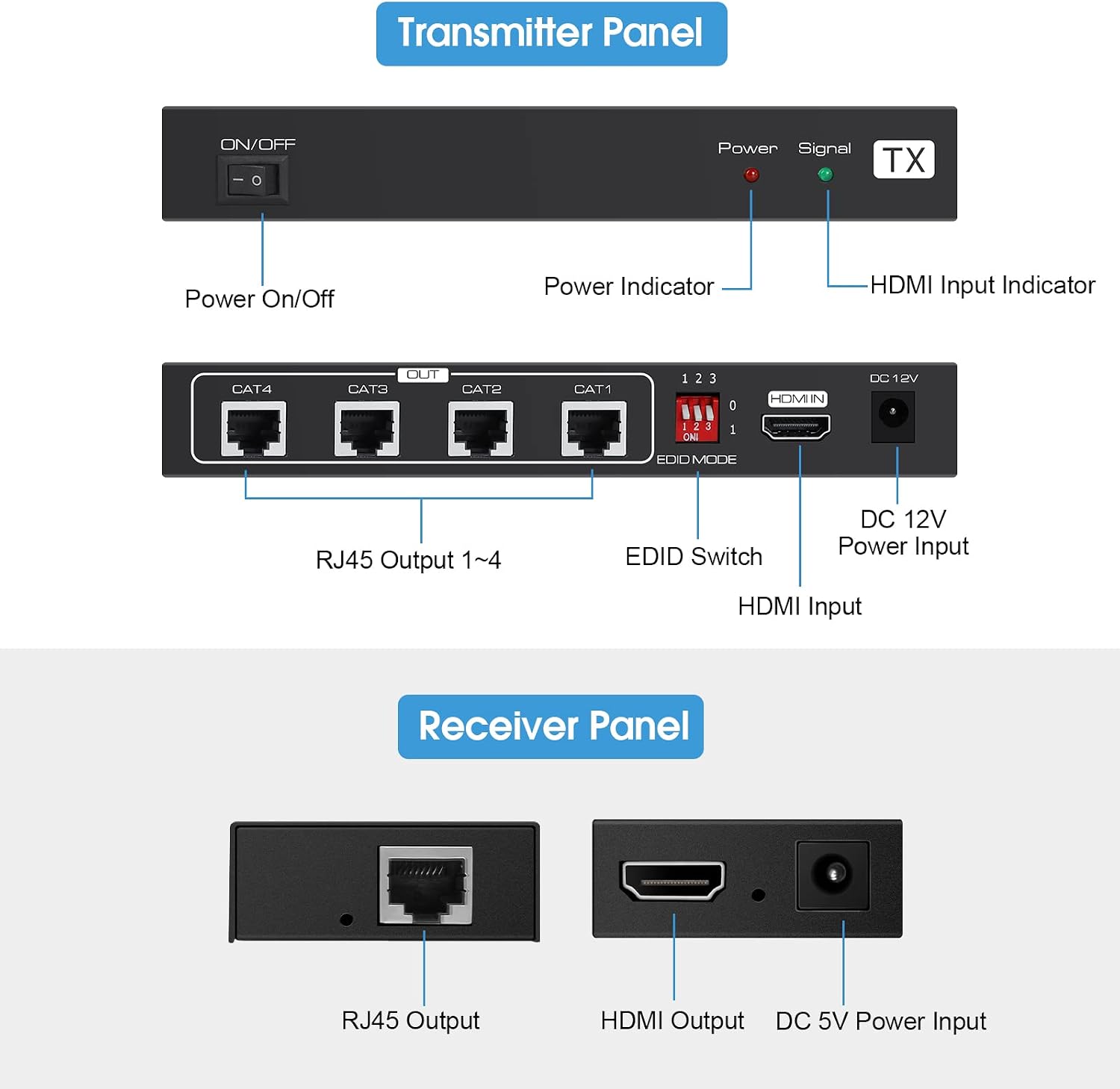
Image: Front and back panels of the Transmitter and Receiver units.
5. Instruccions de configuració
Follow these steps to set up your HDMI Extender Splitter:
- Connecteu la font HDMI: Connect your HDMI source device (e.g., Blu-ray player, TV box, PC) to the Entrada HDMI port on the Transmitter (TX) unit using a high-quality HDMI cable (up to 5 meters / 16 feet).
- Connect Receiver Units: Connect each of the four Receiver (RX) units to the Sortida RJ45 ports (CAT1-CAT4) on the Transmitter (TX) unit using individual CAT5e/6/7 Ethernet cables. Each cable can be up to 50 meters (165 feet) long.
- Connecta les pantalles: Connect each Receiver (RX) unit to an HDMI display (e.g., TV, monitor) using a high-quality HDMI cable.
- Encès: Connecteu l'adaptador de corrent CC de 12 V proporcionat a Entrada d'alimentació DC 12V on the Transmitter (TX) unit. Flip the ON/OFF switch to the ON position. The Power Indicator light on the TX unit should illuminate.
- POC Technology: Due to Power Over Cable (POC) technology, the Receiver (RX) units do not require separate power adapters. Power is supplied through the Ethernet cables from the Transmitter unit.
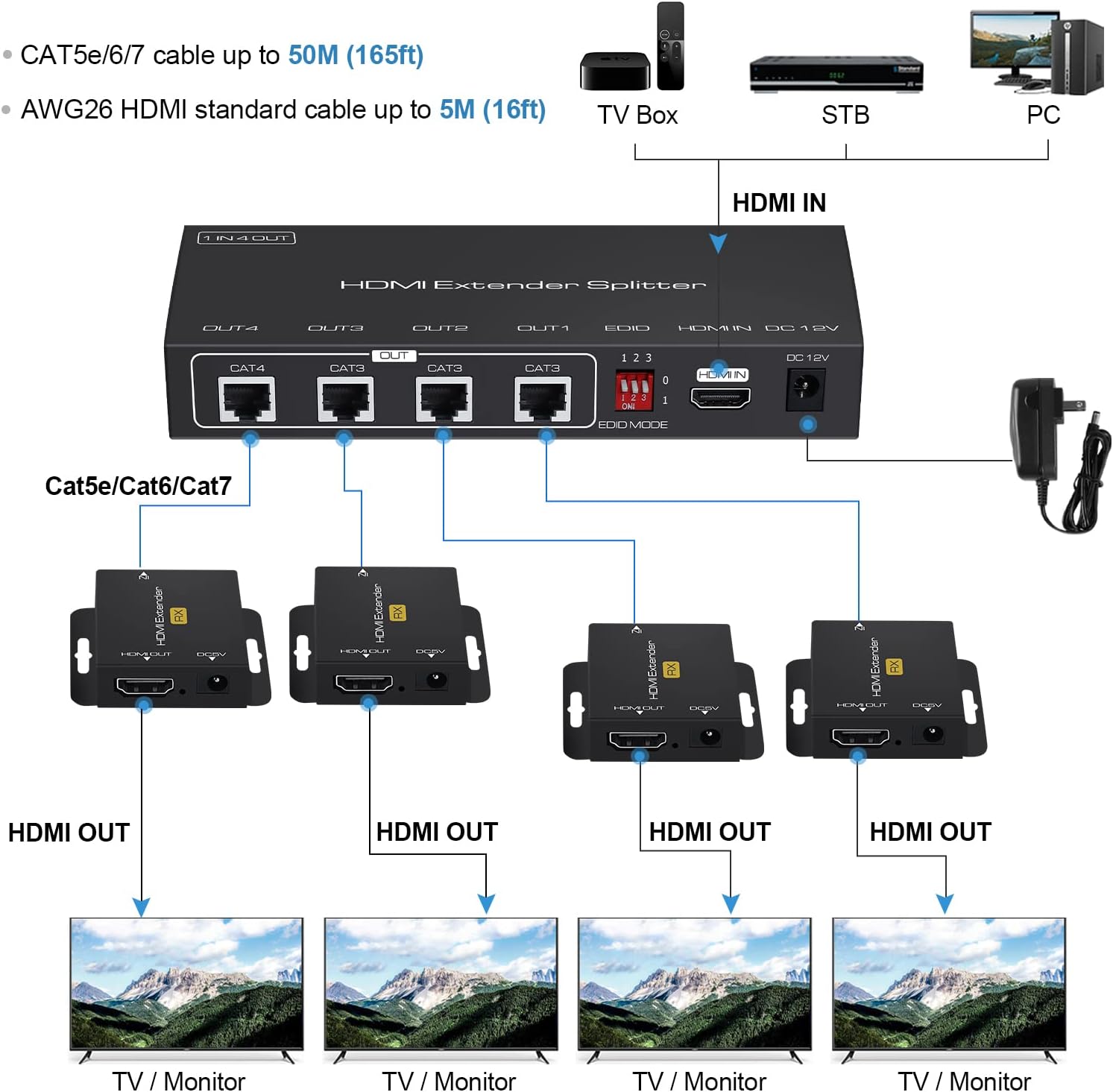
Image: Typical connection diagram for the HDMI Extender Splitter.

Image: The transmitter unit, illustrating the POC power supply feature.
6. Instruccions de funcionament
6.1 Gestió EDID
The EDID (Extended Display Identification Data) switch on the transmitter unit allows you to select the optimal audio and video format for compatibility with your connected displays. Adjust the dip switches (1, 2, 3) according to the desired EDID specification.

Image: EDID switch and corresponding settings table.
Configuració de l'interruptor EDID:
| Posició 1 | Posició 2 | Posició 3 | Especificació EDID |
|---|---|---|---|
| 0 | 0 | 0 | 1080P 2 canals |
| 0 | 0 | 1 | 1080P 5.1 canals |
| 0 | 1 | 0 | 1080P 7.1 canals |
| 0 | 1 | 1 | 1080P 3D 2CH |
| 1 | 0 | 0 | 1080P 3D 5.1CH |
| 1 | 0 | 1 | 1080P 3D 7.1CH |
| 1 | 1 | 0 | 1920x1200 2CH |
Note: After changing EDID settings, it is recommended to power cycle the transmitter unit for the new settings to take effect.
7. Manteniment
- Netegeu el dispositiu amb un drap suau i sec. No utilitzeu netejadors líquids ni en aerosol.
- Assegureu-vos de ventilar adequadament al voltant de les unitats per evitar el sobreescalfament.
- Guardeu el dispositiu en un lloc fresc i sec quan no l'utilitzeu.
8. Solució De Problemes
If you encounter issues, refer to the following troubleshooting steps:
8.1 Sense poder
- Check if the power adapter is securely plugged into both the wall socket and the DC 12V input on the Transmitter unit.
- Ensure the ON/OFF switch on the Transmitter unit is in the ON position.
- Verifiqueu que la presa de corrent funciona connectant-hi un altre dispositiu.
8.2 No Picture / Signal
- Confirm that all connected devices (HDMI source, displays) are powered on and functioning correctly.
- Check all HDMI and CAT5e/6/7 cable connections. Ensure they are firmly seated.
- Test with different HDMI cables if possible, as faulty cables can cause signal loss.
- Ensure the CAT5e/6/7 cables are of good quality and meet the specified length requirements (up to 50m/165ft).
- Adjust the EDID switch settings on the Transmitter unit to match the capabilities of your displays. Power cycle the transmitter after changing EDID settings.
8.3 Obscure / Poor Picture Quality
- Reconnect all cables to ensure a good connection.
- Verify the quality of your HDMI and CAT5e/6/7 cables. Low-quality or damaged cables can degrade signal quality.
- Ensure the total cable length (HDMI input + CAT + HDMI output) does not exceed recommended limits.
- Check for any sources of electromagnetic interference near the cables or units.
9. Especificacions
| Característica | Descripció |
|---|---|
| Resolució HDMI | 3D / 1080P / 1080i / 720P / 576P / 576i / 480P / 480i @60Hz |
| Format d'àudio | DTS-HD / Dolby-trueHD / LPCM7.1 / DTS / Dolby-AC3 / DSD |
| Velocitat de transmissió màxima | 4.95 Gbps |
| Input Cable Distance | Cable estàndard HDMI ≤5m AWG26 |
| Distància del cable de sortida | ≤50m CAT5e/6/7 cable |
| Font d'alimentació | POC (Power Over Cable) - TX unit requires DC 12V, RX units are powered via CAT cable. |
| Nombre de Ports | 1 HDMI Input, 4 RJ45 Outputs (TX); 1 RJ45 Input, 1 HDMI Output (RX) |
| Color | Negre |
| Marca | enllaços avedio |
10. Vídeo oficial del producte
Watch this video for a visual guide on the avedio Links 1X4 HDMI Extender Splitter's features and setup.
Video: An official product video demonstrating the avedio Links 1X4 HDMI Extender Splitter, its components, and connection process.
11. Informació de la garantia
This product comes with a standard manufacturer's warranty. Please refer to the warranty card included in your package or contact customer support for specific details regarding warranty coverage and terms.
12. Atenció al client
For technical assistance, troubleshooting, or any questions regarding your avedio Links 1X4 HDMI Extender Splitter, please contact avedio links customer support. Contact information can typically be found on the product packaging, the official avedio links weblloc web o a través del vostre distribuïdor.