
1. Introducció
This manual provides essential information for the safe and efficient operation of your SHINCO WIFI Portable Dehumidifier, model SDZ1-50D. Please read it thoroughly before using the appliance and retain it for future reference. This dehumidifier is designed to remove excess moisture from the air, helping to create a healthier and more comfortable indoor environment. It features a powerful compressor, multiple drainage options, and smart control capabilities.

Figura 1.1: Davant view of the SHINCO WIFI Portable Dehumidifier SDZ1-50D. This image displays the unit's compact design, control panel, and visible water tank level indicator.

Figura 1.2: Acabatview of key features including 50L/day dehumidification, 24-hour timer, automatic humidity capture, and quiet operation.
2. Instruccions de seguretat
Si us plau, observeu les següents precaucions de seguretat per evitar lesions o danys a l'aparell:
- Connecteu sempre la unitat a una presa de corrent amb connexió a terra i el volum correcte.tage (220 V).
- No feu funcionar el deshumidificador amb un cable d'alimentació o un endoll danyats.
- Mantingueu l'aparell allunyat de l'aigua i altres líquids. No el submergiu.
- Ensure adequate ventilation around the unit. Do not block air inlets or outlets.
- No introduïu objectes a les sortides d'aire.
- Desendolleu la unitat abans de netejar-la o realitzar qualsevol manteniment.
- Aquest aparell no està dissenyat per ser utilitzat per persones amb capacitats físiques, sensorials o mentals reduïdes tret que estiguin supervisades.
- No utilitzeu el deshumidificador en zones on s'emmagatzemen gasos o líquids inflamables.
3. Components del producte
Familiaritzeu-vos amb les parts principals del vostre deshumidificador:
- Tauler de control amb pantalla digital
- Sortida d’aire
- Entrada d'aire amb filtre
- Dipòsit d'aigua (capacitat de 7L)
- Sortida de drenatge continu
- Lift Pump Drainage Outlet
- Cable d'alimentació
- Casters for mobility

Figura 3.1: posterior view showing the continuous drainage port and a top view with the water tank removed, illustrating internal components.
3.1 Tauler de control
El panell de control permet gestionar totes les funcions del deshumidificador.

Figura 3.2: Close-up of the control panel, displaying buttons for power, mode selection, humidity adjustment, fan speed, internal cleaning, and timer.

Figura 3.3: Detail of the power button and digital display, which shows current humidity levels or timer settings.
4. Configuració
4.1 Desembalatge
- Traieu amb cura el deshumidificador del seu embalatge.
- Traieu tots els materials d'embalatge i assegureu-vos que no falti cap component.
- Inspect the unit for any damage incurred during shipping. If damaged, do not operate and contact customer support.
4.2 Col·locació
- Col·loqueu el deshumidificador sobre una superfície plana i estable.
- Assegureu-vos que hi hagi almenys 20 cm (8 polzades) d'espai al voltant de la unitat per a un flux d'aire adequat.
- Avoid placing the unit near heat sources, in direct sunlight, or in areas exposed to splashing water.
- The unit is equipped with casters for easy movement.
4.3 Connexió d'alimentació
- Connecteu el cable d'alimentació a una presa de corrent adequada de 220 V amb connexió a terra.
- No feu servir cables d'extensió ni endolls múltiples.
5. Instruccions de funcionament
5.1 Encès/Apagat
- Premeu el botó Poder botó (
 ) al tauler de control per encendre o apagar la unitat.
5.2 Selecció del mode
Premeu el botó Mode botó () to cycle through available modes:
- Mode automàtic: The unit will automatically operate to maintain the set humidity level (30% to 80% RH). It will turn off when the target humidity is reached and restart if humidity rises.
- Mode de bugaderia: Designed to absorb excess moisture from clothes, reducing drying time.
- Mode de descongelació: The unit features an automatic defrost mode for efficient operation even at low temperatures (down to 5°C).
5.3 Configuració d'humitat
- En el mode automàtic, premeu la tecla Humitat botó () to adjust the desired humidity level between 30% and 80% in 5% increments.
5.4 Velocitat del ventilador
- Premeu el botó Velocitat del ventilador botó () to select between High and Low fan speeds.
5.5 Funció de temporitzador
- Premeu el botó Temporitzador botó () to set the operating time from 1 to 24 hours. The unit will automatically turn off after the set time.

Figura 5.1: Illustration of the timer function, allowing scheduled operation for convenience.
5.6 Internal Cleaning Function
- Premeu el botó Neteja botó () to activate the internal drying function, which helps prevent mold and odors inside the unit.
5.7 WIFI Control (Smart Home App)
Control your dehumidifier remotely using the Smart Home application on your smartphone.
- Download the "Smart Home" app from your device's app store.
- Follow the in-app instructions to pair your dehumidifier with your Wi-Fi network.
- Once connected, you can power on/off, change modes, set humidity, and manage the timer from your phone.

Figura 5.2: Screenshot of the Smart Home app interface, demonstrating remote control capabilities for the dehumidifier.
6. Opcions de drenatge
Your dehumidifier offers three methods for water removal:
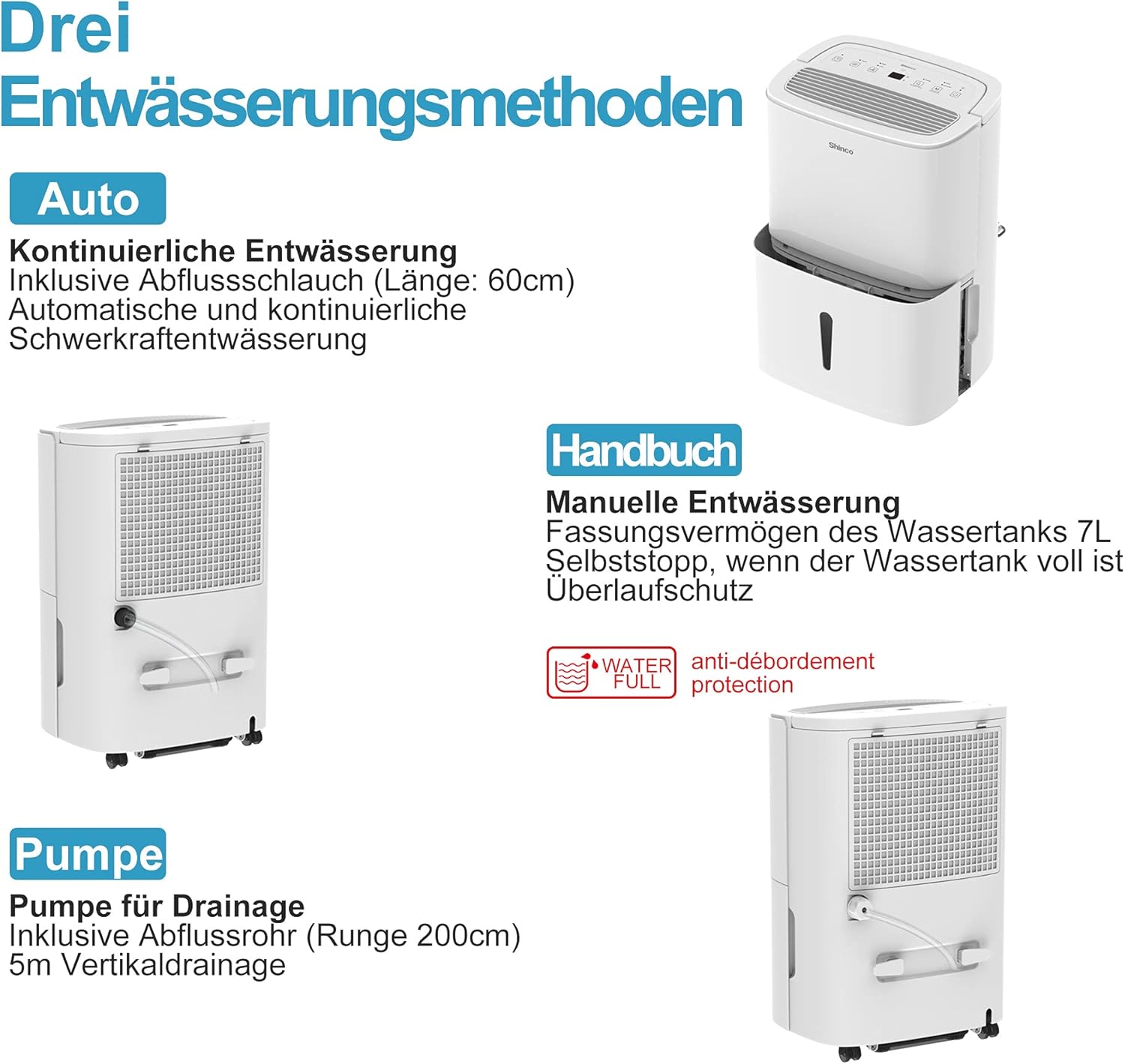
Figura 6.1: Visual representation of the three drainage options: manual tank, continuous gravity drainage, and lift pump drainage.
6.1 Drenatge manual (dipòsit d'aigua)
- The dehumidifier collects water in its removable 7-liter tank.
- When the tank is full, the unit will automatically stop operating, and an indicator light will illuminate.
- Traieu amb cura el dipòsit, buideu l'aigua recollida i torneu-lo a inserir de manera segura.

Figura 6.2: The display showing a 'Full' indicator, signaling that the water tank needs to be emptied.
6.2 Continuous Gravity Drainage
- For continuous operation without emptying the tank, attach the provided 60 cm drainage hose to the continuous drainage outlet on the back of the unit.
- Ensure the hose is sloped downwards to allow water to drain by gravity into a floor drain or suitable container.
6.3 Lift Pump Drainage
- The unit includes a lift pump and a 2-meter drainage hose for situations where gravity drainage is not possible.
- Connect the 2-meter hose to the lift pump drainage outlet. The pump can discharge water vertically up to 5 meters.
7. Manteniment
Un manteniment regular garanteix un rendiment òptim i una llarga vida útil del deshumidificador.
7.1 Neteja del filtre d'aire
The dehumidifier is equipped with an active carbon filter to purify the air. Clean the filter regularly.
- Apagueu i desconnecteu la unitat.
- Traieu el filtre d'aire de la part posterior de la unitat.
- Netegeu el filtre amb un aspirador o renteu-lo amb aigua tèbia i sabó. Esbandiu-lo bé i deixeu-lo assecar completament a l'aire abans de tornar-lo a inserir.
- Substituïu el filtre.

Figura 7.1: Illustration of how to remove and clean the air filter, showing both the pre-filter and the active carbon filter.
7.2 Neteja de l'exterior de la unitat
- Netegeu l'exterior de la unitat amb un damp tela.
- No utilitzeu productes químics agressius, netejadors abrasius ni dissolvents.
8. Solució De Problemes
If you encounter issues, refer to the following table before contacting customer support:
| Problema | Causa possible | Solució |
|---|---|---|
| La unitat no s'encén | Sense font d'alimentació El cable d'alimentació no està ben connectat | Check power outlet and plug connection Ensure the outlet is functional |
| Sense deshumidificació | Dipòsit d'aigua ple Filtre d'aire obstruït Temperatura ambient massa baixa | Dipòsit d'aigua buit Netegeu el filtre d'aire Ensure room temperature is above 5°C |
| La unitat és sorollosa | La unitat no està sobre una superfície plana Filtre d'aire obstruït | Col·loqueu la unitat sobre una superfície plana i estable Netegeu el filtre d'aire |
| Fuites d'aigua | Dipòsit d'aigua no inserit correctament Continuous drainage hose loose or blocked | Reinsert water tank correctly Check hose connection and clear any blockages |
| La connexió WiFi falla | Contrasenya de Wi-Fi incorrecta Router too far L'aplicació no s'ha actualitzat | Verify Wi-Fi password Move unit closer to router or use a Wi-Fi extender Update Smart Home app |
9. Especificacions
Technical details for the SHINCO WIFI Portable Dehumidifier SDZ1-50D:
| Característica | Especificació |
|---|---|
| Número de model | SDZ1-50D |
| Capacitat de deshumidificació | 50 Liters/Day |
| Potència nominal | 750 watts |
| Voltage | 220 Volts |
| Capacitat del dipòsit d'aigua | 7 litres |
| Nivell de soroll | 49 dB |
| Dimensions (L x A x A) | 29 x 39.5 x 52 cm |
| Pes | 19 quilos |
| Refrigerant | R290 |
| Mida recomanada de l'habitació | Fins a 55 m² (aprox. 592 peus quadrats) |
| Components inclosos | Dehumidifier, Drain Hose, Instruction Manual |

Figura 9.1: Diagram illustrating the physical dimensions of the dehumidifier and a summary of its technical specifications.
10. Garantia i Suport
For warranty information or technical support, please refer to the warranty card included with your product or contact SHINCO customer service through their official website or the contact details provided in your purchase documentation. Please have your model number (SDZ1-50D) and purchase date ready when contacting support.