
Introducció
This manual provides instructions for the ALLIMITY GB346WJSA replacement remote control, designed for use with specific Sharp Smart TV models including 4T-C60BK2UD and 4T-C70BK2UD. This remote offers standard television control functions and includes a voice control feature. Please read these instructions carefully to ensure proper setup and operation.
Configuració
1. Instal·lació de la bateria
The remote control requires two (2) AAA alkaline batteries (not included). Follow these steps to install them:
- Localitzeu el compartiment de la bateria a la part posterior del comandament a distància.
- Premeu la pestanya i feu lliscar la tapa de la bateria cap avall per obrir-la.
- Introduïu dues piles AAA, assegurant-vos que els terminals positiu (+) i negatiu (-) s'alineïn correctament amb les marques de l'interior del compartiment.
- Feu lliscar la coberta de la bateria al seu lloc fins que faci un clic de manera segura.

Imatge: Enrere view of the remote control with the battery compartment open, illustrating where to insert AAA batteries.
2. Configuració inicial i aparellament
For basic functions (e.g., power, volume, channel), no programming is required. Simply insert new batteries, and the remote should operate your compatible Sharp Smart TV directly.
Per al Funció de veu, pairing with your Sharp Smart TV is required. The specific pairing process may vary slightly depending on your TV model. Generally, you will need to access your TV's settings menu to initiate the remote control pairing process. Refer to your Sharp Smart TV's user manual for detailed instructions on how to pair a Bluetooth remote control or activate voice control functionality.
Instruccions de funcionament
This remote control provides access to various functions of your Sharp Smart TV. Below are some common button functions:
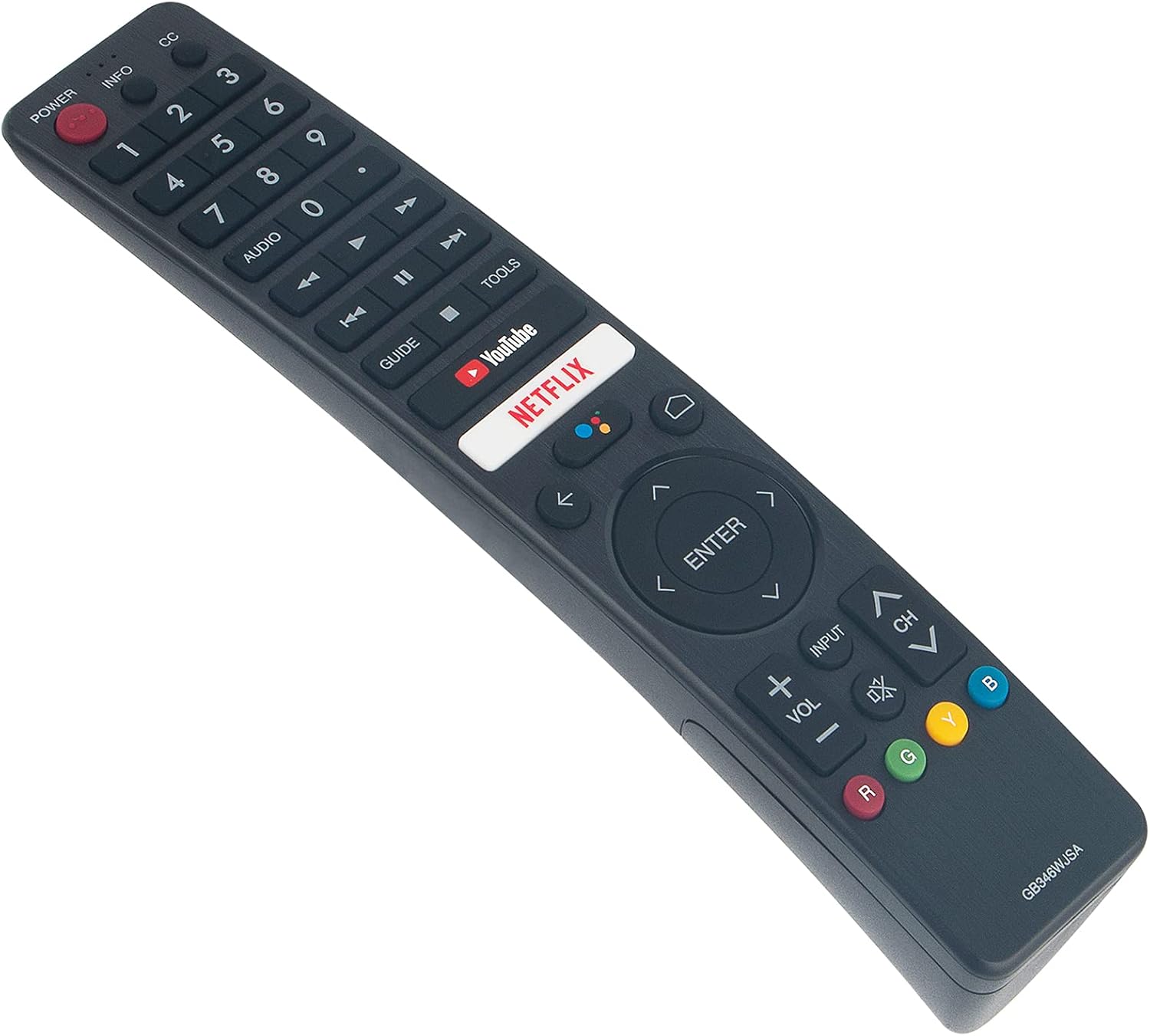
Imatge: Frontal view of the ALLIMITY GB346WJSA remote control, displaying its layout and button labels.
- PODER: Encén o apaga el televisor.
- INFO / CC: Displays information or activates Closed Captions.
- Botons numèrics (0-9): Directly select channels.
- ÀUDIO: Adjusts audio settings or tracks.
- GUIA: Accesses the electronic program guide.
- YouTube / NETFLIX: Direct access buttons for these streaming services.
- Navigation Pad (Up, Down, Left, Right, ENTER): Navega pels menús i confirma les seleccions.
- BACK / HOME: Returns to the previous screen or accesses the TV's home menu.
- ENTRADA: Selecciona les fonts d'entrada (HDMI, AV, etc.).
- VOL +/-: Ajusta el nivell de volum.
- CH +/-: Canvia de canal.
- MUT: Silencia o activa l'àudio del televisor.
- Botons de color (R, G, Y, B): Functionality varies by application or TV menu.
Utilització del control de veu
Once the remote is successfully paired with your Sharp Smart TV for voice functionality, press the dedicated voice button (often indicated by a microphone icon) and speak clearly into the remote. Ensure you are within a reasonable distance from the remote and that there are no obstructions between you and the remote's microphone.
Manteniment
Canvi de bateria
Replace batteries when the remote's response becomes sluggish or stops working. Always replace both batteries at the same time with new AAA alkaline batteries. Do not mix old and new batteries, or different types of batteries.
Neteja
To clean the remote control, gently wipe it with a soft, dry cloth. Do not use liquid cleaners, sprays, or abrasive materials, as these can damage the remote's surface or internal components.
Resolució de problemes
El comandament a distància no respon
- Comproveu les bateries: Ensure batteries are correctly inserted and are not depleted. Replace with fresh AAA alkaline batteries if necessary.
- Línia de visió: Ensure there are no obstructions between the remote control and the TV's infrared receiver.
- Compatibilitat amb TV: Verify that your TV model is listed as compatible with the ALLIMITY GB346WJSA remote control.
Voice Function Not Working
- Estat de l'aparellament: Confirm that the remote control has been successfully paired with your Sharp Smart TV for voice functionality. This is a separate step from basic remote operation.
- Configuració del televisor: Access your TV's settings menu to check if voice control is enabled and if the remote is properly connected. Refer to your TV's specific instructions for voice remote pairing.
- Microphone Obstruction: Ensure the microphone on the remote is not covered or obstructed.
- Distància: Speak clearly and within a reasonable distance to the remote.
Especificacions
| Marca | ALLIMITAT |
| Número de model | GB346WJSA |
| Dispositius compatibles | Sharp Smart TV (4T-C60BK2UD, 4T-C70BK2UD) |
| Tecnologia de connectivitat | Bluetooth |
| Característica especial | Voice Function, No Programming Required (for basic functions) |
| Font d'alimentació | 2 piles AAA (no incloses) |
| Interval màxim | 10 metres |
| Pes de l'article | 2 unces |
| Dimensions de l'article (L x A x A) | 6 cm de llargada x 2 cm d'amplada x 0.5 cm d'alçada |
Garantia i Suport
This product comes with a 30-day refund policy and a 60-day warranty from the date of purchase. For any issues or support inquiries, please contact the seller or refer to the product listing for customer service contact information.