
1. Introducció
This manual provides detailed instructions for the assembly, operation, and maintenance of your FLEXISPOT EN2 Electric Standing Desk. Please read this manual thoroughly before assembly and use to ensure proper function and safety. Keep this manual for future reference.
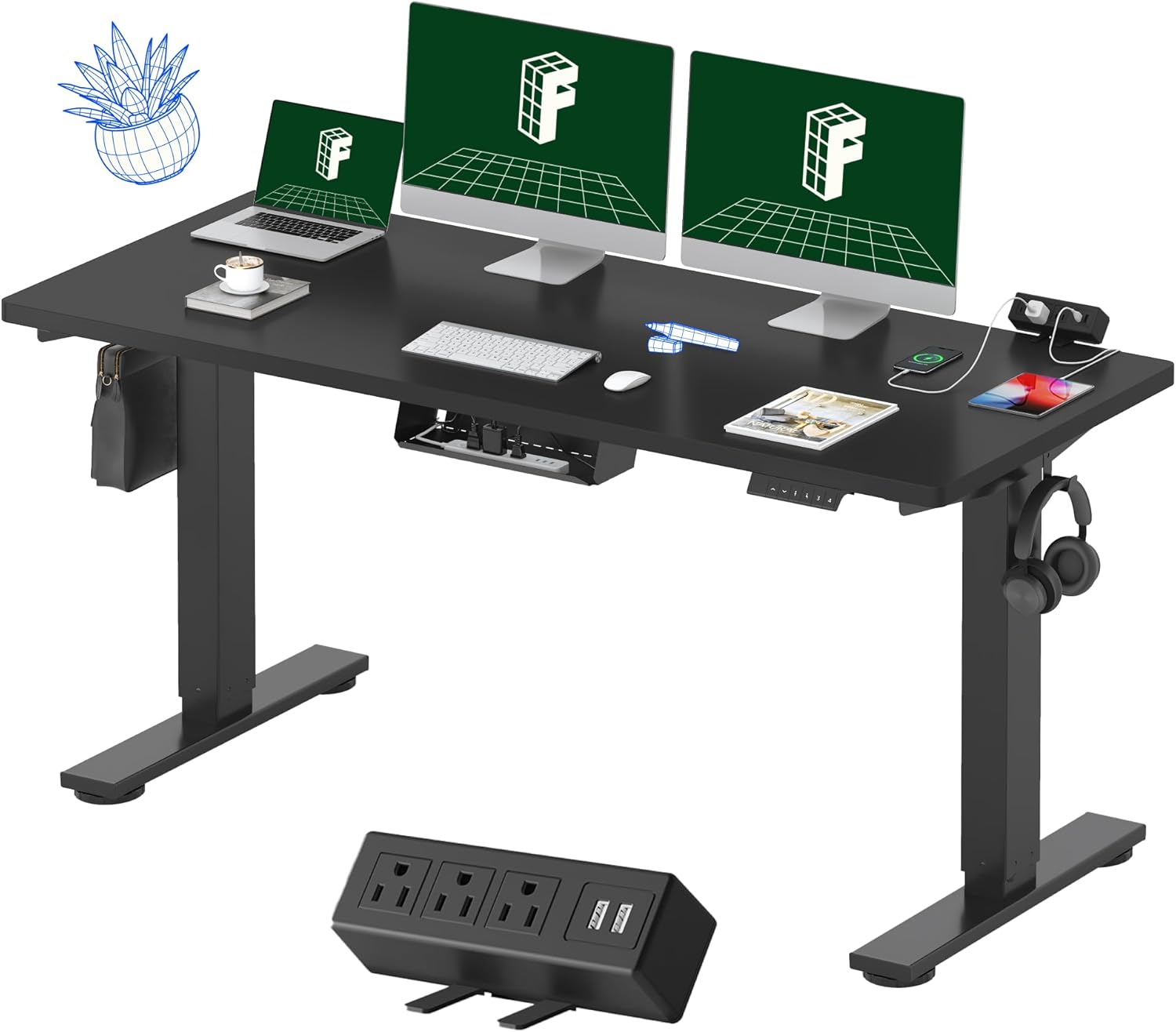
Figure 1: FLEXISPOT EN2 Electric Standing Desk
2. Informació de seguretat
Per evitar lesions o danys al producte, observeu les següents pautes de seguretat:
- Always use the correct tools for assembly.
- No supereu la capacitat màxima de pes de 176 lliures (80 kg).
- Ensure the desk is properly anchored and stable on a level surface to prevent tipping.
- Mantingueu els nens i les mascotes allunyats de l'escriptori durant el funcionament.
- Eviteu col·locar líquids directament sobre el tauler de control o a prop de components elèctrics.
- Do not disassemble or modify the desk's electrical components. Contact customer support for service.
3. Components del producte
The FLEXISPOT EN2 desk features a robust design with integrated functionalities for an ergonomic workspace.
3.1 Whole-Piece Desktop
The desk is equipped with a spacious, single-piece desktop made from FSC-Certified wood, providing a stable and continuous work surface. This design enhances stability compared to multi-piece desktops.

Figure 2: Single-Piece Desktop for Enhanced Stability
3.2 Removable Desktop Power Outlet
A convenient clamp-on power strip is included, featuring 3 AC outlets (125V/12A) and 2 USB charging ports (5V/2A). This can be positioned on the back or side of the desk for easy access.
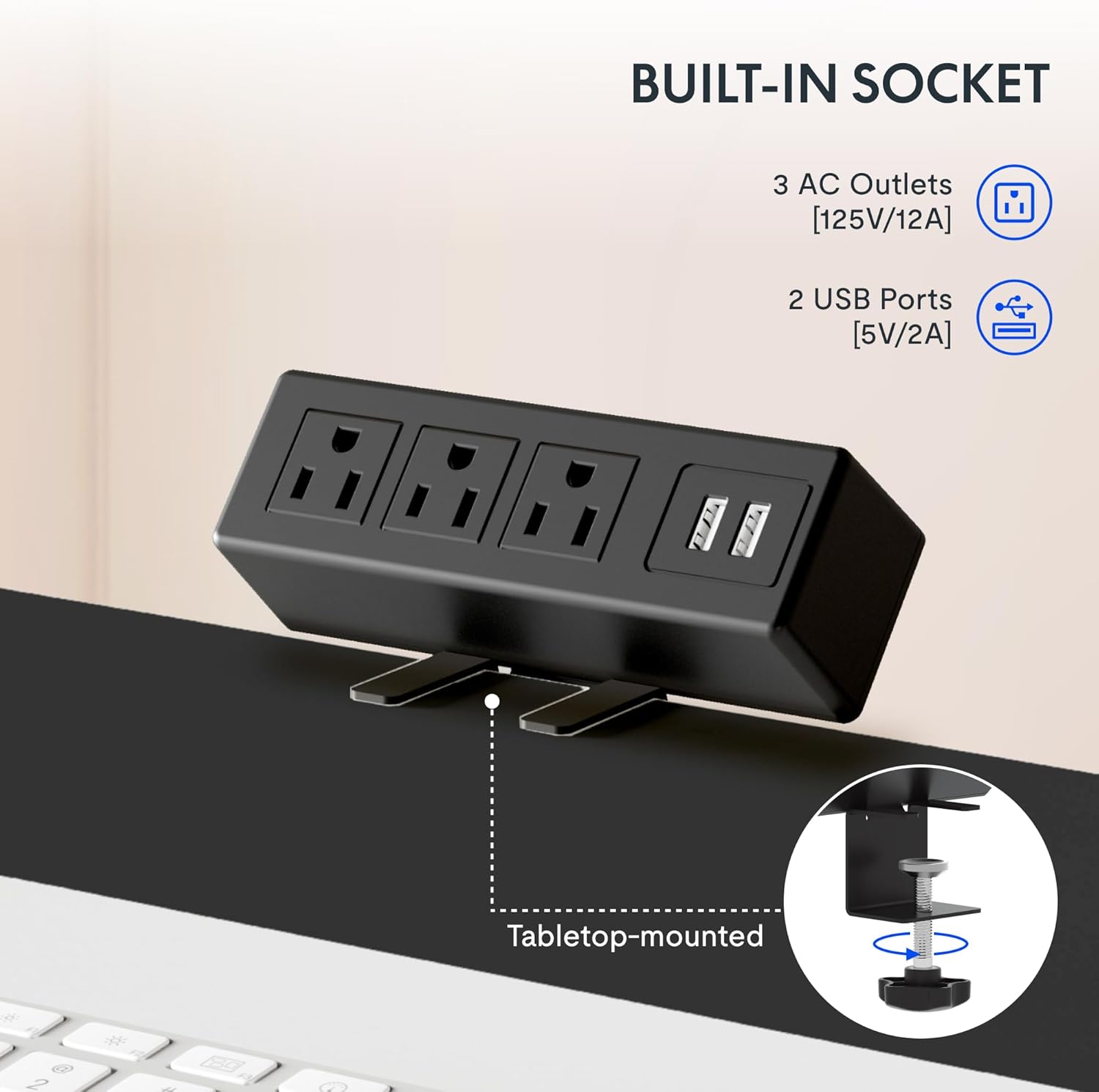
Figure 3: Integrated Power Outlet with USB Ports
3.3 Panell de control digital
The desk features a 6-button digital controller with an LED display for precise height adjustments and memory presets.

Figura 4: Panell de control digital
3.4 Cable Management and Accessories
The desk includes a cable management device to help organize wires and maintain a tidy workspace. Adjustable foot pads ensure stability on uneven floors, and storage hooks provide convenient places for headphones or bags.

Figure 5: Cable Management and Accessories
4. Instruccions de muntatge
The FLEXISPOT EN2 desk typically arrives in two separate packages: one for the desktop and one for the desk frame. Ensure you have both packages before beginning assembly. An electric drill (not included) may be required for certain steps.

Figure 6: Desk Packaging (Two Separate Boxes)
4.1 Desembalatge i preparació
- Desembaleu amb cura tots els components i verifiqueu-los amb la llista de peces que s'inclou al paquet.
- Place all components on a soft, clean surface to prevent scratches.
4.2 Muntatge del marc
- Assemble the desk legs and crossbar according to the included diagram. Ensure the crossbar is extended to the maximum sign and screws are only loosely tightened until the desktop is attached.
- Attach the lifting columns to the feet.
4.3 Desktop Attachment
- Carefully place the desktop upside down on a soft surface.
- Align the assembled frame with the pre-drilled holes on the desktop.
- Secure the frame to the desktop using the provided screws. Once the frame is attached, fully tighten the crossbar screws.
4.4 Control Panel and Power Strip Installation
- Mount the digital control panel to the underside of the desktop in the desired location (typically on the right side).
- Enganxeu el clamp power strip to the back or side edge of the desktop.
- Connect all necessary cables from the motor, control panel, and power strip to the control box. Ensure all connections are secure.
4.5 Gestió de cables
Utilize the included cable management device and ties to organize and secure all power and data cables, preventing tangles and ensuring smooth desk operation.

Figure 7: Effective Cable Management
5. Instruccions de funcionament
Your FLEXISPOT EN2 desk allows for easy height adjustment to switch between sitting and standing positions.
5.1 Ajust bàsic d'alçada
- Utilitza el Amunt (▲) i Avall (▼) buttons on the digital control panel to adjust the desk height. The current height will be displayed on the LED screen.
- The desk adjusts smoothly from 28.1 polzades (71.4 cm) a 45.7 polzades (116.1 cm).
- The motor operates quietly, typically below 50 dB.
5.2 Preajustos de memòria
The control panel features 4 programmable memory presets to save your preferred sitting and standing heights.
- Ajusteu l'escriptori a l'alçada desitjada amb els botons Amunt/Avall.
- Premeu el botó M button (or similar memory set button) followed by one of the numbered preset buttons (1, 2, 3 o 4). La pantalla confirmarà la configuració.
- To recall a saved height, simply press the corresponding numbered preset button.
5.3 Smart Anti-Collision System
The desk is equipped with a smart anti-collision system. If the desk encounters an obstacle during height adjustment, it will automatically stop and reverse slightly to prevent damage.
Figure 8: Anti-Collision System in Action
6. Manteniment
Un manteniment regular garanteix la longevitat i el rendiment òptim del vostre escriptori de peu.
- Neteja: Netegeu l'escriptori i el marc amb un drap suauamp drap. Eviteu netejadors abrasius o productes químics agressius que puguin danyar l'acabat.
- Gestió de cables: Periodically check and reorganize cables to prevent tangles and ensure they do not interfere with the desk's movement.
- Elements de fixació: De tant en tant, comproveu tots els cargols i perns per assegurar-vos que estiguin ben ajustats. Torneu-los a apretar si cal.
- Motor: The motor is maintenance-free. Do not attempt to lubricate or open the motor housing.
7. Solució De Problemes
If you encounter issues with your FLEXISPOT EN2 desk, refer to the following common troubleshooting steps:
- L'escriptori no es mou:
- Comproveu totes les connexions d'alimentació per assegurar-vos que estiguin ben connectades.
- Comproveu que la presa de corrent funcioni.
- Perform a reset (refer to your specific control panel instructions for reset procedures, often involving holding down certain buttons).
- Moviment desigual:
- Ensure the desk is on a level surface. Adjust the foot pads if necessary.
- Check that all frame screws, especially those on the crossbar, are securely tightened.
- Codis d'error a la pantalla:
- Refer to the specific error code in your control panel's supplementary guide (if provided) or contact customer support.
- Freqüència d'activació del sistema anticol·lisió:
- Ensure there are no obstructions in the desk's path during adjustment.
- Check if the desk is overloaded beyond its weight capacity.
If these steps do not resolve the issue, please contact FLEXISPOT customer support.
8. Especificacions
Key technical specifications for the FLEXISPOT EN2 Electric Standing Desk:

Figure 9: Desk Dimensions and Features Overview
| Característica | Especificació |
|---|---|
| Marca | FLEXISPOT |
| Model | EN2 |
| Desktop Dimensions (W x D) | 152.4 cm x 60.96 cm |
| Gruix de l'escriptori | 1 polzades (2.54 cm) |
| Interval d'ajust d'altura | 28.1" - 45.7" (71.4 cm - 116.1 cm) |
| Capacitat màxima de pes | 176 lliures (80 kg) |
| Nivell de soroll del motor | Menys de 50 dB |
| Tauler de control | Digital with 4 Memory Presets |
| Endoll | 3 endolls de CA (125 V/12 A), 2 ports USB (5 V/2 A) |
| Material del marc | Industrial-grade Alloy Steel |
| Material d'escriptori | Fusta certificada per l'FSC |
| Muntatge obligatori | Sí |
9. Garantia i Suport
FLEXISPOT provides comprehensive warranty coverage for your EN2 Electric Standing Desk:
- Frame & Motor: Garantia limitada d'5 any.
- Controller, Switch, Electronics: Garantia limitada d'2 any.
For warranty claims, technical assistance, or further inquiries, please visit the official FLEXISPOT weblloc web o contacteu directament amb el seu servei d'atenció al client. Podeu trobar més informació i productes a FLEXISPOT Store on Amazon.