
Introducció
Thank you for choosing the VETEK AF6 4K Video Camera Camcorder. This manual provides comprehensive instructions for the proper setup, operation, and maintenance of your device. Please read this manual thoroughly before using the camcorder to ensure optimal performance and longevity.
Contingut del paquet
Verifiqueu que tots els elements que s'enumeren a continuació s'inclouen al vostre paquet:
- 1x VETEK AF6 4K Camcorder
- 1x cable USB
- 1x cable HDMI
- 1x Lens Hood
- 1x Fill Light (External LED Light)
- 1 x carregador USB
- 1x comandament a distància
- 1 targeta SD de 32 GB
- 1x Microphone Cable
- 1x Micròfon extern
- 1x Reusable Camera Bag
- 2x Rechargeable Lithium Batteries
- 1x Dual External Battery Charger
- 1x Camera Instruction Manual
- 1x Microphone Instruction Manual
- 1x Handheld Stabilizer

Producte acabatview
Familiarize yourself with the main components of your VETEK AF6 camcorder.

Característiques principals:
- Resolució de vídeo 4K: Records videos at 3840*2160.
- 48.0 MP Image Resolution: Captures still images at 7920*5940.
- 3.0-inch 270° Rotatable Touch Screen: Proporciona flexibilitat viewing angles and intuitive control.
- Zoom digital 18X: Allows for closer shots of distant subjects.
- Connectivitat Wi-Fi: Enables remote control and file transfer via a smartphone app.
- Funció de càmera de PC: Es pot utilitzar com a webcàmera per a transmissió en directe i videotrucades.
- Compatibilitat amb micròfon extern: Millora la qualitat de l'àudio.
- External Fill Light Support: Improves illumination in low-light conditions.
- Handheld Stabilizer Compatibility: Reduces camera shake for smoother footage.
- Special Shooting Modes: Includes Slow Motion and Time-Lapse.
Configuració
1. Instal·lació i càrrega de la bateria
- Obriu la tapa del compartiment de la bateria de la càmera de vídeo.
- Insert a rechargeable lithium battery, ensuring correct polarity.
- Tanqueu la tapa del compartiment de la bateria.
- To charge, insert the batteries into the dual external battery charger. Connect the charger to a power source using the provided USB cable and charger. The indicator lights will show charging status.
Nota: Ensure batteries are fully charged before first use for optimal performance. If indicator lights flicker or do not show a stable charging status, ensure the batteries are correctly seated in the charger and the power connection is stable.
2. Instal·lació de la targeta SD
- Localitza la ranura per a targetes SD a la càmera de vídeo.
- Insert the 32GB SD card (included) into the slot with the metal contacts facing the correct direction, until it clicks into place.
- To remove, gently press the SD card until it pops out.
Important: Format the SD card in the camcorder's menu before initial use to ensure compatibility and prevent data corruption.
3. Fixació d'accessoris
- Micròfon extern: Slide the external microphone onto the hot shoe mount on top of the camcorder. Connect the microphone cable to the MIC input port.
- Parasol: Attach the lens hood to the front of the camcorder lens by twisting it clockwise until secure. The lens hood helps reduce glare and protects the lens.
- External LED Light: Slide the external fill light onto the hot shoe mount. Ensure it is securely fastened. This light provides additional illumination.
- Estabilitzador de mà: Attach the camcorder to the handheld stabilizer using the screw mount at the bottom of the camcorder. The stabilizer helps maintain steady footage.



Instruccions de funcionament
1. Encendre/apagar
Open the LCD screen to power on the camcorder. Close the LCD screen to power off. Alternatively, use the power button located on the device.
2. Enregistrament bàsic (vídeo/foto)
- Canvi de modes: Use the Mode button to switch between video recording mode and photo capture mode.
- Iniciar/Aturar la gravació: In video mode, press the Record button to start recording. Press it again to stop.
- Fes una foto: In photo mode, press the Photo button to capture a still image.

3. Funció de zoom
Use the T (Telephoto) and W (Wide) buttons on the camcorder or the zoom controls on the remote control to adjust the 18X digital zoom.
4. Funcionament de la pantalla tàctil
The 3.0-inch LCD screen is rotatable up to 270 degrees and supports touch input. Navigate menus, adjust settings, and review footage by tapping or swiping on the screen.
5. Wi-Fi Connection & App
Download the specified app (refer to the camera's manual for the app name) on your smartphone or tablet. Enable Wi-Fi on the camcorder and connect your mobile device to the camcorder's Wi-Fi network (SSID: 4K_WIFI1079, Password: 12345678). This allows for remote viewing, image capture, video shooting, and sharing to social media.

6. PC Camera Mode (Webcam Function)
Connect the camcorder to your PC using the USB cable. Select "PC CAM" mode on the camcorder. Your computer will recognize the camcorder as a webcam, enabling its use for video chatting and live streaming on platforms like YouTube or Facebook.

7. Característiques especials
- càmera lenta: Access this mode through the camcorder's menu to record videos at a higher frame rate, allowing for slow-motion playback.
- Fotografia de lapse de temps: Select this option in the menu to capture a series of still images at set intervals, which can then be compiled into a time-lapse video.
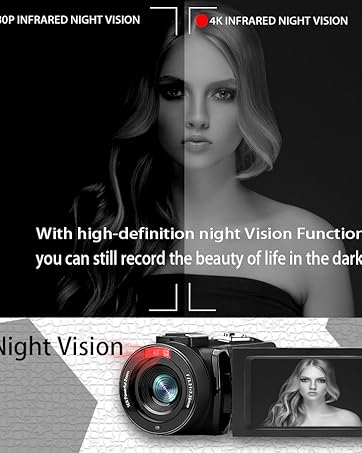
- Visió nocturna: The camcorder features an infrared night vision function, enabling recording in low-light or dark environments. Activate this feature via the menu.


8. Control remot
The included remote control allows you to operate the camcorder from a distance, controlling functions such as recording, photo capture, and zoom without touching the device.

Manteniment
- Neteja: Feu servir un drap suau i sec per netejar el cos de la càmera de vídeo. Per a l'objectiu, feu servir un drap i una solució especials per a la neteja d'objectius. Eviteu materials abrasius o productes químics agressius.
- Emmagatzematge: Store the camcorder in a cool, dry place away from direct sunlight and extreme temperatures. Remove batteries if storing for extended periods.
- Resistència a l'aigua: This camcorder is no resistent a l'aiguaEviteu l'exposició a l'aigua o a una humitat elevada.
Resolució de problemes
| Problema | Causa possible | Solució |
|---|---|---|
| La càmera de vídeo no s'encén. | La bateria està esgotada o instal·lada incorrectament. | Assegureu-vos que les piles estiguin completament carregades i inserides correctament. |
| Battery charger indicator lights flicker. | Poor contact between battery and charger, or unstable power supply. | Re-seat batteries firmly in the charger. Check USB cable and power adapter connection. Try a different USB port or power source. |
| No es pot gravar vídeo ni fer fotos. | La targeta SD està plena, no està inserida o està malmesa. S'ha seleccionat el mode incorrecte. | Check SD card status, ensure it's inserted and has free space. Format the SD card if necessary (this will erase all data). Verify camcorder is in the correct mode. |
| Mala qualitat de vídeo/fotos. | Lens is dirty. Insufficient lighting. Incorrect settings. | Clean the lens. Use the external fill light or shoot in better-lit conditions. Adjust resolution and other settings in the menu. |
| Problemes de connexió Wi-Fi. | Incorrect Wi-Fi password or app not installed. | Ensure correct SSID (4K_WIFI1079) and password (12345678). Download and install the correct app. |
Especificacions
- Marca: VETEK
- Número de model: AF6
- Resolució de captura de vídeo: 4K (3840*2160)
- Resolució fixa efectiva: 48.0 MP (7920*5940)
- Zoom digital: 18X
- Mida de la pantalla: 3.0 polzades
- Tipus de visualització: 270° Rotatable Touch Screen
- Tipus de memòria flash: SD (supports up to 128GB, 32GB included)
- Format de captura de vídeo: MP4
- Format d'àudio compatible: MP4
- Tecnologia de connectivitat: USB, HDMI, Wi-Fi
- Compatibilitat del sistema operatiu: Windows XP/7/8/10, MAC
- Estabilització d'imatge: Digital
- Nivell de resistència a l'aigua: No resistent a l'aigua
- Nombre de bateries: 2 bateries de polímer de liti (incloses)
- Dimensions de l'article (D x W x H): 3.9 "P x 6.2" W x 7.8" H
Garantia i Suport
For warranty information and technical support, please refer to the contact details provided in the separate warranty card or visit the official VETEK weblloc. Si teniu algun problema que no es tracta en aquest manual, poseu-vos en contacte amb el servei d'atenció al client per obtenir ajuda.