
Introducció
This manual provides detailed instructions for the installation, operation, and maintenance of your SpeaKa Professional SP-HDS-110 1x2 HDMI Splitter. This device is designed to distribute a single HDMI input signal to two HDMI output displays simultaneously. It supports video resolutions up to 4K (3840 x 2160 pixels), ensuring high-quality video transmission.
Please read this manual thoroughly before using the product to ensure proper setup and to prevent damage.
Instruccions importants de seguretat
- Do not expose this device to water, moisture, or excessive humidity.
- Do not attempt to open or modify the device. This may result in electric shock or damage and will void the warranty.
- Feu servir només l'adaptador de corrent proporcionat o una font d'alimentació USB compatible.
- Assegureu-vos una ventilació adequada al voltant del dispositiu per evitar el sobreescalfament.
- Mantingueu el dispositiu allunyat de fonts de calor, llum solar directa i camps magnètics forts.
- Netegeu el dispositiu amb un drap suau i sec. No utilitzeu netejadors líquids ni en aerosol.
- If the device malfunctions, disconnect it from the power source and contact customer support.
Contingut del paquet
Si us plau, comproveu el contingut del paquet en desembalar-lo. Si falta algun article o hi ha algun malmès, poseu-vos en contacte amb el vostre distribuïdor.
- SpeaKa Professional SP-HDS-110 1x2 HDMI Splitter
- Cable d'alimentació USB
- Manual d'usuari (aquest document)
Característiques del producte
- Distributes 1 HDMI input signal to 2 HDMI displays simultaneously.
- Supports video resolutions up to 4K (3840 x 2160 pixels).
- Disseny compacte per a una instal·lació fàcil i flexible.
- Powered via USB cable.
- Admet HDMI 1.4b.
- Admet format de vídeo 3D.
- Suporta HDCP 1.4.
Producte acabatview
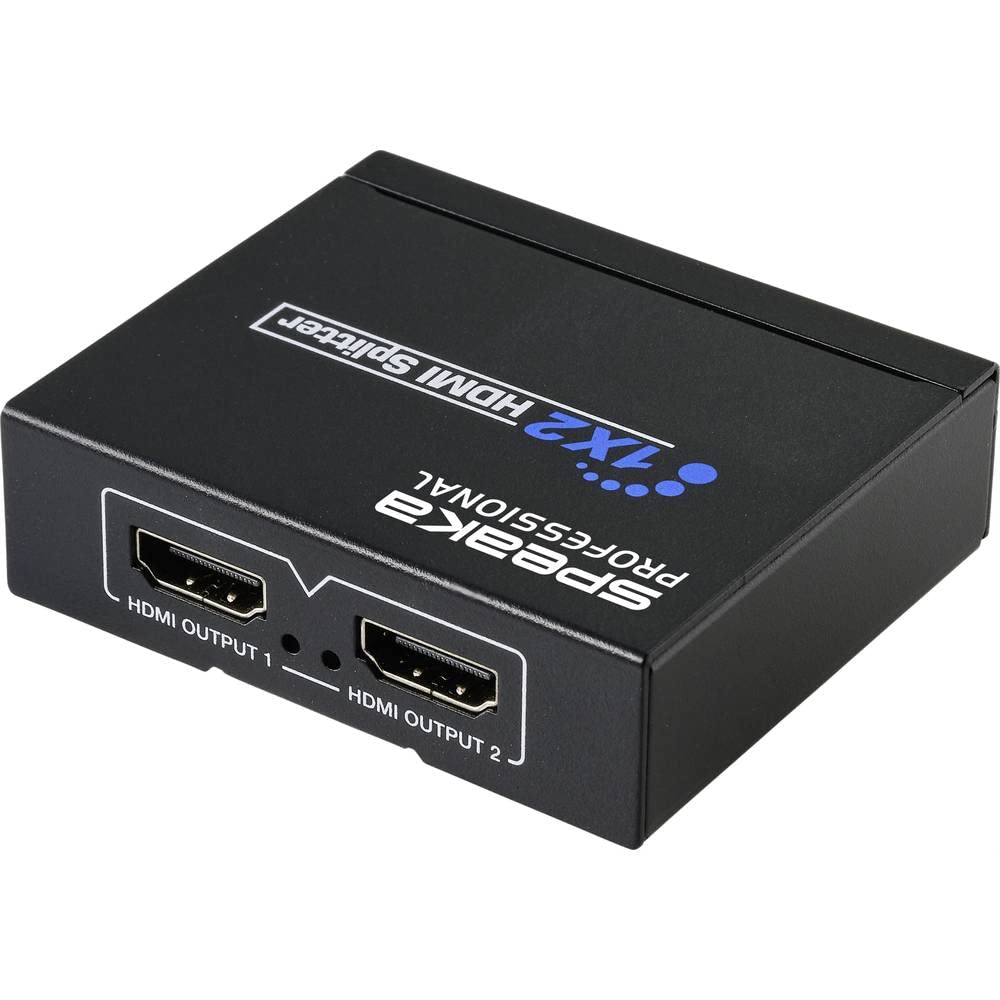


Instruccions de configuració
- Connecteu la font HDMI: Connecteu un cable HDMI des del dispositiu font (per exemple, reproductor de Blu-ray, consola de jocs, PC) al Entrada HDMI port on the SpeaKa Professional SP-HDS-110 splitter (refer to Figure 2).
- Connecteu pantalles HDMI: Connect HDMI cables from your two display devices (e.g., TV, monitor, projector) to the SORTIDA HDMI 1 i SORTIDA HDMI 2 ports on the splitter (refer to Figure 3).
- Connectar l'alimentació: Connect the provided USB power cable to the DC 5V power input port on the splitter (refer to Figure 2). Plug the other end of the USB cable into a suitable USB power source (e.g., a USB wall adapter, a USB port on a TV or PC). The splitter requires 5V DC power for operation.
- Dispositius d'encesa: Power on your HDMI source device and both HDMI display devices.
- Seleccioneu l'entrada: Ensure your display devices are set to the correct HDMI input channel.
- EDID Management (COPY/AUTO-POWER Switch):
- AUTOMÀTIC: In this mode, the splitter automatically detects the optimal EDID (Extended Display Identification Data) from the connected displays and sends it to the source device. This is the recommended setting for most setups.
- CÒPIA: In this mode, the splitter copies the EDID from the display connected to HDMI OUTPUT 1 and sends it to the source device. Use this if you encounter display issues in AUTO mode, especially if one display has specific resolution or audio requirements.
The splitter should now be operational, displaying the source content on both connected screens.
Instruccions de funcionament
The SpeaKa Professional SP-HDS-110 HDMI Splitter is a plug-and-play device. Once all connections are made and power is supplied, it will automatically distribute the HDMI signal from your source to both connected displays.
- Ensure all HDMI cables are securely connected to prevent signal loss.
- The splitter does not require any additional software or drivers.
- If you experience issues with resolution or audio, try adjusting the "COPY/AUTO-POWER" switch as described in the Setup section.
Manteniment
- Mantingueu el dispositiu net i lliure de pols. Feu servir un drap suau i sec per netejar-lo.
- Avoid placing heavy objects on the splitter.
- Guardeu el dispositiu en un lloc fresc i sec quan no el feu servir durant períodes prolongats.
Resolució de problemes
| Problema | Causa possible | Solució |
|---|---|---|
| No hi ha cap imatge a la pantalla. |
|
|
| Picture but no sound. |
|
|
| Mala qualitat d'imatge o parpelleig. |
|
|
Especificacions
| Número de model | SP-HDS-110 (SP-9493352) |
| Ports d'entrada | 1 x HDMI |
| Ports de sortida | 2 x HDMI |
| Resolucions suportades | Up to 4K (3840 x 2160 pixels) |
| Versió HDMI | HDMI 1.4b |
| Versió HDCP | HDCP 1.4 |
| Suport 3D | Sí |
| Font d'alimentació | DC 5V via USB |
| Dimensions (L x A x A) | 12 x 11 x 7 cm (aprox. 4.7 x 4.3 x 2.8 polzades) |
| Pes | 120 g (aprox. 0.26 lliures) |
| Color | Negre |
Garantia i Suport
SpeaKa Professional products are designed for reliability and performance. This product comes with a minimum 2 any de garantia des de la data de compra.
If you encounter any issues or require technical assistance, please contact your retailer or SpeaKa Professional customer support. Please have your model number (SP-HDS-110 or SP-9493352) and proof of purchase ready.