
1. Informació de seguretat
Please read all instructions carefully before assembly and use. Failure to follow these instructions may result in injury or product damage. Keep this manual for future reference.
- This desk requires assembly. Ensure all components are correctly installed before use.
- The maximum weight capacity for this desk is 220 pounds (100 kg). Do not exceed this limit.
- When adjusting the desk height, ensure there are no obstructions above or below the desk that could interfere with its movement.
- Mantingueu els nens i les mascotes allunyats de l'escriptori durant el funcionament.
- Do not attempt to manually force the desk up or down. Use only the electric control panel.
- Ensure the power cord is properly connected and routed to prevent tripping hazards or damage.
- For optimal stability, ensure the desk is placed on a level surface.
Important Note: When using the LED control panel to adjust height, the three height keys must be pressed and held continuously until the desired height is reached.
2. Contingut del paquet
Verifiqueu que tots els components siguin presents abans de començar el muntatge. Si falta alguna peça o hi ha alguna peça danyada, poseu-vos en contacte amb el servei d'atenció al client.
- Desktop (71"x32" Black Top)
- Desk Frame (Black Frame)
- 4 cames
- Tauler de control
- Adaptador d'alimentació i cable
- Maquinari de muntatge (cargols, perns, etc.)
- Manual d'instruccions
3. Instruccions de muntatge
Assembly typically requires two people. Please follow these steps carefully. A power drill may be helpful for some steps, but is not strictly required.
- Desempaquetar components: Traieu amb cura totes les peces de l'embalatge i col·loqueu-les sobre una superfície neta i suau per evitar ratllades.
- Fixar les potes al marc: Securely attach the four legs to the desk frame using the provided hardware. Ensure all connections are tight.
- Install Desktop: Place the desktop upside down on a soft surface. Carefully align the assembled frame with the pre-drilled holes on the underside of the desktop. Secure the frame to the desktop using the appropriate screws.
- Panell de control de muntatge: Attach the LED control panel to the underside of the desktop, typically on the front edge, using the provided screws.
- Connectar els cables: Connect the motor cables from the legs to the control box. Connect the control panel cable to the control box. Finally, connect the power adapter to the control box and plug it into a power outlet. Ensure all cables are neatly managed to avoid interference with desk movement.
- Configuració inicial: Once assembled, carefully flip the desk upright. Perform an initial height calibration by pressing and holding the 'Down' button until the desk reaches its lowest point, then release. The desk is now ready for operation.

Figure 3.1: Fully assembled FLEXISPOT 4 Leg Standing Desk.
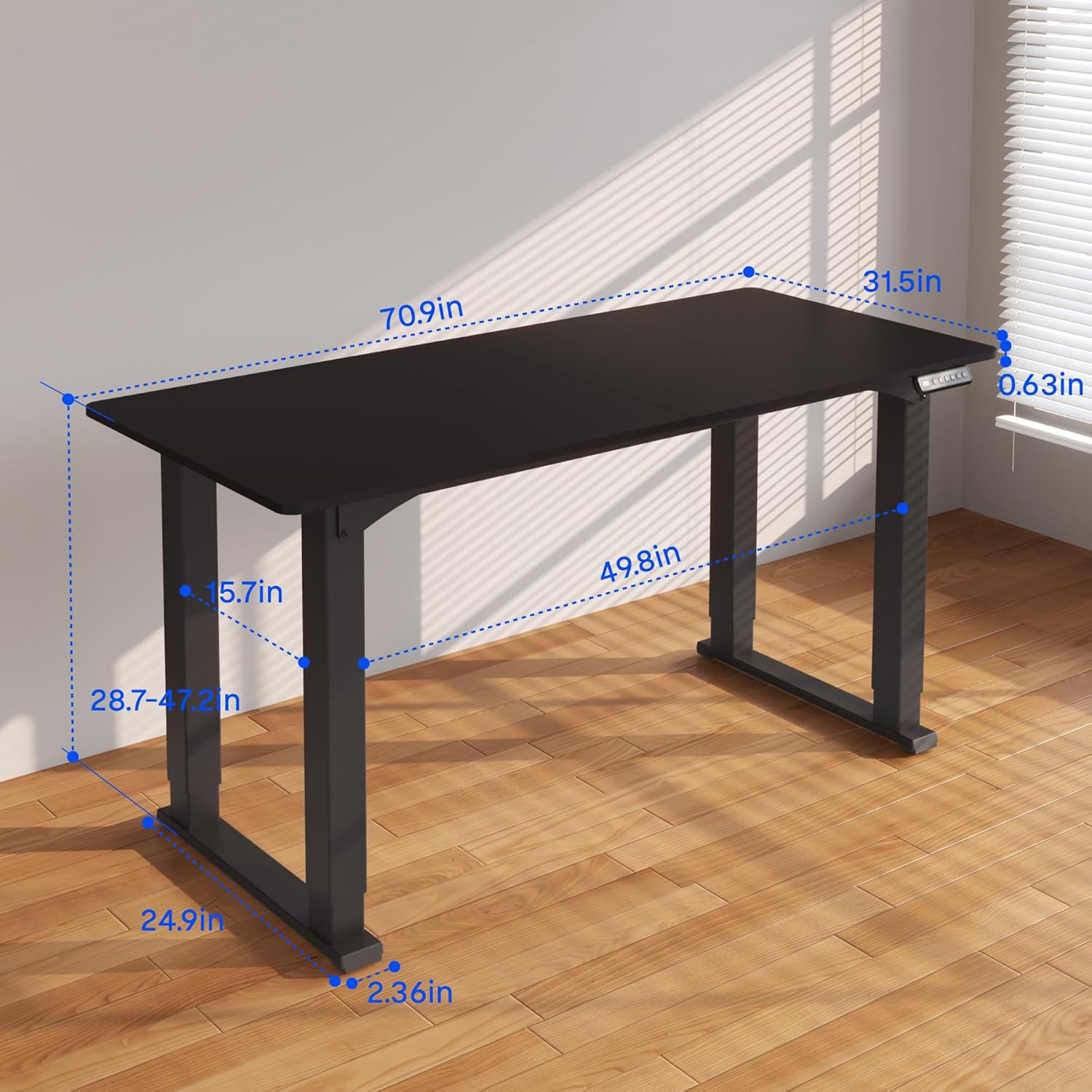
Figure 3.2: Detailed dimensions of the desk, including height range and desktop size.
4. Instruccions de funcionament
The FLEXISPOT 4 Leg Standing Desk features an intuitive LED control panel for easy height adjustments and memory settings.
4.1. Tauler de control acabatview

Figure 4.1: Digital Keypad with memory functions and up/down controls.
- Fletxes amunt/avall (▲ / ▼): Press and hold to adjust the desk height upwards or downwards. The current height is displayed on the LED screen.
- Botons de memòria (1, 2, 3): These buttons allow you to save and recall preferred height settings.
- Memory Set Button (M): Used to program a height into a memory slot.
4.2. Ajust d'alçada
To adjust the desk height, press and hold the ▲ (Up) or ▼ (Down) arrow button until the desk reaches your desired position. The desk will move smoothly between 28.7 inches and 47.2 inches.
4.3. Saving Memory Presets
You can save up to three preferred height settings for quick recall:
- Ajusteu l'escriptori a l'alçada desitjada amb les fletxes amunt/avall.
- Press the 'M' button. The LED display will show 'S-'.
- Within 3 seconds, press one of the memory buttons (1, 2, or 3). The LED display will show 'S-1', 'S-2', or 'S-3' to confirm the setting has been saved.
4.4. Recuperació de preajustos de memòria
To move the desk to a saved height, press and aguantar the corresponding memory button (1, 2, or 3) until the desk reaches the programmed height.
4.5. Sistema anticol·lisió
The desk is equipped with an anti-collision system to prevent damage. If the desk encounters an obstruction during movement, it will stop and reverse slightly. Remove the obstruction before resuming operation.

Figure 4.2: Anti-collision system in action, preventing damage from obstructions.
5. Manteniment
Regular maintenance ensures the longevity and smooth operation of your standing desk.
- Neteja: Netegeu l'escriptori i el marc amb un drap suauamp drap. Eviteu productes químics agressius o netejadors abrasius.
- Gestió de cables: Periodically check and organize cables to prevent tangles and ensure they do not interfere with the desk's movement.
- Comprovació de fixació: De tant en tant, comproveu tots els cargols i perns per assegurar-vos que estiguin ben ajustats. Torneu-los a apretar si cal.
- Cura del motor: The electric motors are maintenance-free. Do not attempt to lubricate or disassemble them.
6. Solució De Problemes
Si teniu problemes amb el vostre escriptori, consulteu els següents problemes i solucions habituals:
- L'escriptori no es mou:
- Comproveu si el cable d'alimentació està ben connectat tant a l'escriptori com a la presa de corrent.
- Assegureu-vos que tots els cables del motor estiguin connectats correctament a la caixa de control.
- Perform a reset: Press and hold the 'Down' button until the desk reaches its lowest point and slightly retracts, then release.
- Moviment irregular o oscil·lació:
- Assegureu-vos que l'escriptori estigui sobre una superfície plana. Ajusteu els peus anivelladors si cal.
- Check that all assembly screws and bolts are tightened securely.
- Verify that the weight on the desk does not exceed the maximum capacity of 220 lbs and is evenly distributed.
- Codis d'error a la pantalla:
- If an error code appears, try performing a reset as described above.
- If the error persists, disconnect power for 10 minutes, then reconnect and try again.
- Consulteu el fabricant website or contact customer support with the specific error code.
- Els valors predefinits de memòria no funcionen:
- Ensure you are pressing and aguantant the memory button until the desk reaches the saved height.
- Re-program the memory presets if they are not recalling correctly.
If these steps do not resolve the issue, please contact FLEXISPOT customer support for further assistance.
7. Especificacions
| Característica | Especificació |
|---|---|
| Marca | FLEXISPOT |
| Número de model | QS2B-1880-AU |
| Mida d'escriptori | 71"D x 32"W (approx. 180.3cm x 81.3cm) |
| Interval d'alçada ajustable | 28.7" to 47.2" (approx. 72.9cm to 119.9cm) |
| Capacitat màxima de pes | 220 lliures (100 kg) |
| Material del marc | Metall |
| Material superior | Fusta |
| Color | Black Frame & Black Top |
| Tipus de control | LED Digital Keypad with Memory Presets |
| Característiques especials | 4-Leg Design, Anti-Collision System, Corded Operation |
| Muntatge obligatori | Sí |
8. Garantia i Suport
FLEXISPOT provides comprehensive warranty coverage for your peace of mind:
- 5 any de garantia: Covers the desk frame and motor components.
- 2 any de garantia: Covers the control panel and other electronic parts.
For warranty claims, technical support, or any questions regarding your FLEXISPOT product, please visit the official FLEXISPOT website or contact their customer service department. Please have your model number (QS2B-1880-AU) and proof of purchase available when contacting support.