
DOBE TY-1793
Manual d'usuari del controlador sense fil
Model: TY-1793
Introducció
Gràcies per la compraasing the DOBE Wireless Controller. This manual provides detailed instructions on how to set up, operate, and maintain your controller. Please read this manual carefully before use and keep it for future reference.
This controller is designed for use with Nintendo Switch, Android mobile devices, Android TV boxes, and personal computers. It offers both wireless Bluetooth and wired USB connectivity.
Contingut del paquet
- 1 x Wireless Controller (TY-1793)
- 1 x cable de càrrega USB-C
- 1 manual d'usuari (anglès)

Image: The product packaging, clearly indicating the wireless controller, USB-C cable, and compatibility with N-S / Android / PC.
Producte acabatview
Familiarize yourself with the various components of your wireless controller.

Imatge: Frontal view of the TY-1793 wireless controller, showing the dual analog sticks with orange accents, D-pad, ABXY buttons, Turbo button, and other function buttons.

Imatge: Lateral view of the TY-1793 wireless controller, highlighting the ergonomic grip and trigger buttons.
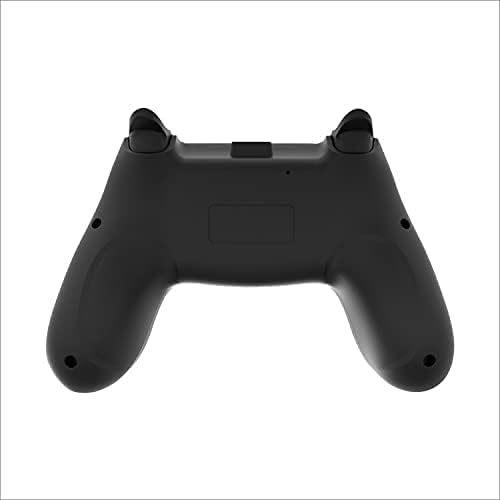
Imatge: Part posterior view of the TY-1793 wireless controller, showing the battery compartment or charging port area.
Configuració
Carregant el controlador
Before first use, fully charge the controller. Connect the supplied USB-C cable to the controller's charging port and the other end to a USB power source (e.g., computer USB port, USB wall adapter). The indicator lights will show charging status and turn off when fully charged.
- Voltage: DC 3.7 V
- Volum d'entrada de càrregatage: DC 5 V
- Charging Input Current: 300mA
- Capacitat de la bateria: 400 mAh
Connexió a dispositius
Bluetooth Connection (Wireless)
- Assegureu-vos que el controlador estigui carregat.
- Engegueu el controlador prement el botó Inici.
- On your device (Nintendo Switch, Android mobile/TV box), go to Bluetooth settings or controller pairing menu.
- Select "TY-1793" or similar from the list of available devices to pair.
- Un cop emparellat, els llums indicadors del controlador s'estabilitzaran.
Bluetooth transmission distance: <10m
Wired USB Connection (PC/Android)
- Connect the USB-C cable to the controller.
- Connect the other end of the USB-C cable to a USB port on your PC or Android device.
- The controller should be automatically recognized by your device. Drivers may be installed automatically.
Instruccions de funcionament
Controls bàsics
- Manets analògics: S'utilitza per al moviment i el control de la càmera.
- D-Pad: Directional input for menus and certain games.
- Botons ABXY: Botons d'acció estàndard.
- Shoulder Buttons (L/R, ZL/ZR): Additional action buttons, often for triggers or special abilities.
- Botó d'inici: Torna a la pantalla d'inici del sistema.
- Botons +/-: System-specific functions (e.g., Start/Select, Plus/Minus).
Funcions especials
Funció Turbo
The controller features a Turbo function for rapid firing of buttons. To activate Turbo for a button:
- Press and hold the desired action button (e.g., A, B, X, Y, L1, R1).
- While holding the action button, press the TURBO botó.
- Release both buttons. The Turbo function is now active for that button.
To deactivate Turbo for a button, repeat the steps above.
Feedback de vibracions
The controller supports motor vibration feedback for an immersive gaming experience. This function is automatically enabled when supported by the game and connected device.
6-Axis Gyroscope (Motion Control)
The controller is equipped with a 6-axis gyroscope, enabling motion control in compatible games, particularly on Nintendo Switch.
Manteniment
- Mantingueu el controlador sec. Eviteu l'exposició a la humitat o a líquids.
- No exposeu el controlador a temperatures extremes.
- Netegeu el controlador amb un drap suau i sec. No utilitzeu productes químics agressius ni materials abrasius.
- Guardeu el controlador en un entorn net i sense pols quan no l'utilitzeu.
- Eviteu deixar caure el controlador ni sotmetre'l a impactes forts.
Resolució de problemes
- El controlador no s'encén:
- Ensure the controller is fully charged. Connect it to a power source using the USB-C cable and allow it to charge for at least 30 minutes before attempting to turn it on again.
- Controller does not connect via Bluetooth:
- Assegureu-vos que el controlador està en mode d'aparellament.
- Comproveu que el Bluetooth estigui habilitat al vostre dispositiu.
- Move the controller closer to the device (within 10m).
- Remove any previous pairings of the controller from your device's Bluetooth list and try pairing again.
- Reinicieu tant el controlador com el dispositiu.
- Buttons or analog sticks are unresponsive:
- Ensure the controller is properly connected (wired or wireless).
- Prova de reiniciar el comandament i el joc/dispositiu.
- Si feu servir una connexió amb cable, proveu un port USB o un cable diferent.
- Netegeu els voltants dels botons i els pals per eliminar qualsevol residu.
Especificacions
| Característica | Detall |
|---|---|
| Model núm. | TY-1793 |
| Connectivitat | Bluetooth (Wireless), USB (Wired) |
| Compatibilitat | Nintendo Switch, Android Mobile, Android TV Box, PC |
| Tipus de bateria | Polímer de liti incorporat |
| Capacitat de la bateria | 400 mAh |
| Voltage | DC 3.7V |
| Entrada de càrrega | CC 5 V / 300 mA |
| Interval Bluetooth | <10 metres |
| Dimensions (paquet) | 17.50 x 11.50 x 6.80 cm (6.89 x 4.53 x 2.68 polzades) |
| Pes (paquet) | 0.372 kg |
| UPC | 6972520252617 |
Garantia i Suport
For warranty information and technical support, please refer to the contact details provided on the product packaging or the official DOBE weblloc web. Conserveu el rebut de compra com a comprovant de compra.
Per a més ajuda, poseu-vos en contacte amb l'atenció al client.
Ask a question about this manual
Ask about setup, troubleshooting, compatibility, parts, safety, or missing instructions. Manuals+ will review the question and use this page’s manual context to help answer it.