
Introducció
The New Bee M50 Bluetooth Headset is designed for clear communication and comfortable wear throughout your day. Featuring advanced Dual Mic Noise Cancelling technology and Bluetooth 5.2 connectivity, it ensures stable signal transmission and superior audio quality. This manual provides detailed instructions for setting up, operating, and maintaining your headset.
Contingut del paquet
Marqueu la casella per als elements següents:
- Nous auriculars Bluetooth Bee M50
- Cable de càrrega USB
- 3 x Optional Eartips (Small, Medium, Large)
- Maleta de transport portàtil
- Manual d'usuari

Image: New Bee M50 Bluetooth Headset with its accessories, including the charging cable, various eartips, and a protective carry case.
Producte acabatview
Familiarize yourself with the buttons and components of your New Bee M50 headset.

Image: A detailed diagram highlighting the control buttons on the New Bee M50 Bluetooth Headset, including volume, multi-function, and mute buttons.
- Botó multifunció: For Music Play/Pause, Answer/Hang up calls.
- Botó Pujar volum (+)/Pista següent: Augmenta el volum, passa a la següent pista.
- Botó per baixar el volum (-)/pista anterior: Baixa el volum, torna a la pista anterior.
- Botó de silenci: Activa/silencia el micròfon durant les trucades.
- Micròfon: Flexible arm for optimal voice capture.
- Ganxo per a l'orella: Rotatable for left or right ear wearing.
Configuració
1. Càrrega dels auriculars
Before first use, fully charge your headset. Connect the provided USB charging cable to the headset's charging port and to a USB power source (e.g., computer, wall adapter).
- Temps de càrrega: aproximadament 2-3 hores.
- The indicator light will change to show charging status (refer to product for specific light indicators).
2. Encendre/apagar
- Encès: Press and hold the Multi-function Button until the indicator light flashes (e.g., blue).
- Apagar: Press and hold the Multi-function Button until the indicator light turns off (e.g., red).
3. Emparellament Bluetooth
Per connectar els auriculars a un dispositiu:
- Assegureu-vos que els auriculars estan apagats.
- Press and hold the Multi-function Button for approximately 5-7 seconds until the indicator light flashes red and blue alternately, indicating pairing mode.
- Al dispositiu (telèfon intel·ligent, tauleta, ordinador portàtil), activeu el Bluetooth i cerqueu els dispositius disponibles.
- Select "New Bee M50" from the list of devices.
- Once connected, the indicator light on the headset will typically flash blue slowly.
The headset supports pairing with two Bluetooth devices simultaneously. After connecting the first device, disable its Bluetooth, pair the second device, then re-enable Bluetooth on the first device to connect both.

Image: The New Bee M50 Bluetooth Headset demonstrating its compatibility with various devices such as music players, Android phones, iPhones, iPads, laptops, and desktop computers, highlighting Bluetooth 5.2 technology.
Instruccions de funcionament
Funcions de trucada
- Respondre/Finalitzar la trucada: Premeu el botó multifunció una vegada.
- Rebutja la trucada: Mantén premut el botó multifunció durant 2 segons.
- Torna a marcar l'últim número: Premeu dues vegades el botó multifunció.
- Silencia/Activa el silenci: During a call, press the Mute Button once. Note: Mute function is only supported on mobile phones.

Image: A visual representation of the mute function on the New Bee M50 headset, indicating how to protect privacy during calls.
Control de música
- Reproduir/pausa: Premeu el botó multifunció una vegada.
- Pista següent: Premeu el botó d'augmentar el volum (+) una vegada.
- Pista anterior: Premeu el botó per baixar el volum (-) una vegada.
- Ajust de volum: Press and hold the Volume Up (+) or Volume Down (-) buttons.
Assistent de veu
To activate your device's voice assistant (e.g., Siri), press the Mute Button for 2 seconds. This feature enhances safety, especially while driving.
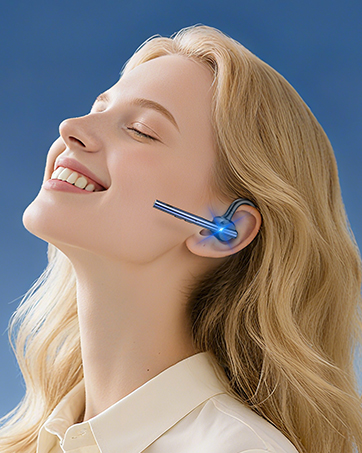
Image: A user activating the Siri voice assistant using the New Bee M50 headset, emphasizing hands-free operation for driving safety.
Portant els auriculars
The New Bee M50 headset is designed for comfort and versatility.
- The ear hook is rotatable by 180 degrees, allowing you to wear the headset on either your left or right ear.
- The microphone arm is flexible and can be rotated 270 degrees to position it optimally for voice capture.
- Choose from the three provided eartip sizes to find the most secure and comfortable fit for your ear.
- Weighing only 16g, the headset is lightweight for extended wear.

Image: A diagram illustrating the 270-degree rotatable microphone and 180-degree rotatable ear hook of the New Bee M50 headset, demonstrating its adaptable design for comfortable wearing on either ear.

Image: A visual guide demonstrating the correct way to wear the New Bee M50 headset for optimal sound and microphone performance, contrasting with incorrect positions.
Manteniment
To ensure the longevity and optimal performance of your New Bee M50 Bluetooth Headset, follow these maintenance guidelines:
- Neteja: Feu servir un drap suau i sec per netejar els auriculars. Eviteu utilitzar productes químics agressius o materials abrasius.
- Emmagatzematge: When not in use, store the headset in its portable carry case to protect it from dust, moisture, and physical damage.
- Eviteu condicions extremes: Do not expose the headset to extreme temperatures, direct sunlight, or high humidity.
- Càrrega: Only use the provided charging cable or a certified equivalent. Avoid overcharging the battery.
- Resistència a l'aigua: The headset is not water resistant. Avoid contact with liquids.
Resolució de problemes
Si teniu problemes amb els auriculars, consulteu les solucions habituals següents:
| Problema | Possible solució |
|---|---|
| Headset won't power on | Ensure the headset is fully charged. Press and hold the Multi-function Button for a longer duration (5 seconds). |
| No es pot vincular amb el dispositiu | Make sure the headset is in pairing mode (flashing red and blue). Turn off Bluetooth on other nearby devices. Restart your device and the headset. Ensure the headset is within 49 feet of your device. |
| Sense so ni volum baix | Check the volume levels on both the headset and your connected device. Ensure the headset is properly connected. Try re-pairing the headset. |
| El micròfon no funciona | Ensure the microphone is not muted. Check microphone settings on your connected device. Adjust the microphone arm for optimal positioning. |
| Connexió intermitent | Move closer to your connected device. Avoid obstacles between the headset and device. Ensure no other devices are causing interference. |
Especificacions
| Característica | Detall |
|---|---|
| Nom del model | M50 |
| Tecnologia de connectivitat | Sense fil (Bluetooth 5.2) |
| Interval Bluetooth | Fins a 49 peus (15 metres) |
| Control de soroll | Active Noise Cancellation (Dual Mic DSP) |
| Temps de conversa | Fins a 24 hores |
| Temps de reproducció de música | Fins a 20 hores |
| Temps d'espera | Fins a 1440 hores |
| Temps de càrrega | 2-3 hores |
| Pes de l'article | 16 grams (0.564 unces) |
| Forma de l'auricular | In Ear, Ear Hook |
| Material | Silicona |
| Dispositius compatibles | Smartphones, Tablets, Laptops (iOS and Android systems) |
Garantia i suport
New Bee provides a 3 anys de garantia for the M50 Bluetooth Headset, ensuring peace of mind regarding product quality and performance.
If you encounter any problems or have suggestions, please contact our customer service team. Our professional technical team is available 24 hours to assist you.

Image: Icons representing the 3-year warranty and 30-day free returns policy for New Bee products.
Vídeo del producte
Video: Official product video demonstrating the features and usage of the New Bee M50 Bluetooth Headset.


