
1. Introducció
Welcome to the BIGGERFIVE Vigor 2 Kids Fitness Tracker Watch manual. This guide provides detailed instructions for setting up, operating, maintaining, and troubleshooting your new fitness tracker. The Vigor 2 is designed to help children aged 5-12 track their daily activity, monitor heart rate and sleep, and encourage healthy habits.
2. Informació de seguretat
Please read all safety instructions before using the device.
- No intenteu desmuntar o modificar el dispositiu.
- Mantingueu el dispositiu lluny de temperatures extremes.
- Supervise children during use, especially during charging.
- Consult a doctor before starting any new exercise program, especially for children with pre-existing health conditions.
- Aquest dispositiu no és un producte mèdic i no s'ha d'utilitzar amb finalitats diagnòstiques o terapèutiques.
3. Contingut del paquet
Verifiqueu que tots els elements siguin presents al paquet:
- Rellotge monitor d'activitat física BIGGERFIVE Vigor 2
- Cable de càrrega
- Manual d'instruccions (aquest document)
4. Configuració
4.1. Càrrega del dispositiu
Before first use, fully charge the fitness tracker.
- Connect the charging cable to the charging port on the back of the tracker.
- Connecteu l'extrem USB del cable a un adaptador de corrent USB estàndard (no inclòs) o al port USB d'un ordinador.
- The battery icon on the screen will indicate charging status. A full charge takes approximately 2 hours.

Image: The BIGGERFIVE Vigor 2 Fitness Tracker connected to its charging cable, illustrating the charging process.
4.2. Installing the BIGGERFIVE App
The BIGGERFIVE Vigor 2 requires the companion app for full functionality.
- Cerca "BIGGERFIVE" in the Apple App Store (for iOS devices) or Google Play Store (for Android devices).
- Baixeu i instal·leu l'aplicació.
4.3. Vinculació del dispositiu
- Assegureu-vos que el Bluetooth estigui habilitat al vostre telèfon intel·ligent.
- Open the BIGGERFIVE app and follow the on-screen instructions to create an account.
- Seleccioneu "Afegeix dispositiu" o una opció similar dins de l'aplicació.
- Choose "BIGGERFIVE Vigor 2" from the list of available devices.
- Confirm the pairing request on both the app and the fitness tracker if prompted.

Image: A smartphone screen displaying the BIGGERFIVE app interface, showing steps, distance, calories, and sleep data.
4.4. Setting Up a Family Account
The BIGGERFIVE app supports family accounts to manage multiple trackers.
- Within the app, navigate to the "Family Account" section.
- Create child profiles and link each Vigor 2 tracker to the respective child's profile.

Image: A smartphone screen showing the BIGGERFIVE app's family account feature, allowing parents to manage multiple child profiles and their fitness trackers.
5. Funcionament del dispositiu
5.1. Navegació bàsica
The Vigor 2 features a touch-sensitive button at the bottom of the screen for navigation.
- Toc senzill: Short press to cycle through different screens (Time, Steps, Heart Rate, etc.).
- Premsa llarga: Press and hold to activate certain functions or enter sub-menus (e.g., start a workout, confirm a selection).
5.2. Seguiment d'activitat
The tracker automatically records daily activity.
- Passos: Mostra el nombre total de passos realitzats.
- Distància: Shows the estimated distance covered.
- Calories: Indicates calories burned.
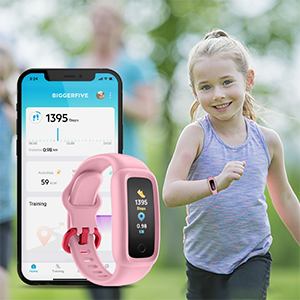
Image: The BIGGERFIVE Vigor 2 screen showing a step counter display.
5.3. Modes esportius
The Vigor 2 supports over 10 sport modes.
- Access sport modes through the device menu.
- Select the desired activity (e.g., Walking, Running, Cycling, Dancing, Basketball, Football, Tennis, Climbing, Workout).
- Long press to start and end a workout session.

Image: The BIGGERFIVE app displaying icons for various sport modes like walking, cycling, basketball, and tennis.
5.4. Monitorització del ritme cardíac
The device monitors heart rate automatically throughout the day.
- View real-time heart rate on the tracker screen or in the app.
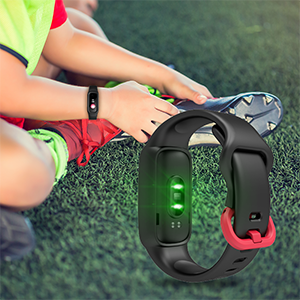
Image: The BIGGERFIVE Vigor 2 screen showing a heart rate display in beats per minute (BPM).
5.5. Seguiment del son
The Vigor 2 automatically tracks sleep patterns.
- Wear the tracker to bed for accurate sleep data.
- Review sleep duration, deep sleep, light sleep, and awake times in the BIGGERFIVE app.
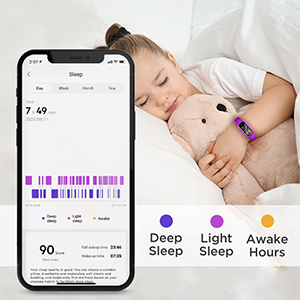
Image: A smartphone screen displaying the BIGGERFIVE app's sleep tracking feature, showing sleep duration and different sleep stages.
5.6. Silent Alarm Clock
Set silent alarms through the BIGGERFIVE app.
- Alarms vibrate gently on the wrist to wake the user without disturbing others.
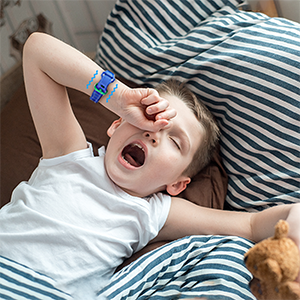
Image: The BIGGERFIVE Vigor 2 on a child's wrist, illustrating the silent alarm clock feature.
5.7. Cronòmetre
The tracker includes a stopwatch function.
- Navigate to the stopwatch screen on the device.
- Use the touch button to start, pause, and reset the timer.
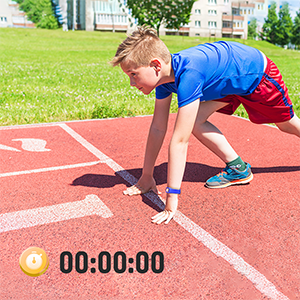
Image: The BIGGERFIVE Vigor 2 screen showing the stopwatch function with a timer displayed.
5.8. Esferes de rellotge personalitzades
Personalize the tracker with different watch faces.
- Select and apply new watch faces through the BIGGERFIVE app.
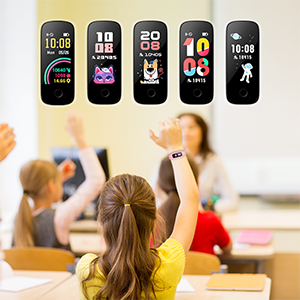
Image: A selection of customizable watch faces available for the BIGGERFIVE Vigor 2 Fitness Tracker.
6. Manteniment
6.1. Neteja
- Regularly clean the tracker and strap with a soft, damp tela.
- Eviteu utilitzar productes químics o materials abrasius.
- Assegureu-vos que els contactes de càrrega estiguin nets i secs abans de carregar.
6.2. Resistència a l'aigua (IP68)
The BIGGERFIVE Vigor 2 is IP68 waterproof, suitable for swimming and water activities.
- Do not use in hot water or saunas.
- Rinse with fresh water after exposure to salt water or chlorinated water.

Image: A child wearing the BIGGERFIVE Vigor 2 Fitness Tracker while playing in water, highlighting its IP68 waterproof rating.
6.3. Cura de la bateria
- Carregueu el dispositiu regularment per mantenir la bateria.
- Eviteu esgotar completament la bateria durant períodes prolongats.
- Battery life is approximately 7 days on a 2-hour charge.
7. Solució De Problemes
7.1. El dispositiu no s'encén
- Assegureu-vos que el dispositiu estigui completament carregat. Connecteu-lo al carregador durant almenys 10 minuts.
- Try a soft reset by pressing and holding the touch button for 10-15 seconds.
7.2. Not Pairing with App
- Confirm Bluetooth is enabled on your smartphone.
- Ensure the tracker is close to your phone during pairing.
- Restart both the tracker and your smartphone.
- Comproveu si l'aplicació està actualitzada a la darrera versió.
- If you have multiple trackers, ensure you are trying to pair the correct one.
7.3. Inaccurate Step Count
- Ensure the tracker is worn snugly on the wrist.
- Calibrate the tracker through the app if available.
- Movement of the arm not associated with walking (e.g., waving) may sometimes be counted as steps.
7.4. Heart Rate/Sleep Data Not Showing
- Ensure the tracker is worn correctly and snugly on the wrist.
- For sleep tracking, wear the device throughout the night.
- Sync the device with the app regularly to transfer data.
7.5. La pantalla no respon
- Reinicieu el dispositiu.
- Assegureu-vos que la pantalla estigui neta i seca.
8. Especificacions
| Característica | Detall |
|---|---|
| Nom del model | BF200 |
| Marca | BIGGER FIVE |
| Mida de la pantalla | 0.96 polzades |
| Tipus de visualització | Electrònica |
| Resolució | 128 x 128 |
| Connectivitat | Bluetooth |
| Classificació impermeable | IP68 (fins a 1.5 metres) |
| Tipus de bateria | Polímer de liti |
| Durada de la bateria | Fins a 7 dies |
| Temps de càrrega | Aprox. 2 hores |
| Material de la banda | Silicona |
| Material de la caixa | Plàstic |
| Pes de l'article | 0.02 quilos |
| Dimensions | 20 x 1.5 x 1 cm |
| Públic objectiu | Unisex Kids (Ages 5-12) |
| Aplicacions compatibles | Sleep Monitor, Pedometer, Heart Rate Monitor |
| Dispositius compatibles | Most Android 6.0+ and iOS 9.0+ smartphones |
9. Garantia i Suport
9.1. Informació de la garantia
The BIGGERFIVE Vigor 2 Fitness Tracker Watch comes with a 1-year warranty. Please retain your proof of purchase for warranty claims. The warranty covers manufacturing defects but does not cover damage caused by misuse, accidents, or unauthorized modifications.
9.2. Atenció al client
For further assistance, technical support, or warranty inquiries, please contact BIGGERFIVE customer service.
- Visit the official BIGGERFIVE weblloc per obtenir dades de contacte.
- Consulteu la vostra plataforma de compra per obtenir la informació de contacte del venedor.