
Earbay headset
Earbay Headset Instruction Manual
Model: headset
1. Introducció
Thank you for choosing the Earbay Headset. This manual provides essential information for the proper setup, operation, and maintenance of your new headset. Please read it thoroughly before use to ensure optimal performance and longevity of the product.
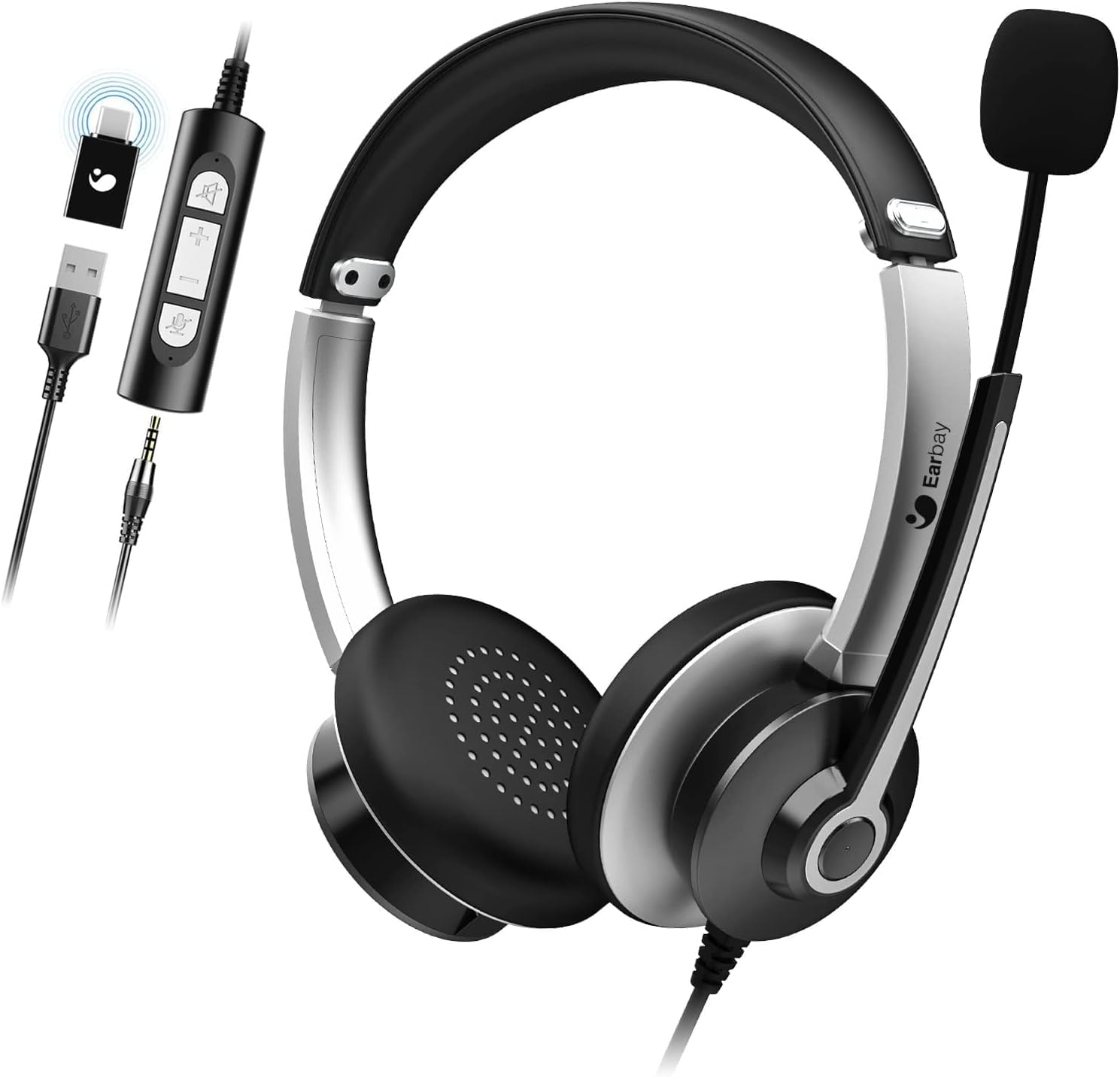
Image 1.1: The Earbay Headset, showcasing its design, adjustable microphone, and inline control unit with USB, 3.5mm, and Type-C adapters.
2. Contingut del paquet
Verifiqueu que tots els elements siguin presents al vostre paquet:
- Earbay Headset with integrated microphone
- Inline control unit
- Adaptador USB
- presa d'àudio de 3.5 mm
- Adaptador tipus C.
3. Producte acabatview
The Earbay Headset is designed for clear audio communication and comfortable wear. It features multiple connectivity options for broad compatibility.

Imatge 3.1: Un primer pla view of the Earbay Stereo Computer Headset, highlighting its compatibility with USB, 3.5mm, and Type-C connections.
Característiques principals:
- Diadema ajustable: Per a un ajustament còmode i segur.
- Coixins transpirables per a les orelles: Dissenyat per a una comoditat d'ús prolongada.
- Noise Reduction Microphone: Enhances voice clarity by minimizing background noise.
- Controls en línia: Easy access to volume adjustment and mute functions for both microphone and speaker.
- Connectivitat múltiple: Supports USB, 3.5mm, and Type-C connections for versatile use.

Image 3.2: Detail of the breathable ear cushions, designed for comfort during prolonged use.

Image 3.3: Illustration of the microphone's noise reduction technology, showing improved sound clarity.
4. Configuració i connexió
The Earbay Headset offers flexible connection options for various devices.

Image 4.1: The headset is compatible with various platforms including laptops, PCs, and tablets.
4.1 Connexió a un dispositiu
- Identifica el connector correcte: The headset comes with a 3.5mm jack, a USB adapter, and a Type-C adapter. Choose the one compatible with your device.
- Per a connexió de 3.5 mm: Plug the 3.5mm jack directly into your device's audio port. This is typically used for smartphones, tablets, and some laptops/PCs.
- Per a connexió USB: Connect the 3.5mm jack to the USB adapter, then plug the USB adapter into an available USB port on your computer (Laptop, PC).
- For Type-C connection: Connect the 3.5mm jack to the Type-C adapter, then plug the Type-C adapter into an available Type-C port on your device.
- Instal·lació del controlador: For most operating systems (Windows, macOS), the headset is plug-and-play and does not require additional drivers. The system should automatically detect and configure the device.

Image 4.2: The inline control unit, demonstrating its three connection options (USB, 3.5mm, Type-C) and dedicated buttons for microphone and speaker mute.
5. Instruccions de funcionament
5.1 Ajust dels auriculars
- Diadema: Adjust the headband by sliding the earcups up or down until they rest comfortably over your ears.
- Micròfon: Position the flexible microphone boom approximately 1-2 inches from your mouth for optimal voice pickup.
5.2 Using Inline Controls
The inline control unit provides convenient access to audio functions:
- Puja el volum (+): Premeu per augmentar el volum de l'altaveu.
- Baixar el volum (-): Premeu per reduir el volum de l'altaveu.
- Silència del micròfon: Press the microphone icon button to mute or unmute the microphone. An indicator light (if present) may show mute status.
- Silenci de l'altaveu: Press the speaker icon button to mute or unmute the headset speakers.
5.3 Funcions de trucada
When connected to a communication application (e.g., Zoom, Skype, Microsoft Teams), the headset is ready for use.
- Ensure the headset is selected as the default audio input and output device in your application's settings.
- Use the inline controls for quick adjustments during calls.

Image 5.1: The Earbay Headset in use for business communication, emphasizing its design for clear calls and webinars.
6. Manteniment i cura
- Neteja: Feu servir un drap suau i sec per netejar els auriculars. Per als coixins de les orelles, una mica deamp es pot fer servir un drap, però assegureu-vos que estigui completament sec abans d'usar-lo. No utilitzeu productes químics agressius ni netejadors abrasius.
- Emmagatzematge: Guardeu els auriculars en un lloc fresc i sec, allunyat de la llum solar directa i de temperatures extremes. Eviteu enredar el cable.
- Manipulació: No estireu el cable per desconnectar els auriculars. Agafeu sempre l'endoll fermament. Eviteu deixar caure els auriculars ni sotmetre'ls a impactes forts.
7. Solució De Problemes
| Problema | Causa possible | Solució |
|---|---|---|
| No hi ha so dels auriculars |
|
|
| El micròfon no funciona |
|
|
| La qualitat del so és deficient o distorsionada |
|
|
8. Especificacions
- Nom del model: auriculars
- Marca: Earbay
- Tecnologia de connectivitat: Amb cable
- Tecnologia de comunicació sense fils: Bluetooth (Note: Product is primarily wired, Bluetooth may refer to a variant or general capability not active in this model)
- Components inclosos: Cable
- Material: Acrilonitril butadiè estirè (ABS)
- Pes de l'article: 104 grams (3.67 unces)
- Dimensions del producte: 7.28 x 6.1 x 1.97 polzades
- Característica especial: Diadema ajustable
- Plataforma de maquinari: Portàtil, PC, tauleta
- Presa per a auriculars: 3.5 mm Jack
- Control de soroll: Active Noise Cancellation (for headphones)
9. Garantia i Suport
Earbay products are manufactured to high-quality standards. For information regarding warranty coverage, technical support, or service inquiries, please refer to the warranty card included with your purchase or visit the official Earbay weblloc web. Si us plau, conserveu el comprovant de compra per a reclamacions de garantia.
Ask a question about this manual
Ask about setup, troubleshooting, compatibility, parts, safety, or missing instructions. Manuals+ will review the question and use this page’s manual context to help answer it.