
1. Introducció
The DOBE TY-1793 Wireless Controller is a versatile gaming accessory designed for multi-platform compatibility. It offers seamless connectivity with Nintendo Switch, Android phones, Android TV boxes, and personal computers (PC). This controller integrates advanced features such as Bluetooth wireless technology, a wired USB connection option, Turbo function keys, a dedicated camera button, 6-axis motion sensing, and immersive motor vibration feedback. Its ergonomic design ensures a comfortable and responsive gaming experience.
2. Informació de seguretat
- Mantingueu el controlador allunyat de l'aigua, la humitat i les temperatures extremes.
- Eviteu deixar caure el controlador ni sotmetre'l a impactes forts.
- Do not attempt to disassemble or modify the controller. This may void the warranty and cause damage.
- Feu servir només el cable de càrrega proporcionat o recomanat.
- Guardeu el controlador en un lloc net i sec quan no l'utilitzeu.
3. Contingut del paquet
Si us plau, comproveu el contingut del paquet en obrir-lo. Si falta algun article o hi ha algun dany, poseu-vos en contacte amb el vostre distribuïdor.
- DOBE TY-1793 Wireless Controller
- Cable de càrrega USB
- Manual d'usuari
4. Disseny del controlador
Familiarize yourself with the buttons and features of your DOBE TY-1793 Wireless Controller.
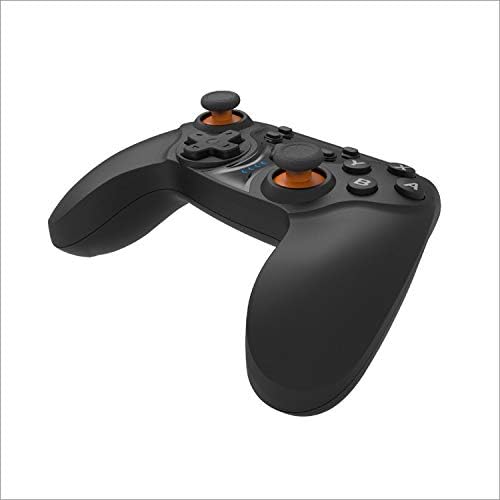
Figura 4.1: Davant view of the DOBE TY-1793 Wireless Controller, showing the dual analog sticks, D-pad, action buttons (A, B, X, Y), and central function buttons.

Figura 4.2: lateral view of the DOBE TY-1793 Wireless Controller, highlighting the USB charging/connection port located at the front edge.

Figura 4.3: Enrere view of the DOBE TY-1793 Wireless Controller, showing the ergonomic grips and battery compartment area.
Descripcions dels botons:
- Manets analògics esquerre/dret: For precise 360-degree movement.
- D-Pad (coixinet direccional): Per a entrada direccional.
- Botons d'acció (A, B, X, Y): Primary game interaction buttons.
- L1/R1 (Botons de l'espatlla): Top trigger buttons.
- L2/R2 (botons de disparador): Bottom trigger buttons.
- Botó HOME: Torna a la pantalla d'inici del sistema.
- SELECT/MINUS Button: Typically used for menu navigation or specific in-game functions.
- START/PLUS Button: Typically used for pausing or menu access.
- Botó TURBO: Activates/deactivates turbo function for assigned buttons.
- Botó CÀMERA: Captures screenshots or video clips (functionality may vary by platform).
- Port USB-C: Per a càrrega i connexió per cable.
5. Configuració
5.1 Càrrega del controlador
- Connect the small end of the USB charging cable to the USB-C port on the controller.
- Connect the large end of the USB charging cable to a USB power source (e.g., PC, USB wall adapter, game console).
- The LED indicator on the controller will show charging status. It will typically turn off or change color once fully charged.
- Una càrrega completa triga aproximadament entre 2 i 3 hores.
5.2 Connecting to Nintendo Switch (Bluetooth)
- A la teva Nintendo Switch, vés al menú INICI.
- Seleccioneu "Controladors" > "Canvia l'empunyadura/l'ordre".
- Press and hold the HOME button on the DOBE TY-1793 controller for 3-5 seconds until the LED indicators start flashing rapidly.
- The Switch will detect the controller. Once connected, the corresponding player LED on the controller will light up solid.
5.3 Connecting to Android Devices (Bluetooth)
- Ensure Bluetooth is enabled on your Android phone or TV box.
- Go to Bluetooth settings and search for new devices.
- Press and hold the HOME button on the DOBE TY-1793 controller for 3-5 seconds until the LED indicators start flashing rapidly.
- Select 'TY-1793' or a similar name from the list of available devices to pair.
- Once paired, the LED indicator will become solid.
5.4 Connecting to PC (Wired USB & Bluetooth)
Connexió per cable:
- Connect the USB charging cable to the controller's USB-C port.
- Connecteu l'altre extrem del cable USB a un port USB disponible del vostre ordinador.
- L'ordinador hauria de detectar i instal·lar automàticament els controladors necessaris. El controlador estarà llest per al seu ús.
Connexió Bluetooth:
- Assegureu-vos que el vostre ordinador tingui el Bluetooth habilitat.
- Go to 'Settings' > 'Devices' > 'Bluetooth & other devices' and click 'Add Bluetooth or other device'.
- Select 'Bluetooth'.
- Press and hold the HOME button on the DOBE TY-1793 controller for 3-5 seconds until the LED indicators start flashing rapidly.
- Select 'TY-1793' or a similar name from the list of available devices to pair.
- Once paired, the LED indicator will become solid.
6. Instruccions de funcionament
6.1 Encès/Apagat
- Encès: Press the HOME button once. The controller will attempt to connect to the last paired device.
- Apagar: Press and hold the HOME button for approximately 5 seconds until the LED indicators turn off. The controller will also power off automatically after a period of inactivity.
6.2 Funció Turbo
La funció Turbo permet prémer un botó repetidament mentre es mantingui premut, cosa que pot ser útil en certs jocs.
- To Set Turbo: Press and hold the button you wish to assign Turbo to (e.g., A button), then press the TURBO button once. Release both buttons. The assigned button will now have Turbo functionality.
- To Clear Turbo: Press and hold the button with Turbo assigned, then press the TURBO button once. Release both buttons. The Turbo function will be removed from that button.
- To Clear All Turbo: Press and hold the TURBO button for 3 seconds. All Turbo settings will be cleared.
6.3 Retroalimentació de vibració
The controller features built-in motor vibrators to provide immersive haptic feedback during gameplay. Vibration intensity is typically controlled by the game or system settings.
6.4 6-Axis Gyroscope
The integrated 6-axis gyroscope provides precise motion control, enhancing gameplay in titles that support motion sensing. This feature is automatically active when connected to compatible platforms like the Nintendo Switch.
6.5 Camera Button
The dedicated camera button allows for quick capture of screenshots or video clips during gameplay on supported platforms. Functionality may vary depending on the connected device and game.
7. Manteniment
- Neteja: Feu servir un drap suau i sec per netejar el controlador. No utilitzeu productes químics agressius ni materials abrasius.
- Emmagatzematge: Guardeu el controlador en un lloc fresc i sec, allunyat de la llum solar directa i de temperatures extremes.
- Cura de la bateria: Per allargar la durada de la bateria, eviteu descarregar completament el controlador amb freqüència. Carregueu-lo regularment, fins i tot si no l'utilitzeu constantment.
8. Solució De Problemes
8.1 Controller Will Not Power On
- Ensure the controller is charged. Connect it to a power source using the USB cable and allow it to charge for at least 30 minutes.
- Try pressing the HOME button firmly.
8.2 Controller Will Not Connect/Pair
- Assegureu-vos que el controlador estigui completament carregat.
- Verify that Bluetooth is enabled on your device (Switch, Android, PC).
- Make sure the controller is in pairing mode (LEDs flashing rapidly).
- Apropeu el controlador al dispositiu.
- Elimina qualsevol emparellament previ del controlador de la configuració de Bluetooth del dispositiu i torna a intentar emparellar-lo.
- Reinicieu tant el controlador com el dispositiu al qual intenteu connectar-vos.
- For PC, try a wired USB connection to confirm functionality.
8.3 Buttons or Joysticks Are Unresponsive
- Ensure the controller is properly connected and paired.
- Test the controller with another game or application to determine if the issue is specific to one title.
- Reinicieu el controlador i el dispositiu connectat.
- Si feu servir una connexió amb cable, proveu un port USB o un cable diferent.
9. Especificacions
| Model: | TY-1793 |
| Connectivitat: | Bluetooth, Wired USB |
| Compatibilitat: | Nintendo Switch, Android (Phones, TV Boxes), PC |
| Tipus de bateria: | Bateria recarregable de polímer de liti |
| Capacitat de la bateria: | 400 mAh, 3.7 V |
| Característiques especials: | Turbo Function, Camera Button, 6-Axis Gyroscope, Motor Vibration |
10. Garantia i Suport
This product comes with a standard manufacturer's warranty. Please refer to the warranty card included in your package or contact your retailer for specific warranty terms and conditions. For technical support or further assistance, please reach out to the customer service provided by your point of purchase.