
1. Introducció
This manual provides detailed instructions for the installation, operation, and maintenance of your EONON GA2190K 10.1-inch Android 10 Car Navigation System. Please read this manual thoroughly before using the product to ensure proper functionality and safety.

Figure 1: EONON GA2190K Car Navigation System
2. Característiques clau
- Processador d'alt rendiment: Equipped with an advanced 8-core CPU, 4GB RAM, and 64GB ROM for smooth operation and ampl'emmagatzematge.
- Connectivitat avançada: Built-in 4G module and Wi-Fi support for internet access, plus Bluetooth 5.0 for faster data transfer and hands-free communication.
- Integració del telèfon intel·ligent: Compatible with wired Apple CarPlay and wired Android Auto for seamless smartphone connectivity.
- Funció de mirall: Supports both wireless and wired mirroring for iPhone and Android smartphones via the 'EasyConnection' app.
- Superior Display: 10.1-inch IPS touch panel with 1024x600 resolution, offering clear visuals from any angle and a customizable UI.
- Àudio millorat: Built-in DSP (Digital Sound Field Processing) with a 48-band graphic equalizer and 8 EQ modes for a personalized audio experience.
- Reproducció multimèdia: Integrated DVD player and RCA output for full-screen sharing to external monitors.
- Expandable Functions: Supports offline navigation with a dedicated map card, TV viewing with an external digital tuner, AHD backup cameras, OBD2 diagnostics, and drive recorders.
3. Producte acabatview i Components
3.1 Característiques de la unitat principal

Figura 2: Mésview of GA2190K's main features including 4G, AHD camera support, 8-core CPU, 4GB RAM, 64GB ROM, 10.1-inch IPS display, Android 10, iPhone connectivity, DSP, unique UI, and built-in CD/DVD player.
3.2 Accessoris inclosos

Figure 3: Standard accessories included with the GA2190K unit. These typically include GPS antenna, power cable, AV cables, microphone, USB cables, 4G antenna, backup camera input, 10A fuse, mounting screws, and disassembly tools.
4. Configuració i instal·lació
Proper installation is crucial for the optimal performance of your EONON GA2190K. It is recommended that installation be performed by a qualified professional.
4.1 General Installation Guide (for similar models)
Video 1: This video demonstrates the installation process for the IAH10D 10.1-inch car navigation system, which shares similar installation principles with the GA2190K. It covers mounting the unit into a double DIN opening.
Video 2: This video illustrates the panel removal and installation method for the UX7SKJ-PRO-MAX, which can be helpful for understanding general panel handling for EONON units.
Video 3: This video demonstrates the front panel removal and installation method for the UX6SKJ-PRO-MAX, providing general guidance for similar EONON units.
4.2 Panel Assembly and Disassembly
The display panel is detachable from the main unit. Follow these steps for proper handling:
- Align the display panel with the main unit, ensuring the connectors are properly oriented.
- Gently push the panel onto the main unit until it clicks into place.
- To remove, simultaneously press the safety switches on both sides inwards and lift the panel upwards.
- Carefully disconnect the ribbon cable by pushing the clips inwards and pulling the cable downwards.
Video 4: This video demonstrates the process of attaching and detaching the display panel from the main unit, including handling the ribbon cable.
5. Instruccions de funcionament
5.1 Android 10 System Overview
The GA2190K runs on a powerful Android 10 system, offering a smooth and responsive user experience. You can install various applications from the Google Play Store.

Figure 4: Android 10 interface and iPhone connection capabilities.
5.2 Connectivity (Wi-Fi, 4G SIM, Bluetooth)
Stay connected on the go with multiple options:
- Wi-Fi: Connect to a Wi-Fi hotspot from your smartphone for internet access.
- 4G SIM: Directly insert a 4G SIM card into the unit for independent internet connectivity (check regional frequency band compatibility).
- Bluetooth 5.0: Enjoy hands-free calling and high-quality audio streaming from your smartphone.

Figure 5: Visual representation of Wi-Fi, 4G, Bluetooth 5.0, and mirroring functionalities.
5.3 CarPlay i Android Auto
Integrate your smartphone for a safer and more convenient driving experience:
- Wired Apple CarPlay: Connect your iPhone (iPhone 5 or later) to access navigation, make calls, send messages, and play music via Siri voice control or the touch screen.
- Android Auto per cable: Connect your Android smartphone (requires EONON A0585 USB dongle, sold separately) to use Google Assistant, navigation, and media apps.
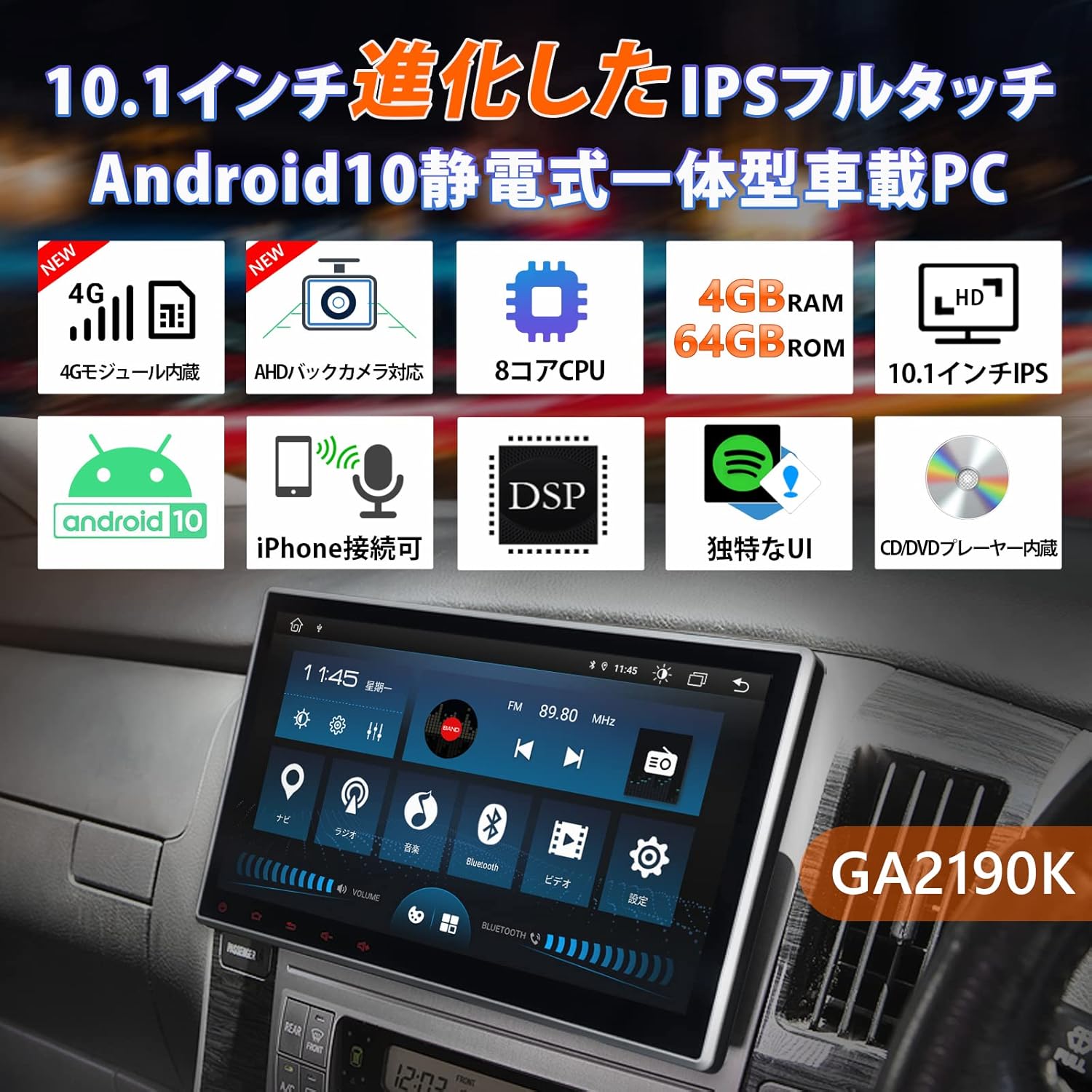
Figure 6: CarPlay and Android Auto interfaces displayed on the unit.
5.4 Mirroring Function
Share your smartphone's screen directly to the GA2190K display:
- Use the built-in 'EasyConnection' app to mirror photos, music, and videos from your iPhone or Android smartphone.
- Supports both wireless and wired connections.
5.5 Pantalla i interfície d'usuari
The 10.1-inch IPS display offers vibrant visuals and a user-friendly interface:
- IPS Touch Panel: 1024x600 ultra-high resolution for clear images from any viewangle de ing.
- Unique UI Design: Customizable UI colors to match your preference, providing a personalized experience.
- Multi-Window Display: Run two applications simultaneously on the screen, such as navigation and music.
Vídeo 5: Aquest vídeo ofereix una visió generalview of the UI and features of a similar EONON unit (GA2198J), demonstrating multi-tasking, app installation, and QLED display capabilities.
Video 6: This video introduces the UI of a similar EONON unit, showcasing split-screen functionality, volume control, media player integration, and day/night mode switching.
Video 7: This video demonstrates various functions of a similar EONON unit (UX7SKJ-PRO-MAX), including map display, music playback, video playback, and system information.
5.6 Audio Features (DSP, Equalizer)
Experience superior sound quality with advanced audio processing:
- DSP integrat: Digital Sound Field Processing with a 56-bit double-precision mode for precise sound signal adjustment.
- Equalitzador gràfic de 48 bandes: Customize your audio with a detailed equalizer and 8 preset EQ modes.
- Correcció del temps: Adjust sound field and time delay for optimal listening.

Figure 7: Visual interface for DSP and graphic equalizer settings.
5.7 Navegació
Navigate with ease using various map options:
- Mapes fora de línia: Use a dedicated map card (EONON G3047, sold separately) for navigation without an internet connection.
- Mapes en línia: Utilize Google Maps or other navigation apps downloaded from the Play Store.
5.8 característiques addicionals
- Control del volant: Connect to your vehicle's steering wheel controls for convenient operation.
- AHD Backup Camera Support: Connect AHD backup cameras (EONON A0126J, A0119N, sold separately) for enhanced parking safety.
- Diagnòstic OBD2: Link with an OBD2 car diagnostic tool (EONON V0056, sold separately) to monitor vehicle data.
- Drive Recorder Mode: Connect drive recorders (EONON R0020, R0019H, R0018H, sold separately) to view footage on the large screen.
- TV Viewing: Connect an external digital tuner (EONON V0050, sold separately) to watch TV in your car.

Figure 8: IPS touchscreen, panel adjustment, and backup camera integration.

Figura 9: Mésview of navigation, TV, AHD camera, OBD2, drive recorder, and RCA output functionalities.
6. Especificacions
| Característica | Especificació |
|---|---|
| Mida de la pantalla | 10.1 polzades |
| Tipus de visualització | LCD IPS |
| Resolució | 1024 x 600 |
| Sistema operatiu | Android 10 |
| RAM | 4 GB |
| ROM | 64 GB |
| Processador | 8 nuclis |
| Connectivitat | Bluetooth 5.0, Wi-Fi, 4G (SIM card support), USB |
| Tipus de sintonitzador | AM/FM |
| Dispositius compatibles | Telèfons intel·ligents |
| Tipus de mapa | carrer |
| Característiques especials | Hands-free, CarPlay, Android Auto, Mirroring, DSP, DVD Player |
| Tipus de muntatge | Muntatge al quadre de comandament |
| Dimensions del producte | 24.5 x 20.5 x 15.3 cm |
| Pes del producte | 3.57 kg |
7. Manteniment
To ensure the longevity and optimal performance of your EONON GA2190K, follow these general maintenance guidelines:
- Neteja: Feu servir un drap suau i sec per netejar la pantalla i l'exterior. Eviteu productes de neteja o dissolvents abrasius.
- Actualitzacions de programari: Regularly check for and install system software updates to ensure stability and access to new features.
- Temperatura: Eviteu exposar la unitat a temperatures extremes, a la llum solar directa durant períodes prolongats o a una humitat elevada.
- Connexions de cable: Comproveu periòdicament totes les connexions dels cables per assegurar-vos que estiguin ben fixades i que no estiguin danyats.
8. Solució De Problemes
If you encounter any issues with your EONON GA2190K, please refer to the following common troubleshooting steps:
- Sense energia: Comproveu totes les connexions d'alimentació i la caixa de fusibles del vehicle. Assegureu-vos que el contacte estigui posat.
- Sense so: Verifiqueu la configuració del volum, comproveu les connexions dels altaveus i assegureu-vos que s'ha seleccionat la font d'àudio correcta.
- Pantalla tàctil que no respon: Prova de reiniciar la unitat. Si el problema persisteix, restableix les dades de fàbrica (nota: això esborrarà totes les dades de l'usuari).
- Bluetooth/Wi-Fi Connection Issues: Ensure Bluetooth/Wi-Fi is enabled on both the unit and your smartphone. Try re-pairing devices or restarting the unit.
- Problemes de navegació: Assegureu-vos que l'antena GPS estigui instal·lada correctament i que tingui una visió clara view of the sky. Check map data for updates.
For more complex issues or if troubleshooting steps do not resolve the problem, please contact Eonon customer support.
9. Garantia i Suport
Eonon is committed to providing quality automotive electronics. For any product-related inquiries, technical assistance, or warranty claims, please contact our customer support team. Our dedicated team is ready to assist you with any questions or concerns.
Please refer to your purchase documentation or the official Eonon weblloc web per conèixer els termes de garantia i la informació de contacte específics.

Figure 10: Eonon Brand Logo