
TAOPON smartwatch zl02
Manual d'usuari del rellotge intel·ligent TAOPON
Model: smartwatch zl02
Introducció
Thank you for choosing the TAOPON Smart Watch. This device is designed to enhance your daily life with its comprehensive features, including fitness tracking, health monitoring, and smart notifications. This manual provides detailed instructions to help you set up, operate, and maintain your smartwatch for optimal performance.

Figure 1: TAOPON Smart Watch Overview
Què hi ha a la caixa
- TAOPON Smart Watch (with Watch Band)
- Cable de càrrega
- Manual d'usuari
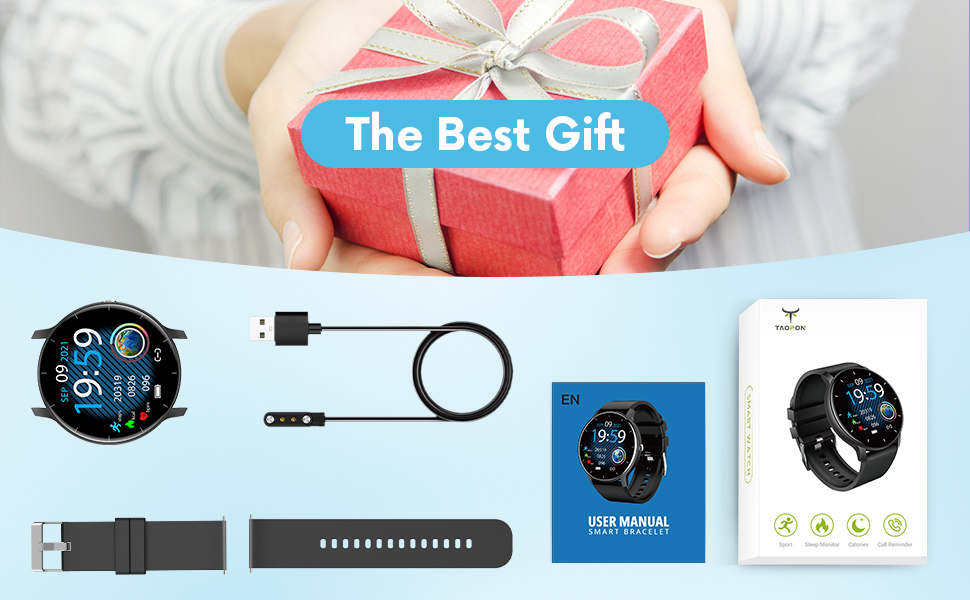
Figura 2: Contingut del paquet
Guia de configuració
1. Càrrega del rellotge intel·ligent
Before first use, fully charge your smartwatch. Connect the magnetic charging cable to the charging points on the back of the watch and plug the USB end into a power adapter (not included) or a computer's USB port. A full charge typically takes about 2 hours and provides up to 7 days of typical use or 30 days of standby time.

Figura 3: Càrrega del rellotge intel·ligent
2. Instal·lació i emparellament de l'aplicació
To unlock the full potential of your TAOPON Smart Watch, download and install the "Da Fit" app on your smartphone. The app is compatible with iOS 9.0 & Android 5.0 or higher.
- Scan the QR code in the manual or search for "Da Fit" in your phone's app store (App Store for iOS, Google Play Store for Android).
- Instal·la l'aplicació "Da Fit".
- Obriu l'aplicació i seguiu les instruccions a la pantalla per crear un compte o iniciar sessió.
- Activa el Bluetooth al teu telèfon intel·ligent.
- In the "Da Fit" app, navigate to the device section and search for your smartwatch. Select "smartwatch zl02" to pair.
- Confirma la sol·licitud d'emparellament tant al telèfon com al rellotge intel·ligent.
Un cop emparellat, el rellotge sincronitzarà l'hora i les dades amb el telèfon.
Instruccions de funcionament
Navegació bàsica
- Pantalla tàctil: Swipe left/right or up/down to navigate through menus and features.
- Botó lateral: Press to quickly return to the home screen or turn the screen on/off.
- Aixecar per despertar: The display will automatically light up when you raise your wrist.
Customizing Watch Dials
Your smartwatch offers a variety of pre-installed dials. You can also personalize your watch face by setting your favorite photo as the dial through the "Da Fit" app.

Figure 4: Watch Dial Customization
Seguiment de la forma física
The watch supports 8 sports modes to track your activities:
- Caminant
- Córrer
- Ciclisme
- Saltar a la corda
- Bàdminton
- Bàsquet
- Futbol
- Swimming (IP67 waterproof, suitable for hand washing or rainy days, not for prolonged submersion or hot water)
During exercise, the watch tracks calorie consumption, steps, distance, minutes of activity, and heart rate. Connect to your mobile phone's GPS via the app to record your movement track.

Figure 5: Multiple Sports Modes Tracking
Vigilància de la salut
The smartwatch accurately tracks real-time health data:
- Monitorització de la freqüència cardíaca: Records your heart rate throughout the day. You can also measure it in real-time by tapping the heart rate icon on the watch.
- Monitorització d'oxigen en sang: Provides SpO2 readings.
- Monitorització de la pressió arterial: Mesura els nivells de pressió arterial.
- Monitor de son: Tracks deep sleep, light sleep, and overall sleep duration, showing trends in sleep quality over a week.

Figure 6: Comprehensive Health Monitoring
Smart Features and Tools
The TAOPON Smart Watch offers various convenient tools:
- Notificacions de missatges: Receive call reminders, SMS, Facebook, Twitter, LinkedIn, WhatsApp, Line, Instagram, etc., by connecting to the "Da Fit" APP. You can reject calls directly from the watch.
- Càmera remota: Control your phone's camera remotely from your watch.
- Control de música: Play, pause, skip tracks on your phone's music player.
- Pronòstic del temps: Rep actualitzacions meteorològiques en temps real.
- Podòmetre: Compta els teus passos diaris.
- Recordatori sedentari: T'avisa que et pots moure després de períodes d'inactivitat.
- Temporitzador: Built-in timer function.
- Deep Breathing Guide: Assists with guided breathing exercises.
- Alarmes: Set up to 3 alarms directly on the watch.
- Brillantor ajustable: Customize screen brightness for optimal viewing.
- Mode teatre: Reduces screen brightness and disables vibrations for undisturbed viewing.

Figure 7: Remote Camera

Figura 8: Control de música
Manteniment
- Neteja: Regularly wipe your smartwatch and band with a soft, damp tela. Eviteu productes químics agressius o materials abrasius.
- Resistència a l'aigua: The watch is IP67 waterproof, meaning it is effective against splashes and can be worn during hand washing or rainy days. It is not recommended for showering with hot water, diving, or prolonged submersion.
- Cura de la bateria: To prolong battery life, avoid extreme temperatures and do not allow the battery to fully drain frequently. Charge the watch regularly.
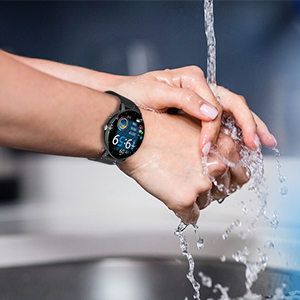
Figura 9: Resistència a l'aigua IP67
Resolució de problemes
- El rellotge no s'encén: Assegura't que el rellotge estigui completament carregat. Connecta'l al cable de càrrega i a una font d'alimentació durant almenys 30 minuts.
- No s'ha pogut emparellar amb el telèfon:
- Assegura't que el Bluetooth estigui activat al telèfon i que el rellotge estigui dins del seu abast.
- Reinicieu tant el telèfon com el rellotge intel·ligent.
- Check if the "Da Fit" app is updated to the latest version.
- If previously paired, try unpairing the device from your phone's Bluetooth settings and re-pairing through the app.
- Dades de salut inexactes:
- Assegureu-vos de portar el rellotge ben ajustat al canell, aproximadament a l'amplada d'un dit de l'os del canell.
- Keep the sensor clean and free from debris.
- Tingueu en compte que les funcions de monitorització de la salut són només de referència i no s'han d'utilitzar per a diagnòstics mèdics.
- Notificacions no rebudes:
- Check app permissions in your phone settings to ensure "Da Fit" has access to notifications.
- Verify that notification settings are enabled within the "Da Fit" app for specific applications.
- Assegureu-vos que el rellotge estigui connectat al telèfon mitjançant Bluetooth.
Especificacions
| Característica | Detall |
|---|---|
| Número de model | smartwatch zl02 |
| Mida de la pantalla | 1.28 polzades (diagonal de pantalla visible: 2" / 4 cm) |
| Resolució | 240*240 píxels |
| Capacitat de la bateria | Polímer de liti de 200 mAh (inclòs) |
| Durada de la bateria | 7 days (typical use), 30 days (standby) |
| Classificació impermeable | IP67 |
| Compatibilitat | iOS 9.0 & Android 5.0 or higher |
| Connectivitat | Bluetooth |
| Pes de l'article | 110 grams (3.88 unces) |
| Dimensions del producte | 6.18 x 4.02 x 1.06 polzades |
| Fabricant | TAOPON |
Informació important de seguretat
- No intenteu desmuntar, reparar o modificar el dispositiu.
- Mantingueu el dispositiu allunyat de temperatures extremes, llum solar directa i flames obertes.
- Eviteu impactes forts o que el dispositiu caigui.
- Mantenir fora de l'abast dels nens.
- Dispose of the device and its battery according to local regulations. Do not dispose of with household waste.
- Consult a medical professional before starting any new exercise regimen or if you have any health concerns. The health monitoring data is for reference only.
Garantia i Suport
For warranty information, technical support, or customer service inquiries, please refer to the contact details provided on the product packaging or the official TAOPON weblloc web. Si us plau, conserveu el comprovant de compra per a reclamacions de garantia.
Documents relacionatssmartwatch zl02


Ask a question about this manual
Ask about setup, troubleshooting, compatibility, parts, safety, or missing instructions. Manuals+ will review the question and use this page’s manual context to help answer it.