
1. Introducció
The RODOT Universal WiFi Ceiling Fan Light Remote Control Kit is designed to upgrade your traditional ceiling fan and light into a smart, controllable device. This kit allows for convenient control via a handheld remote, a mobile application, and voice commands through smart home assistants like Amazon Alexa and Google Home.
It is compatible with most three-speed motor ceiling fans and lights, offering enhanced functionality including fan speed control, light on/off, and timing features.

Imatge: Més deview of the RODOT Universal WiFi Ceiling Fan Light Remote Control Kit, showing the remote, receiver, and a smartphone displaying the control app, alongside a ceiling fan.
2. Contingut del paquet
- 1 x transmissor de control remot
- 1 x Unitat receptora
- Wire Nuts (for installation)
- Manual d'instruccions

Image: Detailed dimensions of the remote control (1.96 x 5.15 x 0.78 inches) and the receiver unit (2.12 x 4.56 x 1.1 inches).
3. Especificacions
| Característica | Detall |
|---|---|
| Número de model | RODOT Alpha |
| Dimensions del receptor | 4.56 x 2.13 x 1.1 polzades |
| Pes de l'article | 7.8 unces |
| Freqüència remota | 433 mHz |
| Freqüència de funcionament | 50-60 Hz |
| Velocitats del ventilador | 3 Levels (1/2/3) |
| Configuració del temps | 1H/2H/4H/8H |
| Bateria a distància | 2 piles AAA (no incloses) |
| Connectivitat | Wi-Fi (2.4Ghz only), RF |
| Compatibilitat de control de veu | Amazon Alexa, Assistent de Google, IFTTT |
| Suport d'aplicacions | Smart Life App (iOS & Android) |
4. Informació de seguretat
- Desconnecteu sempre l'alimentació a l'interruptor automàtic abans de la instal·lació o el manteniment.
- Assegureu-vos que totes les connexions del cablejat estiguin segures i aïllades correctament.
- Do not exceed the maximum electrical ratings of the device.
- Consulteu un electricista qualificat si teniu dubtes sobre alguna part del procés d'instal·lació.
- Keep the remote control and receiver away from water and excessive heat.
5. Instal·lació
This kit is designed to replace the traditional driver of your non-smart LED ceiling fan. The receiver unit must be installed within the canopy of the ceiling fan.
5.1 Esquema de cablejat

Image: Wiring diagram showing connections from main power to the receiver (White: AC Neutral Line, Black: AC Live Line) and from the receiver to the fan (Black: Live Line to FAN, Blue: Live Line to LIGHT).
5.2 Instal·lació pas a pas
- Desconnecteu l'alimentació: Before starting, ensure the power to the ceiling fan is turned off at the main circuit breaker.
- Cablejat d'accés: Remove the canopy cover of your ceiling fan to expose the wiring.
- Connecta el receptor: Follow the wiring diagram carefully. Connect the receiver's wires to the corresponding fan and power supply wires using the provided wire nuts. Ensure secure connections.
- Receptor de posició: Carefully tuck the receiver unit into the fan canopy. Ensure it fits without pinching wires.
- Dosser segur: Reattach the canopy cover to the ceiling fan.
- Restaura l'alimentació: Torneu a encendre l'alimentació al disjuntor.
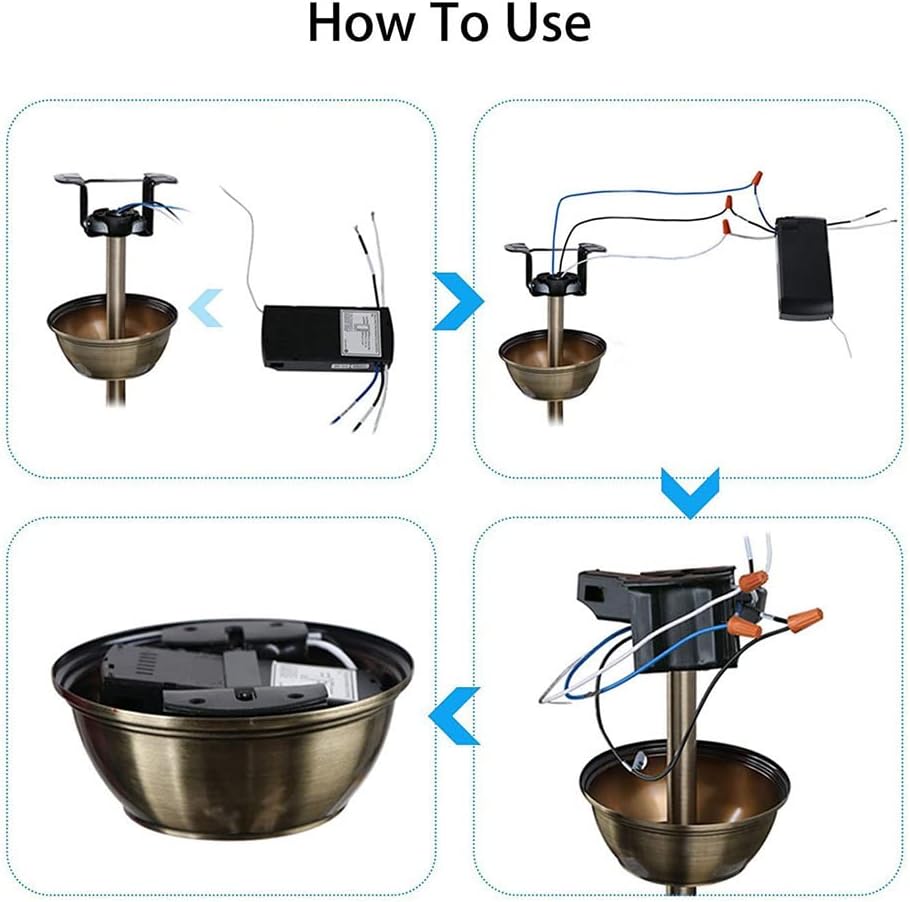
Image: Visual guide illustrating the installation process: 1) Opening the fan canopy, 2) Connecting the receiver, 3) Placing the receiver inside, and 4) Closing the canopy.
Video: A tutorial demonstrating the physical installation and basic use of the fan light remote control kit, including wiring and initial testing.
6. Configuració i emparellament
6.1 Emparellament del control remot
- Assegureu-vos que el receptor estigui encès.
- Within 5 seconds of power-on, press and hold the 'LIGHT' + 'HI' buttons on the remote control until you hear a beep. This indicates successful pairing.
6.2 Smart Life App Setup
- Descarregar l'aplicació: Download and open the 'Smart Life' mobile application from your device's app store.
- Registra't/Inici de sessió: Registra un compte nou o inicia la sessió en un d'existent.
- Afegeix un dispositiu: Tap 'Add Device' or the '+' icon in the app. Select 'Fan' or 'Ceiling Fan Light' from the electrical category.
- Connecteu-vos a una xarxa Wi-Fi de 2.4 GHz: Ensure your mobile phone is connected to a 2.4GHz Wi-Fi network. The device does not support 5GHz or 5.8GHz networks. Enter your Wi-Fi network name and password in the app.
- Reset Device for Pairing: Turn on the power to the fan light receiver. After 10 seconds, press and hold the 'LIGHT' and 'HI' buttons on the remote control simultaneously until you hear 3 LONG 'BE-EP' sounds from the receiver. If you hear 3 SHORT 'BEEP' sounds, release and press again until you hear the long beeps.
- Confirm Indicator Blinking: In the app, confirm that the indicator on the receiver is blinking rapidly.
- Inicia la connexió: Tap 'Next' in the app to begin the connection process. The app will scan for and add the device.
- Dispositiu afegit: Un cop afegit correctament, podeu canviar el nom del dispositiu a l'aplicació.

Image: Smart Life App interface showing initial steps for adding a device, including Wi-Fi settings and device selection.

Image: Smart Life App interface for entering 2.4GHz Wi-Fi network name and password, with a note about 5GHz incompatibility.

Image: Smart Life App interface showing the device reset prompt, device adding progress, and successful device addition.
Video: A detailed demonstration of setting up the WiFi Fan Light Remote Control Kit with the Smart Life App, including Wi-Fi connection and device pairing.
7. Instruccions de funcionament
7.1 Control remot de mà

Image: Diagram of the remote control with labels for Fan Speed (LOW, MED, HI), Light On/Off, Fan Off (STOP), and Timing Off (1H, 2H, 4H, 8H).
- Llum encès/apagat: Press the 'LIGHT ON/OFF' button to toggle the light.
- Velocitat del ventilador: Use 'LOW', 'MED', 'HI' buttons to adjust fan speed.
- Fan apagat: Press 'STOP' to turn off the fan.
- Temps de desactivació: Select 1H, 2H, 4H, or 8H to set a timer for the fan to turn off automatically.
7.2 Control de l'aplicació Smart Life
Once the device is added to the Smart Life App, you can control it from your smartphone.
- Control de la llum: Tap the light icon to turn the light on or off.
- Control de velocitat del ventilador: Adjust the slider or select predefined levels (e.g., Level 1, 2, 3) to change fan speed.
- Timing/Scheduling: Use the app's scheduling features to set specific times for the fan or light to turn on/off, or to activate the countdown timer.
- Funció de silenci: The 'Smart Life' APP can be used to implement the mute function for the device.
7.3 Control per veu (Alexa/Google Home)
After linking your Smart Life account with Amazon Alexa or Google Home, you can use voice commands.
- Activa l'habilitat: In the Alexa or Google Home app, search for and enable the 'Smart Life' skill.
- Enllaça el compte: Link your Smart Life account using your credentials.
- Descobriu els dispositius: Discover new devices in the smart home app.
- Ordres comuns:
- "Alexa, encén el llum del dormitori."
- "Ei Google, apaga el ventilador."
- "Alexa, set the fan speed to medium."
8. Solució De Problemes
- El comandament a distància no respon: Check battery in remote. Ensure receiver is powered. Re-pair the remote control (see Section 6.1).
- Problemes de connexió Wi-Fi: Ensure your Wi-Fi network is 2.4GHz. Check Wi-Fi signal strength near the receiver. Re-attempt app pairing process.
- El control per veu no funciona: Verify Smart Life skill is enabled and linked in Alexa/Google Home app. Ensure device name is easily recognizable. Check internet connection.
- Fan/Light not working after installation: Double-check all wiring connections according to the diagram. Ensure power is restored at the circuit breaker.
- Receiver size: Note that the receiver size is 4.56 x 2.13 x 1.1 inches. Ensure your fan canopy has sufficient space.
9. Manteniment
The RODOT Ceiling Fan Light Remote Control Kit requires minimal maintenance.
- Periodically check the remote control batteries and replace them when needed.
- Keep the remote control clean and free from dust.
- Ensure the receiver unit remains dry and free from moisture.
10. Garantia i Suport
RODOT offers a 12-month warranty for hardware-related issues. For any problems encountered during product use, please contact customer support. Support is available 24/7 via email.
Per obtenir més ajuda, visiteu el RODOT Store on Amazon.