
weelikeit C72W
weelikeit 7-inch Kids Tablet C72W User Manual
Model: C72W
1. Introducció
The weelikeit 7-inch Kids Tablet is designed to provide a safe and engaging digital experience for children. Running on Android 11.0, it features a durable kid-proof case, parental control functions, and access to educational content. This manual will guide you through the setup, operation, and maintenance of your new tablet.

Figure 1: weelikeit 7-inch Kids Tablet
2. Què hi ha a la caixa
Si us plau, comproveu el contingut del paquet per assegurar-vos que hi hagi tots els elements:
- 1 x 7-inch Android Tablet
- 1 x protector de pantalla
- 1 x Stylus
- 1 x cable tipus C
- 1 x UL Certified Charger
- 1 x Manual d'usuari (aquest document)

Figure 2: Stylus and Screen Protector included with the tablet.
3. Producte acabatview
The weelikeit Kids Tablet features a 7-inch IPS HD display, dual cameras (2MP front, 5MP rear), and a durable kid-proof case with an integrated stand. It is equipped with a 1.5 GHz quad-core processor, 2GB RAM, and 32GB ROM, expandable up to 256GB via an SD card.

Figure 3: Tablet Features and Ports
Característiques principals:
- Visualització: 7-inch IPS HD (1024x600)
- Processador: Quad-core d'1.5 GHz
- Memòria: 2GB RAM, 32GB ROM (expandable to 256GB with SD card)
- Càmeres: 2MP frontal, 5MP posterior
- Connectivitat: Wi-Fi, Bluetooth
- Sistema operatiu: Android 11.0
- Ports: Type-C, 3.5mm Headphone Jack, Micro SD Card Slot
- Protecció: Built-in Kid-Proof Case with Stand
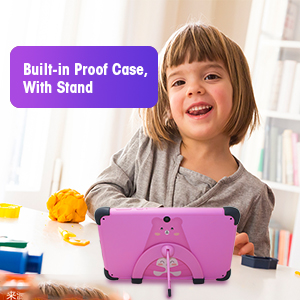
Figure 4: Built-in Kid-Proof Case with Stand
4. Configuració
Follow these steps to set up your weelikeit Kids Tablet for the first time:
- Carregueu la tauleta: Before first use, fully charge the tablet using the provided Type-C cable and UL Certified Charger. The charging port is located on the side of the tablet.
- Encès: Press and hold the Power button (refer to Figure 3) for a few seconds until the screen lights up.
- Assistent de configuració inicial: The tablet will guide you through the initial setup process. This includes selecting your language, connecting to a Wi-Fi network, and setting up a Google account. A Google account is required to download apps from the Google Play Store.
- Connexió Wi-Fi: During setup, you will be prompted to connect to a Wi-Fi network. Select your network from the list and enter the password. If you encounter issues, ensure your Wi-Fi router is on and within range.
- Compte de Google: You can choose to set up the tablet with a parent's Google account or create a new one. This account will be used for app downloads and parental control management.
5. Instruccions de funcionament
5.1 Engegar/apagar i reiniciar
- Encès: Premeu i manteniu premut el botó d'engegada fins que la pantalla s'encengui.
- Apagar: Press and hold the Power button until a menu appears. Select "Power off" to shut down the tablet.
- Reinicia: Press and hold the Power button until a menu appears. Select "Restart" to reboot the tablet.
5.2 Navegació bàsica
The tablet uses a touchscreen interface. Swipe, tap, and pinch gestures are used for navigation and interaction. Swipe up from the bottom of the screen to access the app drawer or navigate between screens.
5.3 Parental Control Function (iWawa App)
The tablet comes with the iWawa App pre-installed, offering robust parental control features. This allows parents to manage content and screen time for their children.
- Access iWawa: Turn on the tablet and open the iWawa application.
- Set Up Profiles: Parents can create separate profiles per a cada nen.
- Manage Content: Within the parental control settings, you can add or block specific applications, filter web content, and set screen time limits.
- Lock Device: The tablet can be locked with a password to prevent children from exiting the child mode without permission.
- Exit Child Mode: Parents can exit the child mode using a password to use the tablet as a regular Android device.
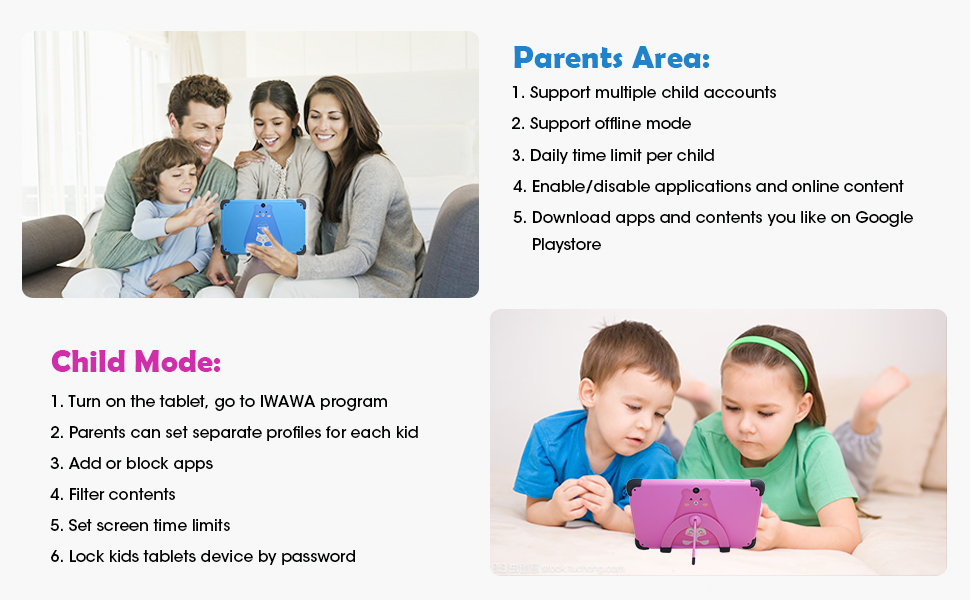
Figure 5: Parental Control Interface
5.4 Learning and Entertainment
The iWawa App provides a range of age-appropriate creative and educational content. Additionally, the tablet is GMS Certified, allowing access to the Google Play Store for downloading more educational apps like ABC Mouse, YouTube Kids, and Zoom.

Figure 6: Children engaging with the tablet
Vídeo 1: Acabatview of the weelikeit Kids Tablet features, including ports, parental control, and learning apps.
6. Manteniment
To ensure the longevity and optimal performance of your tablet, follow these maintenance guidelines:
- Neteja: Feu servir un drap suau i sense borrissol per netejar la pantalla i el cos de la tauleta. Eviteu utilitzar productes químics agressius o materials abrasius.
- Cura de la bateria: Avoid completely draining the battery frequently. Charge the tablet regularly. Do not expose the tablet to extreme temperatures.
- Actualitzacions de programari: Periodically check for system updates to ensure your tablet has the latest features and security patches.
- Gestió d'emmagatzematge: Netegeu regularment innecessaris files and apps to maintain optimal performance. Consider using an SD card for additional storage.
- Funda protectora: The built-in kid-proof case provides protection against drops and bumps. Ensure it remains properly fitted.
7. Solució De Problemes
If you encounter issues with your tablet, refer to the following common problems and solutions:
| Problema | Possible solució |
|---|---|
| La tauleta no s'encén | Ensure the tablet is charged. Connect it to the charger for at least 30 minutes, then try powering it on again. If it still doesn't turn on, try pressing and holding the power button for 10-15 seconds. |
| Problemes de connexió Wi-Fi | Check if your Wi-Fi router is working correctly. Restart the tablet and your router. Ensure you are entering the correct Wi-Fi password. Try connecting to a different Wi-Fi network if available. |
| Rendiment lent | Close unused applications. Clear cache and data for frequently used apps. Uninstall unnecessary apps. Restart the tablet. |
| Durada de la bateria curta | Reduce screen brightness. Close background apps. Disable Wi-Fi or Bluetooth when not in use. Limit continuous video streaming or gaming. |
| La pantalla tàctil no respon | Restart the tablet. If specific areas are unresponsive, ensure the screen is clean and free of debris. If the issue persists, contact customer support. |
| Cannot download apps | Ensure you are connected to Wi-Fi. Check your Google account settings and payment methods if applicable. Verify that parental controls are not blocking the app. |
8. Especificacions
Detailed technical specifications for the weelikeit 7-inch Kids Tablet C72W:
| Característica | Detall |
|---|---|
| Marca | weelikeit |
| Nom del model | Toca |
| Número de model | C72W |
| Sistema operatiu | Android 11.0 |
| Mida de la pantalla | 7 polzades |
| Resolució de visualització | 1024 x 600 IPS HD |
| Velocitat del processador | Quad-core d'1.5 GHz |
| Memòria RAM | 2 GB |
| Emmagatzematge intern | 32 GB |
| Emmagatzematge ampliable | Fins a 256 GB (MicroSD) |
| Càmera posterior | 5 MP |
| Càmera frontal | 2 MP |
| Capacitat de la bateria | 3000 milionsamp Hores (ions de liti) |
| Connectivitat | Bluetooth, WiFi |
| Ports | Type-C, 3.5mm Headphone Jack, MicroSD Slot |
| Entrada de la interfície humana | Pantalla tàctil, pantalla tàctil amb suport per a llapis |
| GTIN / UPC | 608571029989 |
9. Garantia i Suport
weelikeit tablets come with a one-year warranty. For any questions or technical assistance regarding your weelikeit Kids Tablet, please refer to the following:
- Garantia: Un any des de la data de compra.
- Contacte amb l'assistència: If you purchased through Amazon, find your order and click "Get Product Support." Weelikeit aims to assist you within 24 hours.
- Recursos en línia: Visit the official weelikeit store on Amazon for additional product information and FAQs: weelikeit Store
Ask a question about this manual
Ask about setup, troubleshooting, compatibility, parts, safety, or missing instructions. Manuals+ will review the question and use this page’s manual context to help answer it.