
1. Introducció
The Xtrem Bots Robbie is a remote-controlled, programmable robot toy designed to introduce children aged 5 and above to basic robotics and programming concepts. This manual provides detailed instructions for setting up, operating, and maintaining your Robbie robot.
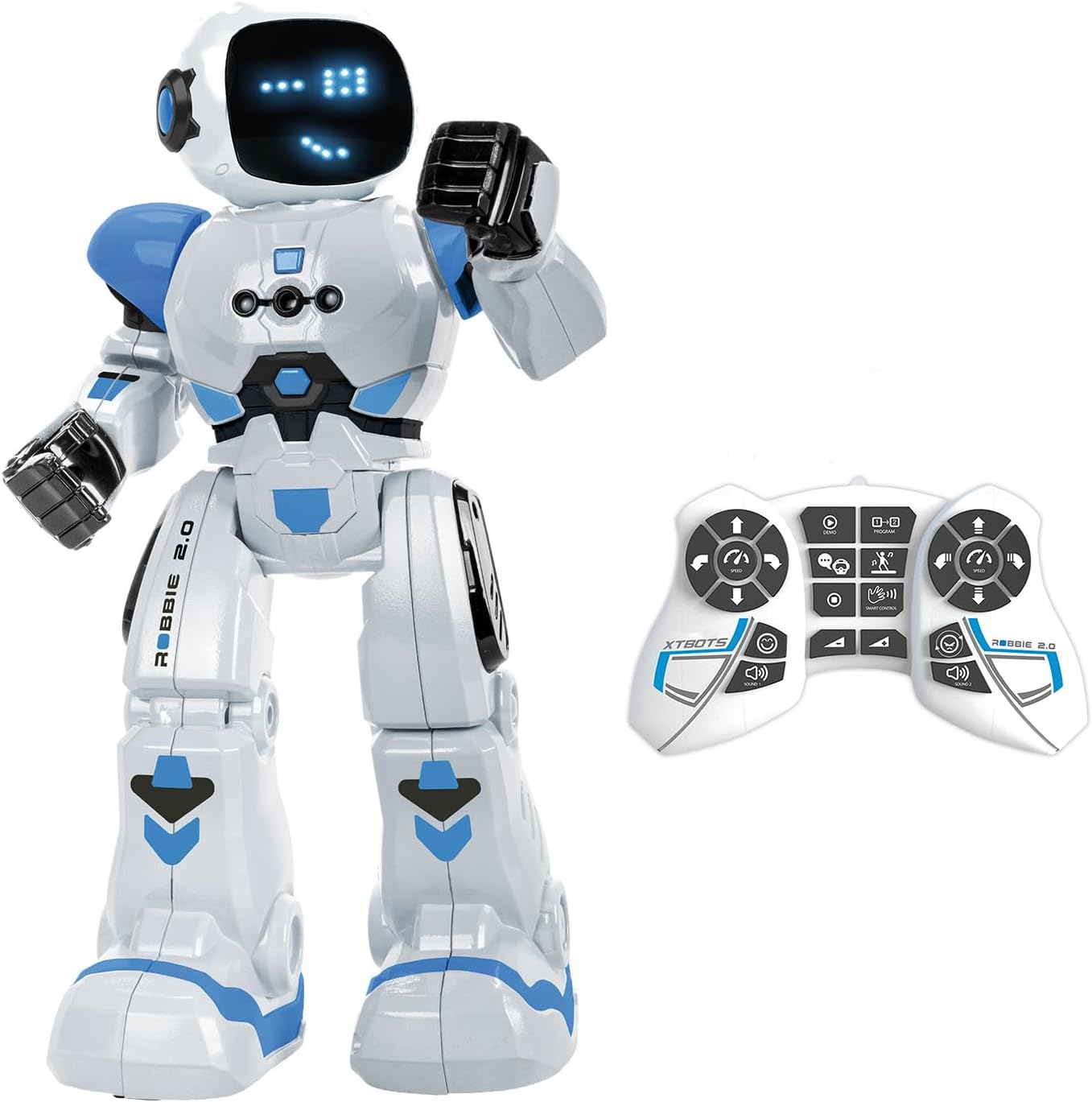
Image 1.1: The Xtrem Bots Robbie robot with its remote control.
2. Contingut del paquet
Si us plau, assegureu-vos que tots els elements estiguin presents al paquet:
- 1 x Xtrem Bots Robbie Robot
- 1 x comandament a distància
- 1 x USB Charging Cable (for robot)
- 1 x Manual d'instruccions (aquest document)

Image 2.1: The Robbie robot packaging, showing included items.
3. Configuració
3.1 Instal·lació i càrrega de la bateria
The Robbie robot uses a rechargeable battery, which is included. The remote control requires two batteries, which are not included for safety reasons during transport.
Càrrega del robot:
- Locate the charging port on the robot.
- Connect the small end of the USB charging cable to the robot's charging port.
- Connect the larger end of the USB charging cable to a standard USB power source (e.g., computer USB port, USB wall adapter).
- The robot's indicator light will show charging status (refer to robot's specific light behavior for full/charging status).
- Espereu prou temps per a una càrrega completa abans del primer ús.

Image 3.1: Robbie robot being charged via USB.
Instal·lació de la bateria del control remot:
- Localitzeu el compartiment de la bateria a la part posterior del comandament a distància.
- Obriu la tapa del compartiment de la bateria.
- Insert two new batteries, ensuring correct polarity (+/-).
- Tanqueu bé la tapa del compartiment de la bateria.
3.2 Engegada/apagada
- Robot: Locate the power switch on the robot (usually on the back or bottom). Slide it to the 'ON' position to power on. Slide to 'OFF' to power off.
- Comandament a distància: The remote control typically powers on automatically when a button is pressed after battery installation. It may have an 'ON/OFF' switch or enter standby mode after a period of inactivity.
4. Instruccions de funcionament
Robbie can be controlled via the remote control or through gesture commands.
4.1 Funcions de control remot
The remote control allows for various actions and modes:
- Moviment direccional: Use the directional buttons to move Robbie forward, backward, left, and right.
- Control de velocitat: Adjust Robbie's movement speed.
- Ajust de volum: Control the robot's sound output level.
- Mode de dansa: Activate a pre-programmed dance sequence.
- Mode programable: Enter programming mode to create custom action sequences.
- Sounds and Lights: Robbie features robotic sounds and 26 blue LED lights that display up to 20 different facial expressions.

Image 4.1: Robbie robot and its remote control, highlighting various functions.
4.2 Gesture Control
Robbie can respond to hand gestures. Ensure the robot is in gesture control mode (refer to remote control instructions for activation) and perform the specified gestures within the robot's sensor range.

Image 4.2: Demonstrating gesture control for the Robbie robot.
4.3 Mode de programació
Robbie allows you to program up to 50 sequential movements. To enter programming mode:
- Press the 'Program' button on the remote control.
- Input your desired sequence of movements using the directional and action buttons.
- Press the 'Play' or 'Execute' button to make Robbie perform the programmed sequence.

Image 4.3: Visualizing the programming sequence for Robbie.
4.4 Dance Mode
Activate Dance Mode to watch Robbie perform various dance routines accompanied by music and light effects.

Image 4.4: Robbie robot dancing, entertaining a family.
5. Manteniment
5.1 Neteja
To clean your Robbie robot, gently wipe its surface with a dry, soft cloth. Do not use water or cleaning solutions, as this may damage the electronic components. Avoid exposing the robot to excessive dust or dirt.
5.2 Cura de la bateria
- Always ensure the robot's rechargeable battery is fully charged before extended play.
- If the robot will not be used for a long period, fully charge its battery and store it in a cool, dry place.
- For the remote control, remove batteries if not in use for an extended period to prevent leakage.
6. Solució De Problemes
| Problema | Causa possible | Solució |
|---|---|---|
| El robot no s'encén. | Bateria baixa o esgotada. | Charge the robot's battery using the USB cable. |
| El comandament a distància no funciona. | Les piles del comandament a distància estan baixes o instal·lades incorrectament. | Canvieu les piles del comandament a distància, assegurant-vos de la polaritat correcta. |
| El robot no respon a les ordres. | Robot and remote control are out of range or not paired. | Ensure robot and remote are within operating range. Power cycle both devices. |
| Robot's movements are erratic. | Interference or low robot battery. | Move to an area with less interference. Charge the robot's battery. |
7. Especificacions
- Model: Robbie
- Marca: Xtrem Bots
- Dimensions del producte: 12.8 x 25.7 x 31.7 cm
- Pes: 830 grams
- Edat recomanada: 5 anys i més
- Valor educatiu: Programming and robotics learning
- Material: Plàstic
- Robot Battery: Recarregable (inclòs)
- Bateries de control remot: 2 x (not included)
- Accions programables: Fins a 50
- Facial Expressions: 20 (via 26 blue LEDs)

Image 7.1: Robbie robot with its height measurement.
8. Garantia i Suport
For warranty information and customer support, please refer to the official Xtrem Bots weblloc web o poseu-vos en contacte amb el distribuïdor on vau comprar el producte. Conserveu el comprovant de compra per a reclamacions de garantia.
9. Vídeos oficials de productes
No official product videos from the seller were provided in the product data. Please refer to the manufacturer's official channels for any available video content.