
1. Introducció i finalview
The ProCase Smart Case is a slim, lightweight, and protective hard back cover designed specifically for the 8.3-inch iPad Mini A17 Pro 2024 (Models: A2995, A2996, A2993) and iPad Mini 6th Gen 2021 (Models: A2567, A2568, A2569). This case offers robust protection against accidental drops and bumps while maintaining a minimal bulk profile. Its intelligent design incorporates features such as automatic sleep/wake functionality and a versatile tri-fold stand.

Figure 1: ProCase Smart Case for iPad mini.
2. Característiques del producte
- Precise Compatibility: Slim case designed for 8.3-inch iPad Mini A17 Pro 2024 (Model: A2995/A2996/A2993) and iPad Mini 6th Gen 2021 (Model: A2567 A2568 A2569). Please verify your iPad model number (found on the back of your device, starting with “Axxxx”) to ensure proper fit.
- Ultra-Slim and Lightweight Design: Adds minimal bulk to your device while providing excellent protection against accidental drops and bumps.
- Translucent Frosted Back Cover: Allows the original Apple icon to be visible while protecting your device from fingerprints and scratches.
- Suport Apple Pencil: Supports 2nd Gen Apple Pencil's magnetic attachment and wireless charging capabilities. (Apple Pencil not included).
- Funcionalitat intel·ligent: Supports auto Sleep/Wake feature and Touch ID unlock function. A strong magnet secures the case closure, allowing for easy snap on and off.
- Versatile Tri-fold Stand: The front cover features a tri-fold design, providing dual standing positions for comfortable viewangles d'escriptura i escriptura.
- Accés complet: Precise cutouts ensure full access to all features, including cameras, speakers, ports, and buttons.
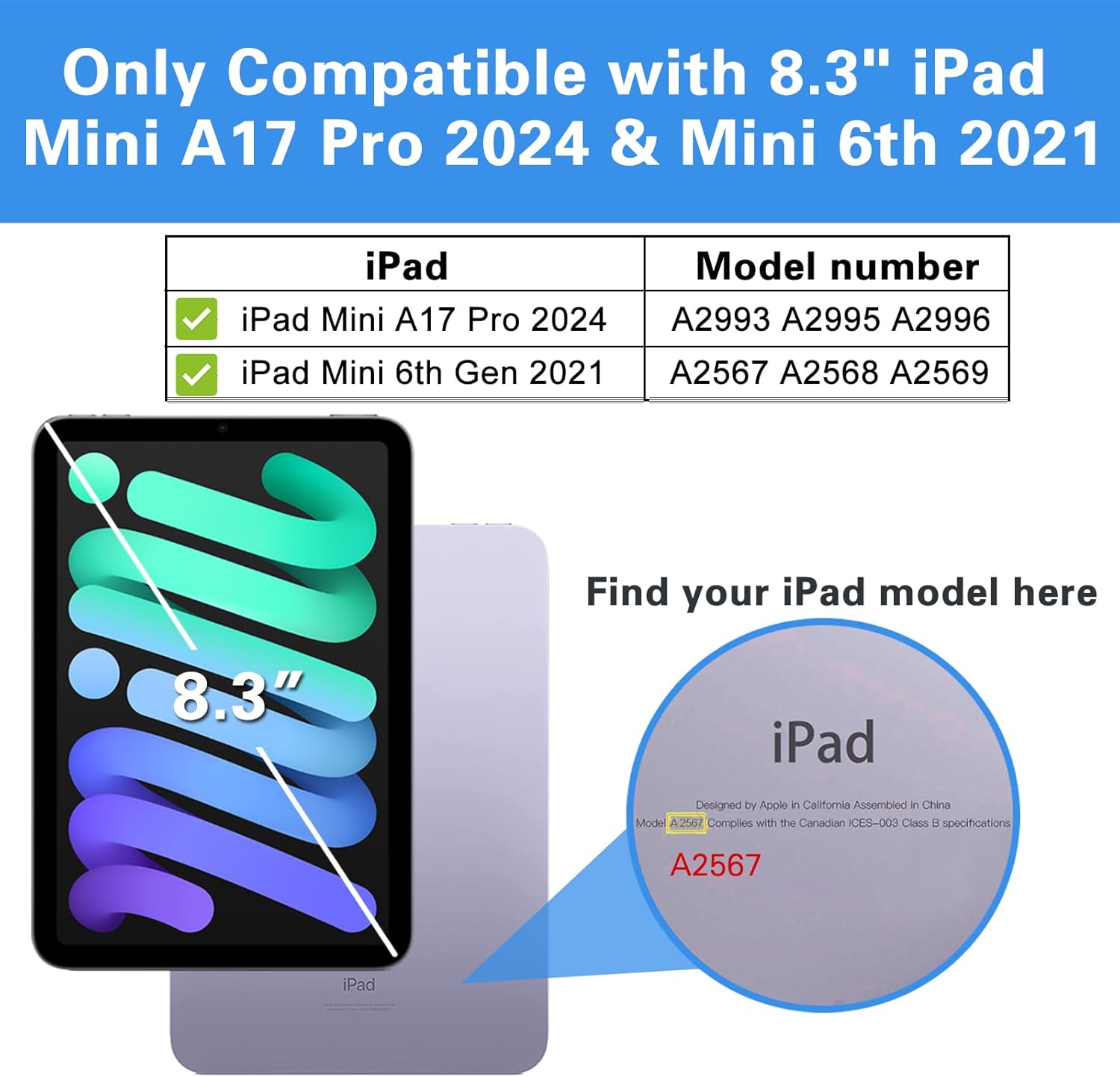
Figure 2: iPad Model Compatibility Guide.

Figure 3: Translucent Back Cover Detail.

Figure 4: Apple Pencil Charging Support.

Figure 5: Auto Sleep/Wake Functionality.

Figure 6: Precise Cutouts and Reinforced Corners.
3. Configuració i instal·lació
- Desempaquetar la caixa: Carefully remove the ProCase Smart Case from its packaging.
- Align Your iPad: Hold your iPad Mini and align it with the hard back shell of the case. Ensure the camera cutout and port openings on the case match those on your iPad.
- Encaixa al seu lloc: Gently press your iPad into the case, starting from one corner and working your way around. The case is designed to snap securely around all four corners of your device, providing comprehensive protection.
- Verifica l'ajust: Once installed, ensure that all buttons (power, volume) are accessible and functional, and that all ports (charging, speakers) are unobstructed.
4. Instruccions de funcionament
- Auto Sleep/Wake: Simply open the front cover to automatically wake your iPad, and close it to put your iPad to sleep. This feature helps conserve battery life.
- Using the Tri-fold Stand: The front cover can be folded into two different standing positions:
- ViewMode d'acció: Fold the front cover into a triangular stand to prop your iPad up at an angle ideal for watching videos, making video calls, or browsing.
- Mode d'escriptura: Fold the front cover into a lower, more acute angle to provide a comfortable incline for typing on the screen.
- Apple Pencil Charging: When using a 2nd Gen Apple Pencil, simply attach it magnetically to the side of your iPad while it is in the case. The case design allows for seamless wireless charging.

Figure 7: Stable Magnetic Stand for Viewing and Typing.
5. Manteniment
To ensure the longevity and appearance of your ProCase Smart Case, follow these simple maintenance guidelines:
- Neteja: Netegeu la carcassa regularment amb un drap suauamp cloth to remove dust, fingerprints, and light smudges. Avoid using harsh chemicals or abrasive cleaners, as these may damage the material.
- Emmagatzematge: Quan no l'utilitzeu, guardeu la funda en un lloc fresc i sec, allunyat de la llum solar directa i de temperatures extremes.
- Eviteu objectes punxants: Keep the case away from sharp objects that could scratch or puncture its surface.
6. Solució De Problemes
If you encounter any issues with your ProCase Smart Case, consider the following common solutions:
- Case Not Fitting Correctly: Double-check your iPad model number against the compatible models listed in Section 2. Ensure the iPad is properly aligned and fully snapped into all four corners of the case.
- Auto Sleep/Wake Not Working: Ensure the front cover is fully closed and making proper contact with the iPad screen. Sometimes, a screen protector or a misaligned iPad can interfere with this function. Verify that the iPad's 'Lock/Unlock' setting is enabled (Settings > Display & Brightness > Lock/Unlock).
- Apple Pencil Not Charging: Ensure the Apple Pencil is correctly aligned and magnetically attached to the charging strip on the side of the iPad. Remove any other accessories that might obstruct the magnetic connection.
- Scratches or Wear: While the case offers protection, extreme impacts or abrasive surfaces can still cause cosmetic damage. Regular cleaning and careful handling can minimize wear.
7. Especificacions
| Atribut | Valor |
|---|---|
| Dimensions del producte | 7.87 x 5.51 x 0.39 polzades |
| Pes de l'article | 4.7 unces |
| ASIN | B09HQ4GRF6 |
| Número de model de l'article | PC-08363111 |
| Característiques especials | Slim Fit |
| Altres funcions de visualització | Sense fil |
| Factor de forma | Portada |
| Color | Marina |
| Fabricant | Procase |
| Dispositius compatibles | 8.3-inch Apple iPad Mini 6th Gen 2021 (Model numbers: A2567, A2568, A2569), iPad Mini 7th Gen 2024 (Model numbers: A2995, A2996, A2993) |
| Tipus de closca | Dur |
8. Garantia i Suport
For information regarding warranty coverage, returns, or technical support for your ProCase Smart Case, please refer to the official ProCase website or contact their customer service directly. Contact details are typically provided on the product packaging or on the manufacturer's official online channels.
Podeu visitar el ProCase Store on Amazon per obtenir més informació i recursos de suport.